AIS Transmit options?

I would have thought it would actually be easier / simpler to let the Em-Trac do both tx and rx and send over the N2k, not sure about about the power supply but this should be clear from the supplied info

 
Thanks for all the recommendations for the Em-Trac B100 which I have now bought. £372 delivered for an AIS tx, what is there not to like?

I'm no longer going to fit a 2nd chart plotter...so keeping things simple; can I leave the VHF connected to the splitter and the chartplotter (Directly / or via the N2K bus - I'm not to sure on current set up) as this is currently providing AIS RX to the plotter and works nicely.

And then do I simply plug in the Em-Trac to the splitter and use it solely to TX rather than as an RX? If I connect the Em-Trac to the N2k bus (which at least is simple to do) will it get power from there or will I still need to connect the +/-

I don't think I need to network the Em-Trac, but if I do connect it to the N2k bus will it cause confusion on the network?

To give the complete picture, I also want to take NMEA 0183 to the Navtex to display lat/long

Apologies for all the questions but I am coming from Raymarine ST60 era which was all rather simple by comparison ;-)

Thanks

The Em-trak will not take it's power from the N2K bus, no matter what. To keep it simple, connect the VHF and the Em-trak to the splitter and a power supply to the Em-trak. The Em-trak will send -0183 data to the Navtex.

If the VHF is on the N2K bus, leave it as it is, if it's connected via 0183 it might be worth connecting it to the N2K bus, as it should give position data on the plotter (position requests in/out, position of mayday received on DSC etc). You could add the Em-trak to the N2K bus, but i'm not sure that adds any value, so best to leave it transmitting stand alone.
 
The Em-trak will not take it's power from the N2K bus, no matter what. To keep it simple, connect the VHF and the Em-trak to the splitter and a power supply to the Em-trak. The Em-trak will send -0183 data to the Navtex.

If the VHF is on the N2K bus, leave it as it is, if it's connected via 0183 it might be worth connecting it to the N2K bus, as it should give position data on the plotter (position requests in/out, position of mayday received on DSC etc). You could add the Em-trak to the N2K bus, but i'm not sure that adds any value, so best to leave it transmitting stand alone.


Thanks Paul
 
ok, I promise this is the last question ;-)

The VHF is connected to the N2k, so getting it's posn data from the chart plotter.

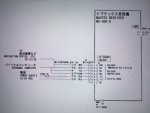
That just leaves me connecting the (by now rather old) Navtex to the EmTrac AIS. The instructions for the EmTrac are very clear but I'm confused on the Furuno. Which wires do I connect where? All I'm trying to do is to send GPS data to the Navtex to use that as a repeater (eg one way flow of data to the Navtex)
 

Attachments

  • Furuno.JPG
    Furuno.JPG
    96.1 KB · Views: 0
  • EmTrac.JPG
    EmTrac.JPG
    110.3 KB · Views: 0
ok, I promise this is the last question ;-)

The VHF is connected to the N2k, so getting it's posn data from the chart plotter.

That just leaves me connecting the (by now rather old) Navtex to the EmTrac AIS. The instructions for the EmTrac are very clear but I'm confused on the Furuno. Which wires do I connect where? All I'm trying to do is to send GPS data to the Navtex to use that as a repeater (eg one way flow of data to the Navtex)

Em-trak purple to Navtex white
Em-trak pink to Navtex blue
 
Thanks, very clear - so that is how I wired it.

Unfortunately though I'm not receiving data on the Navtex NX300. I can receive weather as expected but not GPS data. I tried the baud setting and seeing if there was anything I needed to set in the Navtex settings menu (there isn't). The Em-Trac is working as I can see my position on Marine Traffic.
 
Thanks, very clear - so that is how I wired it.

Unfortunately though I'm not receiving data on the Navtex NX300. I can receive weather as expected but not GPS data. I tried the baud setting and seeing if there was anything I needed to set in the Navtex settings menu (there isn't). The Em-Trac is working as I can see my position on Marine Traffic.

The power of Google - I'm rapidly becoming educated and didn't appreciate there are different versions of NMEA 0183. It looks like the Furuno Navtex needs to receive the GPS data in RS232 format and since the Em-Track is a recent product I guess it is a newer version of NMEA 0183 so maybe never going to work unless I get a converter (?) which I don't seem to be able to find
 
The power of Google - I'm rapidly becoming educated and didn't appreciate there are different versions of NMEA 0183. It looks like the Furuno Navtex needs to receive the GPS data in RS232 format and since the Em-Track is a recent product I guess it is a newer version of NMEA 0183 so maybe never going to work unless I get a converter (?) which I don't seem to be able to find

I expect the Em-trak to be RS422 and i know that the Navtex is RS232C, they should communicate. Both should default to 4,800 baud. The wiring i gave is definitely correct, but, if it isn't working, try connecting the pink and blue wires to 122v negative. (no, it won't all explode).
 
I expect the Em-trak to be RS422 and i know that the Navtex is RS232C, they should communicate. Both should default to 4,800 baud. The wiring i gave is definitely correct, but, if it isn't working, try connecting the pink and blue wires to 122v negative. (no, it won't all explode).

Hmm - that didn't work either. I've emailed Furuno who sent me all he product data and suggested the dealer network. I don't mind paying for a dealer to make it work but need some reassurance that it actually can be done. Next step is to contact EmTrack themselves and see if they have a view on the type of nmea0183 and whether it should talk to the Natvex (which Furuno didn't answer, but I'm pretty sure is RS422)
 
Hmm - that didn't work either. I've emailed Furuno who sent me all he product data and suggested the dealer network. I don't mind paying for a dealer to make it work but need some reassurance that it actually can be done. Next step is to contact EmTrack themselves and see if they have a view on the type of nmea0183 and whether it should talk to the Natvex (which Furuno didn't answer, but I'm pretty sure is RS422)

Have you tried taking an NMEA0183 feed to the Navtex from the VHF50?
 
Have you tried taking an NMEA0183 feed to the Navtex from the VHF50?

No I hadn't, but that's a potential alternative. The attraction of taking it from the AIS was that it gave me some redundancy in addition to the plotter. I think the VHF has it's own GPS, albeit the antenna is on the same N2k network as the plotter, but at least the VHF has it's own dedicated power so it probably still provided some degree of redundancy. Thanks for the suggestion - this may be the route I have to go. Given the recent thread on retiring Navtex I'm even more determined that it performs the additional function of acting as a GPS display to avoid it becoming completely obsolete :(
 
update - spoke with Em-Track who were very helpful. Apparently the port2 isn't enabled by default so I have to go in via the pro ais sw and enable that as it wont be sending any data. Having done that it may be that Paul's wiring as described would work ;-) That said, Em-Track recommend a converter eg to convert RS422-232 (although I've not been able to find one yet). Apparently I also need to download a config file onto an SD card which is all explained on their FAQ site
 
When I was setting my old NMEA message setup to various different devices (not the same as yours) I would connect the output of he device to the RS232 port of a PC. If you don't have a RS232 on your PC you could use a RS232 to USB as I have done with my NASA AIS engine.

You an then use something like NavMonPC to read the NMEA messages and get the format correct.
 
update - spoke with Em-Track who were very helpful. Apparently the port2 isn't enabled by default so I have to go in via the pro ais sw and enable that as it wont be sending any data. Having done that it may be that Paul's wiring as described would work ;-) That said, Em-Track recommend a converter eg to convert RS422-232 (although I've not been able to find one yet). Apparently I also need to download a config file onto an SD card which is all explained on their FAQ site

Might be easier to use the VHF50's feed then!
 
update - spoke with Em-Track who were very helpful. Apparently the port2 isn't enabled by default so I have to go in via the pro ais sw and enable that as it wont be sending any data. Having done that it may be that Paul's wiring as described would work ;-) That said, Em-Track recommend a converter eg to convert RS422-232 (although I've not been able to find one yet). Apparently I also need to download a config file onto an SD card which is all explained on their FAQ site

I has assumed that you had set the port, my bad. I've never messed around with SD cards to get the Em-Trak to send data, perhaps they have created a simple cfg file to make it easier for people.

All i've ever done is to tell the AIS which sentence to output, using the AIS-Pro software, which you must have used to program the MMSI etc. The Furuno should work OK with the GGA sentence. I would try without the cfg file first. If you do use the cfg file, not the settings before using it and see what it changes, i'd be interested to hear what it does.

I would expect the Furuno to cope with the Em-Trak output, without a converter. I've connected some very old Furuno equipment to modern systems and they have always worked, so fingers crossed. A lot of NMEA 0183 equipment only followed the "rules" very loosely, it mostly worked.
 
What sort of socket does the Em Trak B100 have for NMEA? I am wondering if there is a cable with a Raymarine STNg spur plug on the other end which would make installation neat and easy.

Pete
 
What sort of socket does the Em Trak B100 have for NMEA? I am wondering if there is a cable with a Raymarine STNg spur plug on the other end which would make installation neat and easy.

Pete

Connecting to STNg would be straight forward, using a STNg to N2K cable, but that doesn't help the OP, he doesn't hav any Raymarine equipment, he has B&G. Besides, the issue currently being discussed relates to NMEA 0183, which is bare wires and only needs two wires to be connected.
 
Yes sorry, I was asking a supplementary question as I am thinking about upgrading to the Em Trak from the existing receive only AIS.

Pete
 
Yes sorry, I was asking a supplementary question as I am thinking about upgrading to the Em Trak from the existing receive only AIS.

Pete

If your existing equipment is Raymarine Pete, the Em-Trak is fitted with a devicenet connector (standard NMEA 2000), so you can use a STNg to N2K adaptor cable, very straight forward.
 
Top