AIS integration & Displays

GregOddity

Well-Known Member
Joined
28 Mar 2018
Messages
1,040
Location
Mermaid hunting in Antartica. No luck so far.
Visit site
So, todays job is to install AIS on Selkie and as with everything were doing on Selkie were using it as a test bed for Oddity. We've managed to acquire two sets of em-track B100 with splitters S100. One for Selkie the other for Oddity.
We've also got an Icom VHF radio IC-M506 with AIS receiver and a basic display.
At this stage I must admit I gave very little thought on how best to use and integrate the AIS into our navigation. So far, we have been using paper charts and Navionics app but mostly rely on paper charts. Were thinking of using open CPN and a tablet with Navionics.
Wondering what you guys have been doing with it and fishing for some input /ideas for our set up.

GjMlo08.jpg

IqXUJbw.jpg
 
A tablet with Navionics is good although there are lots of threads about why a dedicated chartplotter can be better.

OpenCPN on the same tablet with the AIS data received by wifi gives a lot of flexibility, although AIS will not display on Navionics which is a pity, so one has to switch screens on the tablet which is easy enough.

Richard
 
A tablet with Navionics is good although there are lots of threads about why a dedicated chartplotter can be better.

OpenCPN on the same tablet with the AIS data received by wifi gives a lot of flexibility, although AIS will not display on Navionics which is a pity, so one has to switch screens on the tablet which is easy enough.

Richard


Yeah… I did spend some time trying to see if you could integrate the AIS on navionics and have seen a couple of pictures of some people doing it in some too complex ways for my sanity. I really don’t fancy the dedicated chartploter idea. I would rather be able to do what I want with it as opposed to what “they” want and pay a fortune on top. We are indeed thinking of OpenCPN and overlaying it.
 
Wondering what you guys have been doing with it and fishing for some input /ideas for our set up.

For AIS display I use a tablet in the cockpit under the sprayhood. Recently got a sony Xperia Z (first one out) for £130, waterproof & bright screen. Works great.

Opencpn runs on the tablet - must be as good an AIS display as any out there. Then I use a Raspberry Pi to spit out the data over wifi - AIS plugs into that with serial/usb converter, maybe a bit OTT in your case if just wanting AIS over wifi, there are other little boxes on Ebay which will do that though the Pi can do so much useful stuff as well.
 
We had two outings last year in very dense fog. This was the only time we used AIS other than helping identify what we could eyeball!

I use a Matsutec transponder with display in the cockpit. (limited display size and similar to your radio). This is good for alerting you to new contacts and gives some information on their relative risk of collision to the helm. I feed this into Open CPN running in the saloon on either a 10 inch Tablet Hybrid or plugged in via HDMI to a very low currrent 24V TV! In my view the Open CPN AIS display is by far the best display for collision avoidance available and sets a standard than many commercially available displays fail to meet.

The second outing lasted over 10 hours in dense fog from dawn to dusk returning from Kilmore Quay to Caernarfon.
We also had the benefit of a very old Radar system. It is not linked in any way.

I would not recommend using just AIS and GPs as a primary collision avoidance system just yet! We still had to avoid fishing boats, buoys, islands and lobster pots that could only be identified by radar and/or vhf contact.

In my opinion I would not want to risk a tablet in the cockpit as a primary and only tool for display in the sort of conditions we had for 10 hours. It was incredibly damp at times and at other times the glare of the sun trying to break through the fog made viewing a tablet or a phone impossible. Others may have a different view.


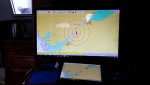
Hybrid pad and TV.jpg
 
Last edited:
We had two outings last year in very dense fog. This was the only time we used AIS other than helping identify what we could eyeball!

I use a Matsutec transponder with display in the cockpit. (limited display size and similar to your radio). This is good for alerting you to new contacts and gives some information on their relative risk of collision to the helm. I feed this into Open CPN running in the saloon on either a 10 inch Tablet Hybrid or plugged in via HDMI to a very low currrent 24V TV! In my view the Open CPN AIS display is by far the best display for collision avoidance available and sets a standard than many commercially available displays fail to meet.

The second outing lasted over 10 hours in dense fog from dawn to dusk returning from Kilmore Quay to Caernarfon.
We also had the benefit of a very old Radar system. It is not linked in any way.

I would not recommend using just AIS and GPs as a primary collision avoidance system just yet! We still had to avoid fishing boats, buoys, islands and lobster pots that could only be identified by radar and/or vhf contact.

In my opinion I would not want to risk a tablet in the cockpit as a primary and only tool for display in the sort of conditions we had for 10 hours. It was incredibly damp at times and at other times the glare of the sun trying to break through the fog made viewing a tablet or a phone impossible. Others may have a different view.

To be honest that is why we decided to install AIS on Selkie so we can work out the kinks and get a system that we're happy with for Oddity. So far, we are thinking of having a monitor on the saloon running OpenCPN with the AIS overlay, as from al the pics I was able to dig on google that did indeed look the best display of AIS data on a chart. We're going to have a display of some sort on the cockpit and I've been tempted to find a waterproof high visibility display and rig it as second monitor for OpenCPN /AIS. The Radio on Selkie is going to be on a bracket that can turn the radio pointing it to the cockpit so we can actually see and access the radio easily. For Oddity we have an old Radar but Selkie will not have one. Unless I can find a small unit on eBay that I can repair and use. Economics are going the way of Oddity.
Since this is all new to us were trying to test our ideas on Selkie ad see if we like them before we do it on Oddity as we have bigger plans for her then just sailing around the UK.

Its just the question on how to integrate everything together and the economics of the all thing in a way we’re happy with and can use efficiently.
 
Last edited:
So far, we are thinking of having a monitor on the saloon running OpenCPN with the AIS overlay,
Raspberry Pi is well worth checking out for that, I just use a 19" samsung monitor plugged straight into the 12v. Though most of the time it's turned off, the Pi spits everything out over wifi so any laptop/tablet can see the data & the same desktop that's on the monitor. Pretty much plug and play if you have nmea0183, N2K needs a can bus/usb adapter 50 quidish from the openplotter shop if they have one. Or maybe cheaper on ebay.
https://docs.sailoog.com/openplotter-v1-x-x/
You could order a Pi3 have have a play at home without a monitor, there's a little script built in to produce dummy data to play with.
 
A tablet with Navionics is good although there are lots of threads about why a dedicated chartplotter can be better.

OpenCPN on the same tablet with the AIS data received by wifi gives a lot of flexibility, although AIS will not display on Navionics which is a pity, so one has to switch screens on the tablet which is easy enough.

Richard

You can get AIS on top of Navionics if you use an App like Digital Yacht's iAIS App or Scott Bender's WilhelmSK
 
To be honest that is why we decided to install AIS on Selkie so we can work out the kinks and get a system that we're happy with for Oddity. So far, we are thinking of having a monitor on the saloon running OpenCPN with the AIS overlay, as from al the pics I was able to dig on google that did indeed look the best display of AIS data on a chart. We're going to have a display of some sort on the cockpit and I've been tempted to find a waterproof high visibility display and rig it as second monitor for OpenCPN /AIS. The Radio on Selkie is going to be on a bracket that can turn the radio pointing it to the cockpit so we can actually see and access the radio easily. For Oddity we have an old Radar but Selkie will not have one. Unless I can find a small unit on eBay that I can repair and use. Economics are going the way of Oddity.
Since this is all new to us were trying to test our ideas on Selkie ad see if we like them before we do it on Oddity as we have bigger plans for her then just sailing around the UK.

Its just the question on how to integrate everything together and the economics of the all thing in a way we’re happy with and can use efficiently.

Weather proof, sunlight readable monitors are expensive. You may find yourself considering a rugged tablet or tablet in a case as a second (WiFi) connected monitor. If that's the case; given that OpenCPN is free and oeSENC charts are not very expensive, you may as well have a second plotter in the cockpit and the redundancy that brings. You can still use WiFi to share NMEA (AIS) and route data on the two systems if you wish.

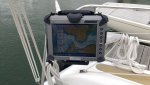
In the cockpit I have a rugged (military spec) Windows tablet. I bought it 2nd hand on eBay which was a bit of a gamble. It has a touch screen, GPS and a docking station. The touch screen works in the rain and the monitor is just visible in direct sunlight when I'm wearing my sunglasses. The docking station is VESA compatible and I've mounted it on a mostly alloy VESA swing arm; we don't have a wheel. The mount means it can be turned to look forward when the auto-helm is in use or backward when helming by hand. I fitted it for 2018 and it did well for 900Nm last year.
IMG_20180616_151712840.jpg

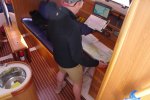
At the chart table, I had a Windows Netbook with a solid state disk drive mounted on a bracket I designed and a VESA arm. I fitted that for 2012 and it's worked flawlessly. I'm updating this to a different Windows system, not because it is faulty but because I'm a bit of a geek.
SAM_4760.jpg

I happen to like Windows solutions. They can be just as low power as Rasp Pi, my Netbook draws <12W with a bright display. It's generally the display on any system that use the most power, and can be made to turn off while the system keeps working.

But that's just me. Once you start looking at OpenCPN, oeSENC and Visit My Harbour charts then the hardware platform choice can be made from Macs, Android tablets, Linux PCs, RaspPI as well as Windows PCs.

Oh, and should you be interested. My 10" netbook and its bracket will be for sale soon;)
 
Last edited:
Weather proof, sunlight readable monitors are expensive. You may find yourself considering a rugged tablet or tablet in a case as a second (WiFi) connected monitor. If that's the case; given that OpenCPN is free and oeSENC charts are not very expensive, you may as well have a second plotter in the cockpit and the redundancy that brings. You can still use WiFi to share NMEA (AIS) and route data on the two systems if you wish.

In the cockpit I have a rugged (military spec) Windows tablet. I bought it 2nd hand on eBay which was a bit of a gamble. It has a touch screen, GPS and a docking station. The touch screen works in the rain and the monitor is just visible in direct sunlight when I'm wearing my sunglasses. The docking station is VESA compatible and I've mounted it on a mostly alloy VESA swing arm; we don't have a wheel. The mount means it can be turned to look forward when the auto-helm is in use or backward when helming by hand. I fitted it for 2018 and it did well for 900Nm last year.
View attachment 75184

At the chart table, I had a Windows Netbook with a solid state disk drive mounted on a bracket I designed and a VESA arm. I fitted that for 2012 and it's worked flawlessly. I'm updating this to a different Windows system, not because it is faulty but because I'm a bit of a geek.
View attachment 75185

I happen to like Windows solutions. They can be just as low power as Rasp Pi, my Netbook draws <12W with a bright display. It's generally the display on any system that use the most power, and can be made to turn off while the system keeps working.

But that's just me. Once you start looking at OpenCPN, oeSENC and Visit My Harbour charts then the hardware platform choice can be made from Macs, Android tablets, Linux PCs, RaspPI as well as Windows PCs.

Oh, and should you be interested. My 10" netbook and it's bracket will be for sale soon;)

I've been looking at stuff like this where I rather spend my money then on a Charplotter 7” for the price of a Rolls Royce Jet Engine. Technically they are just not worth it. They don’t seem to get the message that 90% or more of boat owners are not Oil Sheiks swimming in billions. You can buy all the components separately and it may not have top end graphics but it will do its job for a fraction of the price.
I’ve also looked at some of those armoured tablets and there are some models that are quite attractive. For Oddity were looking at monitors that we can integrate on the inside as we want to do a small nav station. One monitor for onboard systems one for navigation and separate single item monitoring as redundancy.

https://hopeindustrial.co.uk/products/rack-mount-monitors/19-rack-mount-monitor/
 
Since this is all new to us were trying to test our ideas on Selkie ad see if we like them before we do it on Oddity as we have bigger plans for her then just sailing around the UK.

Just noticed that bit - for cruising then something running signalk becomes much more relevant. Sailing's the easy bit of cruising, it's all about not breaking too much and fixing the bits that do break without trashing the budget :)

Signalk/openplotter makes monitoring and plotting so much easier, and on a Pi with openplotter it's mostly all there out of the box. From full time living aboard the biggies are battery voltage/current & various engine thermometers. This needs a bit of wiring and maybe a little geekiness for current but basically cheap relly accurate sensors off ebay and some wiring. With data plotted you can really see any trends long before you'd notice just looking at numbers and hopefully catch some maintenance issue before it goes metaphorically bang expensively . :cool:

Also with chartplotters - why bother for cruising? More money needed for new charts each time you move plus getting overnighted can be a nightmare and take weeks..
Opencpn makes getting google satellite images viewable as charts easy which can be so useful to check if what the anchorage really looks like talleys up with the charts from a survey decades ago.


rNVHcfO.png
 
Last edited:
What a minefield. Ive a Vulcan 7 chartplotter. £500. your VHF should connect to this and its overlaid on the screen. you can then link a tablet inside with a wireless connection on the Vulcan 7. youd have a display inside and out.
Ive not got this yet, but it could not be more simple to set up and use. A dedicated chartplotter is cheap as chips and simple and robust to use. you can add so much to them and I would not be without mine. What are the pitfalls to this setup?.

Steveeasy
 
Just noticed that bit - for cruising then something running signalk becomes much more relevant. Sailing's the easy bit of cruising, it's all about not breaking too much and fixing the bits that do break without trashing the budget :)

Signalk/openplotter makes monitoring and plotting so much easier, and on a Pi with openplotter it's mostly all there out of the box. From full time living aboard the biggies are battery voltage/current & various engine thermometers. This needs a bit of wiring and maybe a little geekiness for current but basically cheap relly accurate sensors off ebay and some wiring. With data plotted you can really see any trends long before you'd notice just looking at numbers and hopefully catch some maintenance issue before it goes metaphorically bang expensively . :cool:

Also with chartplotters - why bother for cruising? More money needed for new charts each time you move plus getting overnighted can be a nightmare and take weeks..
Opencpn makes getting google satellite images viewable as charts easy which can be so useful to check if what the anchorage really looks like talleys up with the charts from a survey decades ago.


rNVHcfO.png

I started a few days ago to collect links and stuff related to that as I would like to use the possibility of controlling what’s happening. have not done due diligence yet on the sensors and best way to do it. But from the holding tank to fuel etc its easy to control and quite efficient. That seems to be the way were going at the moment. Share away ;)
 
What a minefield. Ive a Vulcan 7 chartplotter. £500. your VHF should connect to this and its overlaid on the screen. you can then link a tablet inside with a wireless connection on the Vulcan 7. youd have a display inside and out.
Ive not got this yet, but it could not be more simple to set up and use. A dedicated chartplotter is cheap as chips and simple and robust to use. you can add so much to them and I would not be without mine. What are the pitfalls to this setup?.

Steveeasy

Hehe it is a minefield. But everyone is entitled to his own opinion. I don’t see a pitfall with that setup. But would not necessarily make me happy neither. I’m assuming the 7 is a 7-inch monitor to display the info. That is the first thing that makes me unhappy. That size of screen simple is as bad as a phone to see important information.
The idea is to have a screen that allows you to see enough of the chart so that you can make sense of it at a level of magnification that allows you to navigate without having to constantly zoom in and out of a chart and allowing you to actually concentrate on navigation.
I rather go Open CPN and spend the money on a proper monitor.
 
What a minefield. Ive a Vulcan 7 chartplotter. £500. your VHF should connect to this and its overlaid on the screen. you can then link a tablet inside with a wireless connection on the Vulcan 7. youd have a display inside and out.
Ive not got this yet, but it could not be more simple to set up and use. A dedicated chartplotter is cheap as chips and simple and robust to use. you can add so much to them and I would not be without mine. What are the pitfalls to this setup?.

Steveeasy

It all depends, do you enjoy taking photos in your spare time or playing with tech? Each to his own. :)
 
It all depends, do you enjoy taking photos in your spare time or playing with tech? Each to his own. :)

For many people it’s more the appeal of a ready-made solution. For me, being a non-conformist and a bit of a geek, I like to improve or create solutions for my specific problems as opposed to one size fits all.
The fact of the matter is that in the last 10 years sensors and tech needed has come down from stratospheric prices to almost peanuts. It’s a question of putting it together and enjoying the ride and experiments.
 
Top