3D Printers

Well, after some 6 hours of playing about with FreeCAD, I have at last managed to see how it all fits together. Very complex options, but the most difficult part was working out how the 2d (sketch) and the 3d (parts design) elements fit together in the process. I am sure it will do all I need and more. Thanks for the pointer towards it.

On the Linux front, what I need is an option to update the music files on my mobile. MusicBee's Sync on windows was perfect, but I haven't been able to find anything as simple and straightforward for Linux. Any ideas?

ps: I know what you mean about dark themes. One tutorial I looked at used it - you could barely make out what he was clicking away at.
 
On the Linux front, what I need is an option to update the music files on my mobile. MusicBee's Sync on windows was perfect, but I haven't been able to find anything as simple and straightforward for Linux. Any ideas?
Interesting, I've just changed the way I sync between my Linux PC and my Android phone and Tablet.
In the recent versions of Android, they have introduced more security thus making it difficult to do this kind of thing.
I like to have all my (55,000) photos (compressed) on my mobile devices as well as MP3 music files.
That requires a sync application.
The change that I made was that I found an Android app called FolderSync to replace the old app that I had that no longer works.
This syncing process is initiated from the mobile device but needs to access the data over a network (WiFi or LAN).
I use Samba shares on my Linux boxes but I believe you can share across other platforms - Dropbox etc.
I do it through my Linux server but you could install Samba on a Linux desktop PC and share the data that way.
There is a free version of FolderSync but I ended up paying £4.50 for the Pro version and removing some very annoying adverts.
If you use Android, maybe this process will work for you as well - i.e. share your music folder and sync it from the Android end.

Of course you can't do anything like this with an iThingy.
 
Back to the 3D boaty stuff.
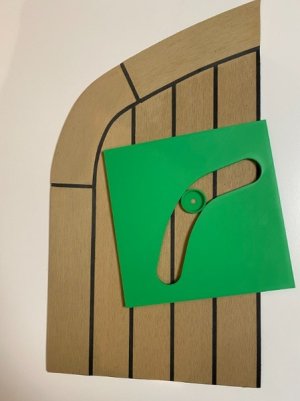
Here is a photo of a test piece of a synthetic teak corner that we made up using the templates discussed above.

Untitled.resized.jpg

We are quite pleased with the result.
Still more work needed but this is a big improvement over my old method.

Since making that green template, I have spent a few more hours with FreeCAD.
The green piece was made, essentially, using two curves that connect to each other tangentially.
Those two curves then had further straight pieces attached (again tangentially).
It was quite difficult to align the 2D sketch especially as the curves didn't have fixed centres.
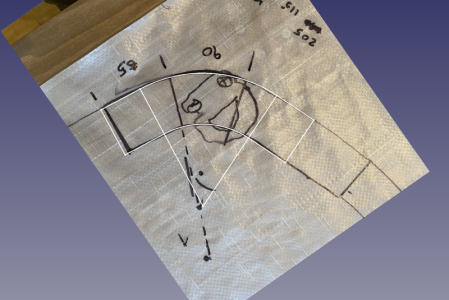
I have simplified the FreeCAD bit by using a single curve and fixing the centres.

This is a screenshot of the main 2D sketch with a photo of the deck template imported into FreeCAD.

Screenshot_2024-12-29_11-15-24.resized.png

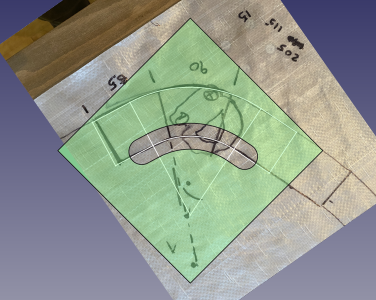
And this screenshot shows the final router guide (semi transparent) over the top.

Screenshot_2024-12-29_11-25-25.resized.png

I haven't printed it yet but it is all set up now to easily manage different radius corners.
 
Interesting, I've just changed the way I sync between my Linux PC and my Android phone and Tablet.
In the recent versions of Android, they have introduced more security thus making it difficult to do this kind of thing.
I like to have all my (55,000) photos (compressed) on my mobile devices as well as MP3 music files.
That requires a sync application.
The change that I made was that I found an Android app called FolderSync to replace the old app that I had that no longer works.
This syncing process is initiated from the mobile device but needs to access the data over a network (WiFi or LAN).
I use Samba shares on my Linux boxes but I believe you can share across other platforms - Dropbox etc.
I do it through my Linux server but you could install Samba on a Linux desktop PC and share the data that way.
There is a free version of FolderSync but I ended up paying £4.50 for the Pro version and removing some very annoying adverts.
If you use Android, maybe this process will work for you as well - i.e. share your music folder and sync it from the Android end.

Of course you can't do anything like this with an iThingy.
FreeFileSync is under test with me - all I want is USB connection.
 
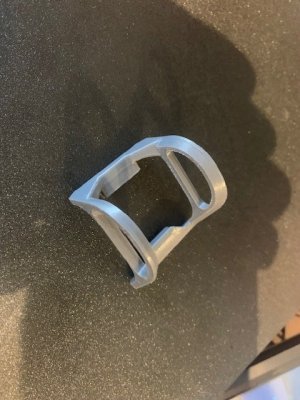
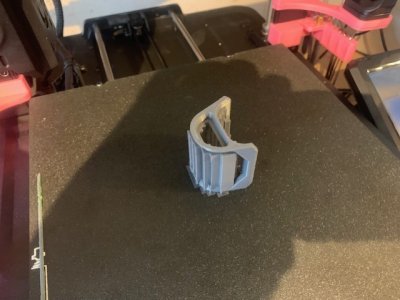
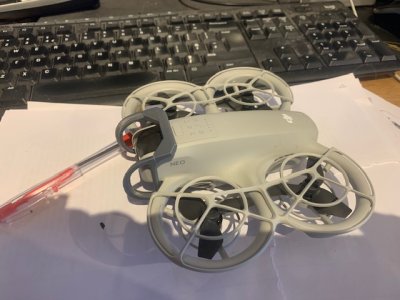
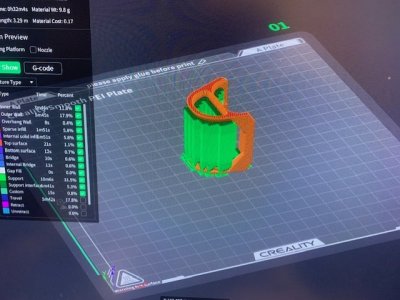
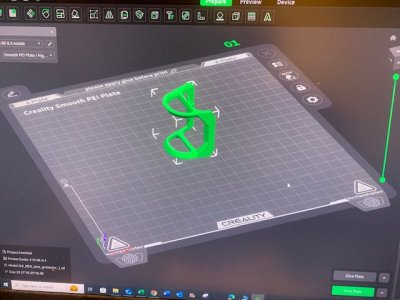
Been flying my DJI Neo FPV quite a lot recently. Great fun it is to. Printed a gimbal protector today. It works lovely
 

Attachments

  • Finished 1.jpg
    Finished 1.jpg
    74.4 KB · Views: 5
  • Supports.jpg
    Supports.jpg
    72.1 KB · Views: 7
  • Guard 3.jpg
    Guard 3.jpg
    73.7 KB · Views: 7
  • Guard 2.jpg
    Guard 2.jpg
    81.3 KB · Views: 7
  • Guard 1.jpg
    Guard 1.jpg
    76.5 KB · Views: 5
In the early days of this thread, I was curious to find out if anyone had experience using a 3D scanner to achieve good results. Today, one of the YouTube channels I follow (Sail Life, which focuses on DIY boat restoration) released a video on the Einstar Vega 3D scanner. Here it was used to reproduce a couple of fiberglass hatches, and the results seem quite good. My understanding is that the scanner was provided as part of a sponsorship, but I don’t believe the video comes across as false praise and I'm sure there will be more videos in the future where its applied for other jobs. I just wanted to share in case anyone else is interested in seeing how 3D scanning can be applied to boat-related projects.
 
I can't help thinking that given the power of modern computers you should be about to use any mobile as a scanner, just take pictures or a video of the object from many angles and orientations and get the computer to convert that into a 3D model.

I am not sure there are enough cases where I am trying to reproduce exactly an object that already exists to make a 3D scanner much use - especially at £2000 a pop!. Most of my uses are to create a new part that does not already exist and I can't buy off the shelf
 
I can't help thinking that given the power of modern computers you should be about to use any mobile as a scanner, just take pictures or a video of the object from many angles and orientations and get the computer to convert that into a 3D model.

I am not sure there are enough cases where I am trying to reproduce exactly an object that already exists to make a 3D scanner much use - especially at £2000 a pop!. Most of my uses are to create a new part that does not already exist and I can't buy off the shelf
There are already a number of available 3D scanning apps. No idea how good or bad they are, but a google search will turn up over 20 of them.

Here's a YT video review of 5 of them.
 
I am looking at the Creality Ferret Pro 3d scanner. Has any one any experience of this looks a decent budget scanner
 
I put myself on the FreeCAD emailing list - once a week they announce news etc.
This week it is on an old feature that I didn't know - called The Turntable.
Nothing special but it allows you to make smooth video screenshots of your FreeCAD designs.
This morning I made a bracket for the Radxa X4 computer that I've been building.
Here is a screen recording of that bracket using the FreeCAD Turntable feature.


I printed it using ABS.
I'm really getting to like ABS over PLA.
I also used for the first time, the Bambu Smooth High Temperature Baseplate.
Really pleased with the results.
 
I put myself on the FreeCAD emailing list - once a week they ive gannounce news etc.
This week it is on an old feature that I didn't know - called The Turntable.
Nothing special but it allows you to make smooth video screenshots of your FreeCAD designs.
This morning I made a bracket for the Radxa X4 computer that I've been building.
Here is a screen recording of that bracket using the FreeCAD Turntable feature.


I printed it using ABS.
I'm really getting to like ABS over PLA.
I also used for the first time, the Bambu Smooth High Temperature Baseplate.
Really pleased with the results.
I think you really need to use ABS to give a reasonable resistance to UV damage.
 
I think you really need to use ABS to give a reasonable resistance to UV damage.
Thanks - agreed - as I understand it though, ASA is a more recent product than ABS and has slightly better UV properties.
I've been using ASA for the external parts that I've built for the boat so time will show if the above is true.
In my previous post, I should have added added that I am starting to use ABS instead of PLA for general stuff as well as external boat parts.
It seems that ABS takes about 20% longer to print (on my Bambu Lab X1C) but the price for ABS is much the same as PLA.
ASA though, is more expensive so it will be interesting to see how good ABS is in the sun.
I keep all my filaments dry all the time so it may be different in other circumstances.
 
For UV-resistant plastic I am using PET-G. Is home friendly for printing (no fumes), cheap and 'environment friendly (recycled bottles), and prints easier than ABS/ASA. It might look less perfect, but for many things it does not matter at all.
 
Last edited:
I played with Freecad for a year & found far too many bugs to make it worthwhile.
In November 2023 I found a black friday deal In Texas USA to purchase Alibre Atom 3d plus 1 years support for £129-00
I liked it so much that this November I bought the pro version for £373-00 In the UK it is something like £1279 plus VAT for the full bells & whistles.
I added support which is UK based for circa £200 & have used it several times since November.
I like it a lot & the email support, plus telephone in some instances, is really fast & concise. They make sure that I have understood why I had the problem or where I was going wrong.
Alibra interface is not so far different to Freecad, so easy to swop over
One can trial it free for 30 days
Unlike Fusion 360 it is a computer based software for 1 unit. I have already up graded my laptop & transferred the prog very easily.
So look out for next November & go to Texas for the deal- Not the UK
 
I played with Freecad for a year & found far too many bugs to make it worthwhile.
In November 2023 I found a black friday deal In Texas USA to purchase Alibre Atom 3d plus 1 years support for £129-00
I liked it so much that this November I bought the pro version for £373-00 In the UK it is something like £1279 plus VAT for the full bells & whistles.
I added support which is UK based for circa £200 & have used it several times since November.
I like it a lot & the email support, plus telephone in some instances, is really fast & concise. They make sure that I have understood why I had the problem or where I was going wrong.
Alibra interface is not so far different to Freecad, so easy to swop over
One can trial it free for 30 days
Unlike Fusion 360 it is a computer based software for 1 unit. I have already up graded my laptop & transferred the prog very easily.
So look out for next November & go to Texas for the deal- Not the UK
What do you design? Are you hobbist, pro? Do you make your designs?
 
What do you design? Are you hobbist, pro? Do you make your designs?
I used it to design the wheel installation etc for a 40 ft boat belonging to a old friend to do the AR in 2023. It included the frame work for the Aeries & a wheel drum in plastic. which I made in my shop It took them across the pond & I did not charge for the work or the installation. They bought an old Aries for £1500

I am currently working on a wind steering for my boat. The Aries is heavy & not good down wind. A friend in Belgium has a design which he does extensive SH sailing in an identical boat to mine. Some without an electric system because he accidentaly kicked the ram overboard. He has given me some construction drawings & photos & I am currently converting to a better format.

I am also building a traction engine. The instructions do not have detailed drawings & I have made a number of mistakes.
Putting in to a decent set of CAD drawings will help to machine it more accurately & see what I am actually building. Then transfer the dimensions ( many of which are missing) to the DROs on my machines & make a better job.
The traction engine is my first & is relatively easy ( Or would be with decent drawings). I can ride it. It is a PYRYTE.
 
This thread has intrigued me to consider dipping my toe into 3D printing.
As an absolute beginner it seems from the thread that the choice is ender 3V 3KE (£239) or bambu lab A13D (£289)
Prices are just from googling the names without any effort to get best price but neither seems very expensive. So in an ideal world (and repeating I am an absolute novice) which one would you guys go for if you were starting all over?
 
This thread has intrigued me to consider dipping my toe into 3D printing.
As an absolute beginner it seems from the thread that the choice is ender 3V 3KE (£239) or bambu lab A13D (£289)
Prices are just from googling the names without any effort to get best price but neither seems very expensive. So in an ideal world (and repeating I am an absolute novice) which one would you guys go for if you were starting all over?
I can only comment from owning a Bambu Lab X1C
It does everything I wanted - and much more.
It is printing right now as I type.
I would really like to see how good the A1printer is.
The Bambu Slicer software (Open Source based) runs my X1C and the A1 - you just select the printer in a drop down menu.

I bought mine about 9 months ago - I wanted a printer that would "just print".
I didn't want a printer that I had to MAKE work - I wanted something like the printers that you buy for your desktop paper printing.
Print and forget type of concept.
And the Bambu does just that - I don't need to set anything up - just put the filament in and send it a design.
There are profiles that you can change but I just use the defaults - AND IT WORKS
I am now using ABS filament rather than PLA and, again, that was just a matter of "Plug and Play" as they say.

That said, the default settings are done automatically by the AMS (multi filament unit) which the starter A1 printer doesn't have.
All rolls of Bambu filament come with an RFID tag in the cardboard core - the Bambu AMS units read that tag and set the printer up accordingly.
So, in the case of the A1, you would have to manually select in the Bambu Studio, the filament that you have loaded.
But you would still be using the Bambu defaults which I'm sure would be as good as the ones that I use.

One thing that worried me was that I thought I would be tied to using Bambu filament.
Of course not, if you are using a different supplier, you can select all your own parameters - Bambu get you started with a "Generic Profile"
But, why wouldn't you use Bambu's filament?
It is about as cheap as any supplier - if not the cheapest supply - AND IT WORKS.

That said, I have no experience of an A1 - only that I am a VERY happy X1 customer.
The quality from my machine is outstanding.
 
Last edited:
All of the above by @Hurricane but on a tighter budget I went for the Bambu P1S with AMS (P1S Combo)
There are a few differences from the more expensive models like larger screen (All driven from the computer I never look at my smaller screen) but functionally the same as far as my lack of experience can ascertain.
As a complete novice it really needed limited skill to get it working. FreeCAD was a bit harder to get the hang of the jargon but I made some simple clips within a couple of hours. (#130)
Best of luck
 
Last edited:
Top