3D Printers

I have various supports also in STL form .... so I can choose whether to let the Slicer add supports - or add them to the print bed myself and move / size as to what I want ...

The Concorde I am printing - we are on Mk4 version ... a couple of parts are mirroed .. ie one is left and other is right .. so they stand on the bed facing each other ... if they were printed as is .. due to the height and items tending to move slightly - "banding" occurs .. where layers are just so slightly out as the item moves.
The trick there is to design a support wall between the two ... so they basically form a H on the bed and support each other. Once printed - you take your Xacto knife and cut the wall away .. sand and you have perfect smooth print with no banding.

You can do this also for a single item print .. create a T shaped item sitting on the bed.
 
Good point
I've used supports before and they do work but the important overhang in this case was a gradual slope which seemed to cope.
But, as you say, maybe I should have used supports.

The job is done now and doesn't look that bad.

Here's the next job
Anyone like to take a guess?
Another boaty one.

View attachment 185317

Still a prototype design - Ive not done helixes in Freecad before so this new to me.
Actually the FreeCAD helix bit was, again, easy - all done in the Part Design so no cheating.
That helix also tapers.
Really pleased with this one - worked first time.
The hoop on our Rocna anchor (this is the hoop that ensures that the anchor always lands the correct way up) is made from tube and galvanised after manufacture.
Our lagoon (just outside our marina) has a very muddy/silty bottom.
And that mud finds its way into the inside of the hoop.
Over time the mud hardens and blocks the tube.
One of the jobs SWMBO and I did this time before leaving the boat was to clear that mud out from the hoop.
We can't easily reach that part of the anchor from the deck so this time, we took the tender round to clean the mud out.
The mud gets so hard that even a screwdriver can't shift it - I used a drill this time and then washed it with a hose.
More importantly, I'm worried that the hoop will corrode inside if we leave the mud in there.

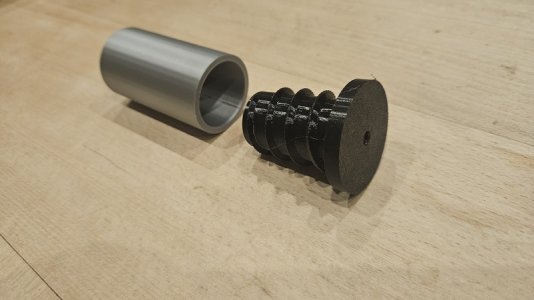
The idea of this part is to bung up the hoop with a cheap 3D printed bung.
The helix is to allow the bung to be hand screwed in and out for cleaning.
So, the first thing I did was to make a short piece of tube with the exact internal dimensions as the Rocna hoop.
I then made the bung as in the above photo.
Made from PLA - and, of course, it didn't fit - went in halfway though.
So, I got some TPU filament out.
TPU produces flexible 3D prints.
I've used it before but it really works well in this case.
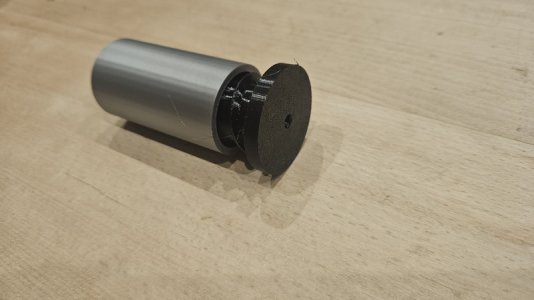
Without a single change to the design, I printed the same bung in TPU.
Perfect fit - tight enough so it won't pull out but loose enough so that with a bit of unscrewing, the bung can be removed.

Here are some pics

20241112_185100.resized.jpg

20241112_185045.resized.jpg

When pushed in, it goes all the way to the bung's flange.
TPU is an interesting material - there will be lots more useful things to print using TPU
 
Its here!

FreeCAD version 1.0 has just been released.
I've been working with the RC releases (RC4 was only last week) and they have been mostly bug free.
I certainly haven't been back to the ole 0.21 release for months.

This is from the release announcement:-
After more than twenty years of intense and sustained development, the FreeCAD community is proud to announce the release of version 1.0. FreeCAD 1.0 is now available for download on all platforms.

Read more here:-
FreeCAD Version 1.0 Released
 
3DLabPrint Flexi Light filament .... specially formulated to 'expand' and be flexible to create rubber like items ... we use TPU and this to print tyres for models ...


As I say in the video - it was first test print and settings were not right .... when I adjusted next prints settings - they were perfect.
 
Last edited:
Really pleased with this one - worked first time.
The hoop on our Rocna anchor (this is the hoop that ensures that the anchor always lands the correct way up) is made from tube and galvanised after manufacture.
Our lagoon (just outside our marina) has a very muddy/silty bottom.
And that mud finds its way into the inside of the hoop.
Over time the mud hardens and blocks the tube.
One of the jobs SWMBO and I did this time before leaving the boat was to clear that mud out from the hoop.
We can't easily reach that part of the anchor from the deck so this time, we took the tender round to clean the mud out.
The mud gets so hard that even a screwdriver can't shift it - I used a drill this time and then washed it with a hose.
More importantly, I'm worried that the hoop will corrode inside if we leave the mud in there.

The idea of this part is to bung up the hoop with a cheap 3D printed bung.
The helix is to allow the bung to be hand screwed in and out for cleaning.
So, the first thing I did was to make a short piece of tube with the exact internal dimensions as the Rocna hoop.
I then made the bung as in the above photo.
Made from PLA - and, of course, it didn't fit - went in halfway though.
So, I got some TPU filament out.
TPU produces flexible 3D prints.
I've used it before but it really works well in this case.
Without a single change to the design, I printed the same bung in TPU.
Perfect fit - tight enough so it won't pull out but loose enough so that with a bit of unscrewing, the bung can be removed.

Here are some pics

View attachment 185381

View attachment 185382

When pushed in, it goes all the way to the bung's flange.
TPU is an interesting material - there will be lots more useful things to print using TPU
Don't forget that there is a hole at the top of the hoop. Not to sure whether mud will get in through it. Luckily I can reach my anchor easily and use a jet setting on the hose to wash out any mud, etc when back at my mooring or visiting a marina.
 
Thanks to Black Friday promotions I have became an owner of P1S. It is huge, huge difference to my old Enders. I am planning a weekend on board of my Sadler 25 with the printer, printing non stop!
The speed is insane, and no more fiddling around test prints to compare real measurements vs one in cad. Although for simple stuff, like 90% boating things Ender or any simple printer is more than enough. I have lot of projects in mind that require better printer, that's it.
Relinking my past prints on Enders: 3D printed items and list is growing
 
Thanks to Black Friday promotions I have became an owner of P1S. It is huge, huge difference to my old Enders. I am planning a weekend on board of my Sadler 25 with the printer, printing non stop!
The speed is insane, and no more fiddling around test prints to compare real measurements vs one in cad. Although for simple stuff, like 90% boating things Ender or any simple printer is more than enough. I have lot of projects in mind that require better printer, that's it.
Relinking my past prints on Enders: 3D printed items and list is growing
Just be careful in an enclosed space.
I’ve been banished to the garage with my P1S. Even using PLA it was a too smelly for SHMBO.
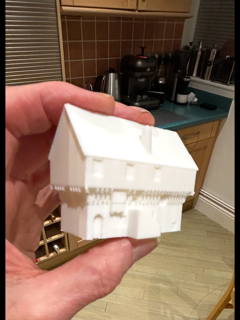
Just as an aside, A friend does CAD reconstructions of ruined castles as a hobby using a very old (no subscription) version of C4D. I noticed he could export to stl, so pushed a simple building through to Bambu and an instant result.
Those in the know will probably not be surprised but I was amazed that it could be done so easily and in 1 hour.
I wonder now what size files Bambu can handle….a whole castle?

IMG_5504.png
 
Last edited:
Thanks to Black Friday promotions I have became an owner of P1S. It is huge, huge difference to my old Enders. I am planning a weekend on board of my Sadler 25 with the printer, printing non stop!
The speed is insane, and no more fiddling around test prints to compare real measurements vs one in cad. Although for simple stuff, like 90% boating things Ender or any simple printer is more than enough. I have lot of projects in mind that require better printer, that's it.
Relinking my past prints on Enders: 3D printed items and list is growing
Did you get the AMS with your printer? If not, it is a VERY worthwhile upgrade.
I use different types of filament.
All except one (TPU) are supplied by Banbu so have the little RFID tag.
Whenever I use the TPU, I always make mistakes - I just load all the others into the AMS and the printer does the rest.
The AMS is a REAL benefit.
Interesting to see that Bambu have just announced TPU filament that can be used in the AMS.
So, I bought a roll but I want to use the old one up first.

On the subject of new filament, Bambu also now have a range of wood based filament.
I also bought one of those but I have opened it and tried it out.
The wood filament is really interesting.
Feels and looks like wood but I tried to wax it and the wax runs off so have must be a large element of plastic.

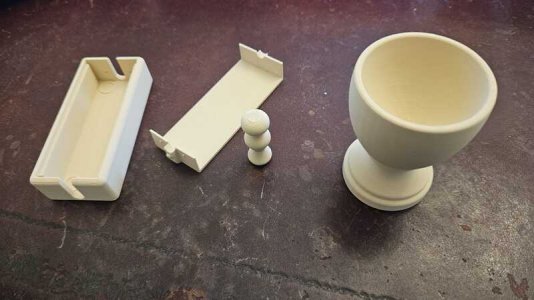
Here is a photo of the items I printed recently with wood filament.

Untitled.resized.jpg

The eggcup looks and feels like it was turned on a lathe.
The little thing in the middle is a test that I designed in FreeCAD to see how well chess pieces would come out.

The two pieces on the left are another story.
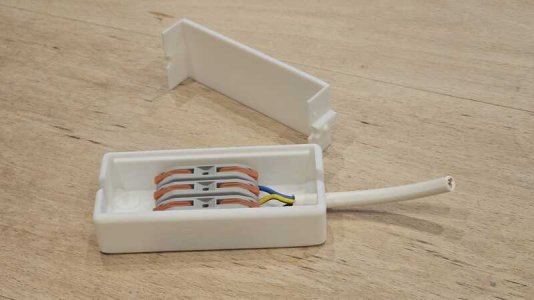
You know those little Wago compatible connectors - really great little connectors - you don't need any tools to make electrical joints.
Well, I thought they deserved a box/case that also doesn't need any tools to assemble/disassemble.
There are lots of designs out there but you need tools to use them.
This isn't a problem - more of a design challenge.
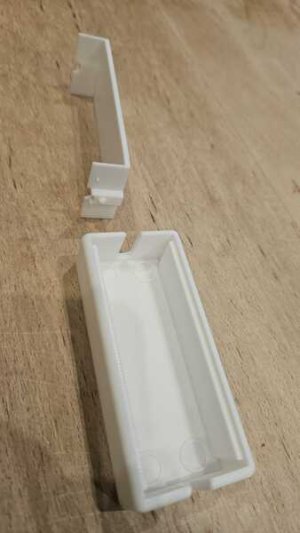
After playing with several different design concepts, I came up with this design.

2.resized.jpg
The idea is that you attach a small cable tie around the wire's outer sheath as a strain relief.
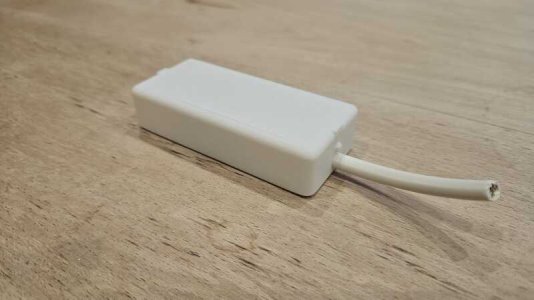
And then simply click the top on.
It all click into place - located by small pips and recesses.
When you want to disassemble it, you squeeze the two buttons at each end and the top bends to allow it to be removed.
Works really well.
1.resized.jpg

3.resized.jpg
 
Quite often we come up against stainless to alloy contact and need for interface to prevent electrolytic action. usually we use Duralac or something ... but we can also use 3D print filament ..... especially TPU and similar 'spongy' filament ..

I'm about to fit midships cleats to my toe-rail .. and they need such.

I can scan and then print a thin TPU spacer exact same shape - with bolt holes etc ... the TPU will also give a bit of stress relied being softer than hard filament / tape etc.
 
Over the last few days, I've been doing a non-boaty print job.
I have managed to get my hands on one of the new Radxa X4 SBCs.
This is a little Raspberry Pi "look alike" SBC - with a difference - it has an Intel x86 chip on board.
In fact, it is one of the new Intel N100 chipsets which means it runs all the software that you would normally run on your Desktop PC or Laptop - quickly.
Dirt cheap as well.
Here's a link to Chris Barnatts review on this device.

I bought the 4GB model (without any EMMC) and one of the Radxa heat sinks to suit it.
I also bought one of the new Raspberry Pi cheap 2230 NVME drives that have just been launched (£27)
The whole lot came to £108 including the SBC, heat sink and NVME disk drive.
It took me no time to install my favourite Linux distro onto it and customise it with my own stuff (I call it Mikes Manjaro because it is Manjaro with my additions).
Of course, this little board will run Windoze as well for those people who follow and don't want to lead!!
Here is a photo of the SBC itself and its heat sink

View attachment 185193

As you can see the heat sink only does half the job as a case so it needed a bit of 3D printing to finish the job.
So, here it is - complete with the heat sink on the top and a 3D printed lower half.

View attachment 185194

One problem I had was that this SBC has a power button on the board - by default it boots whenever the power is applied but it is also nice to have a power button.
I suppose I could have soldered a button to a wire and attached that to the board but have you seen how small these things are these days?
So, I made a 3D printed button that pushes a shaft through the enclosure to push the SBC's PCB button.

This is still a bit of a prototype - I have, since, rounded the edges a bit and I will change the colour of the button - probably to red.
Here is a photo of the side with the 3D printed button.

View attachment 185195

Electronically, this is a very powerful little device.
Truly a "Pocket Rocket"

It would make a really great ships PC.

EDIT - just for interest, I have a photo of it attached to a monitor

View attachment 185196
can you put up a link to the radxa you bought? cheers
 
can you put up a link to the radxa you bought? cheers
They are as rare as "Rocking Horse Poo" at the moment.
This is the official manufacturers website Radxa X4
If you click the links on that page, you will be taken to the official Radxa supply channels.
I bought mine from Aliexpress.
I would like to buy some of the bigger memory versions so I'm waiting for stock at the moment.
Arace seem to have some 4GB versions in stock.

The one I bought is working really well - even though it is only a 4GB (WiFi 5) version.
It needed a little bit of tweaking.
As I said, I made a 3D box that turns the heat sink into a full case and I printed a support for the WiFi antennas and its CMOS battery.
I also drilled a hole in the heat sink to route the fan cable properly.
You need to run it from a 12v PD USB C power supply - I got a cheap one from Amazon for 10 quid - works well.
I fitted the Radxa X4 with one of the new cheap Raspberry Pi NVMe 2230 SSDs
The 256GB ones from Raspberry Pi are £27.70 each and now they have 512GB ones for £41.50 (I bought a couple of those last week but not used them yet).

As most people on here know, I'm not a Windows man so I've not tested it on Windoze.
Instead, got it running easily using a GUI desktop under Linux - I use the Manjaro XFCE distribution.
It boots completely in 20 seconds and runs like lightening.
I can't wait to get some with larger memory.

They really are a Raspberry Pi Killer.

Hope that helps.
 
Just be careful in an enclosed space.
I’ve been banished to the garage with my P1S. Even using PLA it was a too smelly for SHMBO.

Did you get the AMS with your printer? If not, it is a VERY worthwhile upgrade.
I use different types of filament.
All except one (TPU) are supplied by Banbu so have the little RFID tag.
Whenever I use the TPU, I always make mistakes - I just load all the others into the AMS and the printer does the rest.
The AMS is a REAL benefit.
I live in small flat, alone and Bambo prints in a room where I am not going to be for next few hours - sadly its quite noisy device. As I move it around rooms, AMS would be very tiring. I just switch filament the whole time.
 
I just added a 4th 3D printer to my collection. It is the Creality Ender 3 V3 KE. All set up and working in under an hour. Initial thoughts are I am impressed. Cost is £199 at the mo. I will do a how to set it up video but the forum police won’t let me post my you tube videos
 
I just added a 4th 3D printer to my collection. It is the Creality Ender 3 V3 KE. All set up and working in under an hour. Initial thoughts are I am impressed. Cost is £199 at the mo. I will do a how to set it up video but the forum police won’t let me post my you tube videos
That would be VERY interesting. Hadn't realised 3D printers had got so cheap.
 
I just added a 4th 3D printer to my collection. It is the Creality Ender 3 V3 KE. All set up and working in under an hour. Initial thoughts are I am impressed. Cost is £199 at the mo. I will do a how to set it up video but the forum police won’t let me post my you tube videos
Not that I am a convert (I dont like all those 'Bamboo fanatics') BUT! A1 mini is cheaper and A1 not that much more expensive. I have printed a lot on my Enders but I wonder if its worth buying new one due to excellent work that Bamboo did. Or if its new design - they should not keep 'Ender 3' in the name ;)
@Bigplumbs maybe after Christmas we could do some comparison in the speed of printing? Speed, not quality, as I managed to have some very good quality prints of my Ender - they were just slooooow.
 
That would be VERY interesting. Hadn't realised 3D printers had got so cheap.
IMO, 3D printers have always been cheap starting at around £100.
The last time I looked was about 7 years ago.
But the difference in the quality between then and now is like comparing chalk with cheese.

Despite what seems to have been said about Bambu, I have found the quality of the Bambu equipment and the items that it prints are outstanding.
I believe it is also one of the quickest machines available.
I'm really pleased with my Bambu X1 - I would love to see if the A1 models come up to that standard - I guess that they would.

On consumables, I use Bambu for my filaments as well.
I don't have the need to look at other suppliers.
Bambu filament is about as cheap as it gets and it comes with those little RFID tags making the whole process of loading filament really easy.
I did buy some filament from other suppliers but I don't like using it because the Bambu filament is just so easy to use.
 
There a brilliant piece of kit I'm in throws of making some bow rollers and then I'm going try making couple of spinnaker winches.
 
Another "boaty" application where the 3D printer is helping.
Some of you will know that I've been making my own plastic teak deck - replacing the old wood teak decks.

To cut a long story short, making the corner pieces requires a 4mm routed slot in which a light weight welding rod is welded in to mimic a caulked joint.
Routing that slot has been a challenge.
I believe that professional suppliers use a specially made template/fence that the router fits into.
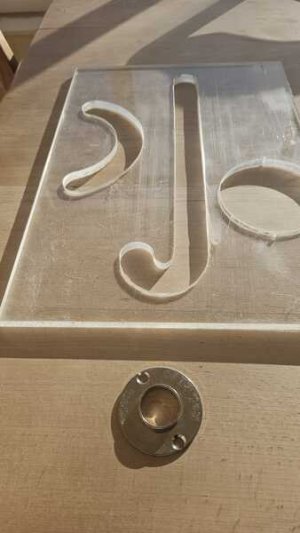
In the early days of making my teak decks, I made my own router templates using a sheet of perspex like this

4.resized.jpg

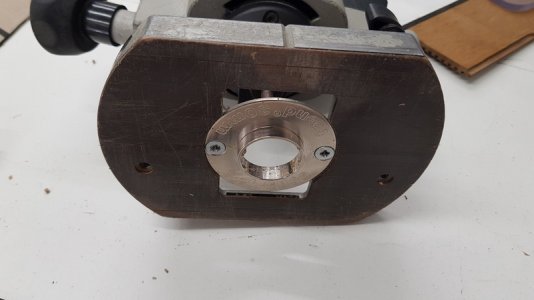
The small metal bush attaches to the router like this

5.resized.jpg

The idea is that the metal bush guides the router along the slot thus creating a 4mm groove in the plastic teak.
The slot is then filled/welded with "top weld" rod to form a plastic caulked joint.

Making those perspex templates was difficult and not particularly accurate because I made them by hand.
The professionals have them made using a CNC machine.

But now with the 3D printer and a little help from FreeCAD, I can make my templates much easier an accurate to within 0.1mm

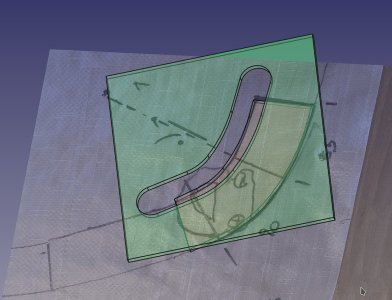
This is a screenshot of the design of a corner in FreeCAD

1.resized.jpg

The brown piece is a mock up of the actual PVC Teak corner.
The grey bit is actually an imported photograph taken of the flexible template taken from the actual deck to be replaced.
FreeCAD allows you to import and scale photographs which can then be overlaid into the design.
The green bit is the new template that will be used as a guide for the router.

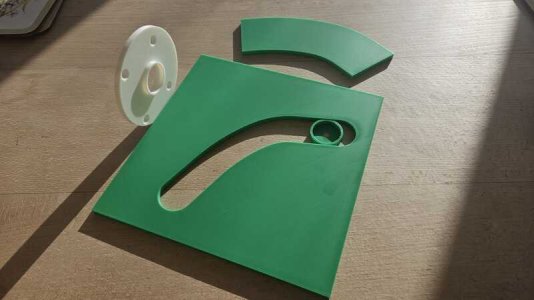
And this is the actual 3D printed template

2.resized.jpg

The big green square piece is the template
The curved piece above is a 3D printed copy of the actual deck corner that will be welded in - I printed it but, it probably isn't required.
The small round part in the template groove is a small circular part with a hole in the middle to help align the template.
I printed 2 of these - one that can be used to draw a pencil line - the other with a larger hole is useful to line up the template prior to cutting with the router.
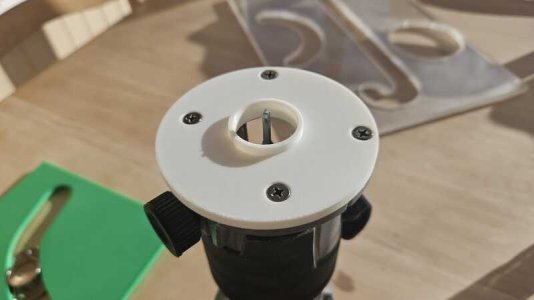
The white piece screws onto a cheap palm router thus accurately placing the router's cutting tool in the centre of the template/guide.
I made the depth of the white piece less than the thickness of the template in order to keep the cut square to the face of the plastic teak.
I hope that makes sense.
Here it is attached to the cheap router

3.resized.jpg

We used this technique yesterday to make a test piece of deck and it worked well.
I haven't got a photo of the final piece we made (I may post one later) but it all worked really well.

So, to recap, the 3D printer made some accurate templates that would have otherwise required a CNC machine,
 
Top