Wifi on board

One thing you should bear in mind - this will be slower than your phone. It's LTE Category 4 which is quite old, but it will maintain a stronger connection more of the time so should be much more consistent than a phone (which are now category 14 or more!).

Radar arch will be a good spot, but make sure it's not level with the actual radar - I don't know if it'd cause damage but I can't imagine having them level would be good when the radar is on. I suspect that for mounting you might get away with raising it a couple of cm using a GPS Antenna mount or something similar, which could be glued down easily enough. Do a dry run before mounting so you can test wifi around the boat. If the radar arch is metal it might block a signal, and water and fuel tanks, engines, etc. might also block signals. Easy on a single floor yacht but your boat may have a more complex layout, although I'm guessing most things like that will be low down.
Thank you. It’s consistency to stream rather than ultimate speed I want.

Arch and everything high is GRP and all significant metal things are under the saloon floor or aft cabin bed.

Agreed 100% on height diversity with the radar. Will arrange that.

Ive ordered it. Will try it with my 3 SIM and load some data onto my EE sim and compare results.

I don’t need a bosun’s chair to change the sim!
 
Thank you. It’s consistency to stream rather than ultimate speed I want.

Arch and everything high is GRP and all significant metal things are under the saloon floor or aft cabin bed.

Agreed 100% on height diversity with the radar. Will arrange that.

Ive ordered it. Will try it with my 3 SIM and load some data onto my EE sim and compare results.

I don’t need a bosun’s chair to change the sim!
the RUT 240 has arrived.

I'm cutting the lead off the transformer and discarding it. Saves me £17.

Sadly my 3 data speed and stability no better. Just trying to load data onto my EE SIM. Remembering why I stopped using EE. You can't get online to top up if yu've run out of data. Tether to go online and it won't let you top up unless you know the phone number. Why would I know the phone number of a data SIM? Try online chat and they won't speak to you unless you have a phone number. So I'm calling them. 17 minute on hold so far. Hopeless in the extreme.
 
haha I couldn't bring myself to cut the cable but that's definitely an option!

using the included antennas you probably want the two LTE ones at 90 degrees to one another for best reception. I have similar issues with numbers on data sims so I made a label to stick on the router. It's also a bit of a nightmare removing the adult filter on them while in the router so I used an old phone for that part.
 
haha I couldn't bring myself to cut the cable but that's definitely an option!

using the included antennas you probably want the two LTE ones at 90 degrees to one another for best reception. I have similar issues with numbers on data sims so I made a label to stick on the router. It's also a bit of a nightmare removing the adult filter on them while in the router so I used an old phone for that part.
55 minutes on the phone to EE and sorted. Steady and much faster. Probably would have been fine in my old router but hey ho, I've now got a system that will work in more marginal spots. Thank you for your help and advice.
 
Just a small update to this thread for those interested as I've started moving on to phase 2 and fitting everything properly. The PoE in the RUT240 is "passive" and doesn't support real PoE which the switch provides. For various reasons the TSW-100 is still a great switch for on board so I'm keeping that in the mix. To supply power to the router though, I've ordered a 12v to 24v step up box Car DC 12v to 24v Step Up Converter 5A 120W Regulator: Amazon.co.uk: Electronics which will give me a 24v supply to connect to the pins in the Ethernet cable - I'm stepping up to avoid voltage drop and high amps on the Ethernet cable, although the router uses very little power so probably not necessary. I also ordered a small Ethernet extender which I intend to butcher and create a PPoE injector by disconnecting the passive pins from the switch side and connecting the 24v feed to the router side. Ethernet Extender - iGreely 2Pack RJ45 Male to Female Screw Panel Mount Cat6/Cat5e/Cat5 Ethernet LAN Network Extension Cable 1ft/30cm: Amazon.co.uk: Business, Industry & Science
This will also be handy as it will allow the router at the mast top to be switched off independently to the switch, which will be supplying radar to my two MFDs eventually and so will be switched with the nav equipment.
 
My project is to have mobile 4G access to facilitate TV streaming while on the River Shannon. Having done a lot of research and read useful user experiences on this forum, I am on the verge of ordering the Teltonika RUT240 + QuWireless QuSpot antenna enclosure which is IP67 and also houses the RUT240. My first question; if I provide a 12V supply to the 240, can the the LAN port be used with a cat6 cable to connect to the smart TV instead of wireless? I have read that the 240 can also be powered by PoE but I would need an extra PoE switch thus only one cable to the QuSpot enclosure. (Don't want to go down that route as extra kit and expense). Second comment I read was from a user:
"I couldn't get this item working with either Three or Id mobile sim cards so I contacted ErnestasB at Crowd Support Forum | Teltonika Networks. The device stated that the sim was not inserted, so I was asked to provide a "troubleshooting file.
Before submitting the file I reviewed the contents. The archive includes **ALL** of your secrets from the device in a unencrypted form. I find this alarming and incredibly unprofessional. There is no reason to do this".

Appreciate if any guru user on here has any comment on this ?
 
There's a lot to unpick there...
The QuSpot has just a single gland for Ethernet. To use 12V through the 3mm Molex connector you'd need to add a gland for the extra cable - not too difficult but it's something to consider.
If you use PoE it's basic PoE using an injector (https://www.amazon.co.uk/gp/product/B00ENNUWO4) - this does not work with PoE switches anyway. DC is connected to 4 of the Ethernet pins with one pair positive and one negative, the remaining 4 pins will give you 100Mb/s Ethernet connectivity the other side of the injector, more than enough for TV and certainly more than 4G will provide in a class 4 device.
The RUT240 itself has 2 Ethernet ports so you could use PoE and a second Ethernet, but again problems with the QuSpot gland.
The TSW100 from Teltonika is a pretty cheap (~£60) switch and would allow you to also connect in things like MFD, RADAR and power solutions like the Cerbo. With mine I can now see my battery and solar info on my plotters from the Victron gear. We don't have a TV but can stream two programs to laptops over wifi quite happily.

Mine has been running flawlessly for months with a Three SIM. I can only assume that was user error, or one of the yacht product manufacturers spreading FUD to justify their massive prices for their own RUT based solution. Yes, it's a RUT240 in most of the marine 4G boxes, and some of them even rebadge the QuSpot!
As for including secrets - it's a troubleshooting file which dumps everything, not unusual in a support situation, especially on Linux where everything will be file based so it just copies the files verbatim. You have to go out of your way to send that info and then you'd only send it to support and even further you're only really sharing your wifi code!
 
  • Like
Reactions: vas
Thanks @lustyd for your prompt informative reply. The PoE injector looks a neat bit of kit. Am I missing something... If I connect the cat6 cable from the injector PoE socket to the RUT240, can I then not just connect the LAN socket on the injector to the TV? Thus only needing one cable to the 240? I have no requirement for any other connected ethernet devices. If I have to install a second gland, I don't see this as being a major issue ;). If all fails, I can just connect wirelessly. I always prefer wired when streaming.
I note your comment regarding the log file.
 
Yes, as I said if you connect the Ethernet to the other side you get 4 data pins which will make a 100Mb/s connection, absolutely fine for your TV.
 
Thank you to Lustyd for this and his other post on the subject of WiFi on board. I bought a RUT240 from Solwise but, during trials at home, found that there was a problem with the WiFi so I sent it back. They exchanged it without question and for good measure I upgraded it to the RUT950, which has two WiFi antennae for hopefully even better performance. On the boat, it seemed to have sufficient reception just mounted in the cabin and plugged into the cigarette lighter socket, so I have just hard wired it in there and haven't bothered with the QSpot. Time will tell but I suspect that anywhere I go will likely have an adequate mobile phone signal, unless I choose a remote anchorage.

I experimented with an O2 and a Vodafone SIM and compared speeds with my EE mobile phone signal and found that Vodafone seemed to work best in my home marina, so I've gone with that. Incidentally, the RUT950 has two SIM card slots so I can switch between either SIM card simply by sending a text message to the router. I have also installed a Humax Aura Freeview Plus box and have connected it directly to the RUT950 with an ethernet cable. As supplied, this runs from a 240v to 12v transformer, so it's easy to do away with the transformer and wire it in to the boat's 12v supply via a voltage stabiliser. Better still, the remote control can work via Bluetooth, so the box and all the cables can be mounted out of sight in a cupboard. Trials in the marina and in Poole Bay suggest that I can easily stream HD TV whilst simultaneously streaming other HD content to my mobile phone via WiFi, so download speeds seem perfectly adequate. I have also connected my laptop and a wireless printer via the router's WiFi, so I now have a truly mobile office, which is what I was after at the start.
 
I've also not fitted my QuSpot yet. I do have one, but getting it installed on the mast is going to take some effort and I've not needed to yet so the RUT sits in a locker working great.
 
I didn't know Solwise sold Teltonika gear. That's good news because Solwise are a UK company, they answer the phone, and they are helpful. They provide the device which alerts us when the boat loses shore power.
It's astonishing that something like the RUT950 can be sold at such a low price when you think what it can do. 6 years ago when I joined the forum there were endless discussions about how to get "WiFi" working on a boat. Now it's simple. Do exactly as Freeloader says. Buy a Teltonika RUT950 from Solwise, choose a cell network provider with a good signal in the area you want to cruise (and get a back-up SIM from another network for the second slot if necessary), buy a small wireless printer, connect your usual devices, and you have a fully-functional 21st century mobile office.
 
I have followed this thread with avid interest . I have gone down the Teltonika route . Everything works fine except the RUT240 which I have connected to the TSW 100 with an 10m Ethernet cable. The RUT 240 is on my mizzen mast. It would appear that I need POE injector. Could someone please recommend one that is compatible with the TSW 100.
Many thanks
 
If you look at my post above there’s a link to the one I used. I did explain all of this a few times on the thread ? unfortunately I can’t edit the original post any more
 
If you look at my post above there’s a link to the one I used. I did explain all of this a few times on the thread ? unfortunately I can’t edit the original post any more
You did indeed. My sincere apologies for my poor standards of literacy. Thanks for all your posts on this subject. They have been most informative and educational.
 
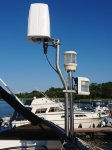
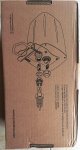
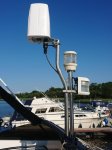
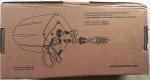
Here's an update to my WIFI project. I purchased a QuRouter 240S which has the RUT 240 in a waterproof enclosure from; Teltonika RUT240 | Forest Rock at £205 including postage. The supplied PSU provides POE to the router. Have used it for streaming on smart TV. Means I can easily change the SIM whenever I travel from Lough Erne to The Shannon. See pics for installation.
Router Install.JPGInstallation schematic.JPG
 

Attachments

  • Router Install.JPG
    Router Install.JPG
    99.4 KB · Views: 39
  • Installation schematic.JPG
    Installation schematic.JPG
    92.8 KB · Views: 38
Top