
You are using an out of date browser. It may not display this or other websites correctly.
You should upgrade or use an alternative browser.
You should upgrade or use an alternative browser.
Victron mppt. Bluetooth connection issue
- Thread starter Looseends
- Start date


vas
Well-Known Member
assume same phone/no updates?
bt code is usually 1234 or 0000, did you try that? Victron site should have the code
else I'd reboot phone and MPPT (if possible - mine had a bt dongle so easy to pull out for a min to reset)
bt code is usually 1234 or 0000, did you try that? Victron site should have the code
else I'd reboot phone and MPPT (if possible - mine had a bt dongle so easy to pull out for a min to reset)

Mr Googler
Well-Known Member
It’s 000000....unless you changed it to a different pin via the app previously
forget the device on your iPhone Bluetooth devices then go into the victron app and try again
forget the device on your iPhone Bluetooth devices then go into the victron app and try again
Looseends
Well-Known Member
hi thanks for reply.It’s 000000....unless you changed it to a different pin via the app previously
forget the device on your iPhone Bluetooth devices then go into the victron app and try again
I have restarted my phone and taken the fuse out of the controller. Same N issue. The controller doesn’t show show up in my Bluetooth device’s on the iPhone ?
 other Bluetooth devices connected ok.
 I tried six zeros with no joy.
thanks again
Mr Googler
Well-Known Member
You have to connect from within the app. Don’t connect via the phones Bluetooth list
Mr Googler
Well-Known Member
Also….make sure you “forget” the charger within the iPhone Bluetooth previous devices menu first. A restart might not clear that unless you reset all connections
Mr Googler
Well-Known Member
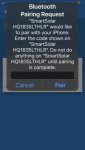
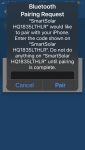
Sorry…just looked at your pictures again….is there a Bluetooth password on the charger itself?

simonfraser
Well-Known Member
I can only connect to VictronConnect if nothing else is running via bluetooth, S10 up to date phone
Looseends
Well-Known Member
Also….make sure you “forget” the charger within the iPhone Bluetooth previous devices menu first. A restart might not clear that unless you reset all connections
Attachments
Looseends
Well-Known Member
Not unless it is on the back I would have to remove it. There is a square scan code on the front but that doesn’t connect it.Sorry…just looked at your pictures again….is there a Bluetooth password on the charger itself?
it used to be listed and connected on the Bluetooth devices list. On the phone.
I can’t see one. I usually use six zeros.Sorry…just looked at your pictures again….is there a Bluetooth password on the charger itself?
But It always used to show up in the device list and connect as soon as I got close to the boat. Other Bluetooth device work on the phone ?
Mr Googler
Well-Known Member
I’m at a loss. I connected up to mine via the iPhone menu but that didn’t work. Forgot the device then did it within the app and it worked. Maybe uninstall then re install the app. Otherwise….email to victron I guess. Sorry
Looseends
Well-Known Member
Thank you for trying to help ?I’m at a loss. I connected up to mine via the iPhone menu but that didn’t work. Forgot the device then did it within the app and it worked. Maybe uninstall then re install the app. Otherwise….email to victron I guess. Sorry

sarabande
Well-Known Member
LEnds
I have the same kit, but never seen the messsage.
Would this be relevant ?
How to Fix Bluetooth Pairing Problems - Techlicious
I have the same kit, but never seen the messsage.
Would this be relevant ?
How to Fix Bluetooth Pairing Problems - Techlicious
Looseends
Well-Known Member
ThanksLEnds
I have the same kit, but never seen the messsage.
Would this be relevant ?
How to Fix Bluetooth Pairing Problems - Techlicious

Hurricane
Well-Known Member
I have to agree with you.
The Victron Bluetooth connection is very flakey.
It works - then it doesn't - then it works again etc.....
I have a friend with a similar problem.
I think it works better when my phone (Android) is closer to the MPPT/Bluetooth dongle.
The default password is 000000
These days, I generally use the Victron Connect PC application.
They supply it for most platforms but I am using a Linux computer with their Linux Appimmage version.
Again, it isn't consistent but my PC is probably about 3m from the MPPT/Bluetooth dongle which may cause the problem.
I've tried several versions of their PC software - all do the same - sometimes connect - other times nothing further than 20% on the display.
About a month ago, I even upgraded the Victron firmware.
It might be slightly better now but it is still vary flakey.
I use it for remote monitoring.
I can start the boat's computer remotely and using a remote desktop application, I can run the Victron Connect app from home.
This was a screenshot of the app a couple of nights ago.
Note that it was dark so no solar voltage!! but the battery voltage is reassuring!!
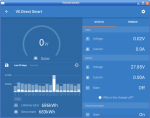
The interesting thing about this report is the history.
The boat's main battery charger is always left switched on so that it provides a float charge to the batteries.
On the 22nd, we had some extensive shore power cuts in our marina so the solar panels "took over" the float charging.
Shown in the history bar graph.
Quite useful and reassuring in these uncertain times when I can't visit the boat.
The Victron Bluetooth connection is very flakey.
It works - then it doesn't - then it works again etc.....
I have a friend with a similar problem.
I think it works better when my phone (Android) is closer to the MPPT/Bluetooth dongle.
The default password is 000000
These days, I generally use the Victron Connect PC application.
They supply it for most platforms but I am using a Linux computer with their Linux Appimmage version.
Again, it isn't consistent but my PC is probably about 3m from the MPPT/Bluetooth dongle which may cause the problem.
I've tried several versions of their PC software - all do the same - sometimes connect - other times nothing further than 20% on the display.
About a month ago, I even upgraded the Victron firmware.
It might be slightly better now but it is still vary flakey.
I use it for remote monitoring.
I can start the boat's computer remotely and using a remote desktop application, I can run the Victron Connect app from home.
This was a screenshot of the app a couple of nights ago.
Note that it was dark so no solar voltage!! but the battery voltage is reassuring!!
The interesting thing about this report is the history.
The boat's main battery charger is always left switched on so that it provides a float charge to the batteries.
On the 22nd, we had some extensive shore power cuts in our marina so the solar panels "took over" the float charging.
Shown in the history bar graph.
Quite useful and reassuring in these uncertain times when I can't visit the boat.
Looseends
Well-Known Member
I have to agree with you.
The Victron Bluetooth connection is very flakey.
It works - then it doesn't - then it works again etc.....
I have a friend with a similar problem.
I think it works better when my phone (Android) is closer to the MPPT/Bluetooth dongle.
The default password is 000000
These days, I generally use the Victron Connect PC application.
They supply it for most platforms but I am using a Linux computer with their Linux Appimmage version.
Again, it isn't consistent but my PC is probably about 3m from the MPPT/Bluetooth dongle which may cause the problem.
I've tried several versions of their PC software - all do the same - sometimes connect - other times nothing further than 20% on the display.
About a month ago, I even upgraded the Victron firmware.
It might be slightly better now but it is still vary flakey.
I use it for remote monitoring.
I can start the boat's computer remotely and using a remote desktop application, I can run the Victron Connect app from home.
This was a screenshot of the app a couple of nights ago.
Note that it was dark so no solar voltage!! but the battery voltage is reassuring!!
View attachment 114976
The interesting thing about this report is the history.
The boat's main battery charger is always left switched on so that it provides a float charge to the batteries.
On the 22nd, we had some extensive shore power cuts in our marina so the solar panels "took over" the float charging.
Shown in the history bar graph.
Quite useful and reassuring in these uncertain times when I can't visit the boat.
Looseends
Well-Known Member
Hi thanks, my controller has always 100 % worked as soon as I am within about 20 meters of the boat.
the problem must of occurred when I unplugged the solar panel when cleaning the boat. ?
thanks again.
the problem must of occurred when I unplugged the solar panel when cleaning the boat. ?
thanks again.
sarabande
Well-Known Member
Loose, I think there may be a clue there. The battery, panel and controller have to be connected in a specific sequence.
I think (in the absence of my instruction book) it is
Controller to battery, then panel to controller,
but worth digging into the 100/20 download ?
Software - Victron Energy
I think (in the absence of my instruction book) it is
Controller to battery, then panel to controller,
but worth digging into the 100/20 download ?
Software - Victron Energy

Never Grumble
Well-Known Member
Slight thread drift, when I installed an Mppt in my camper van it was a self-contained unit and any "adjustments" could one made on it. Nowadays are Mppt like this one plug and play ... am I likely to need to make any adjustments to values? I presume you do need the Mobile App, etc if you want to effectively see the screen? Anyone want to recommend me an Mppt, wont be putting that much through it probably less than 100W
freddyuk
Well-Known Member
The controller is connected to the battery first so it can establish what voltage the system is. Then connect PV.
Other threads that may be of interest
- Replies
- 4
- Views
- 171

