
Troubleshooting NMEA2000 on my Lowrance Link-8 VHF

Should be all by the book. I have measured power and ground to be OK at the end of each cable. Neither the Link 8 nor the MFD register there's a 2000 network. There's no traffic on it. Though there has to be registered units at both ends for that to happen, so it makes it impossible to know if the fault is one of the units, or the cables. I guess I simply have to exchange the cables and the backbone to know...

View attachment 64922

Sounds like you really could do with a third device on the network to see which of your existing two devices it could see.. Perhaps worthwhile trying to borrow a simple display and get that to scan for other devices and see what it lists..
 
Sounds like you really could do with a third device on the network to see which of your existing two devices it could see.. Perhaps worthwhile trying to borrow a simple display and get that to scan for other devices and see what it lists..

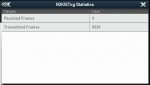
Yes, I think so too...
 
IMG_3317.jpg

Latest: When I disconnect my plotter from N2K, it starts sending data. Likely to probe if there's anything connected?
But when I connect the cable again, the plotter stops sending.... Maybe because it senses the network cable, But figures there's Nothing on it??
 
So at least I finally managed to piece together the loose threads of 0183 at least. Now I have AIS at 38400 Baud working just fine. So for now I will retire the N2K cables and enjoy summer.
 
I have a Link 8 on my raymarine network passing AIS data to the A65 MFD and receiving GPS data all working on N2k. However, it only works if the VHF is turned on a minute or so before the rest of the network. If the VHF is turned on after the Raymarine network or annoying off/on then the raymarine log and wind instruments no longer receive GPS data.

Obviously there appears to be some compatibility issues with Lowrance and Raymarine products.


Have you found any solution to this problem?

I have the same problem with my A95 MFD and B&G V50, which is, as I understand, same product as Link 8. My onboard system works if I turn on the VHF first and then the Raymarine instruments. If I do it the other way my Raymarinwe Wind instrument i60 will stop working. Wind data still exists on the network, the MFD shows all data.

I'm not sure that turning on the VHF first works to 100% because sometimes some navigational symbols are missing from the MFDs chart.I have to orestart it an then I can see all symbols.
 
Have you found any solution to this problem?

I have the same problem with my A95 MFD and B&G V50, which is, as I understand, same product as Link 8. My onboard system works if I turn on the VHF first and then the Raymarine instruments. If I do it the other way my Raymarinwe Wind instrument i60 will stop working. Wind data still exists on the network, the MFD shows all data.

I'm not sure that turning on the VHF first works to 100% because sometimes some navigational symbols are missing from the MFDs chart.I have to orestart it an then I can see all symbols.

I never found a solution with the A65 setup. However, I moved the link 8 to a new boat with a combination of old seatalk, new seatalk, N2K, new axiom chart plotter, a old raymarine gps and old ST60 wind & speed instruments and it works like a dream. My gut feeling is the link 8 and the i60 instruments were not playing nice on the same network.
 
I never found a solution with the A65 setup. However, I moved the link 8 to a new boat with a combination of old seatalk, new seatalk, N2K, new axiom chart plotter, a old raymarine gps and old ST60 wind & speed instruments and it works like a dream. My gut feeling is the link 8 and the i60 instruments were not playing nice on the same network.
Thanks for your answer!
I'll try a solution where I skip the N2K part and instead I communicate with the VHF completely over NMEA0183. A95 has one input/output NMEA0183-port and one input-only NMEA0183-port. I transfer GPS data to the VHF and get DSC data back on the input/output port. I get AIS data from the VHF to the input-only port. Hope this will work.
 
Top