Standard horizon Cp180 problem

Tamar

Well-Known Member
Joined
9 Apr 2019
Messages
7,358
Location
All over the shop
Visit site
Hi my ten year old CP180 is functioning fine, only thing playing up is the log. It just stopped logging the miles, it might log 2 miles for every 12 sailed. I have tried to re set it but nothing seems to work. Any ideas?

 
The CP-180 does not have a log function as such: it just displays data from another (log/speed) item of electronics connected to it by NMEA0183. It must be your log that is malfunctioning. Presumably you have checked the paddlewheel is rotating freely? Or that if a non-paddlewheel doppler-type log that the sensor is not encrusted with fouling.
 
The CP-180 does not have a log function as such: it just displays data from another (log/speed) item of electronics connected to it by NMEA0183. It must be your log that is malfunctioning. Presumably you have checked the paddlewheel is rotating freely? Or that if a non-paddlewheel doppler-type log that the sensor is not encrusted with fouling.
It only has an Arial, is this what you mean?
 
The CP-180 does not have a log function as such: it just displays data from another (log/speed) item of electronics connected to it by NMEA0183. It must be your log that is malfunctioning. Presumably you have checked the paddlewheel is rotating freely? Or that if a non-paddlewheel doppler-type log that the sensor is not encrusted with fouling.
You sure about that John ? Does the plotter not keep a trip log from the GPS ?
 
Hi my ten year old CP180 is functioning fine, only thing playing up is the log. It just stopped logging the miles, it might log 2 miles for every 12 sailed. I have tried to re set it but nothing seems to work. Any ideas?
If you consider it may be the GPS receiver (mushroom) I have a spare (with a long cable attached) which you could try.
Have to be done by postage as I am probably as far as possible from you on land.
 
Hi my ten year old CP180 is functioning fine, only thing playing up is the log. It just stopped logging the miles, it might log 2 miles for every 12 sailed. I have tried to re set it but nothing seems to work. Any ideas?


If an external GPS puck check the connections between I and ghe plotter. Is your current position always visible on the plotter?
 
10.0 TRACKING
You may have to take a few trips to see how you like the Distance or Time Interval setup on the previous step. However when using the tracking feature you will notice every time a Track Point is layed down on the Chart page a small filled in circle is shown on the Track line. If you move the cursor over the top of the circle a popup window will be shown with the Time, Water Temperature (shown when FF525 (or FF520) is connected), Speed and Course Over Ground (COG)

This is what the book says. I have and use the trip log box in the on screen data display.
The only thing I can think of that could affect the log display is if it overflows ie. needs a reset to zero.

10.0.0 Saving and starting a new Track
A Track is automatically saved to memory. To start a new Track:
1. Press [MENU]. Move the ShuttlePoint knob to highlight USER POINTS and press [ENT].
2. Move the ShuttlePoint knob to highlight TRACK and press [ENT].
3. Move the ShuttlePoint knob to highlight ACTIVE TRACK and press [ENT] or move the ShuttlePoint knob to the right.
4. Move the ShuttlePoint knob up/down to select the next available open Track and press [ENT] or move the ShuttlePoint knob to the right.
5. Move the ShuttlePoint knob to highlight TRACKING and press [ENT] or move the ShuttlePoint knob to the right to set On.
6. Press [CLR] or move the ShuttlePoint knob to the left until the Chart page is shown.
7. A new Track now will be laid down.

10.1 USING THE TRIP LOG
On the Chart, Navigation, Highway and NMEA Data pages the windows may be customized to show TRIP LOG information.
1. Select one of the pages listed above, press and hold [MENU]. You will notice one of the data boxes will be highlighted.
2. Press [ENT] and move the ShuttlePoint knob to highlight TRIP LOG, press [ENT] or move the ShuttlePoint knob to the right.
3. A popup window will be shown with Nm (Nautical Mile), Sm (Statute Mile), Km (Kilometer) and RESET. Move the ShuttlePoint knob to select the desired units of measure and press [ENT] or move the ShuttlePoint knob to the right.
4. Press [CLR] or move the ShuttlePoint knob to the right until the selected page (Chart, Navigation, Highway or NMEA Data Page) is shown.

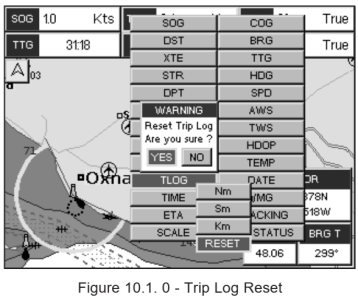
10.1.0 Trip Log selection / Reset
When Trip Log is selected in one of the data windows and you want to reset the log:
1. Press and hold [MENU] until a field is highlighted (it will be shown in a yellow frame).
2. Move the ShuttlePoint knob to highlight the Trip Log window TLOG and press [ENT].
3. A popup window will be shown. Move the ShuttlePoint knob to TLOG and press [ENT].
4. Another popup window will be shown. Move the ShuttlePoint knob to RESET and press [ENT].
5. A warning popup window will be shown to confirm if you want to reset the Trip Log. Move the ShuttlePoint knob to YES and press [ENT].The Trip Log is now reset.
6. Press [CLR] to store and exit the editing mode

tlog.png
 
Thanks for this, very kind of you. I was astonished when I first discovered the trip log last year to find I have travelled over 35k nms in the last 10 years on this boat. I thought it was more like 15k
 
Top