So what setup are you all using for OpenCPN.

I tried OpenCPN on an older laptop but the performance was way to slow using raster charts so I'm kind of resigned to buying a new laptop.
You may be able to improve OpenCPN performance by enabling OpenGL &/or OpenGL caching, by clicking the "advanced" button under graphics options.


Have another try before doing that, though - raster charts have to initialised (in OpenGL mode I think they are texturised) and are then cached. Each chart you view requires undertaking this process once, which takes a few seconds; when you return to an already-initialised chart area, though, it should display immediately.

When you're using OpenCPN at home, passage planning a new area, start by zooming in and out of the area, and panning around it, too. You'll see the annoying hourglass as it initialises all the charts you'll be using, but after they've initialised it'll be much faster.

You can probably increase NCacheLimit to 40 or more in opencpn.ini.
 
I use OpenCPN on a Macbook Air. It connects via bluetooth to a homemade gadget, which provides all the NMEA 2000 data (AIS, speed, depth, barometric pressure, temp, GPS, log, wind) over the bluetooth connection. I can also upload a route with the "send to GPS" function, shut the macbook lid, and my gadget will continue to navigate providing distance, bearing and XTE to the next waypoint. I also have a Zeus2, but don't switch it on much these days.
 
A dedicated plotter will always do a better job than a cobbled-together laptop set-up. And it'll be waterproof. Or perhaps all your sailing is done in perfect conditions?

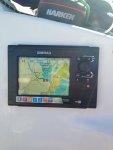
Now I think you're talking at cross purposes. I would agree that for cockpit navigation nothing is as good as a dedicated chartplotter. Here's my 7-inch Simrad running Navionics:

IMG_1037.jpg

But 'cockpit navigation' to me means what you do when you're helming the boat, checking position and pilotage. At the chart table, I want to be able to do other things like:

Plan at multiple scales
Compare weather models
Weather and tide route my passage
Compare tricky parts of the passage on raster or paper charts, to check that I am happy with the vector charts i'll be looking at on the cockpit plotter

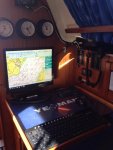
For chart table use, nothing else is in the room compared to a PC setup, particularly a dedicated PC talking to the instruments through a fixed multiplexer. Here is my PC running the same Navionics charts as I have in the cockpit but on a seventeen inch screen:

IMG_1040.jpg

The PC allows me to:

Flick seamlessly between the vector Navionics and Imray raster
Run tide routing for a passage in multiple packages
Pull down GRIB files from PredictWind and Squid, run weather routing in both
Overlay weather models on charts in real time
Run automated real-time polars which feed back into the weather routing
etc

No chartplotter is going to get near that.

For the OP, consider a fanless mini-PC solution rather than a laptop. A complete setup with voltage regulator, screen and mounting hardware is likely to cost in the region of £350-£400. Being fanless the mini-PC pulls very little amps. The setup above pulls about 2.5amps total.
 
I use Raspberry pi 3 running openplotter, fantastic. 0.1A with monitor turned off. Monitors engine temp as well and broadcasts the lot over wifi to a Xperia tablet in the cockpit. Downside for some would be not being able to use VMH charts as it's Linux.

XNQVXbCh.jpg

It looks like a good setup. But as you say, no VMH charts.
I've spent a while looking for Open CPN compatible charts in Vector format for the UK and its seems like a real pain to try and get hold of them.
They all seem aimed at commercial ventures.

You may be able to improve OpenCPN performance by enabling OpenGL &/or OpenGL caching, by clicking the "advanced" button under graphics options.

First thing I tried, but thanks anyway.

Bitbaltic.
I did actually read your excellent blog post on the subject my only concern for my boat was perhaps the power draw was a little bit too high, but it looks like an excellent setup.
Has it worked well in actual use?
 
For chart table use, nothing else is in the room compared to a PC setup, particularly a dedicated PC talking to the instruments through a fixed multiplexer. Here is my PC running the same Navionics charts as I have in the cockpit but on a seventeen inch screen:

...but more importantly, I see that you have a Yeoman :)

Pete
 
I have a dell rugged. with a built in gps which is totally waterproof and will run for 10 hours on a battery. they are not cheap but about the same price as an expensive plotter. the laptop gives me all the other stuff such as internet including a 3g card for when there is no wireless internet. i have a cheap ais which goes into the laptop too. because it is "rugged" it is waterproof and shock proof. not cheap, about 2 grand but very good
 
I have a similar setup to GHA.
I used to run OpenCPN on a HP laptop but now I run OpenCPN on a Raspberry Pi3 using the OpenPlotter build.
I have a 15" flat screen monitor (screen from an old Toshiba laptop) at the chart table and a 10" Panasonic Wireless touchscreen repeater in the cockpit.
I can therefore do passage planning or route changes in the comfort of the cabin but easily follow the route using the cockpit display. I only have one instance of OpenCPN running so there can be no mistakes over syncing routes or waypoints between multiple devices. I can connect using my Android phone over WiFi but for me that's really just a toy.
OpenPlotter sends NMEA data to my DSC radio and to the Autopilot via a NMEA-SeaTalk converter
Openplotter receives data from my Raymarine instruments via the same SeaTalk converter and receives AIS from my Advansea receiver.
Like GHA I also use the system to monitor critical system parameters such as exhaust water temperature and Alternator Temperature (GHAs setup is much more sophisticated than mine in this respect)
The hardware is all down below in the dry except for the cockpit repeater which is a ruggedized waterproof unit anyway.
I have a number of old BSB charts from Maptech days but I prefer Vector charts and have purchased a small folio of S63 ENCs from Chartworld for my current cruising area. I also have a number of Google Maps screen grabs which can be used for additional detail of bays and harbours.

I have a small 5" Garmin chartplotter for redundancy should the main system fail however so-far my Pi OpenCPN/OpenPlotter system has been rock solid. (Latest Sea Trial was a 5 week cruise through Turkey and Greece where it didn't miss a beat.)
Altogether very happy with my setup.
A chartplotter is pretty much plug and play which my OpenCPN config definitely isn't but I then again my setup was probably a couple of thousand pounds cheaper.
 
Last edited:
I'm interested in seeing / hearing what sort of computer and chart table setups everyone is using for OpenCPN. After some inspiration.

I've got hold of a visit my harbour chart stick which is brilliant on my main laptop, but there's no way I'm taking that laptop into a boat environment! :D
I tried it on an older laptop but the performance was way to slow using raster charts so I'm kind of resigned to buying a new laptop.

But I've also seen some good setups with mini-PCs and TVs or Computer monitors but I'm concerned about power usage, so just wondering what setups people are going with, and the kind of current they're taking to run them.

To answer your question this is my spec.

I have a mini ITX 12VDC power PC that had the Atom processor.

Inputs include AIS from a NASA engine through RS232 to USB converter.
GPS through USB.
My Simrad instruments NMEA 0830 through RS232 converter.
My Standard Horizon GX2000 DSC VHF is also connected to the PC.
The GX2000 inputs are from the same NASA AIS engine as the PC
The GX2000 has is own GPS but this tine it has RS232 output.
Wired Mouse and wireless keyboard.
The VGA output is split to 3 screens, Navstation, Saloon and cockpit. I have an active VGA splitter and a VGA to Video converter for the cockpit screen.
I use windows & at the mo but may go to 10 soon
NavMonPC collects all inputs and the send to a vertical port to feed OpenCPN.
Charts are world wide and from wherever (Pls dont ask)
IMGP2998_zps6rydmagc.jpg

Nav station
This Monitor can also receive video input for my Digital TV decoder and any other video output devise like CCTV.
It can also receive normal TV if need be.
IMGP2995_zpswuksavja.jpg

Cockpit screen
IMGP2994_zpsd5htae7h.jpg

Cockpit screen reversed so it can be viewed for companionway. Cam be swung round to be viewed from the outside wheel.
 
Last edited by a moderator:
a 10" Panasonic Wireless touchscreen repeater in the cockpit.

That sounds interesting. How viewable is it in bright light ? How is it connected and powered ?

The vYacht wifi adapter i have just ordered has a LAN socket so maybe i could connect the laptop via LAN and use the wifi between the laptop and tablet. Or maybe hardwire the tablet via LAN, but that means running independent software.

I'm really interested how you have this setup and how well it works, because at the moment my "weak link" is the sunlight viewability of my Lenovo tablet.
 
Bitbaltic.
I did actually read your excellent blog post on the subject my only concern for my boat was perhaps the power draw was a little bit too high, but it looks like an excellent setup.
Has it worked well in actual use?

Well apart from the fact that the VGA part of the mini-PC blew up last weekend precipitating the replacement of the PC :rolleyes: (in practice all this has meant is ordering a like for like replacement. My hope is that the replacement unit, which is 'Mark 2' doesn't do this again. If it does, it wil be replaced with a different brand of min-PC. At least, at around £100 a pop, the PC itself can be regarded as semi-disposable).

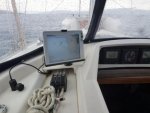
Because we have also installed a chartplotter I found we are using that a lot underway, so how core a PC would be to your setup depends on whether you have any other gizmos that you are using. The main thing the PC is used for is weather forecasting- both in advance and comparing the actuals to expectation underway- and for this it is better than anything, running specific software from PredictWind and Squid. I also make a lot of use of it for weather routing with those tools. For passage planning, being albe to look at both raster and vector at whatever scale you need just with the click of a mouse is a huge advantage, also I have multiple options for tide planning which is very helpful in the Bristol Channel. It is also very good for interrogating AIS targets in complex situations with lots of boats about, far better than the plotter for that. Whilst underway generally it is plotting the boat's polars with the PolAuto software. You can also wire it up to run an autopilot- I did this originally but it was a case of too many cooks for the old Simrad TP20 so I rolled back to the AP being controlled by the cockpit plotter. SO I have to confess I wouldn't be without it now.

Re. power draw. As part of the installation I did a couple of things. I replaced an ageing 120ah battery with a new Rolls of about the same capacity (this one). The performance of the Rolls has been tremendous under load. As I say the PC and screen together pulls about 2.5a, with the full instrument network on (including the cockpit chartplotter) the pull is 4 point something amps. This is easily enough to sail for 12hrs or so without reaching 50% depletion of the battery and in fact I have never seen its voltage drop below 12.6v.

For belts and braces I also fitted a small (20w) solar panel on top of the garage (this one). This was dead easy to do and it produces around about 0.5a of charge. The idea here was just to offset the draw produced by the PC system when sailingh on a sunny day, and give some top up options other than the engine when away from shore power.

So far the power draw of the PC installation hasn't been a problem at all due to the above.
 
...but more importantly, I see that you have a Yeoman :)

Pete

:D Dead right and I spent ages looking for that too (it's the 'compact' version which is hard to find). I actually bought it at the same time as I set up the PC. Apart from the redundancy- it is very low power and talks to a simple Garmin GPS, so provides an emergency back up solution- it protects my paper chart (it has the clear film cover) so I can answer a nav question with any working method I feel best- on digital raster, vector, using the Yeoman itself (!) or old school with a dry pen on the Yeoman film. Like yourself I always get the paper charts out to pre-plan and keep a folio chart of the area we're sailing through on the yeoman whilst underway. Wouldn't be without it either :)
 
Following the lead of a poster on here I built myself a boat PC system using a Sumvision Cyclone mini PC and a secondhand 15 inch monitor, both of which run on 12 volts. My system is mainly for internet use, and for running a number of programs including Quicken and Libra Office. It also runs Open CPN very well on its Atom processor, using a U-blox 7 USB GPS dongle. The only issues with it have been a temporary faiolure of its connection to the GPS which was caused by a Windows update, and cured by rolling back the driver for the virtual COM port. The other issue is the very small size of its storage, at 32GB, much of which is taken up by the operating system and program files, plus a maximum of 64GB on a memory card.

I am now playing around at home with a Gigabyte Brix BACE 3150 which has a Celeron processor. I have added 8GB of RAM (overkill, 4GB would be fine) and a 240GB SSD, and am running Windows 10 Professional, 64 bit operating system. The only real downside to this is that the Brix has a 19 volt 2.1 amp power supply and will need either to run from a universal car laptop adapter when on the boat, or from a dedicated boost converter (something like this? http://www.ebay.co.uk/itm/6-35V-to-...9c7a263&pid=100005&rk=4&rkt=6&sd=222105881681 )
 
Some good info coming through.

I was wondering, today's inverters are pretty efficient, I think read around 90%?
So could power savings be made by using an inverter in conjunction with a modern LED television? (which could be VESA mounted)

Because although there are lots of old 12v monitors out there, I imagine power efficiency has come on in leaps and bounds since then?
 
Some good info coming through.

I was wondering, today's inverters are pretty efficient, I think read around 90%?
So could power savings be made by using an inverter in conjunction with a modern LED television? (which could be VESA mounted)

Because although there are lots of old 12v monitors out there, I imagine power efficiency has come on in leaps and bounds since then?

I don't think and inverter is required.

All 3 of my monitors are 12VDC. the 2 TV /monitor came with a 240VAC to 12VDC external power supply that I just did not use and powered it directly from the boat 12VDC supply and would work even when my batteries are charging at 14 VDC +. It was only my satellite TV decoder that did not like 14 VDC so I just used a low cost DC to DC regulator which works fine.
 
The display is a second hand Panasonic CF-08 Wireless Display.
Its actually a first generation ruggedized tablet running Windows CE 5.0 so not exactly state of the art but it is rugged and splash/water proof
I connect to the host PC (originally my laptop and now the Pi) using Windows Remote Desktop over WiFi however the CF-08 does have an Ethernet port
BTW - I think you'll find that Windows 10 does not include WRDP Server unless you upgrade to W10Pro - that caught me out when I was using a laptop)
The CF-08 has built in battery so can be detached if necessary but usually I leave it powered from a 12v-18v DC-DC converter.
My CF-08 is under the sprayhood and Greece I generally find viewing acceptable. Having said that it isn't as bright as a good quality chartplotter and I'm looking at replacing the internal CFL backlight with LED.
EMYR 033s.jpg
 
I have a similar setup to GHA.
I used to run OpenCPN on a HP laptop but now I run OpenCPN on a Raspberry Pi3 using the OpenPlotter build.
............

I have a small 5" Garmin chartplotter for redundancy should the main system fail however so-far my Pi OpenCPN/OpenPlotter system has been rock solid. (Latest Sea Trial was a 5 week cruise through Turkey and Greece where it didn't miss a beat.)
Altogether very happy with my setup.
,.......
Same here, first decent passage with the latest pi incarnation was uk-portugal, solid all the way.
Some more details...
I use the Opencpn android app on an Xperia in the cockpit, fine under the sprayhood even when it's sunny. Solo with a tiller this is fine as the windvane is usually steering. The Pi sends ais & gps data over wifi plus the Xperia talks to the Pi over vnc so is basically a touch screen monitor, but the Opencpn app is easier to use. Also on the Xperia I have a tasker app macro set up which copies all the routes etc from the Pi and backs everything up so route planning can be done down below and easily synced to the Xperia.
Another Opencpn bonus is being able to paste lat and long easily into new way points, I never use the navtex reciever engine anymore but use the Pi running fldigi to recieve navtex broadcasts from a ham radio then any interesting missing fishing nets, live firing ranges etc are dead easy to paste straight into Opencpn so become part of the charts.
And openplotter isn't even a release yet, still beta! It really is so powerful already with all the email/sms possibilities and all for 0. 1A. :cool:
 
The display is a second hand Panasonic CF-08 Wireless Display.
Its actually a first generation ruggedized tablet running Windows CE 5.0 so not exactly state of the art but it is rugged and splash/water proof
I connect to the host PC (originally my laptop and now the Pi) using Windows Remote Desktop over WiFi however the CF-08 does have an Ethernet port
BTW - I think you'll find that Windows 10 does not include WRDP Server unless you upgrade to W10Pro - that caught me out when I was using a laptop)
The CF-08 has built in battery so can be detached if necessary but usually I leave it powered from a 12v-18v DC-DC converter.
My CF-08 is under the sprayhood and Greece I generally find viewing acceptable. Having said that it isn't as bright as a good quality chartplotter and I'm looking at replacing the internal CFL backlight with LED.
View attachment 58484

Thanks for that, sound like an interesting alternative to the tablet, which is neither rugged or splashproof.
 
Top