
Raymarine C120 Classic (or C Series) plotter firmware update

Hello
excuse my basic english ...
i have a c120.
I've spent hours trying to update it.
I bought an 8mb card ... but it still doesn't work. could you help me ?
thank you

View attachment 95538


Are you sure it's 8mb and not 8gb. I think you would struggle to find any memory device with only 8mb now. I don't even recall CF cards that small back in the day.
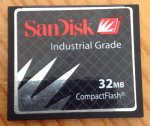
 
Do you really have a 32MB card? The OP is using v4.30 (June 2008). v5.04 (August 2010) added support for 16GB CF cards, as well as a lot of other bug fixes, so is definitely worth getting. The latest software is v5.16 (July 2012), which has minor AIS improvements.

Yes, this is it. Still has the last version of the software loaded.

image.jpeg
 
Hello,

Just purchased a boat with the old c80 raymarine with radar trying to update software version from 1.24 to the latest 5.16, I've tried all types of CF cards including a 32MB Sandisk it just boots up normal any help would be greatly appreciated.
 
Full instructions here. Make sure you have followed every step, starting with downloading the software from a computer onto the card.

Have you definitely used a 32MB card and not a 32GB card. Your old software version won't let you use a 32GB card

Upgrading the software in your Multifunction Display (MFD)
Yes it is a 32MB maybe i have to try updating to an older version 4.3 and see it that takes ?
 
I tend to leave them well alone.

I've never had problems with the old software and these machines will outlast anything on the market just now.
 
I tend to leave them well alone.

I've never had problems with the old software and these machines will outlast anything on the market just now.


I still run a C80 and love it, but would advise to bring software up to date if you can. Especially considering the person in post 23 has version 1.24.
 
I finally updated my C80 (new to me) last year, after buying about half a dozen assorted CF cards on eBay (some SanDisk, some not) and having them all fail to be recognised. Turns out the trick (at least for me) was to format a card using the DOS formatting tool in Windows, not the the Windows formatting app. I.e. for those who post-date command lines:
  1. Insert the CF card into the PC's reader/writer
  2. Open a command tool (Start->Run->cmd)
  3. Type at the prompt in the command tool: FORMAT x:/FS:FAT (x in the above Format command should be replaced with the drive letter that your PC has assigned to the CF card)
  4. Press the enter key
  5. When prompted for a Volume Name, press the ENTER key on the keyboard.
  6. When formatting is complete, close the command tool and remove the card

I now have far too many spare cards, formatted this way, that work fine for saving waypoints etc...
 
I finally updated my C80 (new to me) last year, after buying about half a dozen assorted CF cards on eBay (some SanDisk, some not) and having them all fail to be recognised. Turns out the trick (at least for me) was to format a card using the DOS formatting tool in Windows, not the the Windows formatting app. I.e. for those who post-date command lines:
  1. Insert the CF card into the PC's reader/writer
  2. Open a command tool (Start->Run->cmd)
  3. Type at the prompt in the command tool: FORMAT x:/FS:FAT (x in the above Format command should be replaced with the drive letter that your PC has assigned to the CF card)
  4. Press the enter key
  5. When prompted for a Volume Name, press the ENTER key on the keyboard.
  6. When formatting is complete, close the command tool and remove the card

I now have far too many spare cards, formatted this way, that work fine for saving waypoints etc...
Presumably the Windows formatting tool uses NTFS?
 
On my Win 10 the Windows tool offers NTFS, FAT and exFAT. In a quick check just now with with a CF card plugged in it shows FAT as the default, which is what I tried initially. But the cards I did this way didn't work, and when I reformatted them (again to FAT) using DOS, they did. I expected the result to be the same (i.e. the Windows tool was just a wrapper round the DOS tool) - but apparently not so.
 
On my Win 10 the Windows tool offers NTFS, FAT and exFAT. In a quick check just now with with a CF card plugged in it shows FAT as the default, which is what I tried initially. But the cards I did this way didn't work, and when I reformatted them (again to FAT) using DOS, they did. I expected the result to be the same (i.e. the Windows tool was just a wrapper round the DOS tool) - but apparently not so.
I would have thought exactly the same as I'm sure that Windows will use the same format routine as the DOS format command but obviously something is different.

Richard
 
I have the 5.16 update here on a Sandisk card which several other forumites have borrowed over the years and all have successfully updated their C Classics.

If you can't get hold of a very small Sandisk card, please PM me with your address and I'll send you my card and you can return it when you've done the update.

Richard
Hi Richard,
Do you still have the 5.16 CF for Raymarine C80,

would you send it to me and I return it after doing the update?
Thanks
 
Are you in the UK?

Please PM me (now called a "Conversation") with your name and address and I'll post it to you.

Richard
Hi ,

Im from Portugal.
Before sending can you please confirm if the other equipaments connected properly with your plotter? Did you had to make any reconfiguration after the upgrade?

Im not concerned with waypoints or routes my conncern is the radar, auto pilot and trydata connections.

After reading so many fóruns just not sure if this is safe Path.


Your feedback Will be welcome
 
All those connections will work after upgrade. AIS will be better. I did upgrade on my system with all those. After upgrade plotter will be reset, so you will have to set any configuration settings you had before.
 
All those connections will work after upgrade. AIS will be better. I did upgrade on my system with all those. After upgrade plotter will be reset, so you will have to set any configuration settings you had before.
This is correct. Also, after the upgrade, you are not restricted to having to use such a small capacity CF card although there will not be any more firmware releases for the Classic series so it's probably an academic point.

Richard
 
This is correct. Also, after the upgrade, you are not restricted to having to use such a small capacity CF card although there will not be any more firmware releases for the Classic series so it's probably an academic point.

Richard

But he will need to be able to take a bigger card if he wants a chart update. The 2GB CF update cards seem to be still available.
 
But he will need to be able to take a bigger card if he wants a chart update. The 2GB CF update cards seem to be still available.
I'm not really sure what "chart update" means in the context of the Classic series as you just remove the older Navionics CF card and stick another one in the slot. I didn't think that the tiny size card capacity limit required for firmware updates also applied to the chart card size but I'm happy to accept that it does.

Richard
 
I'm not really sure what "chart update" means in the context of the Classic series as you just remove the older Navionics CF card and stick another one in the slot. I didn't think that the tiny size card capacity limit required for firmware updates also applied to the chart card size but I'm happy to accept that it does.

Richard
It did - you need to do the upgrade to obtain the latest chart releases.
 
Top