Raymarine AXIOM 9+ now crashing having updated Navionics chart

picardy

Well-Known Member
Joined
31 Mar 2005
Messages
266
Visit site
Hi all

My Navionics chart card has worked fine in my AXIOM until I registered the chart and then downloaded the latest data. The AXIOM now crashes whenever the chart is installed - if I remove it then it works fine (albeit no chart data).

I have updated Raymarine software - does anyone have any ideas on where I need to start please and why this is happening?

Many thanks
 
I would contact Navoinics / Raymarine tech support in the first instance.

My first reaction would be to do a CHKDSK on the chart card, but proceed with caution. Do you know what filesystem the card is formatted in? DO NOT FORMAT THE CARD - I'm just asking.
 
Thank you I will contact them on Tuesday. I dont' know what a CHKDSK is and nor do I know the filesystem - is there an easy way to look for this? I am using an Apple Mac to manage the Manage the Navionics - does that change things at all?
 
On a Mac:

T3QFaEf.png

I guess it's Navonics who are best equipped to help you if you have a corrupt card.

Does anyone know if you can safely format a Navonics card and redownload the data?

I am generally reluctant to repair Windows filesystems using a Mac. When I was a PC repair guy it was always my practice to use a PC for this where possible.

I can't say for sure that a corrupt file system or damaged chart file is the cause, but that is the assumption I am leaping to.
 
Thank you I will contact them on Tuesday. I dont' know what a CHKDSK is and nor do I know the filesystem - is there an easy way to look for this? I am using an Apple Mac to manage the Manage the Navionics - does that change things at all?
FORGET CHKDSK ..... any diagnostic tool run on that card has the liability to ruin the encryption - rendering the card useless and voiding your claim ...

Get to a dealer who services Navionics updates etc. -
 
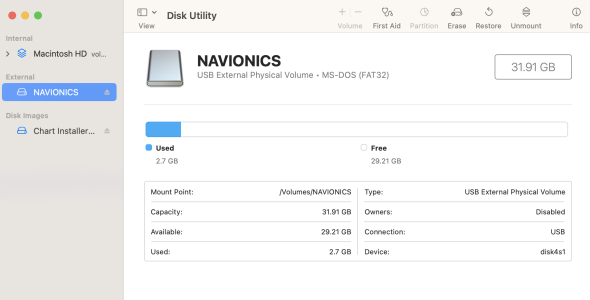
Thanks both - really appreciate your help. here is the screen shot from Disk Utility.

I too am assuming its a corrupted file simply because it worked fine before the update and when the card is removed the AXIOM works normally......

I'll call NAVIONICS tomorrow and ask for their advice unless this screen shot tells you anything obvious???

Screenshot 2023-05-08 at 07.55.37.png
 
I once had a routine update fail for some reason, with the result that the card wouldn't work in the plotter. The update appeared to have been successful but it wasn't apparent that it had failed until I put the card into the plotter. Running update again fixed it.
 
Had a similar problem last season when I updated the 2gb navionics card in my Simrad NSS plotter. The cartography, which had been fine before, just froze or was scrambled etc. took it to a dealer and the problem was the size of the card- 2gb (which was fine when purchased in 2015) is now too small to effectively hold all the update data, and the navionics online system should have flagged that but didn’t. In fact, I’d been through their help system twice without them realising the card was too small to remain effective. The dealer gave me a new, larger, chart update card and all has since been fine.

Doubt your problem is the same as the card is much larger but definitely worth taking it to a dealer for advice.
 
Hi all

My Navionics chart card has worked fine in my AXIOM until I registered the chart and then downloaded the latest data. The AXIOM now crashes whenever the chart is installed - if I remove it then it works fine (albeit no chart data).

I have updated Raymarine software - does anyone have any ideas on where I need to start please and why this is happening?

Many thanks
You say you updated the RM software as well. Have you got another slave plotter, if so that will need updating as well. Hudson Marine in Hamble maybe able to help you.
 
Thanks both - really appreciate your help. here is the screen shot from Disk Utility.

I too am assuming its a corrupted file simply because it worked fine before the update and when the card is removed the AXIOM works normally......

I'll call NAVIONICS tomorrow and ask for their advice unless this screen shot tells you anything obvious???

View attachment 155999
As expected, that's a Windows FAT32 filessystem. Out of an abundance of caution and because Macs use different filesystems by default, if I'm repairing the filesystem I generally prefer to do so using a Windows PC (and the DOS command line method).

I think @PeterBoater's suggestion to run update again is a good one.

If Navonics say its safe to wipe the card then I'd remove the files, run First Aid with the Mac and then redownload them. But don't delete them unless Navonics say it's safe!
 
No just the one plotter. I'll call Navionics in Plymouth tomorrow and let you know the outcome!
I had a problem with a corrupt navionics card today and had a very useful online chat via their support website with one of their team. the card had become undreadable and needed to be reformatted. You will need the serial number of your card, usually begins IT, mine was printed on the SD card adapter that came with the card. Once formatted (to fat 32j you need to create a text file on the card that contains the serial number, the file should be called ntag.txt

as soon as that was done chart installer recognised the card and allowed me to download my files again. I suspect if you get the serial number wrong it won’t work, as it’s probably using that to look up your entitlement to charts online.

Chat was really quick, got me sorted in under 10 minutes and no long holding on the phone.
 
Try running 'First Aid' on the SD card. I had a issue with an Irma chart card in my Axiom and that solved it.
 
Top