Radar System: YES or NO? - Do you really need a radar cruising the Med?

The software for the RYA course is awful, and v. expensive for a club or school who don't run many courses. The course itself has been designed to cover a bare minimum (and doesn't even cover modern CW Radar). They are updating the course, but again they've missed the opportunity of following the US and creating a tool that outputs NMEA sentences on a network that can be displayed on quite a few free software plotters.

Unfortunately the VHF course is the same, it doesn't cover how to install or check the system - it's not plug and play.


Belgium are rolling out VDES, hopefully the UK will follow soon, or we'll have difficulties with travelling abroad and with interference.
Rolling out? it came in to force on 1st Jan 2025 :)

Looking at You & Sea's facebook page they have a Transas/ECDIS simulator that they use for MCA training but they also use it for the RYA Radar courses
 
If I were to buy a Garmin system, I would want to look very hard at how (in Raymarine terms) you Reset The Cross Track Error.

Imagine you are on a nice relaxed cruise - autopilot/ navigating to a waypoint.
You come across a pod of dolphins and decide to play around with them - something that we have done a lot.
In doing so, you disengage the autopilot.
Afterwards, you need to reengage the autopilot but you don't want the track to go back to the old track, you want the new track to go directly to the old waypoint.

The same thing happens if you have to change course to avoid a collision.
After taking avoidance action, you want to go straight to the waypoint - not work your way back onto the old track.

On a Raymarine system, this ie dead easy - you simply press the Reset Cross Track Error button.

A friend has an 8 year old Garmin system and we cant find out how to do this without cancelling the waypoint and resetting the autopilot.
Not a big deal but I am so used to doing it the easy Raymarine way. If Garmin can't do this, I wouldn't buy it.

In previous threads, JFM has said that it id definitely possible to reset the cross track error with Garmin. It is just that my friend and I cant seem to find how to do it on his system.
not sure I get the exact point you're trying to make Mike, but when I disable a/p to do something and want to continue the original route, I just go to: Recalculate autoguidance and then enable the autopilot again (not on the boat now so don't remember the exact name but pretty sure that's it)
Not quite sure what xtrack has to do with it so maybe replying to a different issue...

V
 
@vas that works if you use autorouting. The scenario that Mike refers to is when you're following under autopilot a prebuilt route with multiple waypoints, and you deviate from your route somewhere between two of the waypoints. When you want to resume your route, you need then to follow a new course towards the next waypoint. In the Raymarine system, the difference between your current position and the original route (ie the cross track error), can be eliminated with a single menu choice. This will then create a new leg in your route from your current position to the next waypoint, when the original route will be resumed. Obviously you need to check that this new route is safe and fit for navigation. In the Garmin system, restarting your navigation towards the next waypoint causes the auto pilot to take the shortest possible route from your current position back onto the original route. This typically results in a 90° turn towards the original route, and then another turn to resume the original path. In my experience, and Mike's experience, this clumsy rerouting is not optimal but there is no equivalent in the Garmin menus to the Raymarine feature.
 
@vas that works if you use autorouting. The scenario that Mike refers to is when you're following under autopilot a prebuilt route with multiple waypoints, and you deviate from your route somewhere between two of the waypoints. When you want to resume your route, you need then to follow a new course towards the next waypoint. In the Raymarine system, the difference between your current position and the original route (ie the cross track error), can be eliminated with a single menu choice. This will then create a new leg in your route from your current position to the next waypoint, when the original route will be resumed. Obviously you need to check that this new route is safe and fit for navigation. In the Garmin system, restarting your navigation towards the next waypoint causes the auto pilot to take the shortest possible route from your current position back onto the original route. This typically results in a 90° turn towards the original route, and then another turn to resume the original path. In my experience, and Mike's experience, this clumsy rerouting is not optimal but there is no equivalent in the Garmin menus to the Raymarine feature.
I think you can tap the next waypoint and "route to", which takes you to that waypoint and continues on the route, i'll double check that next time i'm out.

Garmin also has the "Shadow Drive" which lets you take over steering without putting the AP back in standby, it resumes when you stop steering. I didn't fit the Shadow Drive on mine so not sure where it heads for when it re-engages, but i suspect it might head back to the original route.

There's also an option or two if you use the AP control, rather than the MFD, i'll double check exactly what they do next time i'm out too.
 
Right thanks, that’s interesting I didn’t know that. I was so pissed off with it after my friend nearly went over the side I vowed never to buy Garmin again. Not that I’ve had much choice in any of the systems I have had, 2 x new with Garmin then Simrad, then a used boat with recent Raymarine so no incentive to change.
 
@vas that works if you use autorouting. The scenario that Mike refers to is when you're following under autopilot a prebuilt route with multiple waypoints, and you deviate from your route somewhere between two of the waypoints. When you want to resume your route, you need then to follow a new course towards the next waypoint. In the Raymarine system, the difference between your current position and the original route (ie the cross track error), can be eliminated with a single menu choice. This will then create a new leg in your route from your current position to the next waypoint, when the original route will be resumed. Obviously you need to check that this new route is safe and fit for navigation. In the Garmin system, restarting your navigation towards the next waypoint causes the auto pilot to take the shortest possible route from your current position back onto the original route. This typically results in a 90° turn towards the original route, and then another turn to resume the original path. In my experience, and Mike's experience, this clumsy rerouting is not optimal but there is no equivalent in the Garmin menus to the Raymarine feature.
My point is simpler than that.
I used to make up routes on the PC using OpenCPN and then upload onto the Raymarine system.
These days, I just use the "Go To Cursor" function - simpler and easy.

So, for example, if we are heading to (say) Mallorca, we leave our home port, clear the Delta and then insert a single waypoint at Mallorca (say close to Dragonera).
Then tell Raymarine/auto pilot to "Go To Cursor" - really simple use of the kit.
The passage might take anything from 5 hours to 8 hours depending on how fast we go.
Most of that passage is out of sight of land but the occasional ship will pass and we might have to adjust the heading (using the auto pilot).
During that process we, obviously move away from the original track.
If we were to simply press "Track" again, the boat would then head for the old track - pointless on an open sea situation.
To solve this, in Raymanine terms, all you do is press a single button to "Reset the Cross Track Error" and then press Track on the auto pilot.
Job done - no need to fiddle with the original waypoint - just two buttons.

I couldn't find this feature on my friends Garmin.
It was a while ago when I played with his Garmin but it seemed to me that he had to "faff around" reseting a new waypoint and then engage the auto pilot,
It seems to me to have a few more unnecessary steps - setting a new waypoint etc. when all you want to do is go directly to the waypoint that is already set,
But we may have missed something.

My original point was that if I were to buy a Garmin system, I would want a simple solution to this issue.

Not against Garmin - my RIB is fitted with a Garmin plotter/echo sounder but only one of the small systems.


My system is easier than most because I have a G Series Raymarine Glass Bridge where the plotter features are split into separate units.
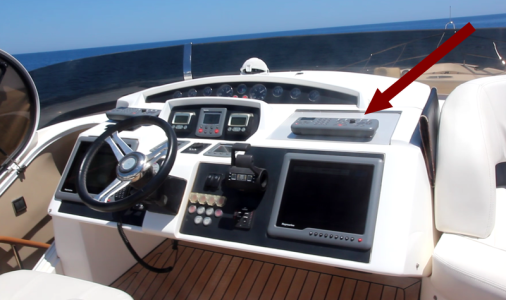
In this pic, you can see the screens - just monitors so have lots of different video feeds to them.
The great thing about that vintage of system is that you just press a single button (one of 8 buttons) to select the video feed that you want.
No fiddling through menus.
This pic also shows the remote keyboards - arrow points to one - these are great in a big sea - you hold the remote on your lap and can press buttons freely.
In fact both those buttons mentioned above ("Reset the Cross Track Error" and "Track") are on those remote keyboards.
I've used standard plotters before - if you and the boat are moving you can easily press the wrong button.
Even more so if it is a touch screen - absolutely awful - IMHO

2025-09-01_23-16.resized.png
 
Last edited:
My point is simpler than that.
I used to make up routes on the PC using OpenCPN and then upload onto the Raymarine system.
These days, I just use the "Go To Cursor" function - simpler and easy.

So, for example, if we are heading to (say) Mallorca, we leave our home port, clear the Delta and then insert a single waypoint at Mallorca (say close to Dragonera).
Then tell Raymarine/auto pilot to "Go To Cursor" - really simple use of the kit.
The passage might take anything from 5 hours to 8 hours depending on how fast we go.
Most of that passage is out of sight of land but the occasional ship will pass and we might have to adjust the heading (using the auto pilot).
During that process we, obviously move away from the original track.
If we were to simply press "Track" again, the boat would then head for the old track - pointless on an open sea situation.
To solve this, in Raymanine terms, all you do is press a single button to "Reset the Cross Track Error" and then press Track on the auto pilot.
Job done - no need to fiddle with the original waypoint - just two buttons.

I couldn't find this feature on my friends Garmin.
It was a while ago when I played with his Garmin but it seemed to me that he had to "faff around" reseting a new waypoint and then engage the auto pilot,
It seems to me to have a few more unnecessary steps - setting a new waypoint etc. when all you want to do is go directly to the waypoint that is already set,
But we may have missed something.

My original point was that if I were to buy a Garmin system, I would want a simple solution to this issue.

Not against Garmin - my RIB is fitted with a Garmin plotter/echo sounder but only one of the small systems.


My system is easier than most because I have a G Series Raymarine Glass Bridge where the plotter features are split into separate units.
In this pic, you can see the screens - just monitors so have lots of different video feeds to them.
The great thing about that vintage of system is that you just press a single button (one of 8 buttons) to select the video feed that you want.
No fiddling through menus.
This pic also shows the remote keyboards - arrow points to one - these are great in a big sea - you hold the remote on your lap and can press buttons freely.
In fact both those buttons mentioned above ("Reset the Cross Track Error" and "Track") are on those remote keyboards.
I've used standard plotters before - if you and the boat are moving you can easily press the wrong button.
Even more so if it is a touch screen - absolutely awful - IMHO

View attachment 198771
Hurricane that is simply not correct. With Garmin you also have 2 presses in that situation: Navigation options/Restart goto.

This does EXACTLY the same as you describe for Raymarine.

Same answer applies to post #63
 
If I were to buy a Garmin system, I would want to look very hard at how (in Raymarine terms) you Reset The Cross Track Error.

Imagine you are on a nice relaxed cruise - autopilot/ navigating to a waypoint.
You come across a pod of dolphins and decide to play around with them - something that we have done a lot.
In doing so, you disengage the autopilot.
Afterwards, you need to reengage the autopilot but you don't want the track to go back to the old track, you want the new track to go directly to the old waypoint.

The same thing happens if you have to change course to avoid a collision.
After taking avoidance action, you want to go straight to the waypoint - not work your way back onto the old track.

On a Raymarine system, this ie dead easy - you simply press the Reset Cross Track Error button.

A friend has an 8 year old Garmin system and we cant find out how to do this without cancelling the waypoint and resetting the autopilot.
Not a big deal but I am so used to doing it the easy Raymarine way. If Garmin can't do this, I wouldn't buy it.

In previous threads, JFM has said that it id definitely possible to reset the cross track error with Garmin. It is just that my friend and I cant seem to find how to do it on his system.
To repeat, Garmin requires 2 button presses, same as Raymarine. On garmin it's Navigation Options then Restart Goto.

On the original OP question, there's no right or wrong answer. Plenty of boats have no radar. Also depends on funds.

I love radar and would always fit it. I prefer two, so you have second opinion on weak targets. For night nav I would also recommend a high quality camera from FLIR - you can see a crisp packet on the water, and also read the waves.

On the brand debate, I would not use Simrad/BG etc becuase the user interface isnt as intuitive as I like. Now owned by Brunswick (who overpaid imho but they're good at not creating shareholder value) so will be pushed onto many boats.

I like Raymarine and Garmin but choose Garmin. Has more intuitive controls imho, fast response time, and generally a pixel count that is a multiple of Raymarine's for a given size of big screen.
 
One big downside for my use of the Simrad Go is that it will not do an autorouting course along the inland waterways, the Garmin does and even plots the track along the correct side of the waterway, both devices are running up to date Navionics charts.

Still, I use Waterkaarten App on my android tablet as my main source of navigating the waterways, makes good routes and info about bridges and locks along the way are only one touch away, the Simrad at the moment is just a glorified depth sounder and speed log as the canals are regulated by speed over ground rather than speed through the water, it is also handy for the AIS information about that large barge ahead that is steaming towards you etc. I could do the same with the Waterkaarten App, but I have not set the tablet up to get the AIS info.
 
My point is simpler than that.
I used to make up routes on the PC using OpenCPN and then upload onto the Raymarine system.
These days, I just use the "Go To Cursor" function - simpler and easy.

So, for example, if we are heading to (say) Mallorca, we leave our home port, clear the Delta and then insert a single waypoint at Mallorca (say close to Dragonera).
Then tell Raymarine/auto pilot to "Go To Cursor" - really simple use of the kit.
The passage might take anything from 5 hours to 8 hours depending on how fast we go.
Most of that passage is out of sight of land but the occasional ship will pass and we might have to adjust the heading (using the auto pilot).
During that process we, obviously move away from the original track.
If we were to simply press "Track" again, the boat would then head for the old track - pointless on an open sea situation.
To solve this, in Raymanine terms, all you do is press a single button to "Reset the Cross Track Error" and then press Track on the auto pilot.
Job done - no need to fiddle with the original waypoint - just two buttons.

I couldn't find this feature on my friends Garmin.
It was a while ago when I played with his Garmin but it seemed to me that he had to "faff around" reseting a new waypoint and then engage the auto pilot,
It seems to me to have a few more unnecessary steps - setting a new waypoint etc. when all you want to do is go directly to the waypoint that is already set,
But we may have missed something.

My original point was that if I were to buy a Garmin system, I would want a simple solution to this issue.

Not against Garmin - my RIB is fitted with a Garmin plotter/echo sounder but only one of the small systems.


My system is easier than most because I have a G Series Raymarine Glass Bridge where the plotter features are split into separate units.
In this pic, you can see the screens - just monitors so have lots of different video feeds to them.
The great thing about that vintage of system is that you just press a single button (one of 8 buttons) to select the video feed that you want.
No fiddling through menus.
This pic also shows the remote keyboards - arrow points to one - these are great in a big sea - you hold the remote on your lap and can press buttons freely.
In fact both those buttons mentioned above ("Reset the Cross Track Error" and "Track") are on those remote keyboards.
I've used standard plotters before - if you and the boat are moving you can easily press the wrong button.
Even more so if it is a touch screen - absolutely awful - IMHO

View attachment 198771
Various remotes from Garmin. Remotes | Garmin

For selecting different screens, zoom in on the image here : https://www.garmin.com/en-GB/p/697243/ the buttons either side of the home button scroll through various screens, you choose which are available and in which order. Some screens have sub screens, for instance when i select engine data i get another set of forward/back buttons which can scroll through different engine pages etc, i have just set mine up with two options here, engine data or power data (batteries, solar charging engine charging etc.
 
Last edited:
The subject of Raymarine ripoff cables often comes up but it’s not really true.

The Axiom displays all have standard NMEA2000 connectors so you can just use standard N2K wiring.

The Raymarine VHFs and AIS all use standard N2K connectors.

The autopilot control unit just has phoenix terminals so you can use standard N2K wiring.

The only thing most people are likely to come across with the proprietary seatalkng connectors are the autopilot heading sensor and the small displays (like the autopilot controller).

However, for these it’s trivial to either buy an adapter cable from Raymarine (which are about 20 quid off eBay)

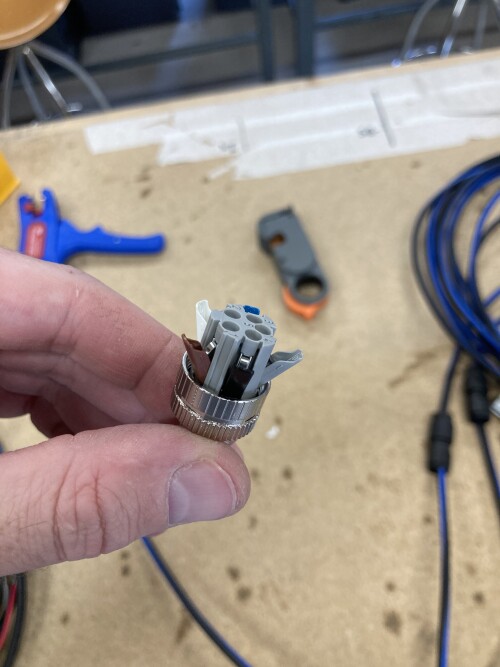
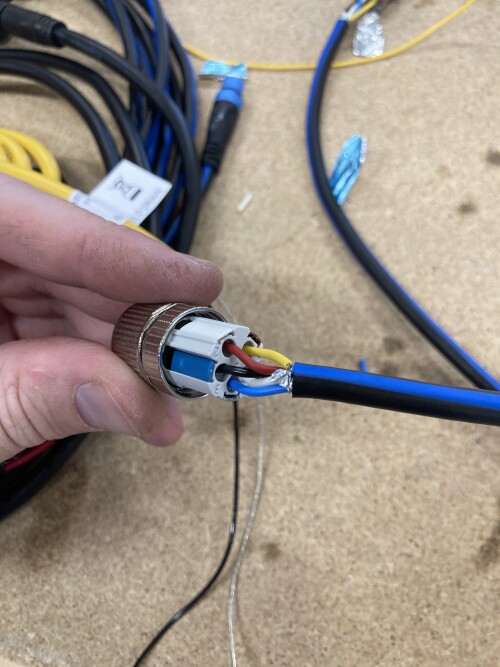
Or you can make your own by cutting a standard SeatalkNG in half and putting a devicenet connector on the free end.

It’s also trivial to have mixed SeaTalkNG and Devicnet network as you can easily cut an included backbone cable in half to make two adapter cables. That’s what I did on my boat as I had a mixture of stuff.

Sure it would be easier if Raymarine would just switch to Devicenet for everything but to be fair to Raymarine that seems to be what they are doing on all new products.

The SeatalkNG cables do actually have the advantage that they are genderless (meaning the connector is the same at either end) and the connector is much smaller (so you can route it through much smaller holes).
They just messed up by having different cables for drop and backbone (which was to try and make it simpler to wire but in reality just made it worse).

Example of home made adapter cable to standard devicenet


Backbone cable cut in half with wago style devicenet


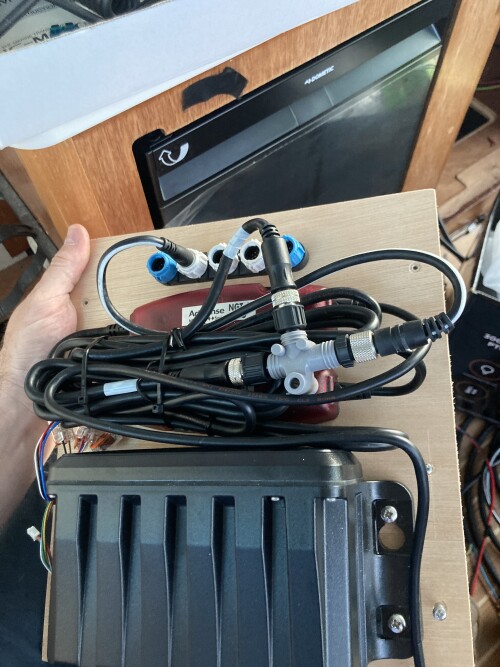
And something a bit more wacky, Raymarine 5 port tee on the backbone, with drop cable going to a 3 port devicenet tee to connect a couple of devices with devicenet connectors. Completely acceptable under the N2K spec and useful if you have a predominantly SeatalkNG backbone.


I’ve got no skin in the game at all because my boat is Furuno radar, Timezero nav software on a PC and then a secondhand Raymarine Axiom backup plotter and Raymarine autopilot (because Raymarine autopilots are generally the cheapest way of adding autopilot).
 
Last edited:
The subject of Raymarine ripoff cables often comes up but it’s not really true.

The Axiom displays all have standard NMEA2000 connectors so you can just use standard N2K wiring.

The Raymarine VHFs and AIS all use standard N2K connectors.

The autopilot control unit just has phoenix terminals so you can use standard N2K wiring.

The only thing most people are likely to come across with the proprietary seatalkng connectors are the autopilot heading sensor and the small displays (like the autopilot controller).

However, for these it’s trivial to either buy an adapter cable from Raymarine (which are about 20 quid off eBay

Or you can make your own by cutting a standard SeatalkNG in half and putting a devicenet connector on the free end.

It’s also trivial to have mixed SeaTalkNG and Devicnet network as you can easily cut an included backbone cable in half to make two adapter cables. That’s what I did on my boat as I had a mixture of stuff.

Sure it would be easier if Raymarine would just switch to Devicenet for everything but that seems to be what they are doing on all new products.

The SeatalkNG cables do actually have the advantage that they are polarity insensitive (meaning the connector is the same at either end) and the connector is much smaller (so you can route it through much smaller holes).
They just messed up by having different cables for drop and backbone (which was to try and make it simpler to wire but in reality just made it worse).

Example of home made adapter cable to standard devicenet


Backbone cable cut in half with wago style devicenet


And something a bit more wacky, Raymarine 5 port tee on the backbone, with drop cable going to a 3 port devicenet tee to connect a couple of devices with devicenet connectors. Completely acceptable under the N2K spec and useful if you have a predominantly SeatalkNG backbone.


I’ve got no skin in the game at all because my boat is Furuno radar, Timezero nav software on a PC and then a secondhand Raymarine Axiom backup plotter and Raymarine autopilot (because Raymarine autopilots are generally the cheapest way of adding autopilot).
Various Raymarine cables are expensive for no good reason and there is no good reason to use proprietary connectors.

It's all well and good cutting and splicing cables and fitting standard connectors as you have done, but how much time did you spend doing it all and how much would that have cost someone who had to pay to have the installation done ?
 
Various Raymarine cables are expensive for no good reason and there is no good reason to use proprietary connectors.

It's all well and good cutting and splicing cables and fitting standard connectors as you have done, but how much time did you spend doing it all and how much would that have cost someone who had to pay to have the installation done ?

Cutting a cable in half and putting the devicenet on the end takes about 4 or 5 minutes per end. No different to making a normal devicenet cable. But the genuine adapter cable only costs about 20 quid trade which isn’t very different to a standard devicenet drop cable.

My point is moaning about the cost of SeaTalkNG cables just doesn’t seem a very real problem. The cost of the cables is peanuts on the grand scheme of things, and if you don’t want to use the SeatalkNG stuff, you can easily avoid it.

Decent quality Devicenet cabling isn’t exactly cheap and it’s much more bulky than the SeatalkNG stuff. Cheap Devicenet cabling also tends to be of dubious quality not adhering to the specs for shielding / wire gauge.

Once Raymarine refreshes the small displays there will hardly be anything in their lineup still using SeatalkNG natively.
 
Cutting a cable in half and putting the devicenet on the end takes about 4 or 5 minutes per end. No different to making a normal devicenet cable. But the genuine adapter cable only costs about 20 quid trade which isn’t very different to a standard devicenet drop cable.
The adaptor cable 705-A06075 for instance is over £40 retail and trade is £38.75


My point is moaning about the cost of SeaTalkNG cables just doesn’t seem a very real problem. The cost of the cables is peanuts on the grand scheme of things, and if you don’t want to use the SeatalkNG stuff, you can easily avoid it.

Decent quality Devicenet cabling isn’t exactly cheap and it’s much more bulky than the SeatalkNG stuff. Cheap Devicenet cabling also tends to be of dubious quality not adhering to the specs for shielding / wire gauge.

Once Raymarine refreshes the small displays there will hardly be anything in their lineup still using SeatalkNG natively.
An EV1, for instance, is all STNG and there is no suggestion that Raymarine are moving away from STNG. Also, there are more cables than STNG that are proprietary to Raymarine, yours is a very small installation. Try pricing some of their other cables, such as Raynet, which is nothing more the Ethernet with ripoff prices. - Hudson Marine Electronics
 
Last edited:
Hurricane that is simply not correct. With Garmin you also have 2 presses in that situation: Navigation options/Restart goto.

This does EXACTLY the same as you describe for Raymarine.

Same answer applies to post #63
OK - I will have another look at my friends Garmin system.
That functionality is obviously there somewhere - I probably need to look harder.
 
One big downside for my use of the Simrad Go is that it will not do an autorouting course along the inland waterways, the Garmin does and even plots the track along the correct side of the waterway, both devices are running up to date Navionics charts.

Still, I use Waterkaarten App on my android tablet as my main source of navigating the waterways, makes good routes and info about bridges and locks along the way are only one touch away, the Simrad at the moment is just a glorified depth sounder and speed log as the canals are regulated by speed over ground rather than speed through the water, it is also handy for the AIS information about that large barge ahead that is steaming towards you etc. I could do the same with the Waterkaarten App, but I have not set the tablet up to get the AIS info.
Fully agree with you: tere is a big difference between sailing the waterways around Netherland - Belgium - France - UK ... and navigating the open sea and offshore. And it makes a lot of sense to use the Waterkaarten App for this region. Also AIS is for great use with all the close traffic between big and small ships on the waterways and you can see the next ship around the corner crossing your way.
 
I'm hoping that the Raymarine Quantum 2 will give me a bit more info on the path and intensity of approaching squalls and thunderstorms. I'm finding these to be more and more of a problem in the Adriatic, more frequent and more violent.

I often see thunderstorms nearby, and I currently estimate their track from Apps like Windy or web based rain radar info.

Obviously I'd rather avoid the worst of them, and hopefully the radar will enable me to avoid the avoidable and reduce my time in anything that hits me by using the optimal exit path.

PS: I'm a sailing boat that does a maximum of 9 knots under motor and around 10 under sail - so it's important I start heading in the right direction as soon as possible.

I've never had a radar capable of this before so only time will tell if it is any use in practice, first test in around 2 weeks.

All the other stuff like differentiating targets that are static, or heading towards or away from me are also of benefit as an extension of AIS Info.

Looking forward to playing with it all and seeing if I have wasted my money or not.
 
I think you can tap the next waypoint and "route to", which takes you to that waypoint and continues on the route, i'll double check that next time i'm out.

Garmin also has the "Shadow Drive" which lets you take over steering without putting the AP back in standby, it resumes when you stop steering. I didn't fit the Shadow Drive on mine so not sure where it heads for when it re-engages, but i suspect it might head back to the original route.

There's also an option or two if you use the AP control, rather than the MFD, i'll double check exactly what they do next time i'm out too.
I have shadow drive installed, does return you to previous route for small changes, else (iirc will have to check on Thu when I'm out on the boat) it goes to heading hold.
 
@vas that works if you use autorouting. The scenario that Mike refers to is when you're following under autopilot a prebuilt route with multiple waypoints, and you deviate from your route somewhere between two of the waypoints. When you want to resume your route, you need then to follow a new course towards the next waypoint. In the Raymarine system, the difference between your current position and the original route (ie the cross track error), can be eliminated with a single menu choice. This will then create a new leg in your route from your current position to the next waypoint, when the original route will be resumed. Obviously you need to check that this new route is safe and fit for navigation. In the Garmin system, restarting your navigation towards the next waypoint causes the auto pilot to take the shortest possible route from your current position back onto the original route. This typically results in a 90° turn towards the original route, and then another turn to resume the original path. In my experience, and Mike's experience, this clumsy rerouting is not optimal but there is no equivalent in the Garmin menus to the Raymarine feature.
that's why you simply hit a button to recalc route and then just hit yes when it asks you to re-engage a/p

and tbh in 2025 in the Med with no tides, I find v.odd someone setting a route to follow by using preset points, why bother? just give the system the final destination and let it decide if it's 5 7 or 10leg thing, just follows it. That's what I do no matter I'm doing 20nm or 100nm going around the local isles...

V.
 
Top