
NMEA 0183 ground question

Mr Googler

Well-Known Member
Joined
11 Apr 2008
Messages
5,901
Visit site
Trying to wire in a quark Qk A024 AIS reciever.

Garmin kit and it’s all a bit odd. On the plotter, 2 nmea transmit ports and 4 nmea recieve ports

I wired the vhf to one plotter transmit port for GPS position. Output wire colours are grey (+) and pink (-) however, it doesn’t work unless I use black (ground) instead of pink....so I did that.

Wired in the AIS on other in and out ports but nothing showing up on the plotter. The AIS unit has a led that flashes when ais signals are recieved which is happening. I also set the receiving port on the plotter to high speed as the manuals say to.

Do I need to connect the nmea black (ground) wire to any negative 12v source and everything will work? My battery negatives are all joined so I guess any negative behind the dash is a common ground?

The wires are too bloody tiny too!
 
NMEA 183 uses differential signals, if you need to connect a ground wire (intended solely for a cable screen) instead of (-) for it to work then sommats broke. (or built wrong in the first place)

Try finding any pair that works when wired correctly.
 
NMEA 183 uses differential signals, if you need to connect a ground wire (intended solely for a cable screen) instead of (-) for it to work then sommats broke. (or built wrong in the first place)

I don't know about their newer stuff, but traditionally a lot of Garmin kit was "built wrong in the first place" in exactly this way :p. Instead of differential, they used RS232-style single-ended signals referenced to the power supply negative. It mostly worked in practice if you treated the supply negative as also being the negative side of the NMEA channel.
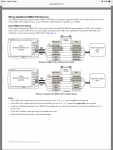
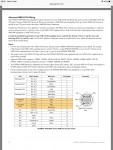
One would assume that, since the OP's plotter has this pink negative core, they've stopped doing this. So who knows what's going on, it all sounds rather odd. The original post is lacking some detail about how the AIS is currently connected.

Pete
 
Thanks for the replies.

The garmin 4008 is definitely NMEA 0183-RS422 which is the same as the ais receiver.

VHF 100i. —- GPSMAP 4008
Purple (Receive +) Gray (Transmit +) port 1
Gray (Receive -) Black (Transmit -)

That works with GPS info going to the VHF

Quark 024 AIS. —- GPSMAP 4008
Receive + Blue (Transmit +)
Receive - Blue/white (Transmit -)
Transmit + Violet (receive +) Port 3
Transmit - Violet/white (receive-) Port 3

AIS appears to be receiving AIS info as unit green LED flashes here and there. Port 3 is set the high speed. The AIS is powered by USB (5v). I have used a dedicated 12v to 5v usb dropper.

When you say the AIS needs to be grounded, does the mean using the black (ground) nmea wire in place of blue/white wire? There is no separate (data ground) on the AIS unit.

Will connecting nmea black to any old 12v negative not create a ground loop? That’s where I’m confused about this stuff.

AIS manual https://www.quark-elec.com/doc/QK-A026_manual.pdf

Garmin info
65A7BC19-9EB5-4B3D-AB8E-A1CCA91C729B.png

FA0C54BF-2530-40D3-ABE2-77554668F9CD.png
 
Last edited:
It appears you are trying to TX on one port to the AIS, and receive data on a different port.
Have you tried using port 2 as both TX and RX? That would be Blue & Blue White for TX (+/-) and Brown & Brown / White for RX.
Set port 2 as High Speed.
Also, have you checked that AIS reception on the 4008 is turned on? CONFIGURE->OTHER VESSELS->AIS->ON.
Are you using the latest software version on the plotter?
Lastly, Quark have an active Forum on their website and they are pretty quick to answer questions.....
 
you do have the lot messed up, don't you?

so your Garmin to VHF works with ONE cable from the Port1 OUT of the Garmin to the VHF and the other being a general black (i.e. negative)

then for some odd reason you want the Gamrin to AIS to work with both Port3 cables used...
Have you tried using only the Violet for Port3IN + and the same black that you used on your VHF connection for Port3IN -
That's what Pete above points and IIRC is what I did when connecting various NMEA0183 things in the past.
Nothing to loose just try it!
you could also touch the black and the AIS black to the Violet-white 2 blue-white junction (one at a time and see when you start getting ship info across...)

cheers

V.
 
@steve
I will check AIS is on, I cant recall seeing it so maybe not!...I have the very latest firmware.
So maybe because I’m using port 2 for tx and Port 3 for rx.....it doesn’t like it?

@vas
So...I will jump the black (ground currently Used for port 1 tx- for vhf) to AIS nmea out -......is that right?

AIS Tx + will go to violet
AIS tx - will go to black

Quark have said nmea in to the ais is optional so I’ll remove that for now.

Sorry for being a bit of a dumbass with this!
 
yes,

btw what's the point of AIS IN? what would the AIS device expect out a plotter? Does it need GPS coords for something? doubt it!

V.
 
It’s a nmea multiplexer to so takes things like heading sensor info and puts it into one output stream. Figured in from the plotter wouldn’t hurt but maybe it’s not helping!

@snowbird....interesting....I will try as you’ve suggested also.
 
It’s a nmea multiplexer to so takes things like heading sensor info and puts it into one output stream. Figured in from the plotter wouldn’t hurt but maybe it’s not helping!

@snowbird....interesting....I will try as you’ve suggested also.

you mean the AIS thing is a multiplexer? in which case let me reword it, which other device is going to benefit from the multiplexed info from this AIS sender?
I guess the GPSMAP is also a multiplexer, do you have an a/p? and is it also N0183?
I'd highly recommend slowly dropping NMEA0183 and move to NMEA2000, you'll soon forget all these wiring issues!

V.
 
you mean the AIS thing is a multiplexer? in which case let me reword it, which other device is going to benefit from the multiplexed info from this AIS sender?
I guess the GPSMAP is also a multiplexer, do you have an a/p? and is it also N0183?
I'd highly recommend slowly dropping NMEA0183 and move to NMEA2000, you'll soon forget all these wiring issues!

V.

No autopilot. First thing I did was go n2k for GPS and depth transducer......the quark n2k version was more expensive....life is full of regrets :):):)

Stops me getting bored and I’m learning new things though. Thanks to everyone for their help :encouragement:
 
Tried again

Pink and grey to the vhf...worked fine this time.

Tried all the channels into the plotter with the ais... nothing.

Tried all the channels with black instead of nmea -......nothing

Joshua from quark happen to have a 4008 plotter for testing so is going to have a play their end. Seem like a very helpful company.

If I get fed up.....I’ll exchange for the n2k version
 
Just to close....I’ve given up. Tried many combinations but no luck. Even checked every wire in the cable for continuity.

Quark happy to exchange for the n2k version so it’s on its way back to them.

Thankyou to everyone who advised
 
OK, better like this :D
btw, did you wait for a few mins each time you did a cable change? Listing ship is not instant when you fire things up...

V.
 
I did.....the little green led flashed a few times every few minutes but nothing ever came through to the screen. I was at it for 2 hours!

Luckily, the n2k version has just gone on sale!
 
Farsco - I see you are in the IOM. Are you or anyone you know travelling to Lancashire area anytime soon? I am an (ex) Marine Electronic Engineer and have a lot of experience with Garmin (but very little with Quark).
If both units can be brought over then I can check them and (hopefully) connect them together for you. FOC of course !
Cheers, Stephen
 
Hi Stephen

That’s a great offer and thank you very much. The nmea 0183 ais unit is on a plane back to them as I type and they will return a n2k one shortly. I already have a n2k backbone so should be straightforward. Again, thank you for the very kind offer. I will certianly get in touch if I have any future issues. Occasionally get to Whitehaven so drop by for a beer....or gin :encouragement:

Paul
 
Well....Quark have been super helpful and I now have their A028 AIS reciever installed. Plug and play and worked immediately. It’s on sale at the mo too incase anyone is thinking about adding AIS.

It’s also got a GPS reciever in it. I’ve bought a cheap sma GPS aerial (£3.49!) for it so I have a second GPS source on the N2K should my primary GPS reciever pack up.
 
Top