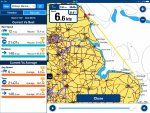
Navonics app on current iPad

Topcat47

Well-Known Member
Joined
2 Jun 2005
Messages
5,035
Location
Solent, UK
Visit site
On the AppStore the navonics app has a lot of very varied reviews, going back 6 or 7 years; very ew recent. Has anyone got experience of the current offering on the latest iPad? £54 is a bit of a stretch just for a punt, but if it is good, we’ll worth the investment.

I have a couple of specific concerns. With no user guide how intuitive is it? I’m no whiz around this technology.

Does it really need both iceland and Europe add ons to go from the channel to the Baltic?
 
I assume you have an iPad with WIFI and Cellular if not you will need an external GPS like Bad Elf.
Navionics works fine on the IPad but not a great screen when in direct sunlight and it is power hungry when in use in this mode.
I thought the Navionics App was free and the annual subscription was for the charts?

It is very easy to use - very very intuitive.

Depending where you are using it please bear in mind that the gps is more accurate than the charts especially for those last surveyed 100 + yrs plus.
 
As a relative novice to sailing technology I have been using my Raymarine plotter as well as Navionics on ipad and find the ipad, which I have mounted under the sprayhood on a bracket, is used far, far more during a passage. I especially like it for local pilotage where it is clear and so far, proven to be accurate.
 
Might be worth looking at iSailor. I also have Navionics but think that iSailor is far better from a charting point of view and much simpler to operate. Happy to let you have a gander when I am next down in Gosport.
 
I'm surprised by your comment Norman. I don't have an iPad but I always understood that visibility in direct sunlight was one of the main selling points of the iPad compared to other tablets? :confused:

Richard

Well I am not making it up. I do not recall Apple ever using outdoor visibility in sunlight as their USP over other tablets. The basic problem is that while it is a high resolution device it is designed for indoor use (and has a reflective screen) and works well there. If you can keep it in the shade under the dodger/bimini so much the better.
Another aspect apart from being power hungry in a navigational app mode - is that these type of devices just do not like being in direct (strong) sunlight and can overheat and shut down. Do I sound like a prophet of doom? No it is quite simple - they just need to be shaded.

Personally I use the iPad for route planning only and synchronise the route with the iPhone. I rarely take the iPad in the cockpit and 'consult' the iPhone from time to time as appropriate. It is in its waterproof cover and attached to me by a lanyard and either lives in my trouser pocket or jacket pocket, where it is no more cumbersome than a hand held compass. It get its most use in pilotage situations and it is fantastic for that (as long as you are zoomed to the right scale to reveal all the chart detail).
 
On the iPad / iPhone issue. I have had to pay for both, ie you can't get Navionics free on a second device unless the device is the same type. That's what the Navionics chap at SIBS told me - but if anyone knows any better I'd love to find out that i'm wrong.
 
Well it is a few years since I started with Navionics so things may have changed.

However, IIRC, the basic app is free (but essentially useless) and you then subscribe to Navionics+ by purchasing a map area. This should (and is for me) available on both iPhone and iPad. If you do not renew your annual subscription you can still use the full chart detail, you will just not benefit from any chart upgrades.

Of course now that Garmin has taken over Navionics - all bets are off and prices are likely to rise while the quality diminishes.

Quote from their current website: Navionics+ is a one-year subscription. Download detailed maps by zooming in or from Menu>Download Map: they will reside on your device even after expiration. You can renew your subscription with a discount of up 50%. If you don’t renew, you can still use the charts you previously downloaded, along with several free features: TRACK, ROUTE, DISTANCS, MARKERS, WIND FORECASTS, MAP, SYNC my DATA, MAGAZINES & GUIDES, GOVT CHART in US.

Another feature if you create a Navionics account on their web page is you can use the web based Navionics to view your route - useful if you have a large screen PC or Mac and you can even do the full route planning on this web based version (with your books spread over the desk) and then synch the route with all your devices (but it does not synch actual tracks which is a bummer). It is a great facility that few seem aware of.

Recent review - Linky
 
Last edited:
The Navionics app is a great app but one major drawback imho is the lack of support for AIS. This makes it good for planning journeys at home and working out your tides and currents but not so good at sea. There are free programmes out there that do accept wireless AIS input via Wifi. And ones that you pay for. I use both myself as they each have their strengths and weaknesses. Having said that I use an Android tablet so I'm not sure if you have access to the same programmes in the Apple world. Having looked at the app store on my i phone Transas iSailor appears to support AIS so that might be worth a look.
 
Having looked at the app store on my i phone Transas iSailor appears to support AIS so that might be worth a look.

It certainly does both internet based (for a fee) and ship based through a wireless feed. Also does Tides & currents for an annual fee of £9.99.
 
On the iPad / iPhone issue. I have had to pay for both, ie you can't get Navionics free on a second device unless the device is the same type. That's what the Navionics chap at SIBS told me - but if anyone knows any better I'd love to find out that i'm wrong.
I have navionics app on iPad and iPhone with one purchase, great for planning at home then sync with chart plotter and away we go, cannot fault it and never had to read manual to get all working. Especially like the fact that the charts are all the same and have three options with routes and wave points on all but can be planned on any one
 
Very happy with Navionics on iPad save for absence of AIS . Don't use as much now as can pair iPad with Raymarine so a fuller display but worthwhile as a back up and to review from home when not on board as previous post says. Don't have on iPhone as rather small but I like idea of having a fourth back up after Raymarine ,paper charts and Garmin handheld .
 
On the AppStore the navonics app has a lot of very varied reviews, going back 6 or 7 years; very ew recent. Has anyone got experience of the current offering on the latest iPad? £54 is a bit of a stretch just for a punt, but if it is good, we’ll worth the investment.

I have a couple of specific concerns. With no user guide how intuitive is it? I’m no whiz around this technology.

Does it really need both iceland and Europe add ons to go from the channel to the Baltic?

Play with it for free. It’s the charts that cost.

It’s as intuitive as your iPad is. That’s its best feature.

No, not their Iceland chart! But their Baltic one. Looks like you’ll also need the ‘Skagerrak & Kattegat’ chart to get over or through Denmark - another £33.

Doesn’t overlay your WiFi AIS, as that would cannibalise Navionics’ sales of memory cards to the chart plotter user market. And now that Garmin, who make chartplotters, has bought them, there’s no hope there.

Still an effective and inexpensive solution, despite the disadvantages of the iThing (compared to chartplotters) of fragility, poor operation in sunlight and need to be powered while using GPS.
 
You can power the iThing with a portable battery that sticks to case with suckers and come free at what I believe is 4000 but Maplins do mega ones at a price so keeps old mr iThing going for a while should you not be able to plug into the USB port on board.
 
You can power the iThing with a portable battery that sticks to case with suckers and come free at what I believe is 4000 but Maplins do mega ones at a price so keeps old mr iThing going for a while should you not be able to plug into the USB port on board.

That is what I do. I have a power pack connected to the ipad and it has served me very well.
 
This is a tiny correction which was mentioned earlier in the thread but not completely clarified, if you use Navionics on one Apple device: IE an iPad you can also use the same account on another Apple device: such as an iPhone, and if using on an Android tablet albeit signed in to the same account on both devices (In both cases) you can use the same account on another Android phone or similar, hope this helps. :)
 
I use the iPad and navionics combination and it is very easy to use. On my longer trips I save the tracks for interest. Easy way is to do a screen shot323B5E13-5E2B-41DC-8E4D-0BFBC24A6D83.jpg It is power hungry so I leave it on the chart table plugged in to 12v via usb. I think the uk Netherlands chart will get you into the Keil canal.
 
Top