Navionics software

Autorouting is very useful when visiting a unknown area or destination and simple job to then check the "suggested" route is something you would have choosen to follow if plotting the course manually with Navionics or paper chart.
Especially useful for journey timings if your trip is not just a straight line but might involve over 50 + waypoints, as a trip along a coast with a non stationary sand bank or two in your way.
 
Last edited:
Autorouting is very useful when visiting a unknown area or destination and simple job to then check the "suggested" route is something you would have choosen to follow if plotting the course manually with Navionics or paper chart.
Especially useful for journey timings if your trip is not just a straight line but might involve over 50 + waypoints, as a trip along a coast with a non stationary sand bank or two in your way.
Whats wrong with “old fashioned” doing it? Paper chart to check for no hidden nasties on the route, then plop the points into the chart, then zoom in behind the electronic outline to double check. saves ending up on those hard bits like those racers did!
 
You trust your boat to autorouting? Really?
My experience is autorouting on Navionics is pretty good. I don’t “trust it” and it takes me closer to the shore than I would with paper and pen but it’s never plotted a course that would have caused me to sink whereas I have seen some human beings make spectacular mistakes!
Whats wrong with “old fashioned” doing it? Paper chart to check for no hidden nasties on the route, then plop the points into the chart, then zoom in behind the electronic outline to double check. saves ending up on those hard bits like those racers did!
One of the good things about autorouting is you can take a complex zig-zaggy passage like Rhu to Kererra Marina and with a couple of clicks it will work out the total time / distance for you, then you can decide if you want to do the effort of planning that trip in detail or you’d rather break it up. Likewise one you arrive in Kerrera and have multiple options, North, West, South, you can play with ideas, perhaps not just for today but where you might go the next day too, perhaps depending on the weather once it’s more certain. Yes you can do all of those scenarios by hand and there is some fun from doing that - but it’s not as quick - and then you’ll need to put each waypoint one at a time into some chartplotter that was designed by the user interface team at Nokia when the 3310 went out of fashion!
 
I've used Navionics Autorouting. It's handy when you have a convoluted 'A' to 'B'. Too close to a hazard? Simply zoom in, add a waypoint and shift it. Given Navionics use vector charts you'd be daft not to zoom in and 'walk the route' looking for more detail. Trust it? No way, but as an aid to passage planning I find it useful. Doesn't help much when the wind coming from where you want to go though.
 
Well Garmin have put the first Nail in the coffin for us, after 11 years google tells me.

We have had it installed on:
iPad (at home planning),
My phone,
Misses Phone,
Android Tablet (stay on the boat) used on the boat,

Now limited to 2 devices.

We only sail one boat however it meant we could navigate freely between devices. We could both plan and decide independently.

We will continue to pay for now, however actively seeking alternatives. The inevitable has happened. Garmin have bought there biggest competitor and are going to price it to such an extent that your better off buying there kit IMHO.

Time to look for other software.

Similar happened to an app we used for walking “ViewRanger” bought out and functionality fell apart costs rocketed and we no longer subscribe.
Edit to add its sad, we have not found an alternative close and our walking in new places is no longer as adhoc.
 
What do you guys use?
He just need to input routes of the race course and have it record his track for after race analysis.
After about five-ish years with Navionics we switched to Orca a year ago. At least on this first season on the Baltic Sea (German coast to Lapland and back) it was a lot nicer than Navionics is. Better autorouting (including rudimentary weather routing), clearer charts (especially how lights, bridge clearances, and recommended routes are shown!), better AIS target rendering etc.

Before these price increases (and other adverse TOS changes), but primary problem with Navionics was that even though their chart data is good, a lot of how they render it make it unusable or outright dangerous. Their rendering of shooting ranges etc is really hard to to see.
And in SonarChart mode they insert “fake detail”, drawing depth contours in places where they don’t actually have data to back it up. We have touched the bottom couple of times (thankfully at low speeds manoeuvring in an anchorage) thanks to the false confidence their apparent data density gives, and I know of other boats where the same has happened. You just can’t know if a depth contour is real from soundings, or something they made up.

We use autorouting quite a lot, to give a starting point. But always go through the route on a high zoom level, and make adjustments where things feel sketchy. Both Navionics and Orca were doing OK routes, with Orca getting an edge thanks to understanding that we can’t go directly upwind, whereas Navionics routes are made for power boats.

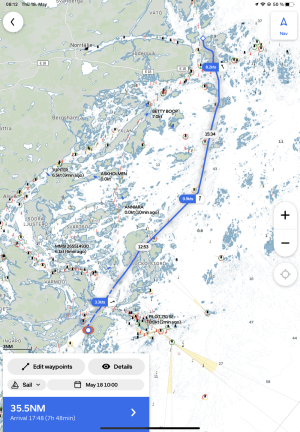
Here’s example of an autoroute east of Stockholm. Downwind sailing, but see the dotted line in the beginning where Orca determined the wind is too light to sail:
IMG_1118.png

All this said, for the simple use case state above, OpenCPN might be the (far cheaper) option than Orca.
 
Top