Navionics. Relief Shading.

oldgit

Well-Known Member
Joined
6 Nov 2001
Messages
29,297
Location
Medway
Visit site
Was debating if to update the Navionics charts on my Ipad.
Had no idea that this new feature was on there.
£35.00 well spent.
Well impressed.
When plotting anything, increasingly grabbing the Ipad first.

Have 3 other plotters in use on the boat.
Laptop with Seaclear.
Old Raymarine on Fly.
Even older Simrad downstairs.
Why on earth would you spend £150 for a new chart for the fixed chartplotters.
For the traditionalists.
Do have some dead tree stuff including a couple of 2HBs. aboard.
 
I was just looking at taking out the Navionics subscription. Thanks for the feedback!
 
I’ve been using Navionics on iPad and nothing else for 6 years now - still no desire to buy a “proper” plotter. We mostly change countries each season so it’s all boating in unfamiliar waters so grateful for the info. From Greece to Canaries so far and still going fine.

But, and it’s a big but, we leave it on in the cabin most of the time as we are so used to line of sight boating - maybe bringing it up to act as a chartlet for a new harbour entrance - iPads aren’t great in bright sunshine as they overheat and display can’t be seen.
 
Last edited:
Yup i swear by it!

Years ago i spent £450 for a plotter and a chart card + a £70 per year subscription to navionics themselves for chart updates etc.

Now I'm not making that mistake again and have a garmin plotter that was on the boat when i bought it BUT Navionics on a smartphone as that is what I prefer for £35

Theres a major difference in price but no differance in quality. I love it!
 
Just be aware that Navionics requires you to be "logged in" to use it.
If it decides to "log you out" and you don't have a signal, then you can play Angry Birds (Space Edition) or get out the paper chart and a pencil.

Also the iPad screen isn't as bright as a plotter, and it isn't as waterproof.
It is a useful addition, but I don't think I'd want it as my primary navigation device.
 
Just be aware that Navionics requires you to be "logged in" to use it.
If it decides to "log you out" and you don't have a signal, then you can play Angry Birds (Space Edition) or get out the paper chart and a pencil.

Also the iPad screen isn't as bright as a plotter, and it isn't as waterproof.
It is a useful addition, but I don't think I'd want it as my primary navigation device.
Ive got mine in a waterproof case and made a DIY visor for it so i get little sun glare on the screen and turn screen brightness as high as it will go. Ive had no issue so far...As far as signing out...I've downloaded my chart so if it does sign me out, i can still use the chart and zoom into contours offline and download charts for "Offline Mode"

To me its PERFECT!
 
Be aware that if your tablet can talk to plotter via wifi if the app senses that the plotter chart is out of date it will start closing down functionality on the plotter. Don’t ask me how I know this :mad:

On the upside, you can update the plotter charts via the tablet on wifi without having to extract the chart card and take it home (y)
 
Just be aware that Navionics requires you to be "logged in" to use it.
If it decides to "log you out" and you don't have a signal, then you can play Angry Birds (Space Edition) or get out the paper chart and a pencil.

Also the iPad screen isn't as bright as a plotter, and it isn't as waterproof.
It is a useful addition, but I don't think I'd want it as my primary navigation device.
Actually it doesn’t - we have been hundreds of mile offshore or in areas without any signal (or around Morocco where the cost of being connected was too high). The only time you need to be logged in is when downloading the detailed chartlets and that can be done months before.
 
Ive got mine in a waterproof case and made a DIY visor for it so i get little sun glare on the screen and turn screen brightness as high as it will go. Ive had no issue so far...As far as signing out...I've downloaded my chart so if it does sign me out, i can still use the chart and zoom into contours offline and download charts for "Offline Mode"
To me its PERFECT!

If you select Menu, click on your name, select "Log out" ... you need a signal to get back in.
This doesn't happen very often.

However, sods law ...
 
Actually it doesn’t - we have been hundreds of mile offshore or in areas without any signal (or around Morocco where the cost of being connected was too high). The only time you need to be logged in is when downloading the detailed chartlets and that can be done months before.

You don't need a signal to use the chart.
But try logging out and using it with no signal ...

Older versions of the app didn't work this way.
 
It can also be used on a PC using the likes of an Android emulator like BlueStacks The one account lets me use the the same app charts on my iPhone, Android tablet, and PC/Laptop.
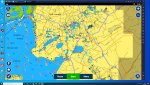
this is from my desktop but it works as good on my tablet laptop, the light areas are the downloaded offline charts, while the darker shaded areas are where you need to be online or still to be downloaded
Nav1.jpg
 
You don't need a signal to use the chart.
But try logging out and using it with no signal ...
The iPad can be switched off without any problem and you will get back in again with no signal. The amount of times we used it out of signal has always shown that and I have just checked it again now by going into Airplane mode, switching the iPad off then switching it back on again - all fine.

Certainly you need to be logged in after installing it, renewing it and when downloading detailed charts but not when you are actually travelling. We keep cellular mostly off then anyway to avoid power loss in low signal areas.
 
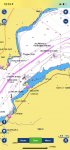
How do you get past this screen with no signal in a "logged out" state?
It's not the same as being "offline" but still "logged in".

The app, for whatever reasons, can cause you to be "logged out".
Not often, but it can happen.

Can you imagine an Airbus cockpit with a stressed pilot sitting in front of a screen that looks anything like this?
(bad photoshop :LOL:)


IMG_0198.PNG
 
Last edited:
How do you get past this screen with no signal in a "logged out" state?
It's not the same as being "offline" but still "logged in".

The app, for whatever reasons, can cause you to be "logged out".
Not often, but it can happen.

Can you imagine an Airbus cockpit with a stressed pilot sitting in front of a screen that looks anything like this?
(bad photoshop :LOL:)


View attachment 113450
I’m not sure that can really happen - if it’s working the last time you had signal it keeps working.
 
That's offline mode.
Marvellous.

Now click on "Menu" within the app, click on your username, then select "Log out".
Try getting back in with no signal and report back.
:)
But in all fairness, What is the big panic of being signed in?

If you've downloaded the charts for "Offline Mode" there shouldn't be any panic if the app decides to sign you out as the chart still works as it would as if you where still signed in providing they've been "Pre downloaded" before hand.
 
Top