Navionics not showing heading or speed?

DangerousPirate

Well-Known Member
Joined
24 Feb 2020
Messages
963
Location
N. Ireland
Visit site
Using it on my phone right now and since 2 weeks, I got this issue that sometimes, for no apparent reason, it tracks my movement alright but doesn't show my current heading or speed.

I read about gps loss but then it wouldn't know my position.

I went in an out and stopped it a few times, but can't seem to "make it" work.

Just me or is there a quick fix?

I normally use orca on my navigation tablet, but forgot to bring it and kinda busy myself trying to make this work now.
 
Using it on my phone right now and since 2 weeks, I got this issue that sometimes, for no apparent reason, it tracks my movement alright but doesn't show my current heading or speed.

I read about gps loss but then it wouldn't know my position.

I went in an out and stopped it a few times, but can't seem to "make it" work.

Just me or is there a quick fix?

I normally use orca on my navigation tablet, but forgot to bring it and kinda busy myself trying to make this work now.
Sorry I can't help you with your problem but thought I'd let you know about my Navionics on a phone quirk.
I bought an Oukitel rugged phone to act as a mini chart plotter in the cockpit. Navionics works ok except when I am in a flat calm situation like in a canal, then it needs some vertical movement of the phone to update my position. When that happens I pick it up and put it down again and it updates. I let Navionics tech support know but they couldn't offer anything. I just live with it.
Maybe let us know what phone you have?
 
This one had me going a while back .... I use my phone based Navionics on my Motor Boat on the river .... I was leaving home pontoon and couldn't figure out why speed etc wasn't showing ... then I touched the bottom left icon - looks like a V dart ... all appeared ...
 
Sorry I can't help you with your problem but thought I'd let you know about my Navionics on a phone quirk.
I bought an Oukitel rugged phone to act as a mini chart plotter in the cockpit. Navionics works ok except when I am in a flat calm situation like in a canal, then it needs some vertical movement of the phone to update my position. When that happens I pick it up and put it down again and it updates. I let Navionics tech support know but they couldn't offer anything. I just live with it.
Maybe let us know what phone you have?

Canal ? High sides ? Plenty of trees / bridges / buildings ?

It sounds same as when you can be walking in a street with buildings etc both sides ... sometimes you can be in 'shadow area' where the GPS signal can be reflected or even lost
 
Canal ? High sides ? Plenty of trees / bridges / buildings ?

It sounds same as when you can be walking in a street with buildings etc both sides ... sometimes you can be in 'shadow area' where the GPS signal can be reflected or even lost
Not just canals, it can be anchorages or lagoons, anywhere where there is no swell or waves.
 
This one had me going a while back .... I use my phone based Navionics on my Motor Boat on the river .... I was leaving home pontoon and couldn't figure out why speed etc wasn't showing ... then I touched the bottom left icon - looks like a V dart ... all appeared ...
V dart? You mean the triangle you press to center on yourself?

I am anchoring now so I'll try tomorrow, but it's annoying. Especially at low speeds or near obstacles. I have given up on it anyway and fullychanged to orca, this is my last trip with it. Just odd.

And to answer the questions: I was moving, I was in the middle of a lough, besides, as I say, I could see my yellow track lines and accurate position (gps is there) just being shown a red heading line or speed.
 
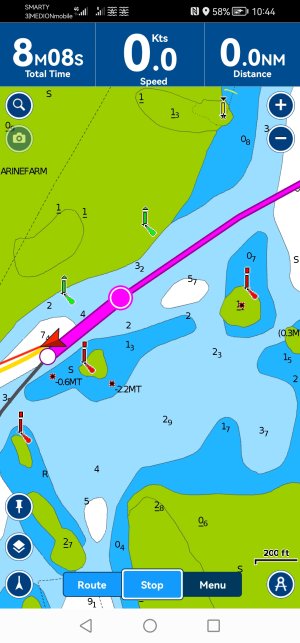
Screenshot_20250331_104424_it.navionics.singleAppMarineLakesHD.jpg

As you cab see I get a track, but no speed and the heading is totally off. Btw I only got this after clicking through the options bottom left, but it doesn't really work at all. I restarted my phone and it works again. But generally don't want to do this all the time. Obviousky I had gps data before. Just some bug in the app
 
Yes, many mobile devices have functions which set speed to zero below a certain speed - to avoid people being concerned at seeing speeds when stopped at traffic lights etc.
But to determine if in the OPs case it is a device issue or a Navionics issue the easy answer is to open a differnt app and see what speeds it shows. Lots of generic apps showing GPS data, or use another marine product eg MemoryMap for All.
Generally mobile devices don’t show Heading (unless interfaced to ships NMEA network) but GPS Course Over Ground.
Similarly not Speed but Speed Over Ground.
 
Yes, many mobile devices have functions which set speed to zero below a certain speed - to avoid people being concerned at seeing speeds when stopped at traffic lights etc.
But to determine if in the OPs case it is a device issue or a Navionics issue the easy answer is to open a differnt app and see what speeds it shows. Lots of generic apps showing GPS data, or use another marine product eg MemoryMap for All.
Generally mobile devices don’t show Heading (unless interfaced to ships NMEA network) but GPS Course Over Ground.
Similarly not Speed but Speed Over Ground.
Exactly speed and heading over ground. That's what I want really. It measures that by determining the difference between the last 2 positions measured. Since it tracks my movemebt it should calculate that.
 
Unconnected, but perhaps relevant:

I moved back aboard last week, after winter ashore. Found that Navionics, on my iPad, was only showing AIS targets if I toggled its WiFi connection off and on again.Noticed that there was a Navionics update available on App Store. Once installed, normal (instant AIS target display, whenever app opened) resumed.

There seem to have been a couple of buggy updates, since Garmin took over. Last summer the app seemed to be forced to periodically check for updates online. If at sea, with no internet connection, it would lock. Until a signal could be found. (Rebooting just repeated the cycle).
 
Exactly speed and heading over ground. That's what I want really. It measures that by determining the difference between the last 2 positions measured. Since it tracks my movemebt it should calculate that.
Just mentioned as you used the term Heading rather than COG. Fine as a shorthand but most of us try to be careful of the difference for navigation reasons. Certainly confusing them would not go well on an ICC / Day Skipper assessment :cool:
 
Unconnected, but perhaps relevant:

I moved back aboard last week, after winter ashore. Found that Navionics, on my iPad, was only showing AIS targets if I toggled its WiFi connection off and on again.Noticed that there was a Navionics update available on App Store. Once installed, normal (instant AIS target display, whenever app opened) resumed.

There seem to have been a couple of buggy updates, since Garmin took over. Last summer the app seemed to be forced to periodically check for updates online. If at sea, with no internet connection, it would lock. Until a signal could be found. (Rebooting just repeated the cycle).
Yeah one of the reasons why I switched to orca. They killed this customer. Literally only using it because I don't have orca on this phone and the subscription is still on. Might as well. Certainly bugs like that don't make me reconsider my decision
 
Regarding the OP’s question, I had a similar problem and messed around until something worked for me. In my case disabling blue tooth on the tablet running Navionics worked. As soon as I did this the course was correctly displayed. Not sure why, but maybe give it a try and see if you have any luck.
 
Regarding the OP’s question, I had a similar problem and messed around until something worked for me. In my case disabling blue tooth on the tablet running Navionics worked. As soon as I did this the course was correctly displayed. Not sure why, but maybe give it a try and see if you have any luck.
Good tip, but my bluetooth was not enabled at all. I barely use it. Who knows. I just abandoned navionics entirely. I like orca better
 
Top