lampshuk
Well-Known Member
I seem to be falling out of love with Navionics.
It's always been cumbersome (to put it politely) to display light characteristics on Navionics,
but with the latest update it's now impossible to see light characteristics for buoys.
I am using the latest (1.4.2) update on an ipad 2.
I can prod the chart near a buoy, and the buoy appears on one prong of the "cross-hair" .
But if I select that icon, no information about the buoy is displayed.
Their webapp behaves differently. No buoy icon on the crosshairs this time, but the "?" does contain the light info
(these screenshots are from the webapp, I haven't spent the time to dump screenshots from my ipad)

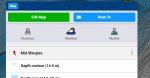
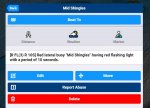
On my iPad the "?" does not show the buoy. Presumably because they have given it an icon of its own, but then forgotten to attach the light info!
Again, it's rather poor for lighthouses (I don't think this is new, but since I'm having a rant I might as well carry on).
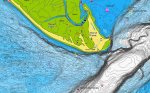
Take Hurst castle:
Each sector has a different "light" entry.
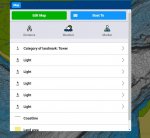
But it just regurgitates the characteristics string - incidentally failing to distinguish the "m" from "M".
And the legend on the chart gives no help whatsoever regarding the location of the sectors.
So, yes, I know you can't rely on navigation apps, and I do carry paper charts (and raster on a different tablet) but Navionics is so good in other respects that it annoys me when they do something goofy like this.
I would be interested to know if this "missing light info" bug also applies to other app versions. I have submitted a report to Navionics and they say they are "looking in to it".
It's always been cumbersome (to put it politely) to display light characteristics on Navionics,
but with the latest update it's now impossible to see light characteristics for buoys.
I am using the latest (1.4.2) update on an ipad 2.
I can prod the chart near a buoy, and the buoy appears on one prong of the "cross-hair" .
But if I select that icon, no information about the buoy is displayed.
Their webapp behaves differently. No buoy icon on the crosshairs this time, but the "?" does contain the light info
(these screenshots are from the webapp, I haven't spent the time to dump screenshots from my ipad)
On my iPad the "?" does not show the buoy. Presumably because they have given it an icon of its own, but then forgotten to attach the light info!
Again, it's rather poor for lighthouses (I don't think this is new, but since I'm having a rant I might as well carry on).
Take Hurst castle:
Each sector has a different "light" entry.
But it just regurgitates the characteristics string - incidentally failing to distinguish the "m" from "M".
And the legend on the chart gives no help whatsoever regarding the location of the sectors.
So, yes, I know you can't rely on navigation apps, and I do carry paper charts (and raster on a different tablet) but Navionics is so good in other respects that it annoys me when they do something goofy like this.
I would be interested to know if this "missing light info" bug also applies to other app versions. I have submitted a report to Navionics and they say they are "looking in to it".