
Navionics Boating app and AIS again (tablet nav)

FairweatherDave

Well-Known Member
Joined
28 Sep 2009
Messages
2,089
Location
Solent
Visit site
Bit gutted. I was planning to use Navionics on my tablet now they have got an AIS overlay. Sadly I find you have to renew your £35 subscription annually to maintain the AIS function. (It is part of Navionics Plus). I was planning a one off payment and then not getting the updates. My pootling about doesn't justify £35 a year when I already have my AIS working on Marine Navigator.....Having downloaded the Boating app and some charts to try yesterday I was disappointed there was no off line instructions as to how to connect to my AIS wifi receiver. Even when I went on line briefly I could not find the instructions quickly, so gave up up and went sailing instead, much more fun.
 
To put my grump in perspective...with Marine Navigator it was merely a couple of quid more to upgrade the app to do AIS. I can understand a subscription for regular chart updates, community input whatever they call it etc etc with Navionics plus.....that is getting something fresh. But I guess they have the power. just not my money this time.
 
Bit gutted. I was planning to use Navionics on my tablet now they have got an AIS overlay. Sadly I find you have to renew your £35 subscription annually to maintain the AIS function. (It is part of Navionics Plus). I was planning a one off payment and then not getting the updates. My pootling about doesn't justify £35 a year when I already have my AIS working on Marine Navigator.....Having downloaded the Boating app and some charts to try yesterday I was disappointed there was no off line instructions as to how to connect to my AIS wifi receiver. Even when I went on line briefly I could not find the instructions quickly, so gave up up and went sailing instead, much more fun.

I connected my tablet wifi to my AIS transceiver wifi and that was really all there was to it.
Your AIS should show up in your Navionics app as 'paired device'.
 
I connected my tablet wifi to my AIS transceiver wifi and that was really all there was to it.
Your AIS should show up in your Navionics app as 'paired device'.
Thanks for that. Just opened the app and can see what I did. I went to Map Options and then AIS settings. Now at home when I open "Paired devices" I can see my Quark listed. Will give it another go at the weekend.
 
Little update. Koeketiene's tip worked. Great. Except the boating app free trial seemed to have expired (less than two weeks after loading), so I could not try Navionics plus features although the trial downloaded charts still worked. Shame as I had the time to play with it.
 
I’ve got the Navionics UK chart card in my plotter, the 12 month subscription for which has now expired. Where I sail I don’t really need regular updates so I’ll re-subscribe in a year or two to get the latest chart updates. What I have discovered is that there are features, not vital ones to be fair, that are no longer available on my plotter. My understanding was that the annual subscription was for chart updates only, not full functionality of the software. Apparently not the case.
 
Little update. Koeketiene's tip worked. Great. Except the boating app free trial seemed to have expired (less than two weeks after loading), so I could not try Navionics plus features although the trial downloaded charts still worked. Shame as I had the time to play with it.

Glad you got there.
FWIW: it does not happen often in the world of sailing, but I feel that the Navionics app is value for money.
Certainly when you compare it to the price of chart updates for a plotter.
 
Last edited:
I agree - charts are always up to date, which not many fixed plotters or marine navigator can boast I guess.

I compared the two as was running an android tablet with marine nav and navionics on the ipad. I prefer looking at an admiralty chart, the light info being there straight away (for example, and better detail), but for lazy following a clear picture then Navionics clears the clutter. So we now run Navionics as main choice but I also have marine navigator on my phone (FFS) just because I can and it's cheap


Glad you got there.
FWIW: it does not happen often in the world of sailing, but I feel that the Navionics app is value for money.
Certainly when you compare it to the price of charupdates for a plotter.
 
I'm sure Navionics is good value for many, and I am reasonably likely to succumb. However before making the move I wanted to see how the AIS info displayed, overlaid on the chart. On Marine Navigator it is very easy to work out which ship might be an issue, it displays a projected course from that ship and yours, and flashes info about the prospect of collision in the corner. What does the AIS look like on the Navionics app, I'm afraid I haven't been able to find anything?
(The nearest I got was that potential AIS targets can be clicked on and then information about their course and speed is given...... but no nice easy to see lines (vectors) off the bow. I may be wrong.)
 
I'm sure Navionics is good value for many, and I am reasonably likely to succumb. However before making the move I wanted to see how the AIS info displayed, overlaid on the chart. On Marine Navigator it is very easy to work out which ship might be an issue, it displays a projected course from that ship and yours, and flashes info about the prospect of collision in the corner. What does the AIS look like on the Navionics app, I'm afraid I haven't been able to find anything?
(The nearest I got was that potential AIS targets can be clicked on and then information about their course and speed is given...... but no nice easy to see lines (vectors) off the bow. I may be wrong.)
I found on android using both navionics for the very simple "where am I and where am I going" and opencpn for much more info worked well.

Most of the time it's just follow the passage plan anyway.

Opencpn AIS display is as good as anything out there :cool:
 
Thanks GHA. I know about OpenCPN on laptops but not on android tablets. I tried the free version maybe 3 years ago and confessed I didn't get on with it, my IT skills are rather average :)....and I didn't try too hard as my "navigation" tends to be in the Solent in the cockpit. I don't "need" AIS really but it is a bit of fun.
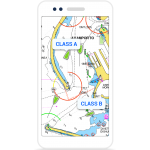
So answering my own question I contacted Navionics live chat and eventually got suggested a German you tube video Navionics webinar
. About 18 minutes in got a bit of an illustration.
Better still they have offered me two weeks further free trial, so I should be able to have a play if I can get to the boat and find some moving targets, (not marina bound AIS broadcasters....)
 
Thanks Daverw. I had seen that and obviously it gives a bit of a clue, but doesn't show your own boat. Does show the direction lines of the other boats so useful. Today I got to the boat and finally got it all functioning. Not much going on but I saw green boats suddenly get a red cross on them and saw my projected track. Not enough boats about on AIS really (just about enough) but I was happy to see "Right Turn" just outside Emsworth Marina :).....
Hardest bit of the connection to my tablet was the password to my wifi AIS Quark receiver. Google is my friend............888888 or something
 
Top