

Irish Rover
Well-Known Member
I started another thread on this but I'm re-posting here under the new title in case it may be of specif interest to others using Navionics and might be missed because of the title of the other thread. What follows below is an exchange of correspondence between me [black] and Navionics [blue]and is all very self explanatory. This is what Navionics says on it's website about Dock to Dock Autorouting
A unique breakthrough
All autorouting existing today can find a route from A to B only if they are both in open water, while good guidance and planning is most needed in cramped complex waterways with a maze of variables. A unique breakthrough in boating navigation, Navionics Dock-to-dock Autorouting, instead, quickly calculates a detailed route even through narrow passages and channels, based on chart data and navigation aids.
Hi,
Can you help me please. If I set an automatic course does the course you
plot for me take account of Colregs for instance in relation to traversing
or crossing a TSS.
Thank you for contacting Navionics.
Dock-to-dock Autorouting takes COLREGS and TSS into account to calculate the route accurately and safely. It quickly creates detailed routes even through narrow waterways and channels, based on chart data and navigation aids. POI nearby the destination like the harbor master, marinas and moorings, fuel stations, restaurants and bars, shops, taxis, launch services and more, now appear automatically within the Autorouting menu.
For best results, make sure that you check your draft setting and start/end point placement. Draft is automatically placed at the default setting of 33ft (about 10mt) when you purchase Autorouting. Go to Menu > Settings > Boat Settings and set properly your draft. Dock-to-dock Autorouting is for general planning and reference only – it does NOT replace safe navigation practices and should never be your only reference source.
Attached are some additional documents for instruction and reference.
Please be advised that our office hours are 9:30am-4:30pm (offices in USA are EST, and office in Italy CET). As our office is not open on weekends, we typically experience a high volume of emails on Monday and answer all inquiries as quickly and efficiently as possible, in the order they are received.
For additional support, access Navionics online Help or Chat Now with a live agent.
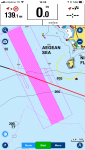
Thank you for your e mail in response to my query of 5 days ago dated 15 March. I had assumed your auto routing would take account of Colregs and TSS but when i used auto routing to plot a course through the Saronic from Corinth to the Island of Kea it has me crossing the TS line at an angle of about 45 degrees whereas Colregs require that " A vessel shall, so far as practicable, avoid crossing traffic lanes but if obliged to do so shall cross on a heading as nearly as practicable at right angles to the general direction of traffic flow". I would be obliged if you could explain this apparent anomaly. Screen shot attached.
Thank you for the screenshot. This is certainly something that we will investigate further. If you could, please provide your start and end coordinates for testing purposes on our side. This way we can determine the best resolution. Thank you for your kind cooperation.
Coordinates sent
Your case has been submitted to Technical Support for assistance. Our Algorithm is not taking care of the Traffic Separation Zone as per the Colregs. There is just an alert to inform of the presence of the TSS and the route is not drawn perpendicular. Please let me know if you need additional clarifications.
Thank you. However I am greatly concerned that on first enquiry I was told otherwise and it appears to me you were not aware of this until I brought it to your notice. I would like to ask now:
1. Do you plan to correct this anomaly,
2. Are there other similar anomalies of which I should be aware concerning safety and COLREGS, and
3. Are you planning to issue an advisory or warning about this.
Apologize for the late reply.
Contrary to the initial information provided by Customer Service, the D2D Autorouting algorithm does not contemplate for specific Colregs regulations.
The D2D Autorouting feature is a planning assistant and the proposed route is to be verified and where necessary to be edited manually. While calculating a Route, Dock-to-dock Autorouting might consider some Route legs hazardous (shown in red). In this case, a red alert button will display on the screen along with a warning listing critical situations for any Route leg. This also applies when the route is proposing the crossing of a TSS.
Do not hesitate to contact me for any further clarification.
A unique breakthrough
All autorouting existing today can find a route from A to B only if they are both in open water, while good guidance and planning is most needed in cramped complex waterways with a maze of variables. A unique breakthrough in boating navigation, Navionics Dock-to-dock Autorouting, instead, quickly calculates a detailed route even through narrow passages and channels, based on chart data and navigation aids.
Hi,
Can you help me please. If I set an automatic course does the course you
plot for me take account of Colregs for instance in relation to traversing
or crossing a TSS.
Thank you for contacting Navionics.
Dock-to-dock Autorouting takes COLREGS and TSS into account to calculate the route accurately and safely. It quickly creates detailed routes even through narrow waterways and channels, based on chart data and navigation aids. POI nearby the destination like the harbor master, marinas and moorings, fuel stations, restaurants and bars, shops, taxis, launch services and more, now appear automatically within the Autorouting menu.
For best results, make sure that you check your draft setting and start/end point placement. Draft is automatically placed at the default setting of 33ft (about 10mt) when you purchase Autorouting. Go to Menu > Settings > Boat Settings and set properly your draft. Dock-to-dock Autorouting is for general planning and reference only – it does NOT replace safe navigation practices and should never be your only reference source.
Attached are some additional documents for instruction and reference.
Please be advised that our office hours are 9:30am-4:30pm (offices in USA are EST, and office in Italy CET). As our office is not open on weekends, we typically experience a high volume of emails on Monday and answer all inquiries as quickly and efficiently as possible, in the order they are received.
For additional support, access Navionics online Help or Chat Now with a live agent.
Thank you for your e mail in response to my query of 5 days ago dated 15 March. I had assumed your auto routing would take account of Colregs and TSS but when i used auto routing to plot a course through the Saronic from Corinth to the Island of Kea it has me crossing the TS line at an angle of about 45 degrees whereas Colregs require that " A vessel shall, so far as practicable, avoid crossing traffic lanes but if obliged to do so shall cross on a heading as nearly as practicable at right angles to the general direction of traffic flow". I would be obliged if you could explain this apparent anomaly. Screen shot attached.
Thank you for the screenshot. This is certainly something that we will investigate further. If you could, please provide your start and end coordinates for testing purposes on our side. This way we can determine the best resolution. Thank you for your kind cooperation.
Coordinates sent
Your case has been submitted to Technical Support for assistance. Our Algorithm is not taking care of the Traffic Separation Zone as per the Colregs. There is just an alert to inform of the presence of the TSS and the route is not drawn perpendicular. Please let me know if you need additional clarifications.
Thank you. However I am greatly concerned that on first enquiry I was told otherwise and it appears to me you were not aware of this until I brought it to your notice. I would like to ask now:
1. Do you plan to correct this anomaly,
2. Are there other similar anomalies of which I should be aware concerning safety and COLREGS, and
3. Are you planning to issue an advisory or warning about this.
Apologize for the late reply.
Contrary to the initial information provided by Customer Service, the D2D Autorouting algorithm does not contemplate for specific Colregs regulations.
The D2D Autorouting feature is a planning assistant and the proposed route is to be verified and where necessary to be edited manually. While calculating a Route, Dock-to-dock Autorouting might consider some Route legs hazardous (shown in red). In this case, a red alert button will display on the screen along with a warning listing critical situations for any Route leg. This also applies when the route is proposing the crossing of a TSS.
Do not hesitate to contact me for any further clarification.


