iPad Charting Recommendations Please

Goldie

Well-Known Member
Joined
29 Sep 2001
Messages
2,322
Location
Nr Falmouth, Cornwall.
Visit site
Firstly, I put my hands up to being an IT numpty so please bear this in mind - I need ‘plug ‘n’ play’!

I’m looking please, for recommendations for chart plotting App to install on a recent, GPS equipped iPad. On my old iPad I was using Transas (now Wärtsilä) iSailor which I started using long before it was taken over, free updates ‘for life’ was removed and all the prices went up. It’s ok, but I suspect there are better options.

Navionics used to be recommended, but recent feedback on the App Store and from friends (since the Garmin takeover) is putting me off.

The App chosen needs to have access to charting for U.K., W. Europe, Baltic and Med’ areas and I’m not hung up on any particular chart presentation - Vector, Raster or colour palettes (providing they’re not outlandish).

My onboard nav’ system uses the (excellent) TimeZero product and I see that there is an iPad option - anyone used it?

What other options are there? I’ve heard of AngelNav but know little about it.

Whatever’s chosen will be a back up to my onboard system and I do carry a comprehensive paper chart folio.

Thanks in anticipation.
 
Firstly, I put my hands up to being an IT numpty so please bear this in mind - I need ‘plug ‘n’ play’!

I’m looking please, for recommendations for chart plotting App to install on a recent, GPS equipped iPad. On my old iPad I was using Transas (now Wärtsilä) iSailor which I started using long before it was taken over, free updates ‘for life’ was removed and all the prices went up. It’s ok, but I suspect there are better options.

Navionics used to be recommended, but recent feedback on the App Store and from friends (since the Garmin takeover) is putting me off.

The App chosen needs to have access to charting for U.K., W. Europe, Baltic and Med’ areas and I’m not hung up on any particular chart presentation - Vector, Raster or colour palettes (providing they’re not outlandish).

My onboard nav’ system uses the (excellent) TimeZero product and I see that there is an iPad option - anyone used it?

What other options are there? I’ve heard of AngelNav but know little about it.

Whatever’s chosen will be a back up to my onboard system and I do carry a comprehensive paper chart folio.

Thanks in anticipation.
Have a good look at Orca. It’s also “free” but what you get is very good.
And if you have internet access will also overlay AIS targets.
 
I use MemoryMap which is a raster chart app, £25 odd for an annual licence for use on 5 devices, phone, iPad, PC etc..

You can also get the full OS set of maps which work seamlessly.
 
I use MemoryMap which is a raster chart app, £25 odd for an annual licence for use on 5 devices, phone, iPad, PC etc..

You can also get the full OS set of maps which work seamlessly.
I also use MemoryMap for the UK, but don’t think it has the geographic coverage the OP needs. Ditto AngelNav.

As the OP also says he likes simple “plug and play”, it is still hard to beat Navionics for its ease of use and global charting coverage. Yes Garmin may be a bit annoying in some ways, but Navionics is the market leader for a reason. It works.
 
Navionics would still be my choice for the coverage you want. On a current iPad operating system, with a new Navionics subscription, you should not have any issues.

I use an iPad with Navionics (as well as Memory Map) as my back up to a plotter. The iPad would not be my primary choice as it is power hungry which seriously shortens duration on battery power. They get very hot when used in sunlight with the brightness turned up. Also, even with full brightness daylight viewing is difficult. Just be aware so you can manage because leaving on, at full brightness, can cause shut down and, or, USB charging unable to keep up.

A recent comprehensive review of Orca made some significant criticisms of its chart package and navigation user interface functionality. The reports, in four parts, can be found at www.morganscloud.com. Unfortunately it is a subscription service, but worth at least 1 years subscription, in my opinion. No association et cetera.

Time Zero Navigation gets great reviews but I have no experience of it. It can be used on an iPad. You should at least review the App to see if it meets your needs.

TIMEZERO | Marine Navigation Software
 
Navionics would still be my choice for the coverage you want. On a current iPad operating system, with a new Navionics subscription, you should not have any issues.

I use an iPad with Navionics (as well as Memory Map) as my back up to a plotter. The iPad would not be my primary choice as it is power hungry which seriously shortens duration on battery power. They get very hot when used in sunlight with the brightness turned up. Also, even with full brightness daylight viewing is difficult. Just be aware so you can manage because leaving on, at full brightness, can cause shut down and, or, USB charging unable to keep up.

A recent comprehensive review of Orca made some significant criticisms of its chart package and navigation user interface functionality. The reports, in four parts, can be found at www.morganscloud.com. Unfortunately it is a subscription service, but worth at least 1 years subscription, in my opinion. No association et cetera.

Time Zero Navigation gets great reviews but I have no experience of it. It can be used on an iPad. You should at least review the App to see if it meets your needs.

TIMEZERO | Marine Navigation Software
Thanks for the input and the links. I appreciate the iPad limitations as I have been using an old iPad with ‘iSailor’ (as per #1) for the last few years including 4 years in the Med’.

I’ll be looking further at TimeZero as it’s brilliant on my main nav system.
 
Thanks for the input and the links. I appreciate the iPad limitations as I have been using an old iPad with ‘iSailor’ (as per #1) for the last few years including 4 years in the Med’.

I’ll be looking further at TimeZero as it’s brilliant on my main nav system.
Your call, but to my mind for a backup navigation device I want something that is specifically different from the main system.
Hence why have raster charts on MemoryMap on iPad (and phone) as backup for Navionics on Raymarine.
Just occasionally there are differences in the mapping availability and/or accuracy, and in tricky places I tend to use both simultaneously (plus GoogleEarth satellite images if charting uncertain).
 
NV charts might be worth a look
NV Charts App Mobile Digital Navigation For Boating
They do a package with paper charts and digital chart together which I liked. I used it extensively in the Caribbean when I was there and now have them for the Dutch coast.

I still use Navionics but do find that it has gone downhill since the Garmin takeover - they seem to assume that you will have internet access at all times amongst other things
 
NV charts might be worth a look
NV Charts App Mobile Digital Navigation For Boating
They do a package with paper charts and digital chart together which I liked. I used it extensively in the Caribbean when I was there and now have them for the Dutch coast.

I still use Navionics but do find that it has gone downhill since the Garmin takeover - they seem to assume that you will have internet access at all times amongst other things
We used NV for the Baltic, the paper and electronic combo you refer to.
But again restricted geographic coverage.
The OP wants UK, but NV only cover the South coast / Channel, none for the other 90% of the UK coastline.
 
Your call, but to my mind for a backup navigation device I want something that is specifically different from the main system.
Hence why have raster charts on MemoryMap on iPad (and phone) as backup for Navionics on Raymarine.
Just occasionally there are differences in the mapping availability and/or accuracy, and in tricky places I tend to use both simultaneously (plus GoogleEarth satellite images if charting uncertain).
Fair point, thanks 👍
 
My Navionics is used on board without any internet connection, with no issues at all. Sure when the iPad is at home I fire up Navionics from time to time, connected to internet, and usually it tells me that my charts need updating. I have never experienced the shit Navionics service reported in here. Subscribed for over 5 years now.
 
My Navionics is used on board without any internet connection, with no issues at all. Sure when the iPad is at home I fire up Navionics from time to time, connected to internet, and usually it tells me that my charts need updating. I have never experienced the shit Navionics service reported in here. Subscribed for over 5 years now.
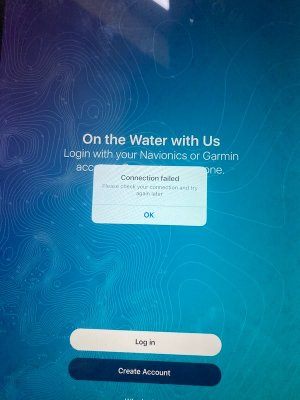
Yes it might be fine if you do connect to the internet whilst at home but woe betide you if you don't do this because this is what you get:
and you can't get past this to access the charts that you have subscribed too.
I have no idea how frequently that you need to log in to prevent this happening.
no connection.jpg
 
Yes it might be fine if you do connect to the internet whilst at home but woe betide you if you don't do this because this is what you get:
and you can't get past this to access the charts that you have subscribed too.
I have no idea how frequently that you need to log in to prevent this happening.

If you don’t ever have time, or occasion within a subscription year to connect to the internet, then Change the App. I downloaded Time Zero last night (£35/year). It has the option to download the charts (Vector, Raster, Bathymetric), which I did for my area. So far, from my limited interaction, the charts are good, tide and weather data is not as good as Navionics but is usable. I can sympathize with users who want to only pay once, then use the charts for ever, but I also sympathize with the vendor who is trying to return profit to share holders, and actively manages value erosion.
 
If you don’t ever have time, or occasion within a subscription year to connect to the internet, then Change the App. I downloaded Time Zero last night (£35/year). It has the option to download the charts (Vector, Raster, Bathymetric), which I did for my area. So far, from my limited interaction, the charts are good, tide and weather data is not as good as Navionics but is usable. I can sympathize with users who want to only pay once, then use the charts for ever, but I also sympathize with the vendor who is trying to return profit to share holders, and actively manages value erosion.
Just tried my Navionics Boating app which not used for many months, and last subscription at least 5 years ago.
Set iPad to aircraft mode to disable both network and wifi data - and it went straight in and I could access my charts that had downloaded previously.
Switching airplane mode off and retrying Navionics, this time it did come up with a Subscription expired message - but gave me either a Login or a Not Now option, and as long as carefully select the latter works fine.

So I wonder if some of the complaints about Navionics are partly user error? It appears that it recognises the iPad being in flight mode and doesn’t try to access the internet - which makes sense.
 
Last edited:
Just tried my Navionics Boating app which not used for many months, and last subscription at least 5 years ago.
Set iPad to aircraft mode to disable both network and wifi data - and it went straight in and I could access my charts that had downloaded previously.
Switching airplane mode off and retrying Navionics, this time it did come up with a Subscription expired message - but gave me either a Login or a Not Now option, and as long as carefully select the latter works fine.

So I wonder if some of the complaints about Navionics are partly user error? It appears that it recognises the iPad being in flight mode and doesn’t try to access the internet - which makes sense.
Now that is interesting
However I do not think you can put it down to user error.
Now speaking as an ex-sytems engineer (computers) I can say
Indeed it is a fault of the software design. The behaviour of the software should be such that it does not rely on a check on whether there is an internet connection or not or whether the iPad is in internet mode or flight mode.
Perhaps you could blame user error if it was a made clear to the user that you needed to log in from time to time or indeed have an internet connection, but in the absence of such warnings or notifications you cannot blame the user. It is poor software design.
 
Just tried my Navionics Boating app which not used for many months, and last subscription at least 5 years ago.
Set iPad to aircraft mode to disable both network and wifi data - and it went straight in and I could access my charts that had downloaded previously.
Switching airplane mode off and retrying Navionics, this time it did come up with a Subscription expired message - but gave me either a Login or a Not Now option, and as long as carefully select the latter works fine.

So I wonder if some of the complaints about Navionics are partly user error? It appears that it recognises the iPad being in flight mode and doesn’t try to access the internet - which makes sense.
The image in post #13 is not saying his subscription has expired. That is not the issue.
It is simply requesting a manual check that there is an account, active or not.
It is, to all intents and purposes for us, random. The problem for users is that if it pops up when you have no signal, you are effectively locked out of the app from that point on until you have a signal and can log in.
That is the really dangerous part.
 
I've been using Imray Navigator for many years (it had a different name initially) It's raster and of course is an exact copy of the Imray chart sitting on my chart table.
I've used all the other apps mentioned but when it come time to renew subscriptions I have always gone back to Imray. It does everything you need and has a nice AIS overlay if you have a wifi source.
 
I've been using Imray Navigator for many years (it had a different name initially) It's raster and of course is an exact copy of the Imray chart sitting on my chart table.
I've used all the other apps mentioned but when it come time to renew subscriptions I have always gone back to Imray. It does everything you need and has a nice AIS overlay if you have a wifi source.
Imray chart coverage is much less than Navionics etc.
Indeed even in UK AFAIK only very small scale charts for N of Scotland.
 
Your call, but to my mind for a backup navigation device I want something that is specifically different from the main system.
Hence why have raster charts on MemoryMap on iPad (and phone) as backup for Navionics on Raymarine.
Just occasionally there are differences in the mapping availability and/or accuracy, and in tricky places I tend to use both simultaneously (plus GoogleEarth satellite images if charting uncertain).
Whereas I’d take the opposite view! As a back up you won’t be looking for discrepancies until the main system fails! If you do need it in anger, you have enough stresses without working out a different user interface, chart style etc!
 
Top