Garmin 450 chartplotter power-up fails at logo

yodave

Well-Known Member
Joined
31 Dec 2010
Messages
400
Location
up North
Visit site
Hi,

My Garmin GPSmap 450 chartplotter has been very reliable until recently. The problem is happening on start-up. When powered on, the Garmin logo appears briefly, but it's a bit dull/muted and then the screen goes blank and the power shuts down.

I've tried an alternative battery away from the boat wiring to ensure that the unit is getting power directly, but this hasn't helped. It seems likely to me that it's a power problem, or that the unit is shutting down due to a problem with the start up procedure/checks. In theory, it could be a problem with the cable, or the connection to the unit, as the cable has never properly/fully connected with the input on the unit.

Any thoughts for troubleshooting?

Thanks
 
Thanks david_bagshaw, I'll have a look at this and do some tests.

I'm also on the Garmin website, where there's info on performing a forced software update to overcome booting problems.

Thanks again!
 
Thanks david_bagshaw, I'll have a look at this and do some tests.

I'm also on the Garmin website, where there's info on performing a forced software update to overcome booting problems.

Thanks again!

I had both a Garmin 550 and 551 (some people never learn) and they both failed with symptoms similar to yours. After being fobbed of by Garmin following the second failure - my 4 year old unit was apparently a 'legacy product' - I opened it up and discovered corrosion from water ingress with obvious stress cracking of the case from overtightening of the screws on assembly. After a lot of wrangling they did a deal on a replacement but I won't buy from them again.
 
Hi Quiddle, Thanks for your reply.

Sounds like you haven't had a great experience. Our 450 has been pretty reliable for about ten years until this season, when it's regularly had to take time out to find satellites. I'll check for water ingress, but that's probably less likely as the unit doesn't get wet and over the years we've typically taken it off the boat whenever we head home.

My current plan is to do a forced reboot following a software upgrade. I've ordered a SD card reader, and will pop the software on that when it arrives.

Thanks again!
 
I've experienced this with my Garmin plotter. It was working fine one day and the next day it would repeatedly not get past the initial start screen. The unit was not getting enough power. After cleaning up the power lead and socket with Servisol spray and a glass-tipped corrosion cleaning pen, it came back to life and has been fine ever since.
 
Please forgive me for asking and ignore me if I’m wrong...
But I’ve a 450s and my old man has a 550s. We both had a similar issue until we realised we were being silly.

Here goes...I don’t suppose you have the setting on night mode ? Or even on auto night mode ?
We both had this and after the initial Garmin start up logo...the screen goes so dark you can’t see it at all..unless you literally shade it and your head to look closely. Then you can only just make out the screen options and half guess your way into the display menu.
I’ve done it loads of times since the first time. I know know the route to the display menu off by heart in fact.
Worth a try.
 
My Garmin 4000 series had a similar problem, eventually traced to a faulty radar wiring connector, plotter worked again when radar disconnected.
 
Hey, thanks for your replies : )

LiftyK: that sounds like something I should try. The cable or the connection could be the problem, so one thing I was considering was sourcing a replacement cable. I might be better trying your solution first. Thanks.

QBhoy: Good call. That could have been a cause/solution, however I've tried to start the unit up in the shade ...unfortunately it's not the problem (worth a shot though). Thanks

biscuit: Good shout. I've taken the unit off the boat and set it up without any other connections other than a battery to overcome any complications relating to wiring onboard. Still no joy unfortunately. Thanks

Thanks very much again for your input!
 
So here's a brief update:

I'm now pretty sure that it's not the cable or power supply, and that it's not the screen.

I pressed and held in the power button for 60 seconds, and the unit stayed on with a bright logo page showing. This was supposed to instigate a soft reset, but that didn't change anything. I also started the unit normally, and started the unit by holding the button down for 60 seconds on both occasions with a boot SD in the card slot. This was supposed to instigate a forced reboot via the software on the card (downloaded from Garmin). This didn't work either.

My next step was going to be replacing the cable, but after my tests yesterday it's clear that the cable isn't the problem. I'm still exploring solutions, but it's beginning to look less like an obvious hardware (screen, cable, power supply) failure at this stage.

Thanks!
 
Further update:

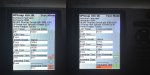
I've managed to access a basic diagnostic screen on my GPSmap 450 by pressing and holding the power on switch and the select switch at the same time. Through this screen it's possible to test the buttons, the screen colours/patterns, and adjust the screen brightness. There may be more, but I haven't been able to access those yet.

I've attached two side-by-side shots of the screen that I can access below. The shot on the right indicates that the Datacard Test has failed, but at this stage I don't know whether that's because the card I've inserted in the slot (which has reboot software provided by Garmin) isn't what the test expected to find. Incidentally, the software on the unit is 5.50, while the Garmin reboot has 5.60. So, I think that the Datacard Test fail is a red herring, in that I don't usually have anything in the slot.

There are also question marks beside Ram Test, BaseMap test, and Prev BaseMap test.

GPSmap450Fix01.jpg
 
Does anyone know of any other diagnostic tests for a Garmin GPSmap 450 [see post #11 above]?

It seems to me that the key components still work [see image in post above], so I'm a tad reluctant to throw the unit in the skip if it's an easy fix.

Thanks!
 
Pete7: As things stand, I'm not quite sure how to proceed, but if I find a solution I'll make sure that I post it back here.
 
so I'm a tad reluctant to throw the unit in the skip if it's an easy fix.

Thanks!

Whatever you do, don't throw it in the skip, my card reader has failed and I'm looking to try and find a replacement!
Good luck with sorting yours though.
Pladdatoo
 
Pete7: I haven't opened it up yet, but that's on the list. I think, looking at the diagnostic information [#11] there may be a problem with the RAM. Thanks!

Pladdatoo: Throwing it in the skip was a figure of speech, and I won't physically bin it - promise!
 
Update: Okay, so I've opened up the unit and it's pristine. It looks factory-fresh with absolutely no signs of corrosion anywhere.

I had a look for anything that looked like RAM, but couldn't see any standout candidates. However, given the condition of the interior, although a hardware failure is obviously feasible, I'm back thinking that it might be a software issue.
 
UPDATE: Well, I've been busy with other stuff but with crane-in approaching I had another look at my Garmin GPSmap 450 problem; thinking that I'd give it one more try prior to buying a new chartplotter. I looked back through this thread, and still felt that it probably isn't a software issue [that I could fix], as the last available update is 5.6, and my unit has 5.5. I also reckoned that it wasn't likely to be a hardware problem as the unit is in pristine condition. So I popped the card back in and tried a system reset. This didn't work... ... ...but the chartplotter did.

What do I think has changed? Well, this morning I powered it up WITHOUT the back casing. The only thing I can put think of is the cable/connection. It's always been a struggle getting the cable far enough into the unit, and without the back of the unit on, I can use additional pressure without fear of breaking the outer-casing. So my guess is that it was a connection problem. I think although they look spotless, I'll take LiftyK's advice and clean both parts of the connection again to see if I can make improvements.

Many thanks to everyone who helped with this thread.

Happy sailing!
 
Top