DIY ammeter - dead cool

  • Thread starter Thread starter GHA
  • Start date Start date
Well I bought an meter on eBay for $10! Actually it doesn't read properly as it always reads minus when I put the black pointer thing on the + part of the battery and the red on to something else. But otherwise it has been OK.

Clive
 
Yes, I have DSC VHF, full instrumentation, AIS receive, plotter, radar, 2 handhelds, autopilot (interfaced to wind), 3 battery banks (one for the thruster) and LED lighting (both inside and nav lights). But I don't have an ammeter!:ambivalence:

An ammeter is a basic bit of kit as soon as electrics go on board a boat imho.
 
Well i think this is rather cool!

I would be interested in the code (github?)

Github created, complete mess of code just seeing what works in the rough-n-ready branch, maybe this will gee me up to being a bit tidier :)
https://github.com/boatybits/Wifi-Amp-Meter/tree/master

Just need to figure out how to link github to google drive now...

So has anyone actually used https://jlcpcb.com/ ??
https://www.youtube.com/watch?v=tmUeMlEQyss
Surface mount ...... nah..

2 bucks for 10 boards, can't go wrong really - had a real quick look at easyeda but it's all new territory - can't be that hard can it?

I really think the likes of esp8266 can do some very useful stuff onboard for so little money but people either don't know about them or are put off by the thought of not knowing how to write a line of code, maybe a stock of PLC designs & fairly basic code online would be popular?

Or maybe not, stick with the astrolab... ;)
 
Well that was a productive couple of hours. Been thinking now and again with this idea for a while and finally stuck it in a case and wrote a little code to make it work, little baby steps but successful so far.

So what we got is >>
eG7layY.png


The bigger board at the bottom is an ESP8266 - like a arduino with wifi, very cool board and capable of doing lots - it has wifi built in. Then the little board bottom right is an INA219. Another great little board, it can measure up to 32V and up to 3.2A *REALLY* accurately. So they say anyway, I have nothing anywhere near accurate enough onboard to check. The battery isn't connected yet but it will allow the unit to run without being plugged in.
So 12v goes in then out again and into something (which uses less than 3.2A) The the ESP measures the current and voltage and sends it over wifi. The laptop reads this and a great program called node-red will display it. Or save it to a file, or loads of other options. So this is what a Nasa AIS engine draws....>>

388o55k.gif


The next stop down the road could be even better - it *should* be possible to connect this to the battery monitor shunt. Says google. Hard to guess the accuracy but apparently down to a few hundred mA. Which would be great, I've a Raspberry Pi recording loads all day every day already so having amps in/out would be nice to keep an eye on the batteries. Then, even better if it works - it might be possible to do a constant current load test - Without turning anything off!! Maybe. Have an external load controlled by the ESP with a few mosfets so the actual load coming out of the batteries stays constant -fridge goes on, external load goes a bit less. Unlikely to go all the way down to complete discharge at anchor but on a living on the hook cruising boat it would just great to do a partial load test once a month and graph ontop of other months to see it the batteries are happy or close to death. With temperature logged as well of course!


Phew...... :cool::cool:

A very naive question but what units are they along the y axis? As we're talking ammeters I assume that they are current related. I've always remembered from O level physics the exhortation to specify units.
 
A very naive question but what units are they along the y axis? As we're talking ammeters I assume that they are current related. I've always remembered from O level physics the exhortation to specify units.

Y axis is milliamps. The graph was created just in a few moments in node-red just to test without any bothering for such niceties as labels or a legend ;)
 
Thanks for sharing this. I too love tinkering with things electronic although keep my sailing fairly basic. Your elegant solution for a perceived need may well adapt well to someone else's need. Thanks
David Morgan
 
Haven't actually read all of this thread, however it occurred to me that reading the title some members may be hoping for a simple amp meter. What may be very simple and useful is to use a digital multimeter on 200mv scale to measure volt drop from the big terminal on the alternator to the other end of that same wire. If the wire is long and not so heavy when the alternator is charging you will get a volt drop that is measurable. It might be convenient to bring a wire out from the 2 points to a place where you can touch the meter probes on. The volts measured will not give you actual amps but will give a voltage commensurate with alternator output amps. If you file this number away when you reckon the system is working fine especially if you keep a log of the number under various circumstances. ie battery low and also when well charged you could build up a sort of calibration in relation to correct operation of alternator. Of course if you can fit an amp meter or have access to a clamp amp meter you could calibrate your millivolt drop into actual amps. Just a thought for a very simple amp meter that does not require disturbing wiring.
Note if you measure voltage from alternator to battery terminal this will be via isolation switch possibly diodes or VSR so while it may detect a fault condition will not be reliably indicating amps due to variable resistance in switch etc. Just check over the wire itself hoping the terminals are good.
olewill
 
The next stop down the road could be even better - it *should* be possible to connect this to the battery monitor shunt. Says google.

And finally got round to crawling under the chart table to hook it up. Works! Yippee! Major leap forward in keeping an eye on battery health. The current INO219 current sensor is just attached across the battery monitor shunt with croc clips, it's a bit noisy at the moment but with some proper crimped short twisted cables that should hopefully get a lot better. Data goes as signalk straight into the Pi where a signalk app saves it into a database then easy to view after that.

This a few hours discharge than back on with the charger.

battamps2.JPG
 
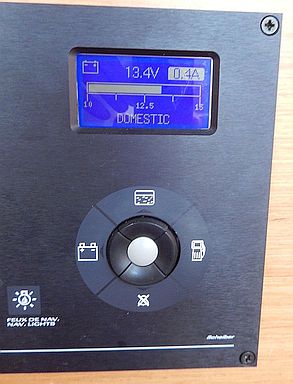
These things can grow. My Scheiber multi-display stopped working and I was tempted to build a replacement because the unit had several features I didn't like. I decided Arduino was the way to go and not too difficult to learn wrt code and circuit design.

The project grew a little :D:D.

1) Proved impossible to find a reasonably priced serial graphic transflective display with the correct dimensions. No room to fit a larger display and only render to visible part either. I finally settled on a parallel display, problem solved

2) Available IO pins in short supply because the parallel display was using almost all of them. I considered using something with more IO pins or building a board to convert serial to parallel. The Ardiuno was so cheap that it was simpler and cheaper to use a second Arduino. One board handles the inputs from buttons and sensors whilst the second one runs the display side. The display Arduino acts as a slave and is controlled by a serial link from the other Arduino.

3) I wasn't happy with the fragility of the original Scheiber unit as it didn't like 15V and I think a spike killed it. I designed an IO board to handle all sensor inputs up to 100V and also the odd spike (hopefully). It also included transistor switches to power backlight, fuels sensor circuit etc. on and off. The board uses 2 four channel ADS1115 ADCs.

I copied look of each page on Scheiber unit and also used the original control buttons. It all seems to work, looks like the original (though display not quite as good as the original). One big advantage is that I could calibrate tanks to give meaningful readings. Original only gave a VERY general indication of fuel and water levels. New unit actually gives meaningful readings.
Domestic: Volts & Amps
Engine & Bowthruster: Volts
Water level forward and aft
Fuel level in litres
Plus more features if I feel the need to extend it (e.g. display readings from other kit).

Interesting little project for my first look at an Arduino and I'll certainly consider using these to fix a few other items I've been meaning to replace (e.g. Boat alarm with SMS alert, doubles as anchor alarm).

Perhaps something a bit simpler might have been better, but as I said "these things grow". :D:D

NewMultiDisplay.jpg
 
Last edited:
Perhaps you could modify the circuits a bit to help poor old RichardS find the missing watts in his Smart Meter problem as mentioned in The Lounge! :cool:
 
Interesting little project for my first look at an Arduino and I'll certainly consider using these to fix a few other items I've been meaning to replace (e.g. Boat alarm with SMS alert, doubles as anchor alarm).

Oh that's lovely!! :cool:

Played with esp8266's yet?
You should be able to just use the same arduino code but they can do so much more! With built in wifi you can create you own web page on board, send data to the web if you have access, lots of fun :)
 
Top