Best setup for Antares Charts?

That's about it. But so far you are the only CPN -friendly respodent, and you don't sound so sure ...

OpenCPN has UKHO charts available, apparently, but the licence conditions are very opaque (you can use them on one device, or maybe three, and a USB stick may be a device, or maybe not, and God knows if they work on a Raspberry PI).
 
That is dead easy to do on Memory Map if you B have the Admiralty Charts set. Use th e Admiralty one then when get closer in select detailed Antares Chart - by zooming or using the charts at location list.

I use Antares and Admiralty with OpenCPN on a Toughbook hanging in the cockpit next to the instruments, but more often just an iPhone with MM Admiralty charts and Antares. Both easily zoom in or out and easily change charts. Although the phone is rather tiny for Antares it’s very convenient going into new anchorages, including when standing at the anchor looking over the side for the sandy patches.
 
Memory map comes with a complete library of UK Admiralty charts, though if you plan to use the chart list for selection, it is worth slimming it down by removing those for areas you will never visit. You add the Antares charts to the library. I never refer to the chart list it is slow hunting through it because it is still too long and random, I just open 'West Coast of Scotland' go to 'Charts at cursor'and choose from the selection offered, I usually open the most relevant Admiralty chart and it will show the outline of the available Antares charts, repeat the process to select the large scale one I want, takes less than a minute. Memory Map cost me about £45 six or seven years ago, I renew the Antares sub. annually but the cost is negligible and it means Bob gets some small recompense for all his efforts.
I am sure OpenCPN may do the same but if we are not prepared to pay anything for our use of the charts it is not surprising that the provision of Admiralty charts to leisure sailors is being downgraded?
 
I am sure OpenCPN may do the same but if we are not prepared to pay anything for our use of the charts it is not surprising that the provision of Admiralty charts to leisure sailors is being downgraded?

I'm perfectly happy to pay for Admiralty charts - I just wish they didn't make it so damn difficult for me to do so.
 
I'm perfectly happy to pay for Admiralty charts - I just wish they didn't make it so damn difficult for me to do so.

Cost or process? I find Bookharbour straightforward enough although the chart catalogue is a bit clunky but usable. They are open to offering discount if you talk to them, I have found.

I run Antares on a MacBook Air, on MemoryMap, easy enough, also on an iPad as stand alone.
 
Cost or process?

Process, mainly. It's fine using MX Mariner, and I would expect the same using any other software with integrated chart supply, but all third party suppliers - VisitMyHarbour, that funny website for OpenCPN and so on - all seem to delight in impenetrable language and incomprehensible licence terms. Which is a little unfair, really, because I think it's UKHO which imposes conditions on distribution which can only be met in convoluted ways.

I find Bookharbour straightforward enough although the chart catalogue is a bit clunky but usable. They are open to offering discount if you talk to them, I have found.

I shall investigate - thanks.
 
Cost or process? I find Bookharbour straightforward enough although the chart catalogue is a bit clunky but usable. They are open to offering discount if you talk to them, I have found.

I run Antares on a MacBook Air, on MemoryMap, easy enough, also on an iPad as stand alone.

Smith's Industries down to their last few squillions?
 
Memory map comes with a complete library of UK Admiralty charts, though if you plan to use the chart list for selection, it is worth slimming it down by removing those for areas you will never visit.

You shouldn’t have to slim down the set of charts, as if you hit the MM chart select button (on IOS or Android) it only shows the charts at that specific location. On Windows it is similar.
 
Process, mainly. It's fine using MX Mariner, and I would expect the same using any other software with integrated chart supply, but all third party suppliers - VisitMyHarbour, that funny website for OpenCPN and so on - all seem to delight in impenetrable language and incomprehensible licence terms. Which is a little unfair, really, because I think it's UKHO which imposes conditions on distribution which can only be met in convoluted ways.


I shall investigate - thanks.

VMH (admiralty raster) doesn't work with RasPi OpenCPN, bit does with windows.

oeSENC admiralty vector charts work with RasPi, or Windows on OpenCPN.

"oeSENC charts can only be used in OpenCPN.

You are allowed to use every chart you buy in 2 systems simultaneously or you can save a backup to be used in case your main system dies.

System is the combination of device and OS. If any of these items changes, your system will be presented as a new one, you will lose your license and you will have to use your backup."

So - you could put them on a USB stick but it doesn't achieve much / anything as it needs the OS to be decrypting them correctly which only be two OS's

I suspect but haven't had a try - you can probably clone a SD card to appear identical.
 
"oeSENC charts can only be used in OpenCPN.

You are allowed to use every chart you buy in 2 systems simultaneously or you can save a backup to be used in case your main system dies.

System is the combination of device and OS. If any of these items changes, your system will be presented as a new one, you will lose your license and you will have to use your backup.".

Not your fault, but this is the sort of impenetrable bullstuff I was talking about.

Use on two systems simultaneously? Do they mean "use" or "install"? How can they tell? Is a net connection used every time you use them? Or install them

You will lose your license and you will have to use your backup If you've lost your licence, how can you use your backup? If you can reinstall from a backup any time you want, what happened to the "2 systems" limitation?

My crew wants to experiment with UKHO charts on a Raspberry Pi with CPN, but I simply can't tell what we'd get for our thirty quid except, apparently, a set of charts just itching to invalidate itself. The fact that the purchase site looks like a Russian Warez site circa 2005 doesn;t help much, but I am assured that it genuine and the people who want my money are just rubbish at websites.

And ... relax.

PS The dongles may be a better bet but the conditions for them are just as impenetrable.
 
Oh I forgot they have a single option!

You can "install" in two machines and "use" on the machines at the same time. No internet is required to use them. Internet is required to activate the licence.

I know what you mean about the website. I think they are Spanish (so English not first language) which doesn't help with the feeling you might be about to sell a kidney to a Russian in exchange for a half drunk bottle of vodka. It's that they are better at creating charts than websites. If you want a better website the product cost might quadruple!!

So, with the standard "install" you basically get two sets of charts. One plus a spare. Up to you how you use the spare. Either a "pure" backup or a second install on another machine (e.g. RasPi aboard and windows Laptop at home for passage planning).

With the dongle - you get one stick. It moves around as much as you want. But only one stick so can only use in one place at a time.

Lost license: the license is actually a file on the PC confirming that PC (or RasPi etc) and that disk (or SDcard etc) are allowed to use the charts. If the license gets damaged (drive failure) you can use the backup license to "reinstall"... This is not a oeSENC issue... oeSENC is stable. The issue is ropey hard drives/sd cards...

The other question people have is the subscription length. 1year gets you 6monthly updates if I recall correctly and then after 1year the chart keeps working but no new updates. You'd need to check if you can activate the backup license after the year ... I don't think so...

With the dongle ... As long as the dongle doesn't break you can use it anywhere for as long as you want. Updated for a year.
 
That's about it. But so far you are the only CPN -friendly respodent, and you don't sound so sure ... I was hoping for a few unequivocal Yes or Nos. Answers so far seem to indicate I need to improve my MM skills.

Derek


Better late than never .. I use OpenCPN on Raspberry Pi and an Android phone, both with Antares.

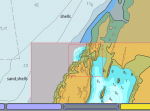
Zooming in and out and swapping between charts is straightforward. For example, you can use your general vector charts, but if you are in the vicinity of an Antares chart you will see a red outline. Change the chart view by selecting one of the coloured blocks at the bottom of the screen (on PC and Pi; IIRC Android has a separate menu). Vector is typically yellow or brown, raster (Antares) charts usually usually pale purple or blue; multiple blocks are available if multiple charts are available.

If "chart quilting" and "preserve scale.." are enabled, Antares charts are overlaid over the vector chart, so you can see the bigger picture.

The attached image shows four charts are available, three of which are Antares (or other raster, shown in lilac) and the yellow is for vector .. clicking on the yellow button will bring the vector chart to the front; clicking one of the other buttons will overlay that chartlet's image.
 

Attachments

  • opencpn.png
    opencpn.png
    61.9 KB · Views: 9
Top