B&G Triton T41 network problem

Koeketiene

Well-Known Member
Joined
24 Sep 2003
Messages
18,433
Location
Le Roussillon (South of France)
www.sailblogs.com
I've got 4 B&G T41 displays above the companionway.
They're daisy chained.
Number 1, 3 and for in the chain work fine.
However number 2 doesn't 'see' any data sources nor any other devices in the network.

At first, I suspected it was a wiring problem but later discarded the idea.
I mean, if it was a wiring problem with the displays further up the chain not be affected?

Anyone any ideas?

PS: I've been through the manual and I can't find anything on the subject.

https://softwaredownloads.navico.co...y/BG_Documents/TRITON_OM_EN_988-10134-003.pdf

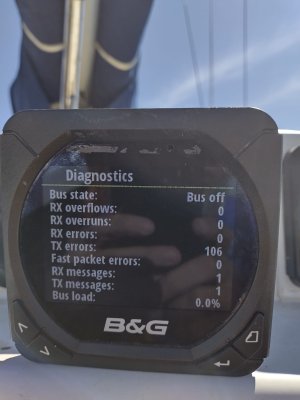
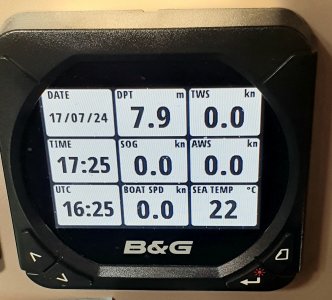
Working unit & not working unit showing 'bus off' - how do I turn 'bus on'?
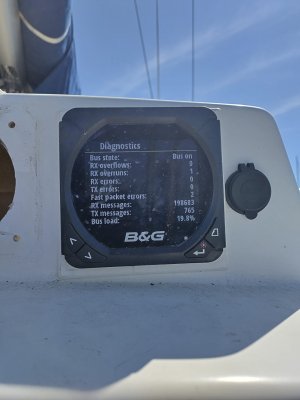

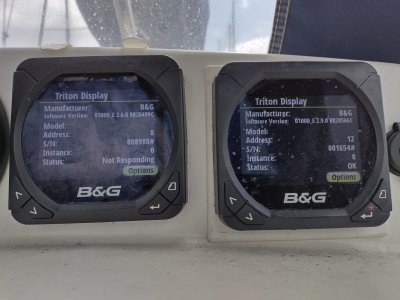
t41 working.jpgt41 not working.jpg
 
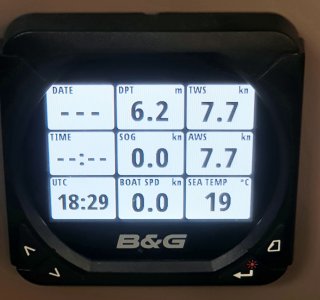
I'm also having a tech issue. At random, the network won't show local time/date. This has the effect that the tide function on the (Zeus S) plotters is wrong and any time to waypoint or track data is wrong.

Allegedly B&G have been aware of this bug for almost a decade.

Sometimes it reappears itself or a hard power off and on again resets it.

T41b.jpg

T41a.jpg
 
What does "daisy chained" mean, please?

Do you mean they're part of a complete NMEA 2000 network?

An NMEA 2000 network must always have a complete backbone, as explained here.
 
The strange thing about a few instruments (not just from B&G) is that they provide two NMEA connections so can be daisychained, either as part of the backbone or on a spur.

The manufacturers do actually say within the documentation for that display that it's not actually therefore NMEA2000 compliant, but that, I understand from the NMEA2000 specification, is because one faulty instrument interface electronics should not be able to affect another instrument (which it could if the displays were daisychained).

This is not too different to a wind mast head unit with built in terminator. Not strictly compliant but nobody seems to worry.

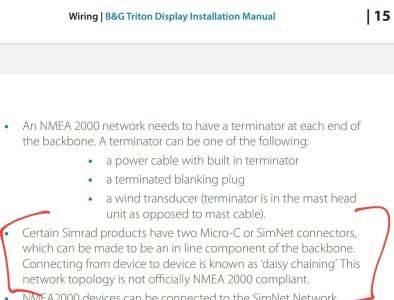
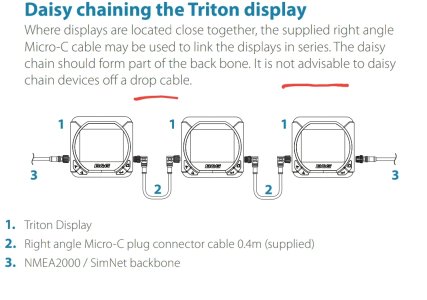
B&G do suggest that these T41 displays are daisychained as part of the backbone, but that's just a recommendation. Some will work daisychained on a drop cable and perhaps displays will affect others if on the same spur (drop cable).

B&G description of the T41 connectors...

Screenshot_20240903-171047_Drive.jpg

And their recommendation as to what daisy chaining involves..

Screenshot_20240903-171124_Drive.jpg
 
What does "daisy chained" mean, please?

Do you mean they're part of a complete NMEA 2000 network?

An NMEA 2000 network must always have a complete backbone, as explained here.

All 4 displays are daisy-chained but on a backbone which also includes a plotter, autopilot, AIS RX/TX, wind/depth sensor and log.

The 'offending' display has been in place for 4 years and has never given me any trouble till a few days ago.
I've tried re-calibration, factory reset, ... all to no avail.
The thing still doesn't see anything on the network.
 
All 4 displays are daisy-chained but on a backbone which also includes a plotter, autopilot, AIS RX/TX, wind/depth sensor and log.

The 'offending' display has been in place for 4 years and has never given me any trouble till a few days ago.
I've tried re-calibration, factory reset, ... all to no avail.
The thing still doesn't see anything on the network.
Have you swapped it out for one of the other units, maybe the unit is at fault?
 
Have you swapped it out for one of the other units, maybe the unit is at fault?

I'm pretty certain it's a faulty unit, but why and can it be fixed?
It's been in place and functioning for over 4 years.
Would it be a hardware failure or something software related?

I've received a reply from B&G support and they suggested I verify the unit is getting enough power.
As displays further up the chain work fine, I doubt if that's the cause.
 
you really just need to do some very basic fault finding.
Swap the device which is not working with one that does. Is it still inoperable is the other still working?
By doing this swap you can narrow the problem to the display or the network.
 
the bus off device, reports TX errors (ie. cannot send data) no receive errors as it obviously wont receive anything if bus is not working. TX errors mean that it's trying to send, doesn't get any acknowledgement from the N2K bus and throws an error. Leave it on long enough the # of errors will go up.

I'd remove them all and clean contacts on all connectors carefully. Then I'd play around with them (as previous posters suggest) and especially put the not working one in the first working position and she what happens. Could be simply a corroded/messed interconnect cable.
Wouldn't dismiss the device as faulty so easily

V.
 
the bus off device, reports TX errors (ie. cannot send data) no receive errors as it obviously wont receive anything if bus is not working. TX errors mean that it's trying to send, doesn't get any acknowledgement from the N2K bus and throws an error. Leave it on long enough the # of errors will go up.

I'd remove them all and clean contacts on all connectors carefully. Then I'd play around with them (as previous posters suggest) and especially put the not working one in the first working position and she what happens. Could be simply a corroded/messed interconnect cable.
Wouldn't dismiss the device as faulty so easily

V.

I'm starting to think so too.

I think I have one or two spare NMEA2K cables lying around somewhere.

Still baffled though, if say the connection between unit 1 and 2 is bad, why does that not affect units 3 and 4 further up the chain? :unsure:
 
  • Like
Reactions: vas
corrosion may be on GND or +12V, leaving bus cable (the other two) passing the signals over.
in theory that would mean that it doesn't fire up, but maybe there's enough juice to fire it up but not enough to do the comms...
Fancy things these electronics!

v.easy to undo cables and mess about till you figure out what works and what not.
would be helpful if you knew which part of the chain goes were though. Daisy chaining them is (imho) stupid for a NMEA2K bus but who am I to argue with B&G
 
v.easy to undo cables and mess about till you figure out what works and what not.
would be helpful if you knew which part of the chain goes were though. Daisy chaining them is (imho) stupid for a NMEA2K bus but who am I to argue with B&G
Agree with all of this.

Raymarine offered the same facility to daisychain their i70 displays, but removed it with the release of the i70s. The only other apparent difference between the two models is the styling of the bezel / buttons / facia.

Would probably make life easier if you bought some NMEA 2000 T-connectors, or one of the multi-T's, and then connected each display using a drop cable.
 
  • Like
Reactions: vas
OK, I'm back.

Suspecting it might be the wiring, I bought 2 new 50cm NMEA2K cables.
No change
I moved the OOO unit up and down the chain.
No change
I disconnected all other units so that the OOO one was the only one left - connected directly to the plotter.
No change

The only other issue - apart from hardware failure - I can see is the all the working units run firmware 2.9 whilst the OOO unit seems to have reverted to firmware 2.6.

I am aware that you update the firmware over the network by inserting a SD card in the plotter.
However, how do you update the firmware over the network of a display that is not visible on the network?

I'm fresh out of ideas, so all suggestions welcome.

WhatsApp Image 2024-09-06 at 12.39.54_87fb0589.jpg
 
to answer your Q, of course you cannot!
However, I'd go back at the plotter and try to hook the offending display next to it (you have to fit terminators on either side, and leave the power supply online)
See if you can see it then in order to update.
else I'd take it and try to get it on a similar system (other boat completely) and see if it works there.
But it does become more and more possible that there's something wrong with the device...
How does the NMEA2K device list from either another device or the plotter look like? Is there by any chance another device with address 8??? that would be a problem but frankly it's v.v. unlikely!

V.

PS. you did check/clean the connector builtin on the device, right?
 
Top