

Poey50
Well-Known Member
Long separation from the boat calls for desperate measures in finding new time-consuming but cheap projects. So Arduino-nerds, what have you got?
Here's the first of mine - two voltage sensors, four relays and a temperature and humidity sensor to communicate by text with the boat from 100 miles away. Total cost under £40 plus £6 per month for a SIM card.
This page introduces the use of the SIM900. In-Depth: Send Receive SMS & Call with SIM900 GSM Shield & Arduino

Screenshot from my mobile phone

Code
#include <SoftwareSerial.h> // Library for using serial communication
SoftwareSerial SIM900(7, 8); // Pins 7, 8 are used as used as software serial pins
// Temp and humidity parameters
#include "DHT.h"
#define DHTPIN 2 // Digital pin connected to the DHT sensor
#define DHTTYPE DHT22 // DHT 22
DHT dht(DHTPIN, DHTTYPE);
float h;
float t;
// GSM parameters
String incomingData; // for storing incoming serial data
String message = ""; // A string for storing the message
int relay_pin1 = 3; // Initialized a pin for relay module
int relay_pin2 = 4; // Initialized a pin for relay module
int relay_pin3 = 5; // Initialized a pin for relay module
int relay_pin4 = 6; // Initialized a pin for relay module
// Voltmeter code parameters
int analogInput1 = A1;
int analogInput2 = A0;
float vout1 = 0.0;
float vout2 = 0.0;
float vin1 = 0.0;
float vin2 = 0.0;
float R1 = 30000.0; //
float R2 = 7500.0; //
int value = 0;
String Voltstring = "";
void setup()
{
SIM900.begin(9600);
Serial.println("Power on");
Serial.begin(9600);
SIM900power();
delay(20000); // give time to log on to network.
// GSM setup
dht.begin();
// Temp and humidity sensor setup (using GSM baudrate of 115200)
// GSM setup 2
pinMode(relay_pin1, OUTPUT); // Setting relay pin as output pin
digitalWrite(relay_pin1, LOW); // Making relay pin initailly low
pinMode(relay_pin2, OUTPUT); // Setting relay pin as output pin
digitalWrite(relay_pin2, LOW); // Making relay pin initailly low
pinMode(relay_pin3, OUTPUT); // Setting relay pin as output pin
digitalWrite(relay_pin3, LOW); // Making relay pin initailly low
pinMode(relay_pin4, OUTPUT); // Setting relay pin as output pin
digitalWrite(relay_pin4, LOW); // Making relay pin initailly low
// set SMS mode to text mode
SIM900.print("AT+CMGF=1\r");
delay(100);
// set gsm module to tp show the output on serial out
SIM900.print("AT+CNMI=2,2,0,0,0\r");
delay(100);
// Voltmeter code setup
pinMode(analogInput1, INPUT);
pinMode(analogInput2, INPUT);
Serial.begin(9600);
Serial.print("DC VOLTMETER");
}
//Insert soft start code here
void SIM900power()
{
pinMode(9, OUTPUT);
digitalWrite(9, LOW);
delay(1000);
digitalWrite(9, HIGH);
delay(2000);
digitalWrite(9, LOW);
delay(3000);
}
// End of soft start code
void loop()
{
//Function for receiving sms
receive_message();
// Read temperature as Celsius (the default)
t = dht.readTemperature();
// if received command is to turn off relay
if (incomingData.indexOf("Hoff") >= 0)
{
digitalWrite(relay_pin1, LOW);
message = "House is turned OFF";
// Send a sms back to confirm that the relay is turned off
send_message(message);
}
// if received command is to turn on relay
if (incomingData.indexOf("Hon") >= 0)
{
digitalWrite(relay_pin1, HIGH);
message = "House is turned ON";
// Send a sms back to confirm that the relay is turned on
send_message(message);
}
// if received command is to turn off relay
if (incomingData.indexOf("Soff") >= 0)
{
digitalWrite(relay_pin2, LOW);
message = "Start is turned OFF";
// Send a sms back to confirm that the relay is turned off
send_message(message);
}
// if received command is to turn on relay
if (incomingData.indexOf("Son") >= 0)
{
digitalWrite(relay_pin2, HIGH);
message = "Start is turned ON";
// Send a sms back to confirm that the relay is turned off
send_message(message);
}
// if received command is to turn off relay
if (incomingData.indexOf("3off") >= 0)
{
digitalWrite(relay_pin3, LOW);
message = "3 is turned OFF";
// Send a sms back to confirm that the relay is turned off
send_message(message);
}
// if received command is to turn on relay
if (incomingData.indexOf("3on") >= 0)
{
digitalWrite(relay_pin3, HIGH);
message = "3 is turned ON";
// Send a sms back to confirm that the relay is turned on
send_message(message);
}
// if received command is to turn off relay
if (incomingData.indexOf("4off") >= 0)
{
digitalWrite(relay_pin4, LOW);
message = "4 is turned OFF";
// Send a sms back to confirm that the relay is turned off
send_message(message);
}
// if received command is to turn on relay
if (incomingData.indexOf("4on") >= 0)
{
digitalWrite(relay_pin4, HIGH);
message = "4 is turned ON";
// Send a sms back to confirm that the relay is turned off
send_message(message);
}
// if received command is to read Voltage1
if (incomingData.indexOf("HV") >= 0)
{
// read the value at analog input
value = analogRead(analogInput1);
vout1 = (value * 5.0) / 1024.0; // see text
vin1 = (vout1 * 0.828) / (R2 / (R1 + R2));
Voltstring = String(vin1);
message = "House = " + Voltstring + "V";
// Send a sms stating the voltage measurement
send_message(message);
}
// if received command is to read Voltage2
if (incomingData.indexOf("SV") >= 0)
{
// read the value at analog input
value = analogRead(analogInput2);
vout2 = (value * 5.0) / 1024.0; // see text
vin2 = (vout2 * 0.828) / (R2 / (R1 + R2));
Voltstring = String(vin2);
message = "Start = " + Voltstring + "V";
// Send a sms stating the voltage measurement
send_message(message);
}
// Temp and humidity sensor loop with if statement
// if received command is to read temp and humidity
if (incomingData.indexOf("TH") >= 0)
{
// Wait a few seconds between measurements.
delay(2000);
// Reading temperature or humidity takes about 250 milliseconds!
// Sensor readings may also be up to 2 seconds 'old' (its a very slow sensor)
h = dht.readHumidity();
// Read temperature as Celsius (the default)
t = dht.readTemperature();
// Check if any reads failed and exit early (to try again).
if (isnan(h) || isnan(t)) {
Serial.println(F("Failed to read from DHT sensor!"));
return;
}
message = "Humidity = " + String(h) + " %, Temperature = " + String(t) + " C";
// Send a sms stating the temperature and humidity measurement
send_message(message);
}
}
void receive_message()
{
if (SIM900.available() > 0)
{
incomingData = SIM900.readString(); // Get the data from the serial port.
Serial.print(incomingData);
delay(10);
}
}
void send_message(String message)
{
SIM900.println("AT+CMGF=1"); //Set the GSM Module in Text Mode
delay(100);
SIM900.println("AT+CMGS=\"+44XXXXXXXX\""); // Replace with mobile number in international format of sender (NOT the GSM module number!)
delay(100);
SIM900.println(message); // The SMS text you want to send
delay(100);
SIM900.println((char)26); // ASCII code of CTRL+Z
delay(100);
SIM900.println();
delay(1000);
}
Here's the first of mine - two voltage sensors, four relays and a temperature and humidity sensor to communicate by text with the boat from 100 miles away. Total cost under £40 plus £6 per month for a SIM card.
This page introduces the use of the SIM900. In-Depth: Send Receive SMS & Call with SIM900 GSM Shield & Arduino
Screenshot from my mobile phone
Code
#include <SoftwareSerial.h> // Library for using serial communication
SoftwareSerial SIM900(7, 8); // Pins 7, 8 are used as used as software serial pins
// Temp and humidity parameters
#include "DHT.h"
#define DHTPIN 2 // Digital pin connected to the DHT sensor
#define DHTTYPE DHT22 // DHT 22
DHT dht(DHTPIN, DHTTYPE);
float h;
float t;
// GSM parameters
String incomingData; // for storing incoming serial data
String message = ""; // A string for storing the message
int relay_pin1 = 3; // Initialized a pin for relay module
int relay_pin2 = 4; // Initialized a pin for relay module
int relay_pin3 = 5; // Initialized a pin for relay module
int relay_pin4 = 6; // Initialized a pin for relay module
// Voltmeter code parameters
int analogInput1 = A1;
int analogInput2 = A0;
float vout1 = 0.0;
float vout2 = 0.0;
float vin1 = 0.0;
float vin2 = 0.0;
float R1 = 30000.0; //
float R2 = 7500.0; //
int value = 0;
String Voltstring = "";
void setup()
{
SIM900.begin(9600);
Serial.println("Power on");
Serial.begin(9600);
SIM900power();
delay(20000); // give time to log on to network.
// GSM setup
dht.begin();
// Temp and humidity sensor setup (using GSM baudrate of 115200)
// GSM setup 2
pinMode(relay_pin1, OUTPUT); // Setting relay pin as output pin
digitalWrite(relay_pin1, LOW); // Making relay pin initailly low
pinMode(relay_pin2, OUTPUT); // Setting relay pin as output pin
digitalWrite(relay_pin2, LOW); // Making relay pin initailly low
pinMode(relay_pin3, OUTPUT); // Setting relay pin as output pin
digitalWrite(relay_pin3, LOW); // Making relay pin initailly low
pinMode(relay_pin4, OUTPUT); // Setting relay pin as output pin
digitalWrite(relay_pin4, LOW); // Making relay pin initailly low
// set SMS mode to text mode
SIM900.print("AT+CMGF=1\r");
delay(100);
// set gsm module to tp show the output on serial out
SIM900.print("AT+CNMI=2,2,0,0,0\r");
delay(100);
// Voltmeter code setup
pinMode(analogInput1, INPUT);
pinMode(analogInput2, INPUT);
Serial.begin(9600);
Serial.print("DC VOLTMETER");
}
//Insert soft start code here
void SIM900power()
{
pinMode(9, OUTPUT);
digitalWrite(9, LOW);
delay(1000);
digitalWrite(9, HIGH);
delay(2000);
digitalWrite(9, LOW);
delay(3000);
}
// End of soft start code
void loop()
{
//Function for receiving sms
receive_message();
// Read temperature as Celsius (the default)
t = dht.readTemperature();
// if received command is to turn off relay
if (incomingData.indexOf("Hoff") >= 0)
{
digitalWrite(relay_pin1, LOW);
message = "House is turned OFF";
// Send a sms back to confirm that the relay is turned off
send_message(message);
}
// if received command is to turn on relay
if (incomingData.indexOf("Hon") >= 0)
{
digitalWrite(relay_pin1, HIGH);
message = "House is turned ON";
// Send a sms back to confirm that the relay is turned on
send_message(message);
}
// if received command is to turn off relay
if (incomingData.indexOf("Soff") >= 0)
{
digitalWrite(relay_pin2, LOW);
message = "Start is turned OFF";
// Send a sms back to confirm that the relay is turned off
send_message(message);
}
// if received command is to turn on relay
if (incomingData.indexOf("Son") >= 0)
{
digitalWrite(relay_pin2, HIGH);
message = "Start is turned ON";
// Send a sms back to confirm that the relay is turned off
send_message(message);
}
// if received command is to turn off relay
if (incomingData.indexOf("3off") >= 0)
{
digitalWrite(relay_pin3, LOW);
message = "3 is turned OFF";
// Send a sms back to confirm that the relay is turned off
send_message(message);
}
// if received command is to turn on relay
if (incomingData.indexOf("3on") >= 0)
{
digitalWrite(relay_pin3, HIGH);
message = "3 is turned ON";
// Send a sms back to confirm that the relay is turned on
send_message(message);
}
// if received command is to turn off relay
if (incomingData.indexOf("4off") >= 0)
{
digitalWrite(relay_pin4, LOW);
message = "4 is turned OFF";
// Send a sms back to confirm that the relay is turned off
send_message(message);
}
// if received command is to turn on relay
if (incomingData.indexOf("4on") >= 0)
{
digitalWrite(relay_pin4, HIGH);
message = "4 is turned ON";
// Send a sms back to confirm that the relay is turned off
send_message(message);
}
// if received command is to read Voltage1
if (incomingData.indexOf("HV") >= 0)
{
// read the value at analog input
value = analogRead(analogInput1);
vout1 = (value * 5.0) / 1024.0; // see text
vin1 = (vout1 * 0.828) / (R2 / (R1 + R2));
Voltstring = String(vin1);
message = "House = " + Voltstring + "V";
// Send a sms stating the voltage measurement
send_message(message);
}
// if received command is to read Voltage2
if (incomingData.indexOf("SV") >= 0)
{
// read the value at analog input
value = analogRead(analogInput2);
vout2 = (value * 5.0) / 1024.0; // see text
vin2 = (vout2 * 0.828) / (R2 / (R1 + R2));
Voltstring = String(vin2);
message = "Start = " + Voltstring + "V";
// Send a sms stating the voltage measurement
send_message(message);
}
// Temp and humidity sensor loop with if statement
// if received command is to read temp and humidity
if (incomingData.indexOf("TH") >= 0)
{
// Wait a few seconds between measurements.
delay(2000);
// Reading temperature or humidity takes about 250 milliseconds!
// Sensor readings may also be up to 2 seconds 'old' (its a very slow sensor)
h = dht.readHumidity();
// Read temperature as Celsius (the default)
t = dht.readTemperature();
// Check if any reads failed and exit early (to try again).
if (isnan(h) || isnan(t)) {
Serial.println(F("Failed to read from DHT sensor!"));
return;
}
message = "Humidity = " + String(h) + " %, Temperature = " + String(t) + " C";
// Send a sms stating the temperature and humidity measurement
send_message(message);
}
}
void receive_message()
{
if (SIM900.available() > 0)
{
incomingData = SIM900.readString(); // Get the data from the serial port.
Serial.print(incomingData);
delay(10);
}
}
void send_message(String message)
{
SIM900.println("AT+CMGF=1"); //Set the GSM Module in Text Mode
delay(100);
SIM900.println("AT+CMGS=\"+44XXXXXXXX\""); // Replace with mobile number in international format of sender (NOT the GSM module number!)
delay(100);
SIM900.println(message); // The SMS text you want to send
delay(100);
SIM900.println((char)26); // ASCII code of CTRL+Z
delay(100);
SIM900.println();
delay(1000);
}
Last edited:

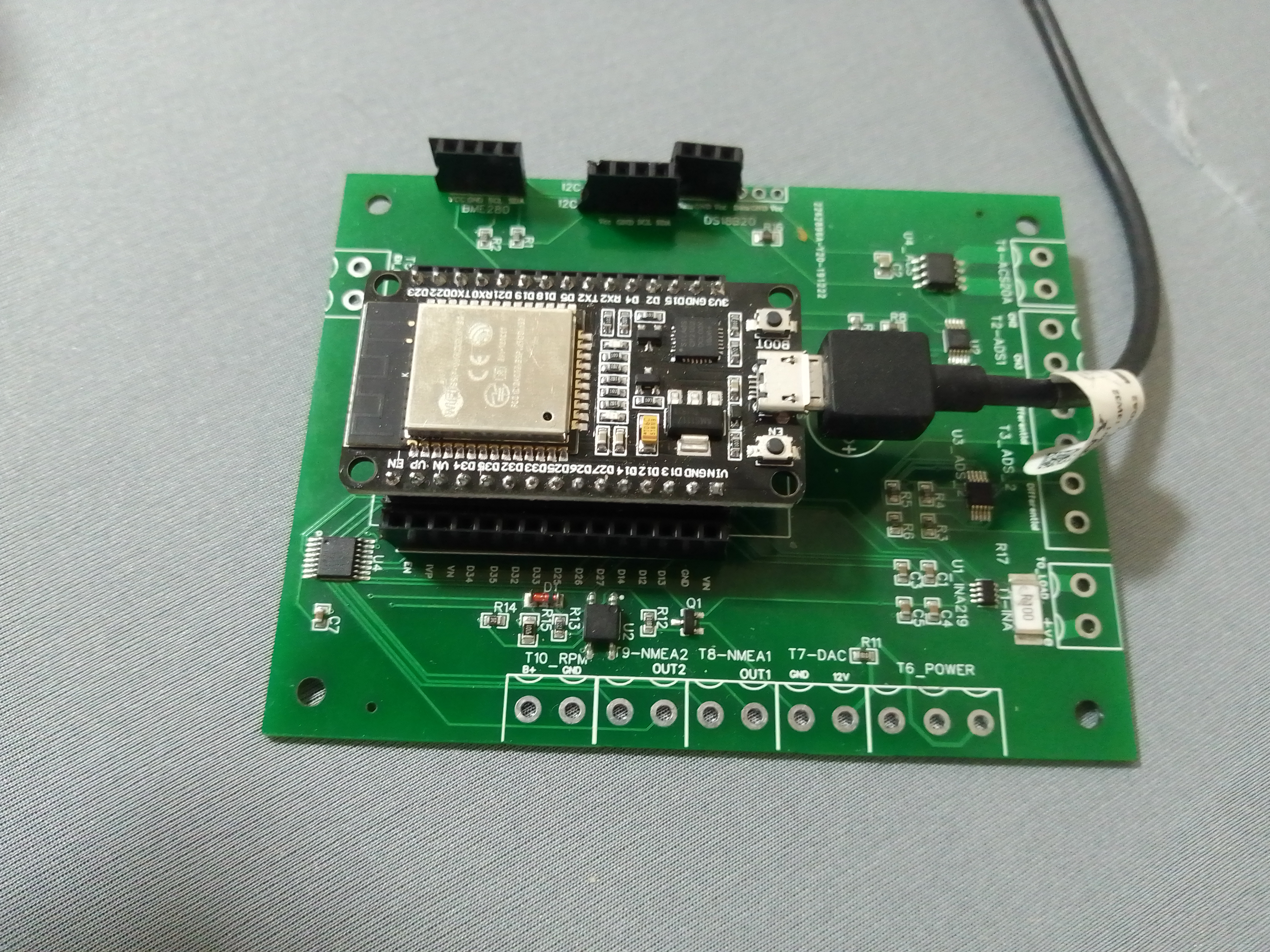

 Think they even do some through hole soldering now cheap, so you get a complete board back.


