
Another River Thames Guide update

Rascal Joe

Well-Known Member
Joined
16 Jun 2013
Messages
278
Location
Ascot
www.jeffmaynard.com
The free to download and use complete guide to leisure activities on the River Thames (tidal and non-tidal) and Wey Navigation has been updated again.
This update is largely to address some increased security features in Apple's upcoming iOS and iPadOS 26.4 release (expected later this week); this version (26.3) also includes new and improved information and better UI on moorings and marinas
The Apple versions (including for Apple silicon Macs) will be available through the App Store over the next day or so - I will update the version for other platforms in the next 24 hours.
As ever, see the full feature list and find download links on the support site here.
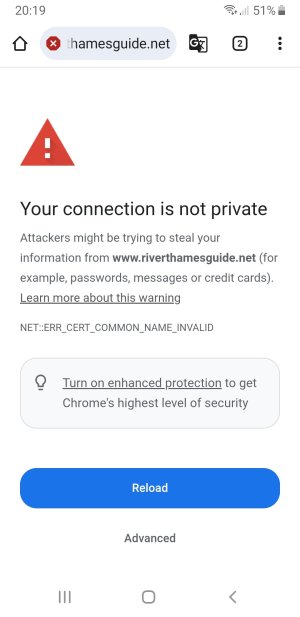
 
I get a security warning when I use that link, also can't find app on playstore.
 

Attachments

  • Screenshot_20260324-201919_Chrome.jpg
    Screenshot_20260324-201919_Chrome.jpg
    132.3 KB · Views: 2
Rascal Joe,

When following the "windows" link, initially it looks fine, but I get the following message when I search the "conditions" page:

"The webpage at https://www.riverthamesguide.net/eaparse/scrape.php might be temporarily down or it may have moved permanently to a new web address."

Notwithstanding this recent new error, the improvements on the "conditions" page are great thank you.

Regards,

Andrew
 
Andrew
Bit puzzled: which ‘windows’ link?
Have you installed latest update which addresses some login issues ?
Let me know
Rascal Joe,

When following the "windows" link, initially it looks fine, but I get the following message when I search the "conditions" page:

"The webpage at https://www.riverthamesguide.net/eaparse/scrape.php might be temporarily down or it may have moved permanently to a new web address."

Notwithstanding this recent new error, the improvements on the "conditions" page are great thank you.

Regards,

Andrew
 
Andrew
Bit puzzled: which ‘windows’ link?
Have you installed latest update which addresses some login issues ?
Let me know
Rascal Joe,

I started by clicking your link in Post No 5.

This shows 4 options, the extreme right is for windows laptops. I clicked it.

I get a page called Journey planning. On the left, I clicked on the 4th from the top called "conditions now".

On the new page, I clicked on the top option called "current conditions". This is when I now get the issue.

By the way, it was working up until a few days ago.

Regards,

Andrew
 
The recent update will clear these issues ( caused by third party security changes). Please update to latest version and let me know if any further problems.
Rascal Joe,

I am really sorry to be a nuisance, but I still have problems on both by Windows computer and my Android phone.

I have deleted all of the old app, and reloaded from the new link.

Oddly, I can get lots of the information perfectly such as bridge heights etc. The problem seems to be isolated to the report on the conditions on each reach. It was working perfectly up until a week ago.

I would appreciate some help please.

Regards,

Andrew
 
Andrew
I have neither a Windows not an Android device so will need some help in tracking this issue to a solution. (I can only run the PWA code in Chrome on a Mac)
Please confirm the version of the app you are using (Home/+/About/Versions)
Then let me know now what, if any, error messages you get when trying to view Conditions - does it load the page headed Conditions/Weather or just do nothing
On the app Home page do you see two coloured bands above the flags (showing stretch boards and fluvial colour respectively)?
Does it work if you load this page (River Thames Guide) in a browser (Chrome or Firefox) and follow the links (particularly Conditions)?

Hopefully, (detailed) answers to these questions will let me isolate the problem...
cheers
 

Other threads that may be of interest

Top