Adverts

boatmike

Well-Known Member
Joined
30 Jun 2002
Messages
7,053
Location
Solent
Visit site
Is anyone else having difficulties using this site because adverts for Velux Windows keep obliterating the forum? I know we have to put up with adverts but not on top of the text!!!!

 
No criticism of Mike is intended but I am surprised how many threads we have every week about the advert "problem". Across all the YBW forums I would suggest that we have a new thread every day, and often, as at the moment, several on the go all at the same time.

The answer to every single thread is always the same so I'm very surprised that the solution never seems to become embedded in the forum consciousness. :confused:

Richard
 
But then I am on Chrome without an adblocker and see no adverts. On the PC at home in the past few days I have had ads overlaying the text a couple of times but the back button removed them.

Very strange that some browsers are showing ads and some not. I'm using home tower PC running W7 , Chrome, DuckDuckGo and adblocker with no sign of ads.

P.S. Just had advice that the forum is being moved to a new platform, Xenforo, on Wednesday. Maybe that will sort problems - or make it worse:confused:
 
Last edited:
Well thank you for the hints. Have installed the adblocker thing. See how it works out. I don't live on this site as much as others may do so have missed if this question has been aired before but I had not seen it. Lets hope all is well now.
 
Been driving me crazy on W10 and Edge. Side window adverts on both sides overlaying the text with no way to remove them other than to exit the browser. Refresh worked for about 5 seconds before they popped up again. I don't mind adverts on the side out of the main text but overwriting the actual forum so its unusable is self defeating as I just won't come here any more... Was trying to avoid installing ad blocker but maybe the way to go if the shower of web programmers employed here don't improve.
 
Been driving me crazy on W10 and Edge. Side window adverts on both sides overlaying the text with no way to remove them other than to exit the browser. Refresh worked for about 5 seconds before they popped up again. I don't mind adverts on the side out of the main text but overwriting the actual forum so its unusable is self defeating as I just won't come here any more... Was trying to avoid installing ad blocker but maybe the way to go if the shower of web programmers employed here don't improve.

As well as an adblocker (I currently recommend uBlock Origin), you might also install the "Compact Page View" userstyle extension, which was developed by forumite DaveRo - it strips out the side panels, amongst other things, leaving a clean view of the actual forum.
 
No criticism of Mike is intended but I am surprised how many threads we have every week about the advert "problem". Across all the YBW forums I would suggest that we have a new thread every day, and often, as at the moment, several on the go all at the same time.

The answer to every single thread is always the same so I'm very surprised that the solution never seems to become embedded in the forum consciousness. :confused:

Richard

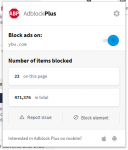
Just installed adblockplus and whilst it is blocking 22 adverts at the moment it does not stop the "we value your privacy banner" coming up every time the screen changes to another page. I have had a way of stopping it explained to me on another thread but i have to go through the process every time i visit the site and its getting a bit onerous. Is there another programme I can install that will stop that banner coming up all the time?
 
Thanks toSeaspray this is the only way i can stop it.
image: http://www.ybw.com/forums/images/ybw/misc/quote_icon.png

Quote Originally Posted by Sea_Spray
image: http://www.ybw.com/forums/images/ybw/buttons/viewpost-right.png

View Post
I have just fixed this (after much investigation). Essentially it looks like there was a corrupt cookie in the browser cookie jar. If you are using Chrome as your browser here are the steps that worked for me.


Navigate to 'chrome://settings/siteData' (without the quotes) by pasting or typing it into the address bar and hit return
type 'ybw' into the search area (not in "Search settings" at the top - but the smaller one adjacent the magnifying glass
delete everything there by clicking on the bin icon. There will likely be some for www.ybw.com and some for ybw.com. Get rid of all
Close the tab.
Visit ybw.com/forums - You'll need to log in, but for me, all is well now.

Read more at http://www.ybw.com/forums/showthread.php?531232-We-Value-your-Privacy-not/page2#mjbKjKXGCsE4wX6x.99
 
Top