Active Captain & Garmin EchoMap Sync issue.

Phil_boat

Well-Known Member
Joined
6 Jul 2025
Messages
161
Visit site
I have a new Garmin EchoMap and I have Active Captain on my phone.

The sync for map updates, software updates etc is working fine, so I know the connection is good between the two.

The thing I am having issues with is getting routes from my phone onto the EchoMap.

If I have the phone connected to the EchoMap then I can click the "Sync & Navigate" button and that specific route will get fired to the plotter and it will start navigating.

BUT

I can't get it to bulk copy across / sync routes from phone to plotter.

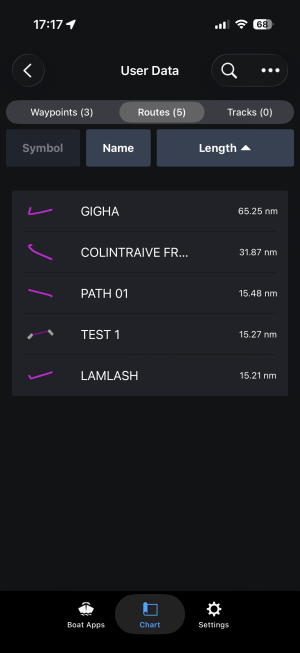
Here's 3 I have made to test it out, I thought after syncing user data the 3 routes should show up as saved routes in the plotter. Or have I miss understood how it works? I also expected any routes created in the EchoMap to end up on my phone.

It does appear to sync waypoints between the two.

Cheers
IMG_0801.png
 
I have Echomap 92sv and Active Captain .... two items I have come to dislike !!

I am watching with interest to also see solution ....

(FYI - I gave up using Active Captain to update and switched to Garmin Express / SD Card..... fed up resetting connection phone to plotter to get all updates across and installed).
 
I have a new Garmin EchoMap and I have Active Captain on my phone.

The sync for map updates, software updates etc is working fine, so I know the connection is good between the two.

The thing I am having issues with is getting routes from my phone onto the EchoMap.

If I have the phone connected to the EchoMap then I can click the "Sync & Navigate" button and that specific route will get fired to the plotter and it will start navigating.

BUT

I can't get it to bulk copy across / sync routes from phone to plotter.

Here's 3 I have made to test it out, I thought after syncing user data the 3 routes should show up as saved routes in the plotter. Or have I miss understood how it works? I also expected any routes created in the EchoMap to end up on my phone.

It does appear to sync waypoints between the two.

Cheers
Those are not routes, they are "Auto Guidance Paths", so you do need to click the "Sync & Navigate" button. If you create a route it will sync instantly, from the plotter to the phone or vice-versa.
 
Aha!

Yes they were quick auto guidance “routes” that I made to test it - I didn’t realise it treats them differently. I’ll plot a route manually and check it works 👍

Can I edit an auto guidance path and then save it as a normal route? I’ll have to have a play…
 
Aha!

Yes they were quick auto guidance “routes” that I made to test it - I didn’t realise it treats them differently. I’ll plot a route manually and check it works 👍

Can I edit an auto guidance path and then save it as a normal route? I’ll have to have a play…
Not seeing a way to change it into a "normal" route, perhaps so you know it was auto generated ?
 
Not seeing a way to change it into a "normal" route, perhaps so you know it was auto generated ?

Yes I’ve been having a play and can’t do anything with the auto routes. It’s no big deal really as if I’m using an auto route I’m more likely to just put it straight into the plotter.

Although there would be definite benefit in being able to start with an auto route and then save & sync a tweaked one.
 
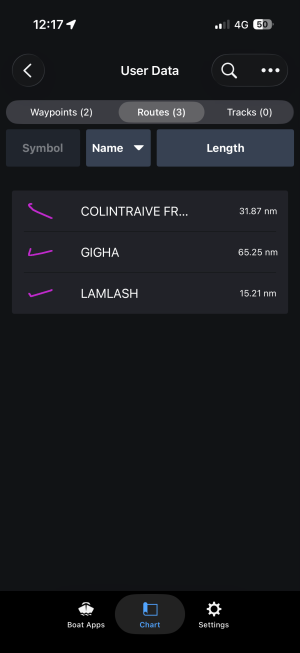
IMG_0825.png

I see now that the manually created routes have a different looking icon ✅


My next task is to try and get the recorded track from plotter to phone…
 
Yes I’ve been having a play and can’t do anything with the auto routes. It’s no big deal really as if I’m using an auto route I’m more likely to just put it straight into the plotter.

Although there would be definite benefit in being able to start with an auto route and then save & sync a tweaked one.
I think you can.
 
Top