Working from the boat - laptop charging

scruff

Well-Known Member
Joined
2 Mar 2007
Messages
1,171
Location
Over here
Visit site
In anticipation of the sailing season starting and working from home continuing for the rest of the year, I think Fridays and perhaps Mondays will become "Work from the Boat" days.

My work laptop can be supplied with a 65w usb c cable and will need circa 1.5hours of charging to make it through two days.

Currently we don't have an inverter & boat will be on swinging mooring / anchor so no shore power.

Whats the cleanest looking - not going to trail croc clips to battery terminals and leads across cabin to run a cheap inverter each time I want to charge, I'd much prefer a socket with switch and all wiring tidied away behind the paneling.

Thanks
 
I bought one of these recently which is enough to power my Surface Laptop 3 while in use or to charge it. I prefer this to a charging adapter as it gives me USB A and C sockets ready to use on the boat. It doesn’t get warm at all when charging the laptop at full pelt.
https://www.amazon.co.uk/gp/aw/d/B07R8JV1LX

Looks like we have a winner thanks!
 
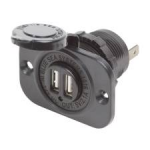
Or buy a 12V powered USB plug and install that instead of a cigarette lighter socket. Save buying a car charger and the socket which is often problematic in a marine environment. Something like this. View attachment 110927

At 25w that's not going to be suitable for the OPs 65w requirements, OK for lower demand use though, just avoid cheap and nasty ones as the output voltages can be all over the place.

The one in post #6 would be OK for the OP.
 
The one in post #6 would be OK for the OP.

Maybe, but the description says the USB-C output is max 46W. But then the specs say the entire device has 36W rated power. So, as with lots of these cheap electronic bits, nobody is really sure what they're getting.
 
Have you considered a solar charger I have one for my sat phone in our grab bag in case we end up in the life raft

We have solar, but when I say "work from the boat" I do, unfortunately, actually mean work. I can imagine I'd get my p45 pretty swift if I dropped off a conference call because a cloud came over at an inopportune moment.
 
I live aboard 24/7 and rely on Solars. I have a Lenovo Think pad Yogga X1 and I bought a 12 volt charger from Lenova which is matched to the PC. This is important because my PC needs 19V 65Watts. I also have cigarette sockets and a cheap invertor as a back up for when the car adaptor breaks (and thye do) , they normally are not designed to be used every day.

See BESTEK 150W Power Inverter - 3.1A Dual USB,

it also runs my hear trimmer and other low watts AC devices

I have had 3 Surface Pro's 3 & 4's and their charger specs are diffenent to the Lenovo (and they are economically un repairabale hence the switch to Lenovo)

Good luck
 
Maybe, but the description says the USB-C output is max 46W. But then the specs say the entire device has 36W rated power. So, as with lots of these cheap electronic bits, nobody is really sure what they're getting.
The one I linked does 18W per port which, as I said, is sufficient for a modern fully specced laptop. The 65W charger included with the laptop charges faster, but 18W is sufficient while in use. The laptop actually uses much less than this while in use, between 6W and 12W although I’d expect that to go up for heavy tasks like video renders. Nobody in their right mind would spend the whole day doing that though so the battery would cope and catch up after it finished. I’ve measured all this on my setup and it’s pretty consistent.
MacBooks can be picky about power sources but any modern PC laptop should be fine
 
I live aboard 24/7 and rely on Solars. I have a Lenovo Think pad Yogga X1 and I bought a 12 volt charger from Lenova which is matched to the PC. This is important because my PC needs 19V 65Watts. I also have cigarette sockets and a cheap invertor as a back up for when the car adaptor breaks (and thye do) , they normally are not designed to be used every day.

See BESTEK 150W Power Inverter - 3.1A Dual USB,

it also runs my hear trimmer and other low watts AC devices

I have had 3 Surface Pro's 3 & 4's and their charger specs are diffenent to the Lenovo (and they are economically un repairabale hence the switch to Lenovo)

Good luck

the X1 will work with the socket I posted via USBC so no need for inverter.
the old gen surface devices didn’t support USBC charging but had standard chargers for AC across the range in different wattages for charge times. All current Surface line support USBC charging apart from the Book which uses too much power to work well. I have the Go and Laptop 3 both working in this socket.
 
In addition to a beefy enough 12v socket you'll need a charger that matches the input voltage reuired by the device that you're charging. I've used universal ones like this before with no problems or your device's manufacturer may do one. Inverter absolutely not the way to go...
No, USBC with PD is a standard so all you need is a USB PD charger and a USBC cable.
 
It's an easy point to miss as laptops always used to be unique snowflakes from a power/socket perspective but since the OP is talking USBC it's much easier. Also because it's generally only modern and higher spec ones that tend to have this right now the power needs will be broadly similar so an 8 hour day is about 150WH of power for most of them, easily doable on Solar. My wifi adds about that again for a full day of Internet on board
 
I've now run two MacBooks constantly off 12v USB-C adaptors, and the exact wattage isn't important. The laptop never actually draws 65W - I guess the mains charger is simply rated at that to facilitate very fast charging when necessary.

Having killed the first MacBook by using a cheap USB-C hub, I am now somewhat careful about which USB-C devices I'll use - Belkin advertise a warranty against such disasters. I presently own one these chargers (to which I am connected right now, in fact) and two of these.

The 15W charger provides enough power to run my laptop, even with quite heavy use. Most of the time it sits at 100% charge, but on a couple of occasions I've spent a few hours doing heavy photoshop / video editing and then it hovered between 90% and 100% the whole time.

I also have four of these USB-C power banks which my MacBook can also run off - I liked the first so much I just kept buying more of them. I've never seen better value powerbanks than these, in terms of capacity per £ and USB-C charging (both ways), but you have to shop carefully as the prices seem to vary - the same thing is currently listed at £29.99 and also at £39.99 (both listed as "Sold by Charmast UK and Fulfilled by Amazon"). So I advise searching Amazon for "charmast bank" and then manually looking for the 26800mAh ones.
 
Top