Which laptop? A possible solution. Waterproof, tough.

Obi

Well-Known Member
Joined
23 Jun 2009
Messages
742
Location
Landlocked temporarily.
Visit site
I remember mentioning this product on a thread a while ago, and am now looking for a small tough solution for my cockpit myself.

So whilst I was searching the web I found the link below and thought I would share it.

Simply because it is quite impressive and anyone looking for a very tough laptop might be interested in seeing this:

http://www.youtube.com/watch?v=YClt8Pq_rjs

Now, if i can only find a small one, old and cheap :-)

Mark
 
Yes, I think you mentioned that before. I was simply putting out information for posterities sake, on a topic I seem to have come across a few times.

Some yachts may find there is a benefit to have a waterproof laptop that doesnt matter if it gets dropped. Everything else on board is built for the environment, if a laptop is going to be on board then its not a bad thing to get something built to handle a harsh environment.

I had a new laptop fail within 3 months of it being on board, and on my very stable and sea worthy yacht, I think a tough book would be a better solution for me, than a run of the mill laptop. Standard laptops are designed to last about 3 years, as I have already said. Many many many will last longer, but if you use it for GPS/Weatherfax, why risk having a prone to fail device. Yes I know we shouldnt rely on only one system, and wihlst I navigate by paper and compass, I also have 3 seperate systems for getting a GPS fix, as for the weatherfax, well I have navtex, as well as internet and HF, AM Radio, and would like to have laptop based weatherfax as well (in progress).
I know some things can really out last expectations, my parents have just had a 40 year old fridge fail for the first time. But it is expectations, and I expect a laptop to not last long on board, or even in the home.

Laptops are prone to failure at the best of times, unless treated with kid gloves. Ive worked in the industry for over a decade.

Not everyone understands or has the pre-requisites for backing up, restoring or rebuilding laptops, so here is one way in which the risk of that can be mitigated. That said, it only mitigates water or impact damage, hardware can still fail, and backups should still be taken, its not a silver bullet by any chance. Its also probably a heavy laptop to lug around, and is costly compared to others.

Another thing I have heard people doing recently, is using a large memory SD RAM chip to hold all personal data (including all user files), so that in the event of a HD failure, their personal data isnt lost. I think I will do this.

Mark
 
Last edited:
I remember mentioning this product on a thread a while ago, and am now looking for a small tough solution for my cockpit myself.

So whilst I was searching the web I found the link below and thought I would share it.

Simply because it is quite impressive and anyone looking for a very tough laptop might be interested in seeing this:

http://www.youtube.com/watch?v=YClt8Pq_rjs

Now, if i can only find a small one, old and cheap :-)

Mark

If you have money to burn, but then you would have a tablet PC with Nobletec VNS pro right?

For the money I would buy 2 laptops and two good GPS units and an Iphone on contract. Done!

It is not usually the damage caused my the elements that causes the problems it is the software the user unexpectedly downloads that messes it up.

Oh and in the test they dont have the car driving over the TFT monitor now do they!! Imagine you drop the laptop while using it the screen lands on the winch, 28 days for insurance to get you a new one??? Why bother.

But thanks for posting your interest in this Hardware.
 
It is not usually the damage caused my the elements that causes the problems it is the software the user unexpectedly downloads that messes it up.
.

Looking at your next post, I would suggest go with the laptop and have it "Navigation Only" so not to download emails, facebook, youtube etc - If you use Nobeltec VNS Pro (we did) then you must be connected at times for updates.

I would buy another laptop (maybe Ipad when it comes out, for internet)

Theres a thought, my iphone takes a hammereing would Nobeltec work on the Ipad, use it with a waterproof case that has padding around it

so many options ay!!
 
Well, I have used a laptop for years, just inside a plastic sealable bag, held down with bungees to a special little table, and will probably go on like that...

HOWEVER..... I was wondering what excuse I could dream up for playing around with the new iPad -- I felt like this about the Tablet PC, but never tried it out -- the thing has everything... it is sold state, no keyboard to spill coffee on (when being used to watch DVDs) has its own GPS which can see through metallic tinted windows (now there's a plus on its own) -- the Nav SW guys are going to be falling over themselves to get there stuff iPadized and the price has to be low in such a mass market.... my advice:don't buy anything for a while unless you can afford to play!

But on more serious note, I often drooled over the Toughbook, so obviously more suited than an 'ordinary' laptop, but never could justify the premium price, and whilst I was drooling the years with my old Toshiba slipped by... 2001 season was the first year, still going fine. ;-) (( No, I lie, the hinge between the keyboard part and the screen tends to be over-stressed by the inertia of the screen and is definitely beginning to be a bit loose, so maybe SWMBO may let me get an iPad....
 
Surely you couldn't do much better for boat use for £100 to £150 odd, as long as it's going to be OK to run whatever you want it to, has XP as well, less hassle than Vista...
 
Standard laptops are designed to last about 3 years, as I have already said.
Laptops are prone to failure at the best of times, unless treated with kid gloves.
Strewth - I've got 3 x Thinkpad 600's set up for navigation - they're currently 12 years old and I reckon good for another 12. Not treated with kid gloves either. Cost me all of £20 each.
And - being modular (IBM calls these FRU's - Field Replaceable Units), they're easy enough to fix, swap parts around etc.
Not very high spec by today's standards, but then I ain't driving a Space Shuttle !
 
Yes, I think you mentioned that before. I was simply putting out information for posterities sake, on a topic I seem to have come across a few times.

Some yachts may find there is a benefit to have a waterproof laptop that doesnt matter if it gets dropped. Everything else on board is built for the environment, if a laptop is going to be on board then its not a bad thing to get something built to handle a harsh environment.

I had a new laptop fail within 3 months of it being on board, and on my very stable and sea worthy yacht, I think a tough book would be a better solution for me, than a run of the mill laptop. Standard laptops are designed to last about 3 years, as I have already said. Many many many will last longer, but if you use it for GPS/Weatherfax, why risk having a prone to fail device. Yes I know we shouldnt rely on only one system, and wihlst I navigate by paper and compass, I also have 3 seperate systems for getting a GPS fix, as for the weatherfax, well I have navtex, as well as internet and HF, AM Radio, and would like to have laptop based weatherfax as well (in progress).
I know some things can really out last expectations, my parents have just had a 40 year old fridge fail for the first time. But it is expectations, and I expect a laptop to not last long on board, or even in the home.

Laptops are prone to failure at the best of times, unless treated with kid gloves. Ive worked in the industry for over a decade.

Not everyone understands or has the pre-requisites for backing up, restoring or rebuilding laptops, so here is one way in which the risk of that can be mitigated. That said, it only mitigates water or impact damage, hardware can still fail, and backups should still be taken, its not a silver bullet by any chance. Its also probably a heavy laptop to lug around, and is costly compared to others.

Another thing I have heard people doing recently, is using a large memory SD RAM chip to hold all personal data (including all user files), so that in the event of a HD failure, their personal data isnt lost. I think I will do this.

Mark
Given that a 250 gb 2.5" hard drive is only about £45 plus VAT, it would make sense to ghost/acronis the system on to a spare and when the time comes (as a pro, I always advise that a hard drive has a life of about 3 years) just take the old one out and plug the new one in. I have USB connectors to connect them externally, acronis recognises them and so a system clone could be done every 6 months or whatever.
It is normally the hard drive that goes on a laptop.
Stu
 
Strewth - I've got 3 x Thinkpad 600's set up for navigation - they're currently 12 years old and I reckon good for another 12. Not treated with kid gloves either. Cost me all of £20 each.
And - being modular (IBM calls these FRU's - Field Replaceable Units), they're easy enough to fix, swap parts around etc.
Not very high spec by today's standards, but then I ain't driving a Space Shuttle !

Here is another vote for the IBM thinkpad 600. I've got 2 of them. If one breaks down , I just pull out the other one and carry on. There is only one problem with this strategy.... The first one hasn't broken down yet.
Actually the thinkpad 600s are the most reliable piece of Navigation equipment on my boat. they have seen off the first GPS, the VHF, The depth instrument, the wind instrument, the chart plotter. And now even some of the paper charts are looking decidedly dodgy compared to the thinkpad 600.
I treat my thinkpad 600 with a total lack of respect and it just keeps on going, never needs rebooting.

So the only problem I have now is that after reading what everyone has to say on the forums about toughbooks and other pc solutions, I can see that if i try to upgrade these I am going to end up very very disappointed and alot poorer.

So it would be interesting to know......

What is the replacement for the IBM thinkpad 600?
At the moment , it looks like there isn't one.
 
toughbook cf29

on eBay.com for $300 US, 2 weeks ago, with dvd 2 gig, splashproof rubber port covers and the battery runs the unit for 4 hours, present for wife on 14th.

Turns out to 3 years old off lease, originally 11X the price new.

No scratches, runs 100 percent. .
 
Last edited:
Here is another vote for the IBM thinkpad 600. I've got 2 of them. If one breaks down , I just pull out the other one and carry on. There is only one problem with this strategy.... The first one hasn't broken down yet.
Actually the thinkpad 600s are the most reliable piece of Navigation equipment on my boat. they have seen off the first GPS, the VHF, The depth instrument, the wind instrument, the chart plotter. And now even some of the paper charts are looking decidedly dodgy compared to the thinkpad 600.
I treat my thinkpad 600 with a total lack of respect and it just keeps on going, never needs rebooting.

So the only problem I have now is that after reading what everyone has to say on the forums about toughbooks and other pc solutions, I can see that if i try to upgrade these I am going to end up very very disappointed and alot poorer.

So it would be interesting to know......

What is the replacement for the IBM thinkpad 600?
At the moment , it looks like there isn't one.
Lenovo
Stu
 
Waterproof laptops

For most people a better (and cheaper) bet than a Toughbook or other rugged laptop is to take an ordinary laptop, mount it in a (ventilated) draw or locker, and plug in a remote display and keyboard and mouse or trackball. The laptop and its cabling is secure and protected, and your chart table is clear for working on.
Unless you want things like 3-d or radar, no need for anything special on the PC front - just about any entry level machine will do.
Alternatively go for a marine PC - I'll be doing a review of some of these in Yachting Monthly soon.
Tim
 
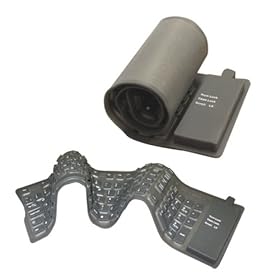
Has anyone tried these waterproof keyboards? £9.99

41RBWQK7PSL._SL500_AA280_.jpg


http://www.amazon.co.uk/Flexible-Waterproof-Keyboard/dp/3582000095

At the rate my children throw food and drink over anything within reach, it's seems like cheap insurance.

As for the mouse, here's one I've just found, but it's £39.95. Keeping some spare £5 mice seems cheaper.

http://www.amazon.co.uk/Silver-Mous...2?ie=UTF8&s=electronics&qid=1265018747&sr=1-2
 
Has anyone tried these waterproof keyboards? £9.99

41RBWQK7PSL._SL500_AA280_.jpg


http://www.amazon.co.uk/Flexible-Waterproof-Keyboard/dp/3582000095

At the rate my children throw food and drink over anything within reach, it's seems like cheap insurance.

Yes. I use one for the laptop on the boat and have 5 or 6 attached to computers in the lab.

You would not want to use them to write a novel, the keys don't feel nice and need sort of vertical pecking action to use. But for most applications that is not a real problem.
 
Waterproof blue tooth display

I met a Dutch couple in Scotland who had a fantastic solution to this. They were both a bit tecky which helped.
On a 32 ft boat they had a normal laptop below, but had a hand held mobile display unit which was waterproof and could repeat the laptop screen image in the cockpit using blue tooth.
There was no interaction with the laptop. It was just a display. This would be perfect for most times as it would do away with the mad dash below just at the critical moment when everything else seems to be unravelling.
Regrettably, cannot remember where he got it, so any ideas most welcome.
 
Used a s/hand Thinkpad ( £100 - £150.00) for 4 years with no problems and not really wrapped it in cotton wool.
Built like a brick out house and ideal for charts, emails playing dvd`s etc etc.
 
I have used a Panasonic CF27 for about 5 years. It is only used for navigation and keeping a few photos on but works very well.

I have to say it was donated to Little Ship but there is a company that sells them at a very good price. If you want something for the internet you will probably need something a little newer/faster but...... have a look here.

http://www.sterlingxs.co.uk/scpages/panasonictoughbooklaptopcf27.html

I also run a remote screen to show the charts. These units are under £100 and for chart use you cant ask for better.

Tom
 
I Have two toughbook CF-29's in the for sale section, they are way better than a normal laptop, the only worries if they fall off the chart table are breaking the floor!!! but, they have lots of advantages to a normal laptop - of which ive broken a couple... our boat is raced heavily so chart plotting is often done with water pouring off sodden wets - usually over the keyboard, you dont have to be so careful when trying to sleep the crew and finding aplace to stow the thing without worrying of it being squashed, then the is the occasional fall... the toughbooks also have the advantage of a daylight screen so its a lot more comfortable to use in the cockpit, the cases look lovey and dont mark easilly... finally, the battery life - using the yellowtab and second batteries you can get over 10 hours of runtime.

With the US laptops you need to be wary of the shipping and customs,
both of mine came from the states originally, but I got hit with customs charged of over £60!!

We now have a slightly more permenant soution - a full size 15" display mounted where the radar used to live, one of those rubber keyboards - horrible to type on (you need to press directly down on the buttons or they dont always register), but fine for nameing waypoints! and a medical silicone encased optical mouse, conneced to an ULV fully sealed and waterproof, passivly cooled 12v PC mounted under the bunk.
 
Top