
Victron Cerbo (RasBo)

lustyd

Well-Known Member
Joined
27 Jul 2010
Messages
14,331
Visit site
Well this is bloody brilliant! Following the recent thread, I bought a Raspberry Pi and a GPIO hat all for £50. I followed the simple instructions on GitHub to install VenusOS on an SD card and now I have what is effectively a Cerbo GX. It's not in a nice blue box, doesn't have support, and I need to sort out a 5v power supply, but it seems to work exactly as if it were a Cerbo GX.

This is very interesting to me, because there was very little chance I'd have spent the extra money on the real Cerbo GX just to collate data and connect to an MFD, but it does add a bit of value overall to the system which is appreciated. Well done to Victron for opening this up to the world and enabling a few extra features on their other systems, this kind of thing really reinforces the decision to go with their system, alongside all the great documentation and training.

Can't wait to get to the boat and hook up the rest of the toys to it.
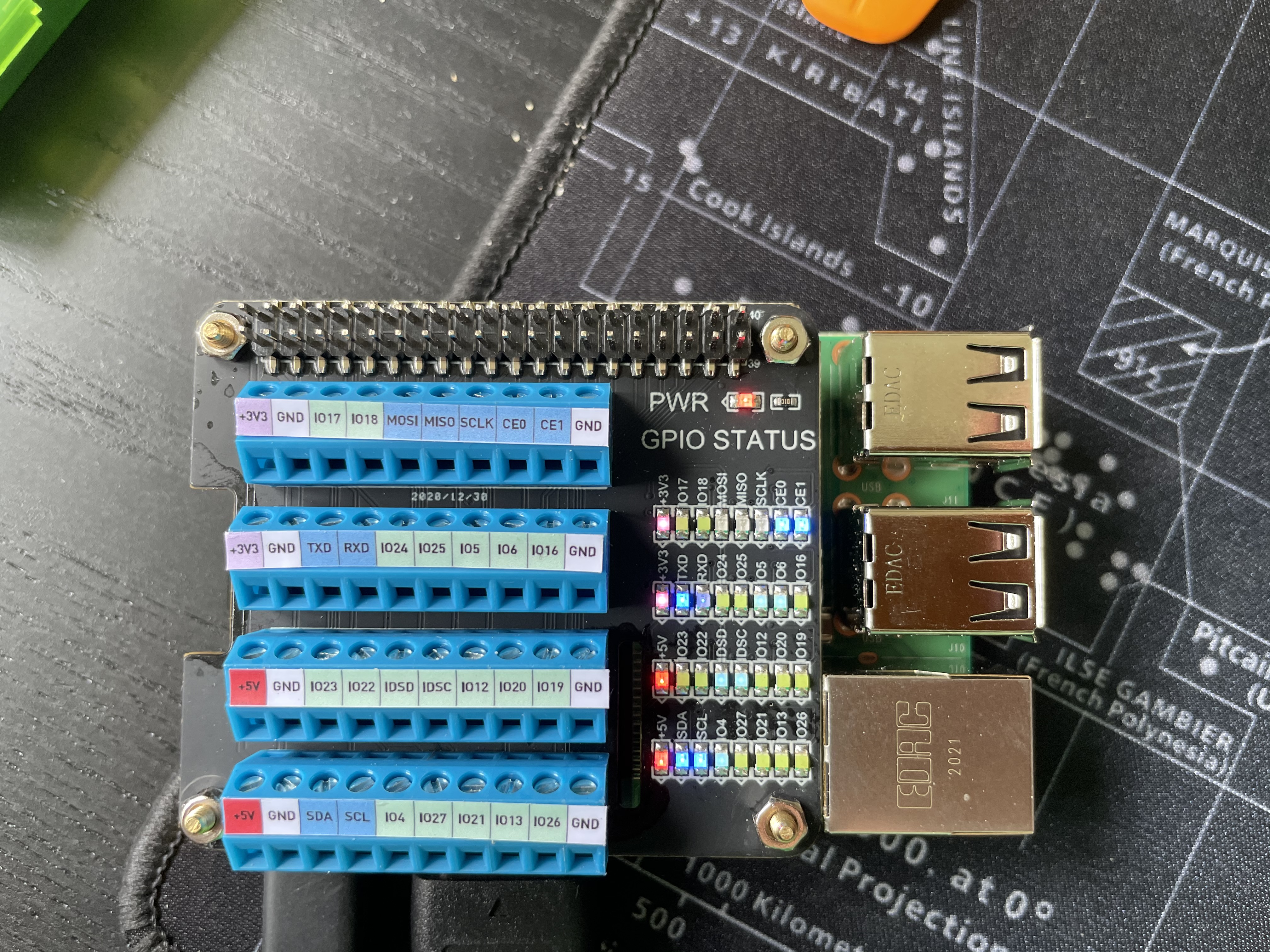
rasbo.jpg
 
Just fitted mine last week on board, connected to onboard wifi hub and now playing with it from home. The remote generator switch via relay board can be used for loads of things, I’ve got it switching the battery charger at the moment to top up when solar is short.
 
There seems to be a lot you can do but not a lot of simple explanation of how. I’d be interested how you hooked up the relays too
 
Well this is bloody brilliant! Following the recent thread, I bought a Raspberry Pi and a GPIO hat all for £50. I followed the simple instructions on GitHub to install VenusOS on an SD card and now I have what is effectively a Cerbo GX. It's not in a nice blue box, doesn't have support, and I need to sort out a 5v power supply, but it seems to work exactly as if it were a Cerbo GX.

This is very interesting to me, because there was very little chance I'd have spent the extra money on the real Cerbo GX just to collate data and connect to an MFD, but it does add a bit of value overall to the system which is appreciated. Well done to Victron for opening this up to the world and enabling a few extra features on their other systems, this kind of thing really reinforces the decision to go with their system, alongside all the great documentation and training.

Can't wait to get to the boat and hook up the rest of the toys to it.

rasbo.jpg

Which Pi did you buy ?

What Victron devices do you plan to connect to it ?
 
Used pi3b+ and 5” TTL touch screen, connected at the moment to smart shunt and blue solar mmpt via VE direct port to USB, will be adding additional mmpt to it later along with inverter next year. going to also look at tank sensor for fuel and water, understand it takes standard resistance sensors direct to the pi IO
 
There seems to be a lot you can do but not a lot of simple explanation of how. I’d be interested how you hooked up the relays too
The relay is a standard pi single relay board, using the +3v output,+5v and Gand direct off the GIO pins, pin 40 is set to be used by Venus OS, then switching a 12v dc standard relay to switch 240vac for charger.
you enable the generator option and it puts a soft button on screen to switch on or off, you can also set parameters to switch automatically on low voltage etc
 
Which Pi did you buy ?

What Victron devices do you plan to connect to it ?
I got the 3 B+ as it seemed to be the latest well supported board and was cheap and easy to get. Setup was incredibly easy given the nature of the project. In hindsight I would probably not have bothered with the GPIO hat and have instead ordered some 3.3v USB to UARTs which I'll use to connect the VE.Directs up to (these were 6.79 for two Yizhet 2PCS CP2102 USB to TTL Serial Converter with 5: Amazon.co.uk: Electronics) and will make up some VE.Direct cables myself. Initially I'll just be hooking up an MPPT and battery monitor, but I'll probably upgrade the charger some time this year too and add that.
It adds in to the Victron app and portal as if it were a real device but it labelled as a rPi.
 
Oh also mine is headless as I didn't want another screen on the boat. I'm hoping to integrate with the plotter and can also use the app or web page to manage it and see the interface.
 
I did look at making the VE leads but was not sure so paid more for two of them than the whole setup, coukd you let me know pin connections you used? got to look how to add the VE bus that’s on the chargers and inverters
 
Most seem to use rx to tx and vice versa and connect the ground but leave the positive disconnected. This seems to work but goes directly against Victron guidance to use +3.3V from the Pi. I plan to use +3.3, ground and cross over the rx/tx on the USB UART which has 3.3 and 5V pins. I'll use 4 of the 5 pins. I have XLX 440PCS 2.0mm 2PIN 3PIN 4PIN 5PIN Female Male Housing Connection and 280PCS Female Pin Head Connector Plug Set Compatible with JST-PH: Amazon.co.uk: DIY & Tools on order which I believe is the correct connector.
Looks like the Pi4 has several more UARTs built in so may not require the USB UARTs or VE direct USB cables (same thing).
 
rpi4 is still a bit of a hit or miss, they'll sort it eventually, mine a 4 2GB works, others not.
I'm running since Oct a full suite of victron OS on a Rpi3B+ with a CAN HAT connected to the NMEA2000 bus onboard as well as the BMV700 and a MPPT30/100.
V. impressed with the setup, went the next step of setting up Victon OS LARGE with signalk and now all the data from the N2K bus at 1min intervals go to a Database in my office server and I can visualise them via grafana.
Not only nice graphs, but now I have a v.clear idea of what's going on, what's wrong with my fridge, SOC of service bats and a zillion more things.
well done Victron!
if you want to avoid paying 20+ for a VEDirect to usb cable, get a FTDI chip usb/serial cable and use it, dead easy
If you want to add to the system a Multiplus invertercharger you most likely (depending on model) need to get their own USB2VEBus or whatever converter.

being able to remotely get into VRM and configure/turn on off Victron devices (in my case the MPPT) is brilliant.

If anyone wants to get their Rpi to the N2K bus, there's a Fin doing a custom HAT which has a large capacitor that works as a backup power supply and can safely soft shutdown the device when disconnected from power. Also has a RealTimeClock if you need one. 70-80euro well worth it, bought it last week.

V.
 
Most seem to use rx to tx and vice versa and connect the ground but leave the positive disconnected. This seems to work but goes directly against Victron guidance to use +3.3V from the Pi. I plan to use +3.3, ground and cross over the rx/tx on the USB UART which has 3.3 and 5V pins. I'll use 4 of the 5 pins. I have XLX 440PCS 2.0mm 2PIN 3PIN 4PIN 5PIN Female Male Housing Connection and 280PCS Female Pin Head Connector Plug Set Compatible with JST-PH: Amazon.co.uk: DIY & Tools on order which I believe is the correct connector.
Looks like the Pi4 has several more UARTs built in so may not require the USB UARTs or VE direct USB cables (same thing).

Early days for me with this, but i did setup a 3B+ in headless mode, was easy enough. I already had VE Direct to USB cables which connected by smart shunt and MPPT to the laptop, so i used those. I connected to the laptop with an ethernet cable which works OK, but i'll need to do some more investigating here as the connection won't access the internet and i don't have/want a router if i can help it.

With only have the smartshunt and MPPT connected it seems almost pointless, as it give less information than Victron Connect, but if i add some more equipment/sensors itshould start to look better.

I also have an RPi4 (2BG), but as VAS says, it's hit and miss. In my case, it's a miss, not been able to get it to boot yet. @vas which version of OS are you running on the Rpi4 please ?

I'm also interested in running a SignalK server on the Rpi4, with a 7" touchscreen that i already have, it also works nicely with the standard Pi OS connected to my TV via HDMI. So i'll look into running SignalK on the Rpi4, connected to the touchscreen, the TV via HDMI and wifi for anything else i want to view data on.

Ref connecting from the VE Connect devices to the Pi, i've read that the Victron cables are optically isolated, which might be a good idea, but also have some info on making cheap DIY cables, thanks to another thread on here recently.

The USB to TTL end: PL2303TA USB to TTL RS232 4 Pin Serial Converter Cable for Win 7/8/8.1 Universal | eBay
The VE connector: 10 Kits 4 PIN JST XH 2.54mm 24AWG Connector plug with Wires Cables 150MM | eBay

The video previously posted on another thread, which amongst other things shows the pin connections for the cables{
 
Those parts basically will make what I'm making. I decided to use a bare USB with dupont connectors as it puts the messy bit next to the Pi rather than along the cable. I very much dislike the connectors with tails, but probably more because I like crimping than any justifiable reason!

As I understand it the logging will be better with the RasBo/Cerbo when compared to Victron Connect. It bugs me that any time I open the app all the graphs reset. The ability to connect via Ethernet to a MFD also intrigues me. Let's be honest, it adds nothing particularly useful, but I like the idea. I note that the Garmin one has a bug right now so it may not work if you try it depending on version.

OS for 4 you probably want the test version from the 4 branch at Index of /feeds/venus/testing/images/raspberrypi4
 
The video shows the 3 pin setup for the cables. Victron are very clear on every place it's mentioned that you need a 3.3V on both ends of the cable and that you can use the 3.3v pin on the Pi if you need to for this. I have taken that to mean "most of the DIY cables are wrong". I'm not an electrical engineer but they seem pretty clear that you need to hook up the 3.3V positive somehow for a proper install.
 
I also have an RPi4 (2BG), but as VAS says, it's hit and miss. In my case, it's a miss, not been able to get it to boot yet. @vas which version of OS are you running on the Rpi4 please ?

I'm also interested in running a SignalK server on the Rpi4, with a 7" touchscreen that i already have, it also works nicely with the standard Pi OS connected to my TV via HDMI. So i'll look into running SignalK on the Rpi4, connected to the touchscreen, the TV via HDMI and wifi for anything else i want to view data on.
Paul, running VenusOS LARGE from Feb-March. Large means it has all the signalK node-red stuff in it plus some other features. Rpi4 is for testing at home (headless) 3B+ is in 24/7 operation onboard.
in theory rpi4 2GB should work Paul, check if you are running older firmware and upgrade it (not via VenusOS, just get normal Raspbian and their tools for that)
too knackered now to check, have to check what firmware I'm running on it.

good call getting all in SignalK, lots of interesting tools to viz/analyse in there
 
The video shows the 3 pin setup for the cables. Victron are very clear on every place it's mentioned that you need a 3.3V on both ends of the cable and that you can use the 3.3v pin on the Pi if you need to for this. I have taken that to mean "most of the DIY cables are wrong". I'm not an electrical engineer but they seem pretty clear that you need to hook up the 3.3V positive somehow for a proper install.

I'm shorter on time than i'd like, so skimming much of this at the moment and very much in amateur mode, there'll be others on here with more knowledge of the subject than i, Vas for instance. Some stuff here on making cables: Connect Raspberry Pi directly to MPPT over serial pins for Venus OS / Venus package - Victron Community

My laptop setup has VE to USB from the smart shunt and MPPT to a USB hub, along with GPS and my N2K network vis a Quark device, which i'm going to change for an Actisense N2K to USB, so i'm going to be inclined to stick with genuine cable, at least for now. With the hub, i only need a single USB cable to the Pi.
 
Paul, running VenusOS LARGE from Feb-March. Large means it has all the signalK node-red stuff in it plus some other features. Rpi4 is for testing at home (headless) 3B+ is in 24/7 operation onboard.
in theory rpi4 2GB should work Paul, check if you are running older firmware and upgrade it (not via VenusOS, just get normal Raspbian and their tools for that)
too knackered now to check, have to check what firmware I'm running on it.

good call getting all in SignalK, lots of interesting tools to viz/analyse in there

Tried a couple of versions on the Rpi4, currently have a Large tversion on an SD card, but it won't boot.Just checked and i'm running the latest firmware.

Edit: Just double checked, i'm running the latest firmware, but it still won't boot with the latest 2.70 large
 
Last edited:
odd, cannot really help Paul, when did you buy the rpi4?
from my understanding following the fora, they do have some clues and I'm pretty sure they'll get to the bottom of it soonish.
 
odd, cannot really help Paul, when did you buy the rpi4?
from my understanding following the fora, they do have some clues and I'm pretty sure they'll get to the bottom of it soonish.

From what i've found it looks like the 1.2 revision boards work K, but the 1.4 revision ones don't. 1.2 was the early 2gb board, 1.4 is the latest 2gb and the 8gb board.

I'll stick with the Pi3 B+ for Venus and use the Pi4 for SignalK.

I'd like to get the Pi3 to connect to the internet, for VRM, but having some issues getting Windows 10 to share my wifi connection over ethernet.
 
Top