Sync (ing) x2 chart plotters

Only if you need the internet, not an intranet (your private network with boat data). Your boat devices don't need the internet for normal operation. You only need it for chart and firmware updates, and those can be done in port and/or at home using SD cards/USB sticks.

I pay £1 a month for a Lebara (Vodaphone) sim with 50mb of data per month. Not sure where you get £200/300 a year for a simo contract from. Unless you're not in the UK.

Anyhow, why do you need an internet connection on your boat? If you need weather, pub reservations etc, just use your phone?

https://www.moneysavingexpert.com/cheap-mobile-finder/sim-only/
I dont need the internet we went off topic, this all started with me wanting an extra chartplotter on my boat so I could have different screens visible at the same time, and someone suggest an Ipad with wifi.
 
The Simrad creates its own WiFi network allowing you to mirror and control your display on an iPad using the Simrad app. No internet needed.

Simrad App | Simrad Marine Electronics
You still need to broadcast a wifi signal. On older gear Simrad use the (unreliable) "Go Free WiFi 1 module" which is what is depicted top right of the image in my post #12 above.

There is no need to use the Simrad product, any wireless access point will do. I use a combined TP-Link Archer MR500 AC1200 4G+ Cat6 WiFi Router but this is the Simrad product ..

WiFi-1 Module | Wireless | Simrad Marine Electronics
 
I dont need the internet we went off topic, this all started with me wanting an extra chartplotter on my boat so I could have different screens visible at the same time, and someone suggest an Ipad with wifi.
Forget the ipad, you don't have the capability with current set up.

All you need is one cable - B&G, Simrad, Lowrance 7.7 m Yellow plug Ethernet cable - 000-0127-30

Other lengths, longer or shorter are available.

You also originally said you wanted them to share, for that you need the cable. You now say "different screens visible at the same time". In which case, you don't even need to connect them.
 
...but I want to be able to have different screens on at the same time, but obviously don't wish to wire up a new/second transducer, is that possible on your method?
 
...but I want to be able to have different screens on at the same time, but obviously don't wish to wire up a new/second transducer, is that possible on your method?
As I said in #12, you need NMEA plugged in for depth, wind, engine parameter sources to show on your new plotter. It can see it's own GPS position.

You need ethernet if you want it to share a map card with the other plotter. If no other ethernet devices, then the ethernet cable I link to is all you need for that. If you want to have more sources, eg radar on both, then you need to plug all sources into an "expander".

The first few pages of your manual (available online) show different set ups inc the one you wish to do.
 
I’m fairly sure the mfd has WiFi built in.
Easy enough to try it.
Page 96 of the owner’s manual.
https://www.bottomlinemarine.com/prod_cat/images/NSS_evo3_User Manual.pdf
Thank you, I couldn't be bothered to read the whole manual.

It will need to be in Access Point Mode to connect an ipad running the Simrad app then put into Client Mode and then connected to your phone or another wifi hotspot to be able to download any updates.

My B&G Zeus S now has the facility to chart updates from within the plotter, saves having to take the micro SD card out and plug it into a laptop running the chart updater programme. Maybe the Evo can do that to?
 
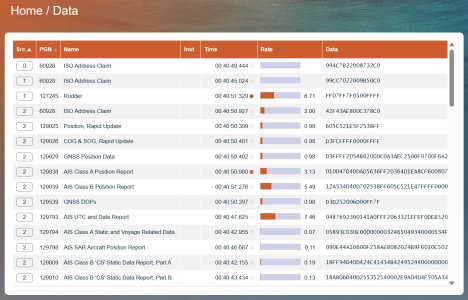
For those interested in NMEA, there are hundreds of PGNs (Parameter Group Number) and lists of them are available online. When they are dancing around your network, they look a bit like this.

Even the data is nerdy, for example, angular values (eg COG) are specified in radians, not degrees. Temperature is specified in degrees Kelvin (presumably so it can handle negative C or F values).

NMEA 2000 Standards

nmea_data.jpg
 
Why use an expensive iPad when a cheap Android tablet will do ?

Besides, the OP wants different screens on at the same time, can't do that with wifi from the plotter to a tablet.
You're a man after my own heart, Android all the way. BTW is it polite for children to laugh at their dad because he's still got a Samsung S2?
 
Top