Splicing an ethernet cable

Fascadale

Well-Known Member
Joined
15 Jan 2007
Messages
1,480
Location
One end of the A1
Visit site
I'm thinking of buying a radar.

The model I'm looking at, a B&G Halo comes with 20 metres of ethernet and power cable.

So major complications running the cable, a substantial plug that would require substantial holes to be drilled, made further complicated by the removing of the mast most winters

The dealer tells me that cutting and rejoining the cable is a problem: loss of signal and the difficulties of working with tiny wires.

Is there a solution to this? (without getting involved in other manufacturers and wireless setups))
 
You could use a swan-neck at the base of the mast, to allow you to pass plugs on cable ends into the boat, then join up inside in the dry. It's easy to get ethernet connections, I have Garmin connections on mine. They're fairly simple to install, all the cable cores are coloured.

https://static.garmin.com/pumac/Marine_Ethernet.pdf

My radome's ethernet connection wriggles around all over the place before it eventually reaches my plotter in the cockpit. The ethernet connections (2 of them) have worked fine for years.
 
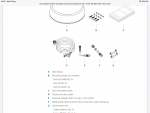
My 3G Simrad came separate from the plug which was fitted on after running the cable. I assume the Halo doesn’t?

2DFB282B-501A-458E-B14F-6AFB70C33209.png
 
RJ45 connectors and the corresponding crimp tool are cheap and easily available, as are couplers for joining two RJ45 cables. Watertight couplers are slightly less ubiquitous but still not hard to find, and recommended for this application (even if you don‘t suffer deck leaks, condensation is likely in the space above the headlining).

I split and rejoined my Raymarine radar cable this way to allow the mast to be unstepped in future; Raymarine use separate power and Ethernet cables so joining the latter is no different to terminating Cat6 in the office. Yours looks to be combined in a single cable so might need some slightly more creative handling, using sheathing and heatshrink to give a neat and watertight result for both power and data (I like Superseal connectors for the power) but the actual connections will still be the same. Since you might be stripping off more sheath than is usual for Ethernet, just make sure to keep the twisted pairs twisted right up until the cores separate down their individual channels inside the plug.

There‘s nothing specific to radar going on here, you’re just cutting and reterminating an Ethernet cable (don’t know if Navico have moved up to Cat6 with the plastic spacer down the middle or are still on Cat5) so you can google any number of guides or videos on how to do it.

Pete
 
Also worth noting that you might prefer to use standard Ethernet cable and separate power wiring for the internal side of the system, after the coupler - nothing says you have to adapt back to the Navico combined cable, and in a protected location inside the boat standard cable might be easier to run. At the very least, by using a ready-made cable you have one less crimping and splicing job to do. Again, this is all just standard networking tech - I happen to know first-hand that the previous generation “3G” and “4G” models transmit multicast UDP packets, and I’m sure “Halo” is the same - not any special radar magic.

Pete
 
I recently learned how to put connectors on Ethernet cable. For a great set of video tutorials search for “my mate vince ethernet”. You can make up an extension cable rather than splice. It is quite straightforward.
 
We’ve just installed navico 4G broadband and the instructions detail that the cable can be cut and joined in line with normal Ethernet cables. The way the scanner end is supplied, it all when through the 11mm deck gland hole. The scanner end plug was sealed and quite large and would have needed about 28mm hole to go through.

I did not need to extend as this unit needed the interface box which was closer, also helped that we were installing on the rear arch not the mast so every at right end of the boat, I did looked at the new Halo as it connects direct so would need to reach plotter, did not need the functions of this and most were on the 4G and £600 cheaper
 
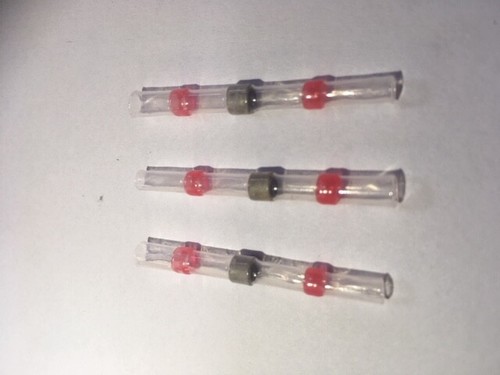
How about Heat Shrink Self-Solder Butt Splice Connectors? Easier to tidy away and feed through holes etc. I have no experience of them in a marine environment but can't see why not. You can set them off with a hot air gun.

s-l500.jpg


Index make make deck glands that would possibly allow the plug to pass through easily, though you still have to drill the large hole to start with. I have found that these are watertight especially when a bit of silicone grease is used to help them clamp up tight.
 
What an amazing place the internet is! Who would have thought you could happily spend a few hours learning about joining and terminating Ethernet cables. Great

I’m still a bit mystified by “shielding” as well as not understanding the role of the foil wrapping and the “drain” wire

Could anyone point me in the right direction that I may find out about all this

Thanks again for all the great advice
 
If you can check what sort of cable you have and continue with the same spec. Over short distances it is probably not too critical as you will not be near the maximum allowed distance of 100m for a link.
  • U/UTP - Unshielded cable, unshielded twisted pairs
  • F/UTP - Foil shielded cable, unshielded twisted pairs
  • U/FTP - Unshielded cable, foil shielded twisted pairs
  • S/FTP - braided shielded cable, foil shielded twisted pairs

Where: TP = twisted pair, U = unshielded, F = foil shielded, S = braided shielding.
 
I’m still a bit mystified by “shielding” as well as not understanding the role of the foil wrapping and the “drain” wire

It's about reducing electromagnetic interference with (and possibly also from, I'm not sure) the signals in the cable. Very unlikely to matter for a cable run in a boat, unless perhaps you took it very close to an HF radio and its antenna wiring. You can get RJ45 plugs for use with shielded cable, which have a thin metal covering over the outside that makes contact with the socket on a network switch that has a metal chassis. However, all the waterproof RJ45 couplers I've seen have been plastic, with no contact path for shielding, so the point is moot.

My Raymarine cable did have a fairly substantial braid around the cores, but I didn't connect it to anything at the joint. I regard it as mostly useful for mechanical protection in case of unexpected chafing in the mast.

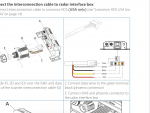
Incidentally, the fact that the screenshot above mentions an "RJ45 to five pin" adaptor tells me that Navico aren't using gigabit - 100Mb ethernet only uses two of the pairs in the cable, gigabit uses all four.

Pete
 
For work I used a lot of RJ45 'field' connectors. You just poke the wires down colour coded holes and snap them shut. No special tools required except a pair of pliers to squeeze them and no chance of bad wiring. They are expensive and a bit bulky but for installation in confined dark spaces onboard ships they were ideal .
Field RJ45
 
Interesting - never seen those before.

About three hundred times the price of standard crimp connectors, and the OP shouldn’t need to be assembling cables upside-down in a wiring cabinet ;). They also won’t fit in the usual waterproof couplers, and may be awkward to squeeze in above headlining. But potentially a useful thing to be aware of (y).

Pete
 
Genuine question, why do the self soldering connector not work?

Do they not come in small enough sizes?

As a slight aside, given the lengths and data badwidth, why gigabit ethernet? Isn't it just a little harder to bend?
 
Genuine question, why do the self soldering connector not work?

Well, for one thing the OP takes his mast down every winter ;)

I don't know, I suppose they'd probably work. It just doesn't seem like the right way to handle a high bitrate data link like 100Mb ethernet, when there are dedicated products available for the purpose. In theory at least, the amount of untwisted conductor permitted in any fitting is very small - when you terminate into a keystone jack for a wall socket, you're supposed to leave the pairs twisted right up to the punchdowns, not (as domestic electricians are notorious for doing) unravel the whole cable and run the cores in individually. Unwinding the individual cores and soldering them like so many trailer tail-light cables just doesn't feel right.

As a slight aside, given the lengths and data badwidth, why gigabit ethernet? Isn't it just a little harder to bend?

Well, as mentioned above, it looks like Navico are still on 100Mb. But Raymarine have adopted gigabit-compatible cabling at least, even if their products don't need it yet. Makes sense to design with an eye to the future - a radar might not ever need gigabit, but one day when they have a super-duper over-the-horizon camera, seabed-penetrating fish-hunting sonar, or virtual-reality drone helmet that does, they don't need to stock yet another series of cables, potentially add a different connector to enforce use of the correct ones where needed, and confuse and enrage their customers. Instead, anything that has a "Raynet" connector will be compatible from 2014ish until the day when even Gigabit is no longer sufficient.

Pete
 
Top