Skype

claymore

Well-Known Member
Joined
18 Jun 2001
Messages
10,644
Location
In the far North
Visit site
I know its been said before on here but I'm a slow learner.
Skype is brilliant for communicating with scattered family. Now have a webcam and have just been talking with Offspring and Zimmer, plus my nephew in Jerez.
FREE!
 
Because I no longer have a home telephone line and broadband, it costs me less to call the UK from Portugal than it does from home in Manchester and, with an 0161 SkypeIn number, it costs people in the UK less to call me in Portugal than at home.

Incredible!
 
welcome to the skype converted!
In December you will be able to buy a cordless skype phone that doesn't even require a PC to be running to use it. You will just need a wireless router
 
Re: Skype + Webcam

Colours indeed it does.
Last night whilst talking to Dear Heart's rather pleasant friend the Lovely Julie - I was wearing a pair of pink trousers to mark national Breast Cancer day - she was pretty impressed I can tell you and was heard to utter "My, what a fine pair of pink thighs your husband is sporting this evening" - this was after I'd scanned the camera over myself.
Dear Heart's response was less than complimentary which I must confess I found rather hurtful.

I'm now wondering if I can patch into Webcam's Webcam or even the Oban Webcam?
 
People may be interested in our experiences of multi-user teleconferences via skype.

We hold regular skype teleconferences, the issue is that there is a maximum number of participants (5, I think). We often have multiple people at each site, if they each made a separate connection that would eat up bandwidth and quickly exceed the limit. Sharing a single headset is very difficult and 'open' speakers and microphones are intolerable as they cause a terrible echo.

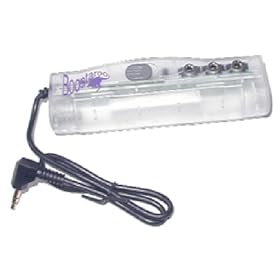
So we got one of these at each site:
B0000DBHFS.01._AA280_SCLZZZZZZZ_V58499488_.jpg


£19,95 from amazon

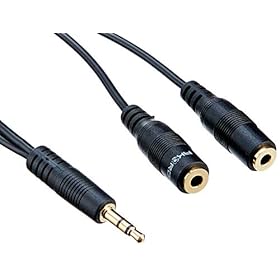
Plus 3 headphone splitters like this:

B0007OC96W.02._AA280_SCLZZZZZZZ_.jpg


£2.89 also at amazon but cheaper from Maplins etc.
We can now plug up to 6 headphones into each computer, we share a separate microphone. It works very well and we regularly have 10-12 people participating while using only 3 or 4 connections.

If you only have 2 participants per site you can get away with just the splitter cable alone, but use the amplifier if you need more (don't be tempted to just stack those cables!)


Thought it may be of interest to some, it has certainly been a great system for us.
 
[ QUOTE ]
'open' speakers and microphones are intolerable as they cause a terrible echo.

[/ QUOTE ] You can usually get rid of the echo or reduce it to reasonable levels by positioning the microphone away from the speakers. I hang the mic off the front of the desk out of 'sight' of the speakers. Everyone on the conference needs to do the same.

I wonder when they will be able to add video to conference calls - when bandwidths improve I guess.
 
Claysie, me ol' techno wizard, are you going to let us know what your Skype ID is? I just might bother to dash out too buy a new headset.
 
We could not get that to work consistently with multiple people on each machine. It was difficult to be sure who was responsible for the echo - headphones totally remove echo and so we just made them a requirement of the conference and got an immediate improvement in quality.
 
I am not sure what you are asking.

The link in my post takes you to a description of the 'boosteroo' in Amazon, it allows you to plug up to 3 headphones into the sound output of 1 computer. By adding 3 splitters you can raise that to 6. Then use a single microphone which can be passed around, or just left in the middle.
 
Being a complete numpty - what is Skype and how do I get it and make it work?

What hardware/software do I need?

My son is in Aussie and it might help if SWMBO could talk to him a bit more often.

Peter.
 
go the the skype website (type skype in google) and sign up - it uses a point to point link and allows voice traffic over the internet (Voice over IP)

You need a microphone and speakers - it's easy and free PC to PC
cheers

Ian
 
you and son just need to download software from here onto your computers and sign up for an account, and then you'll be able to 'dial' each other.
http://www.skype.com/intl/en-gb/

You need speakers and microphones on each computer, or better, a headset with microphone, so you don't get feedback. You need broadband, dial up is really too slow.
 
One thing I forgot to say.

I suggest you use cheapo headphones which allow you to hear what the person next to you is saying. If you use posh ones that cut out ambient noise you are in the strange situation of being able to hear the bloke the other side of the world but not the bloke sitting next to you.
 
Top