Simrad nss evo 3

Nigel52

Well-Known Member
Joined
21 Nov 2021
Messages
267
Location
Poole
Visit site
Does anyone know how to change the settings from km to nautical miles on the trip etc. I have SOG in NM but can’t get the other settings to nautical miles instead of km. So trip, distance run etc all in km.
Also in chart setting how to get the chart to auto scroll as you move forward. Been through the manual and have not found reference to the above. Will auto scroll in navigate mode but that does not have the chart detail I want. Also in chart mode it is easier to see AIS targets.
 
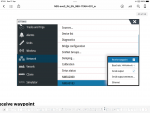
If you go to the homepage (where you change function), settings, and scroll down the black bar on the left you will find ‘units’ where you can set the universal units.
DB099915-B087-4B47-9228-9454BCF8B8AA.png

Auto scroll in chart mode I thought was default, you can switch between true motion and relative motion in the radar screen, relative motion being the screen scrolling past the boat. I have my chart set to ‘heading up’ and ‘look ahead’, not sure if ‘north up’ gives a different scrolling pattern. Simrad manuals are not the most intuitive to use, unless you already know the system:(
 
Last edited:
If you go to the homepage (where you change function), settings, and scroll down the black bar on the left you will find ‘units’ where you can set the universal units.
View attachment 133494

Auto scroll in chart mode I thought was default, you can switch between true motion and relative motion in the radar screen, relative motion being the screen scrolling past the boat. I have my chart set to ‘heading up’ and ‘look ahead’, not sure if ‘north up’ gives a different scrolling pattern. Simrad manuals are not the most intuitive to use, unless you already know the system:(
Thanks I’ll have a look tomorrow.
 
Autoscroll is cancelled as soon as you move the chart or touch the chart to select an alternative position. There is an option to restore position (or similar working) to reinstate.
Do you know which button to press to reinstate chart going to current position. Can’t believe how unhelpful the Simrad manuals are.
 
Do you know which button to press to reinstate chart going to current position. Can’t believe how unhelpful the Simrad manuals are.
Press the 'clear cursor' button that appears in the bottom right corner of the screen when you move the map manually
 
Do you know which button to press to reinstate chart going to current position. Can’t believe how unhelpful the Simrad manuals are.
As above, although some functions are chart dependent. I have Navionics+, C-Map has different menu options although ‘clear cursor’ I think is the same in both.
 
Top