Simrad IS15 to Chartplotter connections ??

Dobbies

New Member
Joined
29 Jun 2014
Messages
20
Visit site
Hi

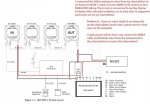
I have Simrad IS15 NMEA 0183 system on board together with a Standard Horizon CP180 chart plotter. Last year I installed a Raymarine EV-100 autopilot that connects to the NMEA 0183 system through an Actisense NWG-1 which enables it to steer to a waypoint or route set on the chart plotter.

My problem is that the A/P cannot steer to wind vane as it says there is no data. I checked the NMEA data settings in the plotter for verification and there is no wind, depth sea temperature data getting back to the plotter.

I believe from the Simrad manual that J1 on any of the instrument heads is the input/output for the NMEA data, but could someone point me to the correct way I would connect the two (red/black) wires to on the plotter?

Here is an image my circuit:
http://www.jacarandatree.co.uk/NMEA.html

and any help would be greatly appreciated.

Thanks
Bob
 
Last edited:
I have exactly this issue with my Tacktick/Garmin setup, and am about to rectify it. You have too many "talkers" on your NMEA network. Your DSC si talking to the plotter, and your instruments are also talkers. You need to multiplex your 0183 "in" data so that the plotter can understand it all on just one connection... You may find it works if you disconnect one of the DSC connections ( data in from the Radio), and just let the plotter send position data to the radio. That means that you will then only have the instruments "talking" to the plotter.
 
I have exactly this issue with my Tacktick/Garmin setup, and am about to rectify it. You have too many "talkers" on your NMEA network. Your DSC si talking to the plotter, and your instruments are also talkers. You need to multiplex your 0183 "in" data so that the plotter can understand it all on just one connection... You may find it works if you disconnect one of the DSC connections ( data in from the Radio), and just let the plotter send position data to the radio. That means that you will then only have the instruments "talking" to the plotter.

I don't agree with this. The plotter has 2 input ports and 3 output ports. I can't see any need for a multiplexer. The DSC radio is only connected to port 1 output, so it can't be "talking to the plotter".

The red/black instrument wires can be connected to port 1 input (red to plotter blue; black to plotter green). Then you'd need to go in to the set-up menu and change the port 3 output NMEA sentences so that it also sends wind information to the autopilot.
 
I don't agree with this. The plotter has 2 input ports and 3 output ports. I can't see any need for a multiplexer. The DSC radio is only connected to port 1 output, so it can't be "talking to the plotter".

The red/black instrument wires can be connected to port 1 input (red to plotter blue; black to plotter green). Then you'd need to go in to the set-up menu and change the port 3 output NMEA sentences so that it also sends wind information to the autopilot.

Thank you for your replies.

In my original post I was seeking help getting wind data to the autopilot assuming it was something simple. I've since discovered that there is no data at all getting back to the plotter from the instruments. From the C/P menu>settings>NMEA DATA> ports 1 and 2 are blank and state "NO DATA", although the GPS is fine. I've now removed the autopilot from the system to just concentrate on the instruments and plotter.

As suggested above I connected the red and black wires coming from instrument J4:- red to plotter blue and black to plotter green and there is still no data at the plotter. I went into the menu>settings>input/output> and port 3 has all sentences set to ON, as does port 2 and 3. Would this be any part of the problem? Thinking there might be a break in the cable I bypassed the plumbed in cable and connected a separate one directly, but this made no difference.

I know very little about these systems but the Simrad manual indicates that there should be an "IN" and an "OUT" NMEA connections from two J4 instruments sockets back to the plotter. But there again the plotter in question is a Simrad unlike mine. Do all plotters have the same or similar colour coded configurations?

Up to now I've focused on DATA reaching the plotter obviously without success but today with the wiring configuration suggested above I'll check to see if there's any DATA coming back from the plotter to the NAV section on the Combi by setting a waypoint and I'll post back any findings.

Question: Should there be any sort of voltage on the red/black wires coming from J4 of the instrument head because on mine there isn't?

With the hours I've spent on this problem I'm now thinking it might be something more sinister with an expensive outcome!

I really appreciate your feed back.
 
A few simple things...

Are the instruments and the plotter set to the same baud rate (4800)?

According to my view of the 180 wiring on the SH website,shows VHF connecting to green (NMEA common)/blue (Port 1 Input)/brown (Port 1 Output), an AP connecting to Yellow (Port3 output)/Green (NMEA Common) and a third device (they use AIS) connected to Grey (Port 2 Input)/ Green With White (Port 2 Input) not being connected because AIS can't receive any plotter output...

I can't get to any SIMRAD docs, to check, but the SH is using "single wire" NMEA (i.e. 1 for output and one for input with the return being the common) and Simrad may use the 2 wire (In + and In -, Out + and Out -). In which case you need to connect any - from the instruments to plotter green, and the in or out pluses to plotter out/in...
 
I have an is11 system but the interconnects are different as the IS11 has 5 connection to each instrument.

The IS15 robnet only has 2 that powers the unit and superimposes the NMEA data on that power supply wires.

http://www.ybw.com/forums/showthread.php?426854-Roblink-cable-carries-both-NMEA-data-AND-12V-power-!

This link has some info as does.

http://support.simrad-yachting.com/...ZONE_OFFSET=&CMD=VIEW_ARTICLE&ARTICLE_ID=2729

and this

http://boating.forumsee.com/a/m/s/p...ble-carries-both-nmea-data-and-12v-power.html

It may be possible to separate the data from the power and supply the data to an RS232 input port or RS232 to USB converter.
 
Last edited by a moderator:
Question: Should there be any sort of voltage on the red/black wires coming from J4 of the instrument head because on mine there isn't?

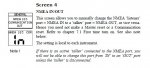
There should be a low voltage, but a voltage nonetheless, if the port is talking. The IS15 manual says there is a menu in the 'Installation and calibration' menu' to turn each head's J4 port from a talker to a listner or vice versa (on combi or graphic models at least I guess). Have you checked that it is set to 'talker' (i.e. 'out') for the particular head you have made a connection to?

menu1.jpgmenu2.jpg

The roblink connections are also quite stiff- next I would check it's fully pushed into the J4 socket and making a good connection.

If there is then a voltage on the output:

I'm not really familiar with the SH plotter but according to page 96 of the manual the input port should be set to 'NMEA 0183' which is the 4800 standard.

If it doesn't work on port 1 try making a connection to port 2 (roblink red to SH grey).

If things are still not working I would start to suspect an NMEA version problem. Neither manual makes it clear which generation of NMEA the devices are expecting/sending.
 
Last edited:
It seems there were some interfacing difficulties with IS15 instruments. The NMEA connection is apparently only an input or an output, and in some references is described as "automatic", whereas bitbaltic has highlighted the menu option to force the decision. If you can't get anything to work, might it be worth asking whatever tech support Simrad currently offer?
 
Thank you all for your helpful & interesting replies but before I comment I’ll update you with today's events.

I went to the boat today and disconnected all wires connected to the C/P. I then connected from instrument J4: red to plotter brown (port 1 output) and J4: black to plotter green (common). I then switched on the plotter, set it to navigate to a waypoint and the found the "bearing to waypoint and the distance to waypoint was being displayed in NAV section on the instruments. Data is being sent to the instruments.

I then connected the cable from J4 of another instrument to: red to plotter blue (port 1 input) and J4 black to plotter green (common), I then rebooted the system but to no avail, there was nothing back from the instruments to the C/P. I tried on a different port 2 (Grey/Green) but got the same result.

There should be a low voltage, but a voltage nonetheless, if the port is talking. The IS15 manual says there is a menu in the 'Installation and calibration' menu' to turn each head's J4 port from a talker to a listener or vice versa (on combi or graphic models at least I guess). Have you checked that it is set to 'talker' (i.e. 'out') for the particular head you have made a connection to?

Bitbaltic

Thank you so much for your informative feedback. I've just read the manual and this is very interesting and might be a solution so I'll check that out tomorrow and post back.

On the question of voltage on the NMEA cable from the instruments I measured 0.02/0.05 volts across red/black.

I recall reading somewhere in the Simrad manual the necessity of a terminator being necessary, (red 5 pinned plug/socket), any ideas?

Thanks also to Gladys, PVB and Roger Shaw, please keep viewing.

Bob
 
It seems there were some interfacing difficulties with IS15 instruments. The NMEA connection is apparently only an input or an output, and in some references is described as "automatic", whereas bitbaltic has highlighted the menu option to force the decision.

The manual I read claimed both- somewhere near the front it said the port (which does seem to be unidirectional) was 'automatically configured' or words to that effect, and then buried deep within was the stuff about a menu change to, erm, configure it. There was a sort of 'changes list' somewhere too which listed the selectability as a post-release software upgrade.

I have a Simrad system but I hate their manuals and I think the IS15 was the worst, almost unintelligible. It seems to have been added to sequentially as things were upgraded without the superceded parts ever being taken out.

Dobbies said:
I went to the boat today and disconnected all wires connected to the C/P. I then connected from instrument J4: red to plotter brown (port 1 output) and J4: black to plotter green (common). I then switched on the plotter, set it to navigate to a waypoint and the found the "bearing to waypoint and the distance to waypoint was being displayed in NAV section on the instruments. Data is being sent to the instruments.

I then connected the cable from J4 of another instrument to: red to plotter blue (port 1 input) and J4 black to plotter green (common), I then rebooted the system but to no avail, there was nothing back from the instruments to the C/P. I tried on a different port 2 (Grey/Green) but got the same result.

It does sound as though perhaps all the head units are set by default to listen and not talk then. Perhaps changing one to talk will solve the problem. At least you know that you are getting a proper electrical circuit and making connections properly. Fingers crossed.

Re. the business of terminators, yes both the older IS15 and the N2K IS20 need those, I have never looked into what they do exactly or how they operate electrically. Someone more expert here might know? I have a feeling that the power cable which feeds your Roblink/Simnet may be doing that job, but it's only a guess. If fiddling with the head unit doesn't sort the problem it might be something to do with that, but I have had too many beers tonight to look into it :)

If changing a head unit to 'talker' does work, it might be neat to source another roblink cable and send data into the system as well as out of it, that way as you say you get waypoints, course data etc on your instruments which could be useful. This info should be needed anyway for the wind instrument to give you true wind?
 
Last edited:
If changing a head unit to 'talker' does work, it might be neat to source another roblink cable and send data into the system as well as out of it, that way as you say you get waypoints, course data etc on your instruments which could be useful. This info should be needed anyway for the wind instrument to give you true wind?

BitBaltic,

Again many thanks for your help, especially at the time you posted!!

I just didn't quite understand your last paragraph though. Isn't the Roblink cable the one that delivers power from the system, and if so why would I need another? If you meant an NMEA cable (J4) that's exactly what I'm trying to do, get all the info back to the plotter to then feed wind data back to the autopilot.

If that's not what you meant please explain as this has been a great learning curve for me.

I'll be back at the boat this morning and post back what I find later.

Great forum
Thank you
 
BitBaltic,

Again many thanks for your help, especially at the time you posted!!

I just didn't quite understand your last paragraph though. Isn't the Roblink cable the one that delivers power from the system, and if so why would I need another? If you meant an NMEA cable (J4) that's exactly what I'm trying to do, get all the info back to the plotter to then feed wind data back to the autopilot.

If that's not what you meant please explain as this has been a great learning curve for me.

I'll be back at the boat this morning and post back what I find later.

Great forum
Thank you

As Roger is saying, I think Simrad call all the (0183) cables that plug into their head units Roblink cables- sending power and data when connecting two Simrad units together, and just data when connecting a Simrad unit to something else. (confusingly I think they also used to call these cables Simnet at one point, although that name later got more associated with their ropreitary connectors for the N2K system, which is the IS20 instrument series).

It doesn't matter what it's called, you're right that the NMEA cable connecting the Simrad system to your instruments is what I meant. I was suggesting that you make a data connection not only from simrad system > plotter (to get wind info to your autopilot as you intend) but also from your plotter > simrad system (as you have just done temporarily) so you can get GPS data into the simrad network. As I understand it from your diagram you didn't have this connection before, so unless you have some sort of heading sensor in the IS15 network I am assuming you will not have had true wind displayed by your wind instrument. Getting that will be a benefit of making permanent NMEA connections both in and out, as well as getting your instruments to display positions and bearings (although I don't know if that is of any use to you). If you wanted to do it you would need to source a second NMEA cable to make both connections.
 
With your much appreciated help my instruments are now talking/listening to my chart plotter. As suggested both the Multi and Combi instruments were setup to listen. I’ve now changed the Combi to “talk” and data is now getting back to the plotter on port 1 blue/green.

However, with that done and with the autopilot reconnected (Actisense input red & black to plotter port 3 yellow & green) it’s still not receiving any data from the instruments, only waypoint data. I can only guess that the data coming in on port 1 (blue) isn’t being bridged to port 3 (yellow) if that's possible, but all sentences are switched on.

I ran out of time yesterday so I didn’t try any other options but I’ve since thought maybe connecting the Actisense red/black to port 1 also.

Any thoughts on that?

Cheers
 
Good news on the instruments but I feared there might be some sort of bridging problem inside the plotter. Not all of them will succesfully do it.

I would broadly follow the advice from jesper over on the Hanse forum: connect the autopilot to the output from the IS15 system, so that the plotter sends GPS and waypoint data into the simrad system, this adds the wind data, and the whole lot is then sent to the autopilot.

I would make the following connections:

Port 1 on plotter OUT (talking) to both the VHF IN (listening) and the first available J4 port on the IS15 system set to IN (listening)

J4 port on a second head of the IS15 system set to OUT (talking) connected to both port 1 on the plotter IN (listening) and to the Actisense IN (listening).

This will get wind, GPS and WPT data to the autopilot without the plotter having to act as a bridge, while still getting the wind and depth sentences into the plotter, which is nice to have.

The only downside of that configuration is that you will have to have your instruments switched on in order to use your autopilot in either wind or steer-to-waypoint mode. I assume that would not be a problem as most people sail with their instruments on all the time, but it is worth flagging it just in case you have been in the habit of sailing e.g. with chartplotter on but IS15 system switched off.

Edit: here is a suggested wiring plan on your original diagram. Note I have re-labelled the J ports in this diagram as Simrad had them in reverse order in the original (Roblink connections are made to J1 and J2 to daisy chain the instruments, NMEA connections to J4).

IS15_SUGGESTED.jpg
 
Last edited:
Bitbaltic

I'll try your suggestion tomorrow and post back.

Since my initial post this has been a tremendous learning curve for me so a big thanks to all the members of this forum but especially Bitbaltic for your comprehensive input.

Cheers
 
Last edited:
Re: Simrad IS15 to Chartplotter connections ?? [SOLVED]

Here is a suggested wiring plan on your original diagram. Note I have re-labelled the J ports in this diagram as Simrad had them in reverse order in the original (Roblink connections are made to J1 and J2 to daisy chain the instruments, NMEA connections to J4).

Hi Bitbaltic

The junction sockets I drew on the diagram were a typo error but I connected the wires as per your diagram and..............Great news, it now tracks to wind. At least it will when she goes back in the water next season. If you're ever in Falmouth PM me and I'll buy you a pint!

Cheers for now :encouragement:
Bob
 
Re: Simrad IS15 to Chartplotter connections ?? [SOLVED]

Hi Bitbaltic

The junction sockets I drew on the diagram were a typo error but I connected the wires as per your diagram and..............Great news, it now tracks to wind. At least it will when she goes back in the water next season. If you're ever in Falmouth PM me and I'll buy you a pint!

Cheers for now :encouragement:
Bob

Marvellous stuff! Happy days and glad to have been able to help. Have a great Christmas!

Cheers
Huw
 
Re: Simrad IS15 to Chartplotter connections ?? [SOLVED]

Hi Chaps,
I note this thread is from last year but hope there is some chance of a reply.
I have the Simrad IS15 system, including a Simrad DSC radio with a Garmin plotter. The NMEA0183 connection from the plotter to the radio appears to be the only NMEA connection ever made. I have just replaced the Garmin plotter with a raymarine ES78 plotter and also installed the raymarine ACU200 Linear Drive Autohelm. I would like to connect up the Simrad wind, depth and speed instruments via the raymarine NMEA0183/Video cable that is connected to the plotter but from the diagram shown in this thread I am uncertain if I can just connect the J4 output (I believe this is the NMEA0183 output on these simrad instruments) direct to the raymarine NMEA cable without causing any damage to the new kit as it is suggested that all NMEA 0183 output from the IS15 system also carries 12volt power. Is that correct or is the J4 output just data with no 12 volt?

Cheers,

Rob
 
Top