Simrad Go Free WiFi

Playtime

Well-Known Member
Joined
29 Jan 2007
Messages
1,194
Location
Chichester
Visit site
Is the Simrad Go Free wifi unit just like an ordinary wifi router or is it something special (bespoke)?

The reason I ask is that I already have a wifi router on board (Alfa R36) that I use for internet connection to a laptop and a couple of tablets.

I also have the latest (wifi enabled) firmware in an NSS8.

Could I just connect the NSS8 ethernet output to the R36, load the Go Free apps on the laptop and tablets and away we go?
 
With the BIG disclaimer that I'm not familiar with Simrad products, this very interesting doc:
http://www.simrad-yachting.com/Global/Simrad-Yachting/Products/GoFree/GoFree%20Tier%201%20Specification.pdf
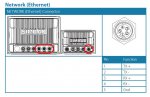
suggests to me that it's just an ordinary wifi access point (which does wpa2) at the logical level. The hard work would be being done by the MFD. The hurdle is physical connectors by the looks of it, although maybe you can buy or crimp up a cable with an RJ45 at one end and the 5-pin weatherproof thing they do at the other.

This looks promising:
http://www.amazon.co.uk/Simrad-Ethernet-Adapter-Yellow-Female/dp/B002IVD2ZO/ref=sr_1_1?s=sports&ie=UTF8&qid=1365329568&sr=1-1&keywords=simrad+male+male+ethernet
but female at the RJ45 end means you'd have to add in a short male-male or chop the cable and crimp on a male connector. Alternatively, maybe someone knows the details of the simrad 5 pin connector?

Doc referenced above is the first time I've seen a manufacturer even mention IEC61162-450, let alone explain why they're not implementing it...
 
Last edited:
Thanks guys - the links were particularly useful. I somehow missed the Simrad-Yachting paper when I did a search. It does seem to indicate that a standard router should work. I will have to buy the cable, unless I can find out what 5 pin plug they use, but I already have a male-male ethernet cable.

I will give it a try in the next few weeks and report back.
 
I've just found the following that describes the ethernet cable, but not yet identified the 5 pin 'yellow' connector.

http://yachtelectronics.blogspot.co.uk/2010/05/lowrance-yellow-ethernet-cabling.html

I've also got another problem - my radar currently plugs into the single ethernet connection on the NSS8 so I would need an ethernet switch for permanent connection of wifi. Maybe one of these would do

http://www.amazon.co.uk/Tenda-S105-5-Port-Mini-Switch/dp/B0029M7TJC/ref=sr_1_cc_2?s=aps&ie=UTF8&qid=1365334168&sr=1-2-catcorr&keywords=ethernet+switch

but I would also need 2 cables . . . .
 
If anyone is still following this thread, here's another relevant paper I've just found. It indicates that a standard router works but may need a (simple) configuration change to disable multicast packets.

http://slingthehook.com/?p=5271

There may well be an underlying point in there (e.g. simrad kit can generate a lot of traffic which can affect your other network activities) but I suggest that the author's strong point is not networking and particularly not multicast. If he's a contributor to this forum, my embarrassment in saying that would be more than made up for by interest in his input to this discussion :-). You won't find the options he mentions on a normal cheap router (from the screenshot he's using a vigor) but in any case I'm not sufficiently convinced by the detail in the problem analysis to worry too much about the solution.
 
Not just following, I've been trying to find the plug for you. No luck so far, I'd try asking Simrad and Lowrance for the manufacturer and part number.

Thanks Nigel. I've also failed to find the plug. My next line of attack is to look carefully at the physical plug on the NSS/radar and see if there is a name on it. If not, I'll try Simrad but they have been silent in response to my other queries recently.

The bold approach, though, would be to cut the radar cable in half and have 2 cables with connectors to which I could attach RJ45 plugs. I'm not sure I want to do that, though, until I've tried the router. I might end up having to buy (and route) a new radar cable!
 
There may well be an underlying point in there (e.g. simrad kit can generate a lot of traffic which can affect your other network activities) but I suggest that the author's strong point is not networking and particularly not multicast. If he's a contributor to this forum, my embarrassment in saying that would be more than made up for by interest in his input to this discussion :-). You won't find the options he mentions on a normal cheap router (from the screenshot he's using a vigor) but in any case I'm not sufficiently convinced by the detail in the problem analysis to worry too much about the solution.

The guy is not on this forum AFAIK. He contributes to panbo and has his own site (as per the link I gave above).

I'm not a networking expert either so I took his paper at face value. Is he wrong in his suggestion re multicast?

Do you still believe it shouldl just 'work' with a normal wireless router without configuration changes?
 
I'm not a networking expert either so I took his paper at face value. Is he wrong in his suggestion re multicast?

Do you still believe it shouldl just 'work' with a normal wireless router without configuration changes?

There's a fair bit of mis-use of terminology which rings alarm bells. The blog post seems to use "IGMP" and "multicast" interchangeably. IGMP is a control protocol used to manage multicast group membership. "IGMP snooping" is listening for IGMP packets indicating a host wishes to join a multicast group and only forwarding multicast data for a particular group out of a port which has asked for it. From that Go Free specification doc, multicast is only used there for service discovery: the data connections are actually tcp (as they describe in the bit at the end about how they differ from EC61162-450).

I don't know how communication between simrad radar and MFDs works: it may work differently to the newer protocol. The interpretation of that blog post is that it's high data rate multicast which will flood your wireless network and make it unusable. Maybe it is implemented like that (anyone know?), although I'd find it surprising given how they implement their go free stuff. However he says everything is fine displaying radar on his ipad: this neither confirms or denies the multicast implementation because his ipad app would have solicited the radar data if it were multicast. But then why is the data not now killing the wireless?

I'm not saying that he's wrong, just that that there's a lot of confused terminology use going on that I can't work out what's actually happening (not that you have any reason to trust my opinion :-). No reason at all to suppose a consumer wireless access point wouldn't "work" but perhaps reason to at least be aware that network load is something to consider.

I'd be very interested if anyone has any links as to how simrad radar->MFD communication works
 
Last edited:
If you've got the time and the inclination, this link might answer some of your questions.

Answer them it does. That radar does use multicast udp. Issues of multicast over 802.11 discussed in the paper. There appeared to be some multicast streams that they didn't identify too. Re-reading the blog post he mentions problems when radar and sonar are turned on, so maybe the network can cope with with the radar image data alone. Note that it won't be IGMP flooding the network (as suggested), but simple multicast data.

The implication is that if you've got radar and sonar attached you might flood your network if you use a wireless access point which doesn't do igmp snooping and just acts as a simple bridge.
 
Thanks. I (think I) understand.

Once I get the cable/connector issue sorted I'll just connect up and see what happens. It could be a few weeks before I can do this but I will report back when I've tried it.
 
I have spoken to a Simrad engineer and he believes a standard router will work. The bad news is that the yellow ethernet plug required to connect the router (and radar) to the NSS8 is proprietary (at least that's what he said) so I will need to buy one of their (expensive) ethernet cables. I would also need to connect the radar through the (commercial) router which I'm not keen on doing for a piece of safety critical equipment.

Since I already have a laptop downstairs with OpenCPN running plus an Actisense N2K to USB converter to read the N2K data, there is no real need for GoFree so I am dropping the idea for the time being.

If anyone else tries it, though, I would be interested in the result.
 
I have it working on my unit but I do not have a radar.

As you have found the Ethernet to simrad lead is a pain to get hold and after trying every way I could I bought the genuine simrad to Ethernet lead.

I used a netgear router with a nss7 and have not had to play with the igmp settings but I have no radar.

Also works excellently with iregatta for racing. Just input the ip of the plotter and you are away.

There is no lag in the system and I find being able to lay in bed and check wind speed anchor drag etc and turn the music up down on the sonichub system worth the £40 in bits it cost. I just wish they would enable autopilot control.
 
Top