Seatalk1 - what have I done?

lustyd

Well-Known Member
Joined
27 Jul 2010
Messages
14,264
Visit site
Hi all, I've not done much with ST1 before and just hit a bit of an issue. Having removed my old Radar screen the ST1 to STNG is no longer starting properly. I can remove the ST1 and of the converter cable and reinsert and it consistently starts as expected and feeds the plotter as before. It's a different plotter too but I'm willing to assume the plotter end is fine for now as that's NMEA2k to the STNG backbone. If I remove power to the whole lot and start it again the converter stops working and won't start until I reinsert the cable as above.

All of the ST1 instruments seem to be working fine, and there is power to them. These are ST60 depth, wind, speed/log and autopilot as well as a heading sensor below deck.

The cable to the chart table used to terminate in a Raymarine box which converts from ST1 to NMEA0183. The cable still terminates there but I have removed the ST1 cable which came from this to the Radar, as well as the NMEA0183 cable that used to go to the VHF.

  • Is there some kind of termination I need on the ST1 bus?
  • Do I actually need to now move the power from ST1 to STNG? There's nothing else on the N2k network right now so it seems to make sense to leave it on ST1
  • Something else to check?
Thanks all! I tried Google but ST1 seems to now be drifting out of focus so it's hard to find good info without sifting through STNG info
 
If I remember my setup correctly, I think Raymarine plotters need a dedicated 12v supply. Everything else can be powered via the ST1/NG bus, but on that whole system there should only be one supply.
 
No because it takes power from st1 if available. To fit the power the other side you need to remove it from st1 network. I think the AP takes power from there so wanted to leave that alone to avoid getting too deep into a rewire ?
 
OK I checked the ST5000+ manual and it says this device must be the one to supply power. I did try adding power to the converter directly and it didn't help so must be something kookie on the ST1 bus somehow. I'm out of ideas on what to try!
 
Yes, its normal for the autopilot to be be providing the power. Is the plotter powered via a relay which has now had its power or energising circuit disconnected?
 
No the plotter is connected direct via the fuse panel along with the other instruments. I have 13V at the AP so doesn't seem to be a voltage issue either. The ST1 bus works using the backlight test
 
I'm trying to visualise what you have going where from your description. Can you sketch it out, even if it's just on paper, take a photo and post it ?

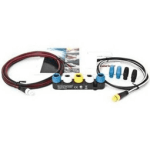
Is the ST1 to STNG converter one of these?

1619036569641.png

If so, is that the only backbone on the system? ie is the Vulcan plugged directly into it and there isn't an N2K backbone as well?

From what you have said, I would try applying power to the converter in addition to the ST1 network and see if that fixes the issue.

If it does, you can keep power going to the ST1 network, and to the STNG converter, just remove the power ( red ) cable from the connection between ST1 and the converter.

Edit:
I'm just wondering if there is a weird startup condition where the converter doesn't get enough juice from the ST1 power as everything else comes online.
 
The ST1 devices should be daisy chained and connected to the yellow socket on the converter.

ST1 does not need to be terminated.

Each blue socket on the converter should have a blue terminator fitted.

The plotter should be connected to a white socket on the converter, using a N2K to STNG adaptor cable.

The ST1/STNG network needs a power supply. This can be one of the following, only one:

A STNG power cable, plugged into a white (spur) socket on the STNG network.
A power connection to one of the ST1 devices.
Depending on the exact model, the autopilot ACU. There should be a switch under the cover to turn the power supply to the network on/off.
 
Everything configured as per Paul's post. I doubt that switch would be an issue otherwise adding power to the converter should have sorted it.

Dolabriform it's complicated! But not within this system. At the helm there are the ST60 instruments and 5000+ AP which are all ST1 on a single daisy chained bus powered by the AP as recommended. To the end of this I have connected the converter you showed to the yellow socket. The blues both have terminators and one white has a blank with the other going straight to Zeus 3S. As I said, I did try the power cable to the other white but it made no difference. After all that I was knackered from climbing the steps up to the cockpit!

Thanks all for the replies, I'm guessing something is just broken as it all seems to be configured correctly. Luckily all the instruments still show their data it just means the plotter doesn't get the extra info but it is all usable as it is.
 
Just closing this off in case it's found in a search. The issue was with the Zeus 3S and how it enumerates devices on the network, if the device isn't on when the Zeus boots then it's simply not found and the Zeus needs to be switched off and left for a few seconds before being switched back on again and everything works. I've since removed the ST1-STNG and replaced with the ITC5 but thought it worth reporting back
 
Just closing this off in case it's found in a search. The issue was with the Zeus 3S and how it enumerates devices on the network, if the device isn't on when the Zeus boots then it's simply not found and the Zeus needs to be switched off and left for a few seconds before being switched back on again and everything works. I've since removed the ST1-STNG and replaced with the ITC5 but thought it worth reporting back

Thanks for posting the fix, that would not have occured to me as my Vulcan is always the last thing powered on. Another school day!
 
Thanks for posting the fix, that would not have occured to me as my Vulcan is always the last thing powered on. Another school day!
Interestingly my Vulcan 9 didn't have the issue, it's only when I moved that indoors and replaced with the Zeus 3S at the helm the issue started.
 
Top