Reverse image cameras

Did you try the single camera flipped horizontally, or the 180° rotated view?
If the latter, I'd be curious to hear on which installation, because for some reason it's a solution which I never saw on any pleasure boat...

Not sure what you mean by 180 degrees rotated.

My G Series Monitors can present other settings as well.

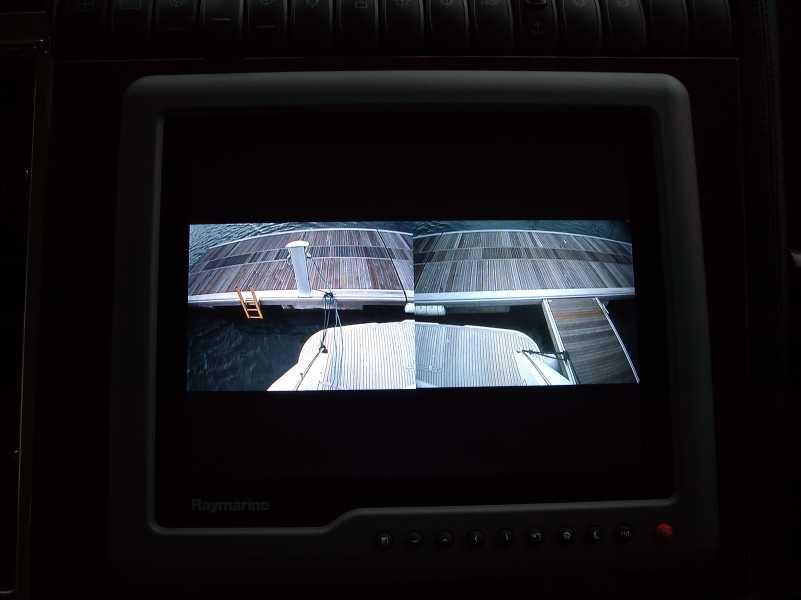
This kind of thing:-

serve.php


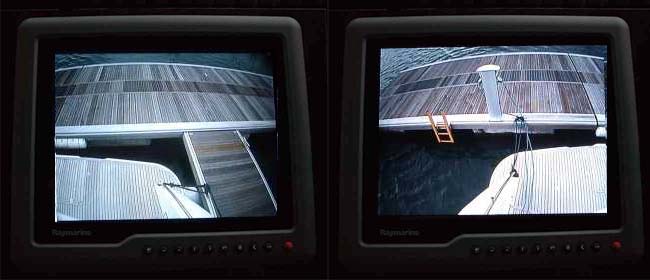
This is a split screen with the port camera on the right and the starboard camera on the left
Just image if these images were reversed!!
OK, you could reverse the whole lot I suppose.

serve.php


I think I tried everything and settled for a very simple approach.
Port screen shows port side
Starboard screen shows starboard side.
 
Not sure what you mean by 180 degrees rotated.

My G Series Monitors can present other settings as well.

This kind of thing:-

serve.php


This is a split screen with the port camera on the right and the starboard camera on the left
Just image if these images were reversed!!
OK, you could reverse the whole lot I suppose.

serve.php


I think I tried everything and settled for a very simple approach.
Port screen shows port side
Starboard screen shows starboard side.

And now it all becomes clear: the reason you don't need to flip your images is because you have them the wrong way up: the stern of the boat on your screen is actually pointing ahead. If you want the image to be completely correctly aligned, with the stern pointing towards the stern, then you'd need to flip the image in the way that jrudge is looking for.
 
LOL, now I can see why we struggle to understand each other.
You DO have both cameras reversed (i.e. flipped horizontally)!
And I disagree with JTB comment, btw.
Gimme a minute, I'll explain better with some pics.
 
K3zdgfuV_o.jpg

Port screen shows port side
Starboard screen shows starboard side.

Ok, back with some examples.
Of course I can see why you would struggle with the above images if they were reversed.
But as a matter of fact, they ARE both electronically reversed already (=flipped horizontally), in your system.
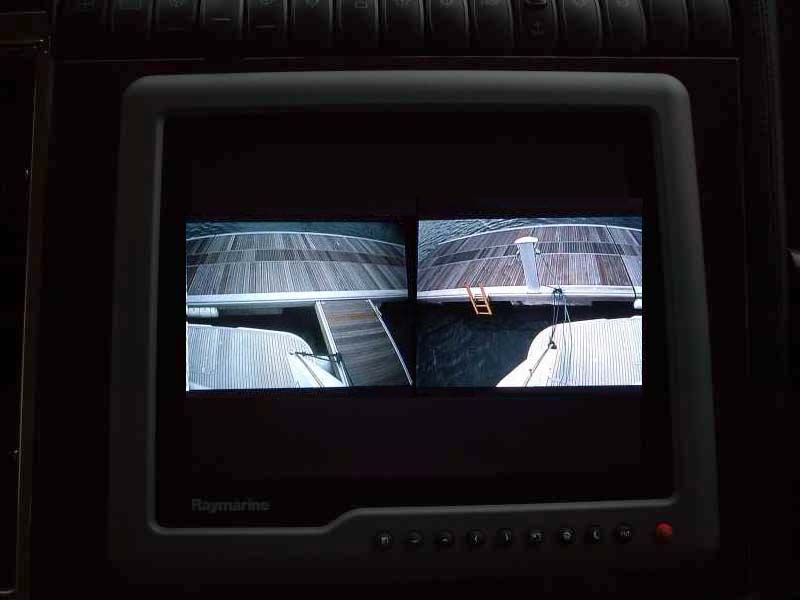
If they weren't, you would see on your screen the two images below.
Just think about it - if you look at your port side of the stern with your eyes, and you just transport the view on the left side of the screen, you would obviously see it as per the following pic - and the same goes for stbd on the right side of the screen.
g6ZidQG9_o.jpg


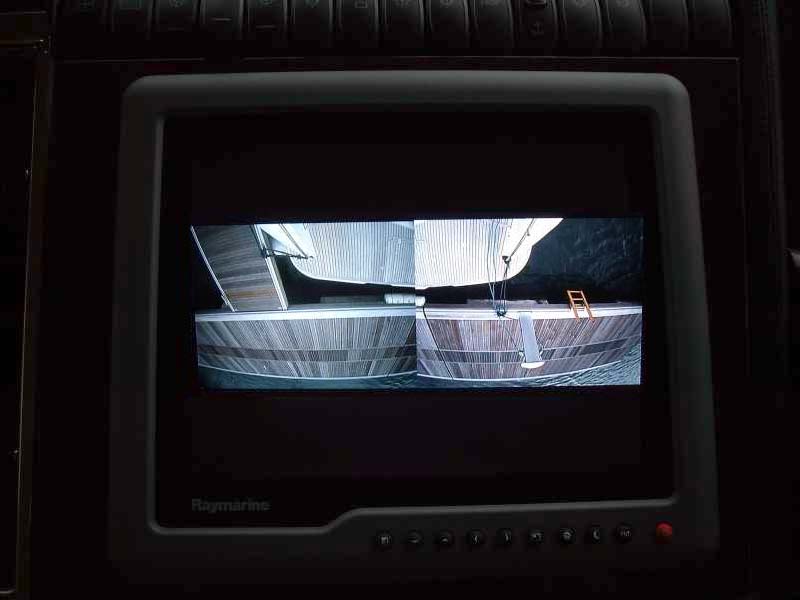
The 180° rotation which I suggested would instead appear as follows.
And it would be the REAL image, not the electronically flipped one:
ZCnl9Zwb_o.jpg


PS: if you wish to double check what I'm saying, try looking at someone standing on the dock, and you will find out that the "model" wears his/her watch on the opposite wrist, when seen in your monitor... :)
 
Last edited:
Ok, back with some examples.
Of course I can see why you would struggle with the above images if they were reversed.
But as a matter of fact, they ARE both electronically reversed already (=flipped horizontally), in your system.
If they weren't, you would see on your screen the two images below.
Just think about it - if you look at your port side of the stern with your eyes, and you just transport the view on the left side of the screen, you would obviously see it as per the following pic - and the same goes for stbd on the right side of the screen.
g6ZidQG9_o.jpg


The 180° rotation which I suggested would instead appear as follows - and it would be the REAL image, not the electronically flipped one:
ZCnl9Zwb_o.jpg

Aha fair enough. I concede! :D
 
Evening all

I can find metal bodied cameras for £30 odd on eBay ( not reverse image ) and also the small car reversing cameras but the only substantial reverse image ones I can find are garmin etc at £300 odd.

https://rover.ebay.com/rover/0/0/0?mpre=https://www.ebay.co.uk/ulk/itm/152542522514

Has anyone come across fair prices reverse image ( used for docking ) cameras ?

I have a swann camera from maplins, £49 image can be reversed or flipped or reversed and flipped can't remember the model, but will be down at the boat at the w/e, it is analogue but i fitted a 12v Bluetooth transmitter and receiver to over come running wires
Fred
 
Last edited:
OK
I agree with your comments about the two images on the same screen
It was just an example of all the permutations that I've tried.
BTW the images themselves aren't reversed - just the positions of the images that have been reversed.
And I don't use it that way anyway.

As I say, the way I use it is:-
I have the port camera showing on the port screen (not reversed)
And the starboard camera showing the starboard screen (not reversed)
And I don't see the need to reverse a camera image.
 
OK
I agree with your comments about the two images on the same screen
It was just an example of all the permutations that I've tried.
BTW the images themselves aren't reversed - just the positions of the images that have been reversed.
And I don't use it that way anyway.

As I say, the way I use it is:-
I have the port camera showing on the port screen (not reversed)
And the starboard camera showing the starboard screen (not reversed)
And I don't see the need to reverse a camera image.

If the images aren't reversed, then presumably you just rotated the camera body 180 degrees in the housing to get the images to join up in the middle.
 
PS: if you wish to double check what I'm saying, try looking at someone standing on the dock, and you will find out that the "model" wears his/her watch on the opposite wrist, when seen in your monitor... :)

Just thinking after my last post.
My images (the actual images themselves) are not flipped - do you agree?
If I were to take a photo looking back this is the same view that I would see.
I don't consider that the image or a photo taken is flipped.
 
If the images aren't reversed, then presumably you just rotated the camera body 180 degrees in the housing to get the images to join up in the middle.

No Jimmy
All my displays have all the video feeds.
So in the example above, one of the displays has taken the port camera's image and placed it on the right side of the display (done electronically).
And the starboard camera's image has been placed on the left side of the display.

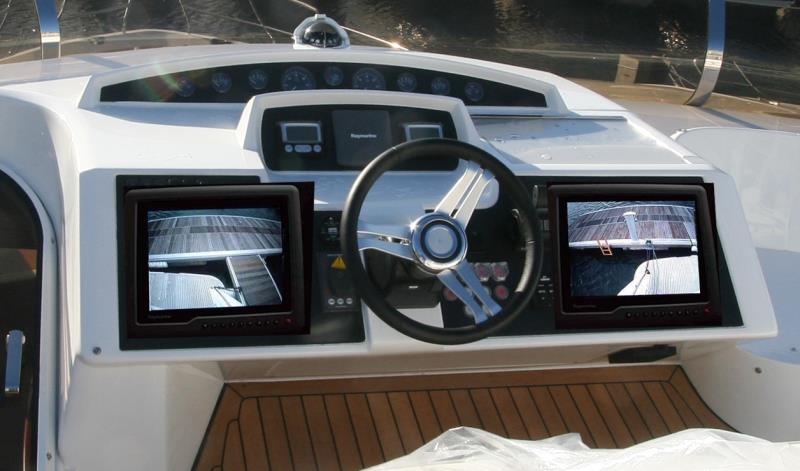
I didn't like this concept so under normal use I just have the port camera's image showing on the port display.
And the starboard camera's image showing on the starboard display.
And nothing flipped.

Someone please tell me I'm not going loopy!!
 
Last edited:
No Jimmy
All my displays have all the video feeds.
So in the example above, one of the displays has taken the port camera's image and placed it on the right side of the display.
And the starboard camera's image has been placed on the left side of the display.

I din't like this concept so under normal use I just have the port camera's image showing on the port display.
And the starboard camera's image showing on the starboard display.
And nothing flipped.

Someone please tell me I'm not going loopy!!

Sorry you're right, I missed a detail from your first photo post - your port image is on the right side of your screen, and your starboard image is on the left side of your screen. Personally, I'd find this arrangement unworkable (and when I had a camera on my P42 years ago, I reversed the image for that reason) but fair enough, all understood.
 
Sorry you're right, I missed a detail from your first photo post - your port image is on the right side of your screen, and your starboard image is on the left side of your screen. Personally, I'd find this arrangement unworkable (and when I had a camera on my P42 years ago, I reversed the image for that reason) but fair enough, all understood.

Phew - I thought I was going nuts.
I remember your P42 and I think I remember you saying something like that about the camera.

During all this, I started thinking about the actual cameras.
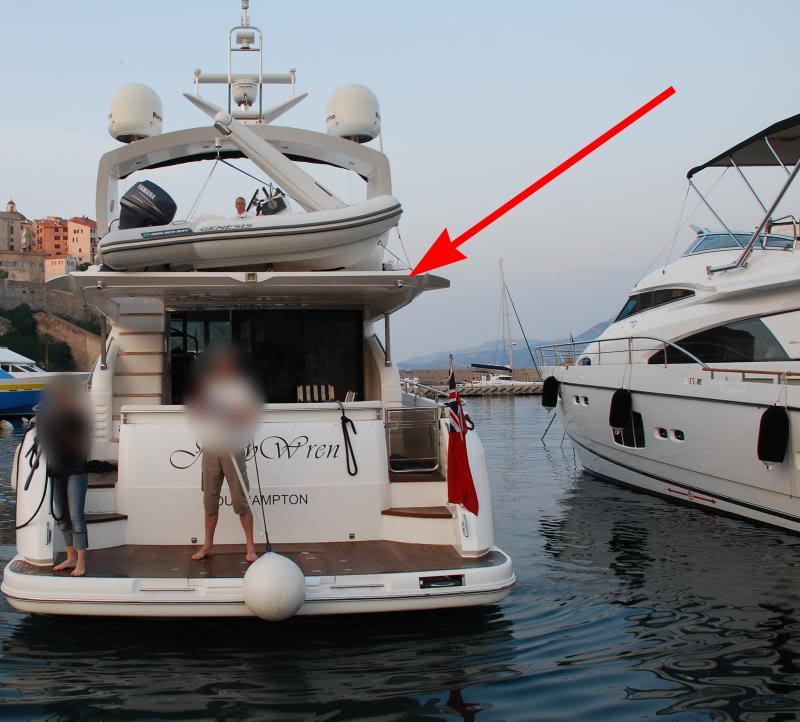
They are dome cameras - MOUNTED UPSIDE DOWN!!!
See in this shot:-

DSC_0893e_Small.jpg


But when I thought about it, they are designed to be fitted in ceilings anyway!!!
So even though they are upside down, the cameras inside them are the right way up.
 
My images (the actual images themselves) are not flipped - do you agree?
Well, I'm afraid I can't tell for sure, M.
I'm only making logical deductions based on your assumptions.

My previous post assumed that in the following pic the screen shows port side on the LEFT and stbd side on the RIGHT.
And IF this would be correct, then by definition both images MUST be flipped:

K3zdgfuV_o.jpg


Otoh, you are now saying...
in the example above, one of the displays has taken the port camera's image and placed it on the right side of the display (done electronically).
And the starboard camera's image has been placed on the left side of the display.
Which is fair enough, but as it happens, that's exactly the opposite of what I understood previously.
Now, if that is what your screen was actually showing in the above pic, then I agree, of course the images are NOT flipped.
Otoh, this implies that the finger shown in the right (stbd) side of the video is actually on your left (port) side, in reality.
Not very intuitive, imho.

In fact, you are now adding the following scenario...
I didn't like this concept so under normal use I just have the port camera's image showing on the port display.
And the starboard camera's image showing on the starboard display.
And nothing flipped.
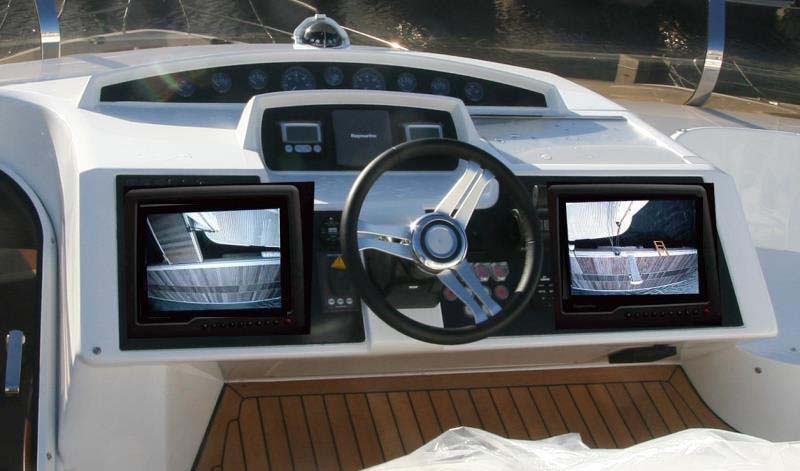
All well and good, but (and it's a big BUT!) in this scenario what you MUST NECESSARILY see on your dashboard is the following.
Again not intuitive at all, 'fiuaskme... :)

VMO4cQS3_o.jpg
 

Yep - well edited
That is how I use it.
Sorry to have confused you.

I've been thinking a lot about this.
And I think I can see where the issue is.

You are all thinking of a camera that "looks backwards" and IMO, that is not what is required.
As far as I'm concerned, it is the corners that are the problem.
Look at the above images - I can see as much of the side of the bathing platform as the back.
My Flybridge monitors are also about 4 feet apart.
When I'm manoeuvring backwards or forwards, I want to know how much the prop wash has "kicked" sideways as much as how close I am to the quay at the back.
OK I COULD reverse them (actually by simply pressing the appropriate buttons on the displays does this - easy).
But I choose to look at a screen as a display of part of the boat and not as a representation of the back of the boat like a car rear view mirror.
So, if I'm worrying about the port rear quarter I will look at the screen that is closest to the port rear quarter.
This is what comes naturally.
And believe me, I've tried both (as I say it is easy to set it up either way - I could switch them over in less than a second).

I then thought back to our visit to Las Fuentes about 3 or 4 weeks ago.
This is a very small marina about 30 miles south of Sant Carles where JW is one of the biggest that they have had in there.
Not enough room to turn her in the fairway - I have to use the space between boats and the fingers to turn her.
When leaving there the other day, we had a strong wind blowing into the marina so going out forward was a non-starter.
The only solution was to reverse out and let the bow drop off to leeward.
It isn't difficult to drive backwards but a reversing camera in its purest form would be next to useless.
It was the individual (both) sides of the bathing platform that I needed to watch.
Then you have to think which engine goes which way - (actually it is second nature these days)
I always face towards the stern when driving backwards - that way the throttles to much the same as they would if I were driving/facing forwards.
To use the docking camera, I have to turn round and look at the dashboard - in that instant, a reversed display is not what I want to see.
From experience, it is MUCH easier to think of the display as a view of that particular corner of the boat - and see it as though you are actually looking at that corner.

So, I thought - what would I do if I only had one camera and I can "kind of" understand the reason to flip/reverse the display.
However, having had this system (and used it) now for 10 years, I think I would still go down the route of not flipping the display.

This brings me back to the OP.
A suggestion
Your boat is big enough to do the same as me - have two cameras.
One looking at each corner.
I think that is way more useful than having a rear facing camera that you won't actually use.

I also chose not to buy marine (Raymarine in my case) cameras.
I bought some external dome security cameras that cos me about £90 vs the Raymarine offering at the time costing about £500.
One failed in the first year under warranty but apart from that they are still going strong.
I believe that the Raymarine alternative at the time would now be rusty and almost certainly require replacement.
Using security cameras on each corner, you can also get a better angle of view - as seen in my pics above.

Sorry guys - with my 10 years of experience with this system this is how I use it
Thanks MapisM for the excellent edit, I've added the dashboard to confirm how I use it.

IMG_4559_Small.jpg


Actually I think the logic is:
"Why look to the other side of the boat for a view of this side."
Maybe that is why it has worked out like this.
 
Last edited:
That's fine M, all clarified and understood.
I still think that I'd rather use the following setting if given the choice, but each to their own on that! :encouragement:
w3uXxKTG_o.jpg
 
Top