AngusMcDoon
Well-Known Member
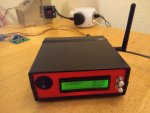
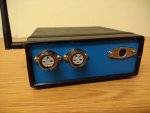
It's time for a new YAPP. There's not been one for a while. This one, which through lack of imagination to think of anything better, is called a boat data hub, because it’s basically a bi-directional Seatalk/NMEA-0183 converter combined with a NMEA-0183 multiplexer with a couple of other YAPPs thrown in. It is considerably bigger than all previous projects as it incorporates the functionality of at least 5 of them. This is what it looks like...
First, an explanation of my current system and what the problem is. I have an old ST60 based system of instruments (depth, log, GPS mushroom, wind) and a ST2000+ autopilot (source of compass data) linked via Seatalk 1 to an RC530 chartplotter. This all works, but the GPS mushroom probably doesn't have long for this world, and the RC530 is big, heavy, slow, power hungry, uses expensive CMAP charts, cannot display AIS information, and its model of the earth’s magnetic field is seriously out of date. Also attached to my Seatalk bus, when needed, are two YAPPs - a wired autopilot remote…
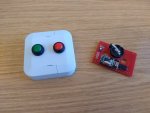
YAPP Seatalk autopilot wired remote
and an anchor watcher…
YAPP New Anchor Watcher - with user interface
These have worked well, until last summer, when the autopilot remote handset got a seawater dunking coming down the Minch and promptly died, not being in a waterproof case, and having decidedly non-waterproof switches.
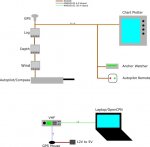
Standing alone I have a VHF which receives NMEA-0183 RMC position information from a Globalsat BR-355 GPS mouse and outputs NMEA0-183 VDM AIS messages from an integrated AIS receiver. As my chartplotter cannot display AIS I have to fire up a laptop with OpenCPN when I want to see what the CalMac ferries are doing. All of the above is shown on this diagram...
What I want to move to is a single integrated system that ditches my RC530 plotter and instead runs OpenCPN on a tablet. This will allow use of much cheaper charts, use less power, take less space and be able to show AIS. I want to be able to input routes in OpenCPN and send them to the autopilot via Seatalk 1. I also want to be able to display instrument data from my ST60/autopilot sources on OpenCPN dashboards.
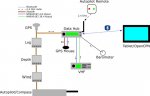
I want the link to the tablet to be wireless, to use my now spare BR-355 GPS mouse as an alternative GPS source for the whole system, incorporate the anchor watcher functionality, add a wireless autopilot remote control receiver, use the latest 2020 World Magnetic Model for magnetic declination, and as OpenCPN can record pressure trends I might as well throw in a pressure transducer while I'm at it. The GPS mouse 5 V power will also be supplied by the new device, and will be switchable to save power when it’s not being used. This diagram shows all of the above...
Previous simpler YAPPs have used PIC 18F microprocessors, and some of those were pushing their limits. This project is way above what an 18F PIC can achieve, so I've moved to an ARM Cortex M3. This is a good compromise between price, capability and power consumption. These devices only come in surface mount package but there are plenty of dev boards available for a few pounds. One of the cheapest is the Blue Pill, so that's what I used being as parsimonious as I am, as it can be obtained for less than £2. It has 64 kBytes of flash memory and 20 kBytes of RAM…
Blue Pill
For the wireless communications the choice is limited to what tablets typically have built in, and that's Bluetooth or WiFi. Bluetooth is simpler, cheaper and less power hungry. Typically the range is 10 m but that can be extended if necessary using a different Bluetooth class device.
There's quite a bit going on in this YAPP - the comms connections are: to/from Seatalk 1 bus, NMEA-0183 to/from tablet via Bluetooth, NMEA-0183 GPS from mouse, NMEA-0183 AIS from VHF, NMEA-0183 GPS to VHF. In addition there's an I2C interface to the pressure sensor and a SPI interface to the 2.4 GHz RF module to talk to the autopilot remote handset. To be able to use the anchor watcher functionality and configure settings the following are needed: text LCD with backlight, 2 user buttons and a beeper for alarms. There’s also the magnetic model to run.
In order to control all that lot a real time operating system has been used. The obvious choice as it's widely used, includes an ARM Cortex M3 processor port, and is free, is FreeRTOS. As multiple parts of the application (and multiple threads) need to access some of the same hardware resources concurrently this needs to be managed to avoid contention. Some processing can be performed slowly or when there is spare processor time, for example reading the pressure or calculating the magnetic declination, which are low priority activities. The firmware design used is to wrap each non-interrupt driven hardware resource in a thread listening for requests from a queue in a client/server model. The hardware resources that will be managed like this each with their own server thread and requests queue are the pressure sensor driver, the LCD driver and the 2.4 GHz RF module listening for messages from the autopilot remote handset.
Other hardware features will be interrupt driven. These are the Seatalk 1 interface which is implemented as a soft UART (taken from earlier PIC YAPPs), the 2 user buttons which are too simple to need a server thread, and 3 bi-directional hardware UARTS are used for the NMEA-0183/Bluetooth communications - 2 running at 38.4 kbaud and 1 at 4.8 kbaud. To get the throughput required without taking too much processor time these UARTS and the Seatalk soft UART will be buffered for both reading and writing.
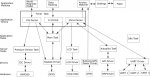
The main processing loop continually handles Seatalk queued incoming and outgoing messages which are ready for processing. Other periodic processing is performed using FreeRTOS timers. These run at 3 rates - every 25 ms, every 1 ms and every 10 s. The timer task functions get and send messages to the hardware server tasks via their requests queues or read from and write to the communications channels’ buffers. A simplified diagram of the firmware design is shown below...
The heart of this project is a bi-directional Seatalk 1 to NMEA-0183 converter of which there are many other incarnations available, both open source and closed source commercial variants (including my previous efforts). However, this one has its NMEA-0183 message support tailored specifically to the messages read and written by OpenCPN. This device might work with other chart plotters, but it’s only guaranteed to work fully with OpenCPN. Of all the multitude of NMEA-0183 message types and variants – if OpenCPN doesn’t support it then this device doesn’t support it.
A note on why the World Magnetic Model was included. OpenCPN has the capability to run this model to get magnetic declination for position and time, but it’s poor at sharing it. It will send out declination in RMC messages but only when a route is active. When no route is active the field is blank in the message output. I added a feature request to OpenCPN to output it at all times in RMC messages but it got classified as of no importance and unlikely to be included in my lifetime. As I want magnetic declination to go on to my Seatalk bus for the autopilot to use I included the model source and coefficients in my code. It’s more up-to-date than the OpenCPN WMM plug-in as well, as I’m using the latest 2020 co-efficients.
The hardware design is basically a main board with a power supply and some communications interfaces (Seatalk 1, NMEA0-183, RS232) with most other features implemented by bought in daughter boards. A BMP280 pressure sensor is used. This is a bit of a fiddle to use from a software perspective requiring many factory programmed calibration values to be read and applied, but once done it is remarkably sensitive and has great absolute accuracy. It’s a tiny surface mount device so the best way to get to it is to use a breakout board available for less than two pounds from Ebay.
The 2.4 GHz RF module is a cheapo Ebay one readily available using a Nordic Semiconductor NRF24L01 chip...
RF Module
The Bluetooth module is an HC-05 board. This provides a simple serial interface and appears as virtual COM ports in Windows or serial devices in Linux when paired which OpenCPN can easily connect to...
Bluetooth module
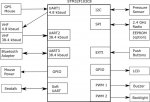
Every pin bar one is used on the Blue Pill board. This diagram shows the modules that are used…
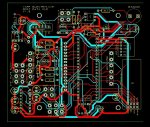
This is the PCB layout - old fashioned through hole double sided board...
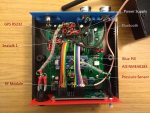
This is the assembled PCB with labelled parts, a bit cluttered but gives you the idea...
The Seatalk and AIS via NMEA-0183 inputs are opto-isolated. The connection to the GPS mouse is not as it's this device that is powering it - it has no external connections.
To be continued as post size limit reached...
First, an explanation of my current system and what the problem is. I have an old ST60 based system of instruments (depth, log, GPS mushroom, wind) and a ST2000+ autopilot (source of compass data) linked via Seatalk 1 to an RC530 chartplotter. This all works, but the GPS mushroom probably doesn't have long for this world, and the RC530 is big, heavy, slow, power hungry, uses expensive CMAP charts, cannot display AIS information, and its model of the earth’s magnetic field is seriously out of date. Also attached to my Seatalk bus, when needed, are two YAPPs - a wired autopilot remote…
YAPP Seatalk autopilot wired remote
and an anchor watcher…
YAPP New Anchor Watcher - with user interface
These have worked well, until last summer, when the autopilot remote handset got a seawater dunking coming down the Minch and promptly died, not being in a waterproof case, and having decidedly non-waterproof switches.
Standing alone I have a VHF which receives NMEA-0183 RMC position information from a Globalsat BR-355 GPS mouse and outputs NMEA0-183 VDM AIS messages from an integrated AIS receiver. As my chartplotter cannot display AIS I have to fire up a laptop with OpenCPN when I want to see what the CalMac ferries are doing. All of the above is shown on this diagram...
What I want to move to is a single integrated system that ditches my RC530 plotter and instead runs OpenCPN on a tablet. This will allow use of much cheaper charts, use less power, take less space and be able to show AIS. I want to be able to input routes in OpenCPN and send them to the autopilot via Seatalk 1. I also want to be able to display instrument data from my ST60/autopilot sources on OpenCPN dashboards.
I want the link to the tablet to be wireless, to use my now spare BR-355 GPS mouse as an alternative GPS source for the whole system, incorporate the anchor watcher functionality, add a wireless autopilot remote control receiver, use the latest 2020 World Magnetic Model for magnetic declination, and as OpenCPN can record pressure trends I might as well throw in a pressure transducer while I'm at it. The GPS mouse 5 V power will also be supplied by the new device, and will be switchable to save power when it’s not being used. This diagram shows all of the above...
Previous simpler YAPPs have used PIC 18F microprocessors, and some of those were pushing their limits. This project is way above what an 18F PIC can achieve, so I've moved to an ARM Cortex M3. This is a good compromise between price, capability and power consumption. These devices only come in surface mount package but there are plenty of dev boards available for a few pounds. One of the cheapest is the Blue Pill, so that's what I used being as parsimonious as I am, as it can be obtained for less than £2. It has 64 kBytes of flash memory and 20 kBytes of RAM…
Blue Pill
For the wireless communications the choice is limited to what tablets typically have built in, and that's Bluetooth or WiFi. Bluetooth is simpler, cheaper and less power hungry. Typically the range is 10 m but that can be extended if necessary using a different Bluetooth class device.
There's quite a bit going on in this YAPP - the comms connections are: to/from Seatalk 1 bus, NMEA-0183 to/from tablet via Bluetooth, NMEA-0183 GPS from mouse, NMEA-0183 AIS from VHF, NMEA-0183 GPS to VHF. In addition there's an I2C interface to the pressure sensor and a SPI interface to the 2.4 GHz RF module to talk to the autopilot remote handset. To be able to use the anchor watcher functionality and configure settings the following are needed: text LCD with backlight, 2 user buttons and a beeper for alarms. There’s also the magnetic model to run.
In order to control all that lot a real time operating system has been used. The obvious choice as it's widely used, includes an ARM Cortex M3 processor port, and is free, is FreeRTOS. As multiple parts of the application (and multiple threads) need to access some of the same hardware resources concurrently this needs to be managed to avoid contention. Some processing can be performed slowly or when there is spare processor time, for example reading the pressure or calculating the magnetic declination, which are low priority activities. The firmware design used is to wrap each non-interrupt driven hardware resource in a thread listening for requests from a queue in a client/server model. The hardware resources that will be managed like this each with their own server thread and requests queue are the pressure sensor driver, the LCD driver and the 2.4 GHz RF module listening for messages from the autopilot remote handset.
Other hardware features will be interrupt driven. These are the Seatalk 1 interface which is implemented as a soft UART (taken from earlier PIC YAPPs), the 2 user buttons which are too simple to need a server thread, and 3 bi-directional hardware UARTS are used for the NMEA-0183/Bluetooth communications - 2 running at 38.4 kbaud and 1 at 4.8 kbaud. To get the throughput required without taking too much processor time these UARTS and the Seatalk soft UART will be buffered for both reading and writing.
The main processing loop continually handles Seatalk queued incoming and outgoing messages which are ready for processing. Other periodic processing is performed using FreeRTOS timers. These run at 3 rates - every 25 ms, every 1 ms and every 10 s. The timer task functions get and send messages to the hardware server tasks via their requests queues or read from and write to the communications channels’ buffers. A simplified diagram of the firmware design is shown below...
The heart of this project is a bi-directional Seatalk 1 to NMEA-0183 converter of which there are many other incarnations available, both open source and closed source commercial variants (including my previous efforts). However, this one has its NMEA-0183 message support tailored specifically to the messages read and written by OpenCPN. This device might work with other chart plotters, but it’s only guaranteed to work fully with OpenCPN. Of all the multitude of NMEA-0183 message types and variants – if OpenCPN doesn’t support it then this device doesn’t support it.
A note on why the World Magnetic Model was included. OpenCPN has the capability to run this model to get magnetic declination for position and time, but it’s poor at sharing it. It will send out declination in RMC messages but only when a route is active. When no route is active the field is blank in the message output. I added a feature request to OpenCPN to output it at all times in RMC messages but it got classified as of no importance and unlikely to be included in my lifetime. As I want magnetic declination to go on to my Seatalk bus for the autopilot to use I included the model source and coefficients in my code. It’s more up-to-date than the OpenCPN WMM plug-in as well, as I’m using the latest 2020 co-efficients.
The hardware design is basically a main board with a power supply and some communications interfaces (Seatalk 1, NMEA0-183, RS232) with most other features implemented by bought in daughter boards. A BMP280 pressure sensor is used. This is a bit of a fiddle to use from a software perspective requiring many factory programmed calibration values to be read and applied, but once done it is remarkably sensitive and has great absolute accuracy. It’s a tiny surface mount device so the best way to get to it is to use a breakout board available for less than two pounds from Ebay.
The 2.4 GHz RF module is a cheapo Ebay one readily available using a Nordic Semiconductor NRF24L01 chip...
RF Module
The Bluetooth module is an HC-05 board. This provides a simple serial interface and appears as virtual COM ports in Windows or serial devices in Linux when paired which OpenCPN can easily connect to...
Bluetooth module
Every pin bar one is used on the Blue Pill board. This diagram shows the modules that are used…
This is the PCB layout - old fashioned through hole double sided board...
This is the assembled PCB with labelled parts, a bit cluttered but gives you the idea...
The Seatalk and AIS via NMEA-0183 inputs are opto-isolated. The connection to the GPS mouse is not as it's this device that is powering it - it has no external connections.
To be continued as post size limit reached...
Last edited: