Recommendations for a route planning program

Ian_Edwards

Well-Known Member
Joined
9 Feb 2002
Messages
2,221
Location
Aberdeen Scotland
Visit site
On the boat I have Raymarine e127 MFD and use Navionics charts.
I'd like to use the same Navionics charts at home on my PC to plan trips. the PC is running the latest version of Windows 10.
No problem bringing the micro SD card home and plugging it into the PC.
I'm looking for a simple program to plan trips on and save the routes onto a micro SD card so I can load them on to the e127.
I really only want to plot waypoints, measure distances and work out approximate times. I'm checking for the feasibility of a cruise I'd like to make, I'll do the detailed planning latter.
Preferably a free program, but I don't mind paying for something that really works.
I've tried SeaClear, OpenCPN and qtVM, but I don't think any of them work with a Navionics micro SD card.
 
Thinking back to the 80s when my company was developing design software to use on the charts which were just becoming 'digitised' we were able to automate a lot of tasks. Fast forward to the present day and i should be able to let some wonderful software tell me when to leave port A and when I will arrive at port B factoring in tides and wind. I would just have to input my boat speed under sail or engine.? Should be simple given the advances of the last 40 years?
 
Does Raymarine not do a PC version of their charting tool? Garmin has HomePort. I still use proper charts to do route planning.
 
I'm keeping my eye on a phone app called 'Savvy Navvy'. It's the only one I've found that takes tides and wind properly into account. However, it has its own maps. It might be sufficient for planning purposes if the route is then transferred to a plotter.
 
Neptune still do their navigation software for pc using windows and they now do an Android version for tablets and phones.

Some years ago I signed up with them to be a tester for the Applemac version they were planning to do but they never did it.
 
I have been a beta tester for the Neptune Android planner which is a very capable piece of software with tides etc all built-in. You can also download Grib files if necessary.
There are two options for charts - detailed and outline. For planning purposes, especially on a small screen device such as a phone, the outline charts offer a much clearer view without too much screen clutter (although that can be selectively turned off). It very, very closely matched a manual operation for a trip with tides all correctly catered for - and you can establish the best time of departure etc.
I believe the annual subscription is very modest and I did in fact use the software on my phone when I forgot to take my new chart to the boat..
No affiliation whatsoever but very pleased with the software.
 
Thanks for the replies, however I'm not interested in an Android app, although I have an Android tablet and phone, I run O charts and Antares chart on the tablet and often use that when navigating into an anchorage where the Antares chart have much more up to date information. I don't have any Apple devices.
I really need a bit of software that runs on a PC, I find a keyboard and mouse much faster and easier to use (old fat fingers with little sense of touch left) and I have a PC with 2 big screens which are easy to see, and I can have Google maps or Google Earth running on one screen and the chart on the other or I can look up marinas and anchorages on the the second screen. I can't do that easily on a phone or tablet or paper charts.
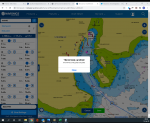
I've just tried Navionics ChartViewer, which seems very unstable, it keeps coming up with there been an error and a close button. Which doesn't close the software and leaves the route on the screen. I found that if I save the route and the return to manually edit the route I can continue to plan. The program also seems to save the route to a "cloud" and I don't see a way to save it to a micro SD card. The area of NW Scotland I usually sail in doesn't as a rule have WiFi and mobile signals are often hard to come by and I don't get 4G very often, even with a dual sim mobile with vodafone and EE. There seems to be push to get everyone to use a cloud in some form or other, but storing your info' on a cloud is of little use when there's no connection to the cloud.
There used to be free program called Nav Planner which did what I want to do, but that doesn't seem to be available now.
The search continues.
 
I've never had a problem with Navionics chart viewer crashing, maybe your web browser and plug-ins (flash player in particular) could do with updating? The only reason that Navionics stores what you create (routes, etc.) in the cloud is so that when you connect to the internet with another device and log in to Navionics it will sync by copying anything new over to the other device. Normally this would be the tablet and/or phone being used for navigating whilst under way. There is no need to be connected to the internet/cloud whilst under way because the routes and charts will have already been downloaded and stored on the phone and/or tablet for use where there is no phone or internet signal if that makes sense. Now whether or not there is a way to do this with your chart plotter and the SD cards I am not sure, I suspect you're trying to mix "old school" electronic navigation (GPS plotters that use SD flash cards) with "generation 2" electronic navigation (web/app based). Others may have tried this and found a way...
 
+1 for Navionic, use it on PC, iPad and on board sync to plotter. All routes sync all ways with no issues. Bonus is that also on iPhone if needed.
 
The only way that I can see to take your navionics card to a PC is to use either the Navionics PC Navigator Software which is around £50 or the full fledged PC Plotter software. These both allow you to use the Navionics card and also the ability to export waypoints and routes for use in your chart plotter. Both have, I believe, trial version available. I have used PC Plotter with the Navionics 'blue' card reader which does not force registration of the chart to your PC. This was CF based so not sure how the SD cards are managed.
 
I use Memory Map with their UK chart package (Admiralty Charts). I also have Antares loaded into Memory Maps and the two packages work together i.e. when I zoom into an area, the Antares Chart shows up if it is over the location I am zooming into. You can deselect the Antares charts in the Memory Map menus. I have not exported routes or waypoints but that feature is available on Memory Maps.

Memory-Map Ordnance Survey maps, Admiralty marine charts, CAA VFR charts for PC, iPhone, iPad, Android
2020 Memory-Map Marine Charts
 
The only way that I can see to take your navionics card to a PC is to use either the Navionics PC Navigator Software which is around £50 or the full fledged PC Plotter software. These both allow you to use the Navionics card and also the ability to export waypoints and routes for use in your chart plotter. Both have, I believe, trial version available. I have used PC Plotter with the Navionics 'blue' card reader which does not force registration of the chart to your PC. This was CF based so not sure how the SD cards are managed.
Navionics now offer a free PC / Mac app (Chart Installer Launcher aka CI Launcher) that loads your SD card contents for updates, adding overlays, and browsing usage on the PC or Mac. Not really what the OP wanted. I do think that the Navionics web app, logged in and using the same credentials for the plotter card and CI Launcher, (and potentially a tablet / iPhone subscription too) is the answer to his requirement but it does need internet access to use that element of it.
 
Last edited:
As far as I can see, the chart viewer is not designed to be plotting a routing tool, a quote from the website:

"The Chart Viewer is not a PC Planner or Navigation software, but does offer Route planning, search options and some basic map options"

The original Nav Planner, which cost around £50 is no longer available.

NAVIPLAN1 Navigation planner is available but cost around £150, this seems to be a fully functional planner, more than I really want.

Scala, I can see any info' on a free PC/Mac app, I have the viewer, as below and discussed, and I also have the chart loader for for the micro SD card, which automatically loads the latest version of the navionics charts. I may have missed this but I don't see how this bit of software allows route planning.

This is one of several messages I get, as I said I can recover, by clicking close, which doesn't close the program, then saving the route which works, then re-enabling manual editing. It's not stable on any of my 3 PCs, all of which are running the latest version of Windows 10.
Screenshot (3).png

I don't like using phones or tablets for live navigation or planning, I've tried. For Navigation they aren't waterproof or full sun viewable and the are impossible to use with gloves on.
For planning at home I find a PC far superior, it's just much easier to use, as I explained.
And I really don't want to be reliant on a New Generation of web based software, I can go for days on the West Coast of Scotland without getting even the most basic GPRS mobile signal.

I'll have a think about splashing out £150 on a planning program, it seems like a lot to spend.
 
Have a look at Memory Map, very low cost and allows planning, routes, waypoints, even printing off plans. Very easy and straightforward, not massively feature rich but it does the job.
 
...
and I also have the chart loader for for the micro SD card, which automatically loads the latest version of the navionics charts. I may have missed this but I don't see how this bit of software allows route planning.
...
It doesn't but the web app does, and you can name and save your planned routes to your Navionics account and they can then be synced to your plotter. Once completed you're not dependant on internet access, but I take your point about such dependency. No worries, this sounds like it's not for you.

Incidentally your boat draft is set to 5m in the webapp which will give unnecessary warnings (unless of course you've got a very deep draft boat!)
 
Thinking back to the 80s when my company was developing design software to use on the charts which were just becoming 'digitised' we were able to automate a lot of tasks. Fast forward to the present day and i should be able to let some wonderful software tell me when to leave port A and when I will arrive at port B factoring in tides and wind. I would just have to input my boat speed under sail or engine.? Should be simple given the advances of the last 40 years?

https://www.savvy-navvy.com/ does this, tidal and weather routing etc. It's aware of TSS, will keep you in channels for port entry etc. Not sure I trust its routing round Portland however.. so I would double check / hint it with additional waypoints. It has a pretty good crack at it though, at least from my noob perspective. Be nice to have it able to work backwards from tidal gates etc but you can quickly adjust start times and see what pops out. They are working hard on it, and something like this is going to be a very serious tool eventually even if this is slightly early days. Can export the waypoints but I just roughly slap a few into le ancient plotters.
 
I use NavigationPLANNER (a bit) on WIndows 10 with Navionics charts (e80 plotter on the boat). It can save the routes to files on the SD card so you can load them into your plotter.
 
Incidentally your boat draft is set to 5m in the webapp which will give unnecessary warnings (unless of course you've got a very deep draft boat!)

The draft keel down is 3.3m, so 5m seemed reasonable, on the Scottish West Coast I get worried at 20m, but because most of the lochs are deep and very steep sided.
 
Top