Picture upload test

BTW

From the library view of thunbnails if you hover over the thunbnail an gear wheel appears in the top RH corner. Hover over that and a menu appears . Click on "get links" to get the link. Autocopy and Ctrl V again.:

Hutch007Large.jpg
 
Well i'm getting close but no cigar yet.
Vic , I was in my stupidity looking at my YBW Album settings not Photobucket , Doh, I've made the change you suggest.Still no joy.
If I past in the URL from Photobucket into YBW's 'insert image function I get "Invalid file"
Photobox allows me to copy a link in IMG format HTML , Direct etc.
None of these work this way.

Oh so close.

Could I have more inserting images from Photobucket for dummies please :-)

By pass all YBW functions and just paste the img link directly to post.
 
OK let's try it.......................................
YealmandBerlin043_zps606efb80.jpg

Eureka , it works.
The mistake I was making was I could past the link with the img tags in fine but I did not preview it to see the picture being displayed.
All is well now.
Many thanks to all who have advised.
(I think Ive' seen enough of me now)
 
What square brackets?How do you go with the link if taken from flicker?

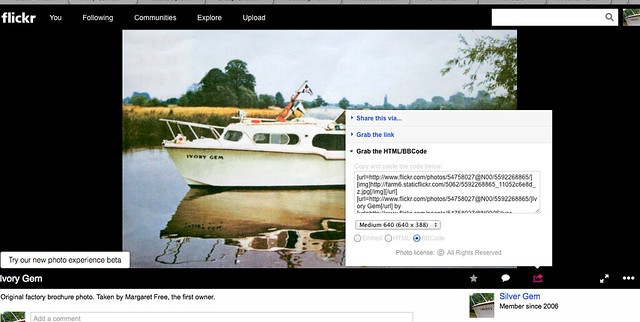
Click on the photo to bring it up full size... then in the bottom right corner there are 3 icons, a star, a bubble and a box with an arrow. Click on the box with the arrow, select Grab the HTML/BB code and paste that into your forum post. You don't need the url bits, just the img bits in the square brackets and the stuff in-between.

11711311314_d1b3512270_z.jpg
 
Eureka , it works.
The mistake I was making was I could past the link with the img tags in fine but I did not preview it to see the picture being displayed.
All is well now.
Many thanks to all who have advised.
(I think Ive' seen enough of me now)
If you click on "Go Advanced" you then have the option to preview the post
 
CFarr
Don't know if this helps but if I look at the image string I have just used from Photobucket I can see two differences with your dropbox link.
1) My photobucket link is a http header not https (This maybe becuse you have not made your image public on dropbox ??)
2) The end image tag on my photobucket looks like [/IMG] , in other words it has a forward slash. This may act as an end delimiter ???)

John
 
Vic,
thanks for the info.
It did take a little time to discover I had to "Go Advanced" to preview the post.
 
Click on the photo to bring it up full size... then in the bottom right corner there are 3 icons, a star, a bubble and a box with an arrow. Click on the box with the arrow, select Grab the HTML/BB code and paste that into your forum post. You don't need the url bits, just the img bits in the square brackets and the stuff in-between.

11711311314_d1b3512270_z.jpg

OK here goes.Now for something a little different.

7826105460_b1917f2642_c.jpg


Blyme it worked.Thanks very much for that Alpha :)
 
Last edited:
CFarr
Don't know if this helps but if I look at the image string I have just used from Photobucket I can see two differences with your dropbox link.
1) My photobucket link is a http header not https (This maybe becuse you have not made your image public on dropbox ??)
2) The end image tag on my photobucket looks like [/IMG] , in other words it has a forward slash. This may act as an end delimiter ???)

John

2013-09-01%2020.27.37.jpg


Aha!
Had to make a Dropbox folder public (thanks for the insight jakeroyd) which Dropbox no longer provide as a default - but found a link on the web.
Then open in photoshop, resize to 800px wide, re-save and hey presto!
You'll all be sick of me soon :)
 
Top