Photos using Photobucket ??

Swordfish

Well-Known Member
Joined
2 Jan 2012
Messages
76
Visit site
Can someone please give me a simple guide to post photos from my photobucket account. I remember seeing the instructions previously, but cannot find it now.

 
It's very simple.

When you view the photo in PB, there are a series of links on the right hand side if the page .

Copy the one the start and then paste it into your post here.

Your photo will magically appear
 
It's very simple.

When you view the photo in PB, there are a series of links on the right hand side if the page .

Copy the one the start and then paste it into your post here.

Your photo will magically appear[/QUOTE]

As long as you not using an ipad
 
1-IMGP5647_zps131e8b56.jpg


Simply delete all the bits outside the
 
Have tried with ipad many times now and followed all the instructions and still doesn't work, even struggle to login, when I looked up the problem it seemed I wasn't the only one. I use pc and works every time
 
(IMG]http://i162.photobucket.com/albums/t275/ctva/1-IMGP5647_zps131e8b56.jpg[/IMG)

This is what you see above with the end two square brackets replaced by round ones so that you can see what you need.
 
(IMG]http://i162.photobucket.com/albums/t275/ctva/1-IMGP5647_zps131e8b56.jpg[/IMG)

This is what you see above with the end two square brackets replaced by round ones so that you can see what you need.

Thanks, I have created the post but actual photos do not seem to show, but the link does. Do I need to change the brackets ? regards, Paul
 
Ah, I see what you have done. You've used the imbed link option in PB

There is a check box on the left when you open account setting which is something like 'link back to image' - you need to in check this
 
Just to test the instructions!

That's the wrong string Sammy I'm afraid. It needs to be as follows, but without the * symbols at each end
[*IMG]http://i739.photobucket.com/albums/xx32/Sammybeacroft/FrenchIphoneJune2014193_zps10c6535e.jpg[/IMG*]

P Bucket should generate it automatically if you have selected the right choices, and also will do multiples in one biug cut and paste if you select "organiser on" at top of album and then click "link" at bottom right of the page

Finally, your pictures are too wide for this forum. See below - it ruins the layout of the whole thread. you need to upload them at 640 wide, or set p'bucket settings so p'bucket automatically shrinks them upon upload to 640 wide


FrenchIphoneJune2014193_zps10c6535e.jpg
 
Keep at it ......once you get the hang of it you can facinate people for ages with incredibly amazing photos...better than setting fire to their dustbins......
Enthral for hours with such thrilling stuff as this.
dipstick.jpg

More pictures of the inside of my fuel tanks are available of request
Please feel free to use this as your desk top background :):):)
 
Last edited:
Sam, ref your PM hope this helps with posting images

1) Upload your pictures to photobucket or similar site

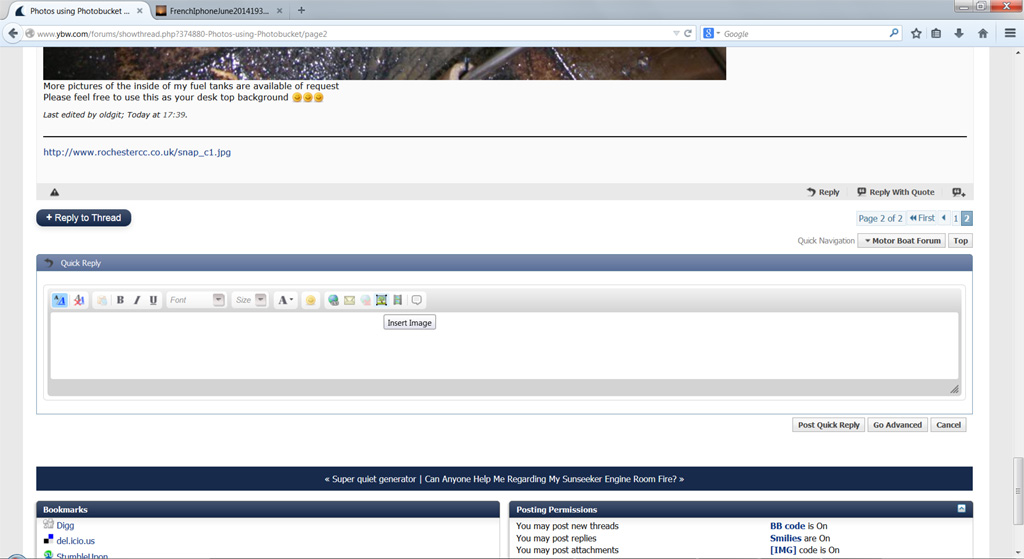
2) Click on the insert image icon shown below in the quick reply section.

insert_image.jpg


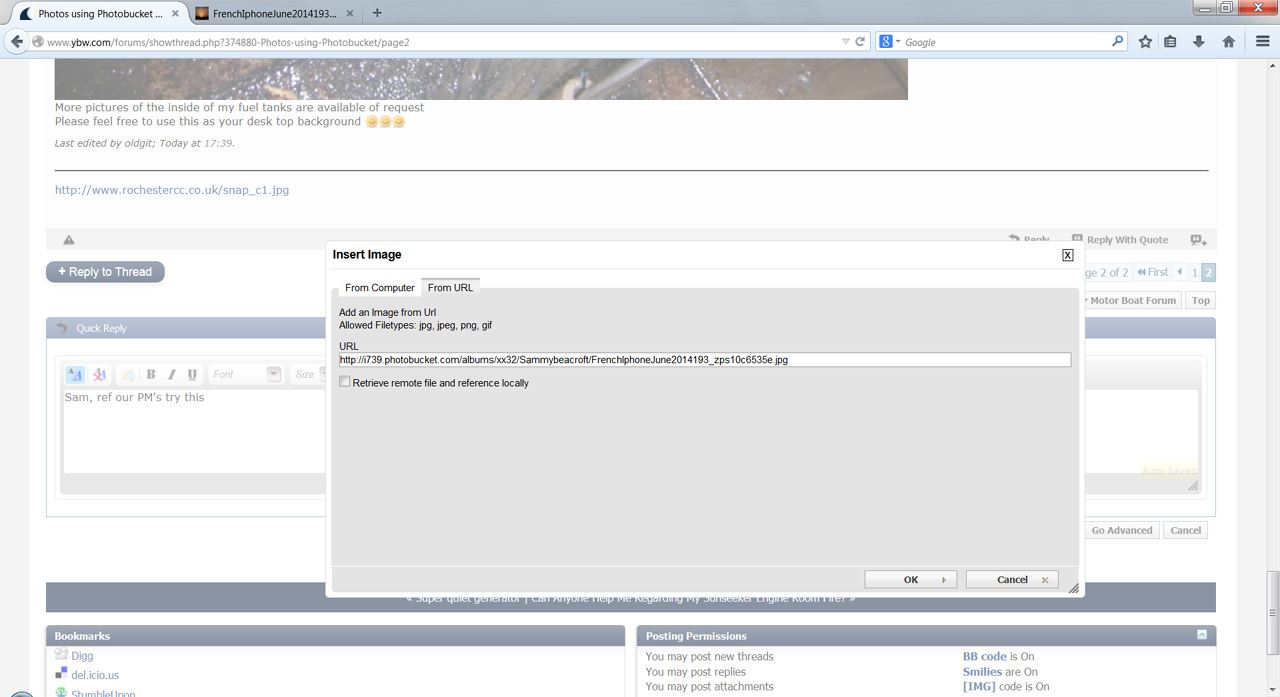
3) This opens the image insert window. Click on the 'From URL' tab

paste_image_url.jpg


4) Paste the link to your image, notice it starts http:// and ends .jpg - if it ends .html you need to remove the html so it ends .jpg

5) I usually untick the box that says 'Retrieve remote file and reference locally', press ok and the image code should look like this:

image_code.jpg


Submit reply and your photo should appear.

Anders
 
Anders that works for one picture but if you want to post a collection of pictures you are better going into pbucket and

1. find your album
2.. turn organiser on at the top
3. Ctrl click all the pics you want (maximum 20 on this forum)
4 click "Link" at bottom of page

then you get a text block of all the IMG code for ALL the pics and you copy/paste that whole block into your post
 
Top