Cardo
Well-Known Member
So, following on from my previous thread...
http://www.ybw.com/forums/showthread.php?382460-Raspberry-Pi-(and-Arduino-)-boat-fun
we are now cooking with gas.
Mrs has got a working piece of software that connects to an NMEA stream (in our case a TCP output from Laika's extremely useful Kplex, though it should also be able to connect to any standard NMEA TCP output) and serves up the NMEA data in a JSON format that the Pebble can understand. The software runs on Python 2.7, so should be able to run on any computer you have onboard. In our case, it's a Raspberry Pi, but a laptop running Windows, Mac OS X or practically any flavour of unix should also work.
We're trying to make this as user friendly as possible, and were hoping not to need the intermediary piece of software, but unfortunately due to limitations with the Pebble APIs, this is the best we can do.
So, we're now starting to work on the Pebble app itself. I have the fun job of design. To be honest, I'm going for function over form! The idea is to have preset watch "screens" that can be selected/deselected and rearranged in the config. Each screen will have a basic function and will display set bits of information based on the function of the screen. You will scroll through each screen by pressing the Select button on the Pebble.
I've started off by looking at the NMEA data we will have available and have come up with the following screens:
Manual Steering
DTW
BTW
XTE
Heading to steer
Steer L or R
Manual Steering Option 2
DTW
BTW
COG
SOG
Navigation
WP Name
WP Lat/Long
BTW
DTW
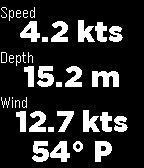
Environment
Boat speed
Depth of water
Wind speed
Wind angle
GPS
GPS status
Lat
Long
COG
SOG
Racing (I know nothing about racing, this is pure guesswork)
DTW
BTW
COG
XTE
XTE L or R
Dest closing velocity
Log
Total distance logged
Distance since reset
Water temperature
Time
UTC time
DD/MM/YYYY
Local time zone offset
These are the ones I've come up with so far. If anyone can think of any extra screens, or a better way to display the info on any particular screens, please do say so.
By default, the data will probably be grabbed every second. This will eat battery, but I guess you won't be using this app 24/7. If feasible, there will be an option to set the data update interval.
There's a couple of other bits of NMEA data that may be available that I haven't put in there, yet. Feel free to make suggestions.
Once this is up and running, we will also add anchor windlass/keel controls. This will require some extra work, and isn't likely to be such a sought after feature, so we're getting the basic data display up and running first.
I don't know how much interest there is in this, but plan is to make this available for free (though donations are always welcome!). Plenty of nerds out there with boats, surely we can't be the only ones!
http://www.ybw.com/forums/showthread.php?382460-Raspberry-Pi-(and-Arduino-)-boat-fun
we are now cooking with gas.
Mrs has got a working piece of software that connects to an NMEA stream (in our case a TCP output from Laika's extremely useful Kplex, though it should also be able to connect to any standard NMEA TCP output) and serves up the NMEA data in a JSON format that the Pebble can understand. The software runs on Python 2.7, so should be able to run on any computer you have onboard. In our case, it's a Raspberry Pi, but a laptop running Windows, Mac OS X or practically any flavour of unix should also work.
We're trying to make this as user friendly as possible, and were hoping not to need the intermediary piece of software, but unfortunately due to limitations with the Pebble APIs, this is the best we can do.
So, we're now starting to work on the Pebble app itself. I have the fun job of design. To be honest, I'm going for function over form! The idea is to have preset watch "screens" that can be selected/deselected and rearranged in the config. Each screen will have a basic function and will display set bits of information based on the function of the screen. You will scroll through each screen by pressing the Select button on the Pebble.
I've started off by looking at the NMEA data we will have available and have come up with the following screens:
Manual Steering
DTW
BTW
XTE
Heading to steer
Steer L or R
Manual Steering Option 2
DTW
BTW
COG
SOG
Navigation
WP Name
WP Lat/Long
BTW
DTW
Environment
Boat speed
Depth of water
Wind speed
Wind angle
GPS
GPS status
Lat
Long
COG
SOG
Racing (I know nothing about racing, this is pure guesswork)
DTW
BTW
COG
XTE
XTE L or R
Dest closing velocity
Log
Total distance logged
Distance since reset
Water temperature
Time
UTC time
DD/MM/YYYY
Local time zone offset
These are the ones I've come up with so far. If anyone can think of any extra screens, or a better way to display the info on any particular screens, please do say so.
By default, the data will probably be grabbed every second. This will eat battery, but I guess you won't be using this app 24/7. If feasible, there will be an option to set the data update interval.
There's a couple of other bits of NMEA data that may be available that I haven't put in there, yet. Feel free to make suggestions.
Once this is up and running, we will also add anchor windlass/keel controls. This will require some extra work, and isn't likely to be such a sought after feature, so we're getting the basic data display up and running first.
I don't know how much interest there is in this, but plan is to make this available for free (though donations are always welcome!). Plenty of nerds out there with boats, surely we can't be the only ones!
Last edited: