scubaman
Well-Known Member
Hi,
Not quite in the same league of upgrades as those of JtB’s, Bart’s, on many others’ but I decided to do a post from a minor but hopefully useful upgrade I completed yesterday whilst on the boat.
Also, as there have been quite a few posts of various types of parking/surveillance cameras I thought someone might find this interesting.
The backward visibility on my boat is quite limited from both helm stations and as I often berth stern-to, I wanted to install a reverse camera to assist in berthing. Running the wires up to the radar arch seemed a bit of a pain so I wanted to utilize the wifi I had installed to the boat earlier. After a bit of searching a found a suitable wireless outdoor ip camera with a wide enough lens to cover the bathing platform. Btw, many cameras have a surprisingly narrow field of view (and also often much narrower that has been advertised as I found out reading the reviews).
Anyway, I ordered a UCam247-HDO1080 from these guys http://www.ucam247.com. First that was shipped refused to start but was swiftly replaced with a new one by their customer service.
I cheated a bit with the power as I used the speaker cables that ran to the underside of the radar arch (the speakers were no longer in use as I had installed new ones to the cockpit earlier). I took the power from the relatively chunky cables feeding the stereos, which of course means that the camera is on whenever the stereos main 12v switch is on but the power consumption is 0,3 amps so it’s not a biggie and I can always switch it off if needed.
There is a conduit within the radar arch taking cables from the nav lights/radar/speakers/etc. down to the sides. To my surprise there is also a metal plate on the underside of the arch in the middle which took a bit of drilling to get through.


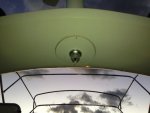
Eventually I had the camera up and running and ready for a testing.

The teak needs attention, I know.
The image quality is decent considering the dimly lit conditions. I had 15 fps regardless of the fact that I had taken the second antenna from the router and put it on the camera as I had stowed the original to a safe place (from which I’ll find it some day, I hope).
The field of view is just about enough but wider angle wouldn’t hurt.
I’ve used similar setup at home for years and it has worked reliably so I’m hopeful this will work as expected. I’m also considering installing extra wireless cameras in the future.
Looking forward to putting it to proper test.
Any and all comments welcome.
Not quite in the same league of upgrades as those of JtB’s, Bart’s, on many others’ but I decided to do a post from a minor but hopefully useful upgrade I completed yesterday whilst on the boat.
Also, as there have been quite a few posts of various types of parking/surveillance cameras I thought someone might find this interesting.
The backward visibility on my boat is quite limited from both helm stations and as I often berth stern-to, I wanted to install a reverse camera to assist in berthing. Running the wires up to the radar arch seemed a bit of a pain so I wanted to utilize the wifi I had installed to the boat earlier. After a bit of searching a found a suitable wireless outdoor ip camera with a wide enough lens to cover the bathing platform. Btw, many cameras have a surprisingly narrow field of view (and also often much narrower that has been advertised as I found out reading the reviews).
Anyway, I ordered a UCam247-HDO1080 from these guys http://www.ucam247.com. First that was shipped refused to start but was swiftly replaced with a new one by their customer service.
I cheated a bit with the power as I used the speaker cables that ran to the underside of the radar arch (the speakers were no longer in use as I had installed new ones to the cockpit earlier). I took the power from the relatively chunky cables feeding the stereos, which of course means that the camera is on whenever the stereos main 12v switch is on but the power consumption is 0,3 amps so it’s not a biggie and I can always switch it off if needed.
There is a conduit within the radar arch taking cables from the nav lights/radar/speakers/etc. down to the sides. To my surprise there is also a metal plate on the underside of the arch in the middle which took a bit of drilling to get through.
Eventually I had the camera up and running and ready for a testing.
The teak needs attention, I know.
The image quality is decent considering the dimly lit conditions. I had 15 fps regardless of the fact that I had taken the second antenna from the router and put it on the camera as I had stowed the original to a safe place (from which I’ll find it some day, I hope).
The field of view is just about enough but wider angle wouldn’t hurt.
I’ve used similar setup at home for years and it has worked reliably so I’m hopeful this will work as expected. I’m also considering installing extra wireless cameras in the future.
Looking forward to putting it to proper test
.Any and all comments welcome.
Last edited: