Openplotter + LAMP?

SiteSurfer

Well-Known Member
Joined
18 Jun 2015
Messages
1,262
Visit site
I've been waiting a few days to get my registration sorted for the openmarine forum, but remembered I'd seen a few posts about OpenPlotter on here.

Anyone know if it's feasible, on a 3 B+ to run a LAMP stack (MySql/Php7/Apache) alongside the existing framework?
Of course its technically do-able, just contemplating whether the Pi can cope.

Aim is to run up a GUI + easy remote access.
 
I've been waiting a few days to get my registration sorted for the openmarine forum, but remembered I'd seen a few posts about OpenPlotter on here.

Anyone know if it's feasible, on a 3 B+ to run a LAMP stack (MySql/Php7/Apache) alongside the existing framework?
Of course its technically do-able, just contemplating whether the Pi can cope.

Aim is to run up a GUI + easy remote access.

Not sure about mysql but influxdb works well, there's a siganlk plug in to write signalk values to the database then chronograf to view. Works a treat :cool:
There is a setting which needs changed which I forget otherwise it hogged a lot of resources, Pi struggled a little , can't remember offhand but will find it & post.
Takes a few minutes to apt-get install influxdb & chronograf & the signalk app is a click to install from the app store, then set either a white list of just the keys you want to save or a black list of the ones you don't want to save. All done on web pages barring the apt-get.

WrjoDDh.png
 
Last edited:
I've now made contact with Sailoog who have semi answered my query and also sorted my account.
Now to play :)
 
I've now made contact with Sailoog who have semi answered my query and also sorted my account.
Now to play :)

Note also that signalk has a cloud app as well so with some web access you can view all the boat data online anywhere :cool:

And if you want to keep bandwidth down then sigK also has an embedded node red app which makes it easy to send data over MQTT.
 
Absolutely, I have played with that already, my aim is to extend the data gathering and display beyond what's available now and provide some kind of historical capability - but within a web interface that uses php to execute python in the backend amongst other things.

I suppose I am doing a bit of re-inventing, however - this is an opportunity to play with skills I already have (and to have bit of fun).
 
Absolutely, I have played with that already, my aim is to extend the data gathering and display beyond what's available now and provide some kind of historical capability - but within a web interface that uses php to execute python in the backend amongst other things.

I suppose I am doing a bit of re-inventing, however - this is an opportunity to play with skills I already have (and to have bit of fun).

I started off saving to a RRD database with very basic PHP scripts to create plots then went on to sqlite with some node-red to create the plots then discovered influxdb & chronograph - no going back now, it does everything and more I can ever imagine needing! Though that's all running on the Pi, had some very brief plays at getting plots on the web with pythonanywhere but living onboard full time there's not really that much point so give up quickly :)
Must be dozens of online IOT sites now to send the data to and plot.
 
wow, I took the advice and looked at signalk -> influxdb.
got that all up and running and its exactly what I wanted - all I have to do is make up the presentation layer and I have what I wanted.

there is a php lib for influx which I can use, and its a lot less resource hungry than mysql - plus of course the retention policy makes archiving data trivial.

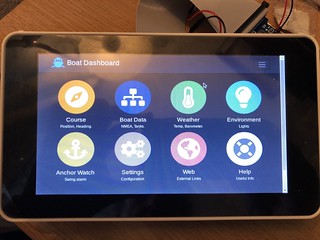
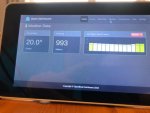
Quite pleased so far with the dashboard for the boat.

boatdash
 
chronograf can create some nice dashboards as well, dead easy for the likes of me who will likely never be good friends with SQL ;)

Also the KIP app can make some good looking displays of live signalk data.

If anyone else wants a play with signalk there's an online demo with some apps (unfortuanately no KIP) , many more apps in the latest real version. This is similar t what you'll see on a web browser if you have the cloud signalk enabled and net access onboard.
http://signalk.org/demo.html

test_image9.jpg
 
Last edited:
Looked at the examples, given my particular circumstances - the presentation of the data is almost as important as how accurate it is.. I need to be able to present information in a ready-to-go format for people who are not used to this kind of thing, plus - of course - I want to be able to do remote stuff. The hookup for me is the easy bit - coding up the php/no-sql is almost fun.
 
Looked at the examples, given my particular circumstances - the presentation of the data is almost as important as how accurate it is.. I need to be able to present information in a ready-to-go format for people who are not used to this kind of thing, plus - of course - I want to be able to do remote stuff. The hookup for me is the easy bit - coding up the php/no-sql is almost fun.

One thing with KIP is the display settings are saved locally so you can tailor a specific tablet for a specific person , chronograf seems saved server end though you can have as many dashboards as you want. Well worth installing chronograf even if you want to write your own, it's extremely powerful .
 
Been playing some more with this concept, and have got SignalK working nicely with InfluxDB as recommended by GHA.
Added Apache and PHP7.2 - then Laravel 5.4 and wired it all up so that I can create a nice UI with Bootstrap 4.

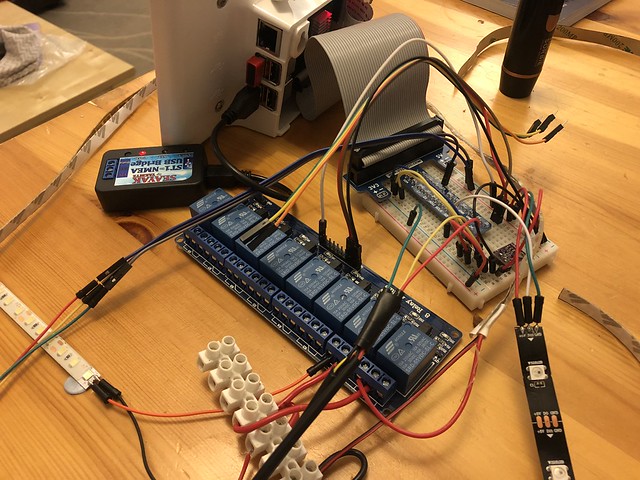
So far I've got current temps and pressure - with historic bar charts for up to 1 week past, 3 x one wire sensors for engine, exhaust and fridge temps (again with both live and historic data). I've also added a 8 channel relay to drive 12V led strips for the lockers, engine bay and other various dark places - all switched via the touch screen interface rather than having loads of switches).

Added RGB strips via the rather cool server library which allows me to make up schemes to drive undershelf lights in the saloon and galley in different sectors, coded in a red mode for night times and several different one touch modes with sliders to adjust the dimmer levels.

The ST1 to NMEA converter arrived and that's going to be tested next weekend, along with the serial to USB converter to take the feed from the SH radio for GPS, AIS etc. I'll then pop all the resulting data after it's been funnelled through SignalK and InfluxDB onto screen as required.

Next step is to work out what the new Quick windlass is generating from the chain counter wires and see if I can make that into a nice interface.

Usefully - because its just a simple web server I can access the panel from anywhere on the boat with any device, and of course from anywhere exterior too. If I could only work out how to trigger the Webasto remotely - now that would be useful.

Oh, and it goes without saying that any areas that are only really to be triggered on the boat (like lights) can be restricted to localhost only via IP checking.

 
Hi

Can you post more details of the ST1 to NMEA and how you do the RGB / touch screen?

Also. Whats the case i can see?
 
The ST1 converter is sold on EBay by SeaYak - https://www.ebay.co.uk/itm/SEAYAK-Seatalk1-to-NMEA-USB-Converter-/173224200076 - it plugs straight into the USB port on the Raspberry and OpenPlotter recognises it and see's data coming in - yet to be fully tested in the wild. Cheap as chips and if it works then I'm happy.

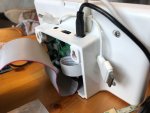
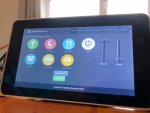
Case is the standard 7" touch screen one which fits that screen perfectly, you will note that I am using 2 x power leads at the moment as the amount of goodies hanging off the back needs a bit more amperage, thats all going to be replaced with a 10A 12V -> 5V converter when in the boat.

Touch screen UI is pure html & javascript, sitting on top of a Laravel (bog standard) installation. I use javascript to communicate with aLaravel driven API for the database data and any switching and php to do the rest.

For instance: To switch a 12V led strip I simply have a javascript button (see pic) which triggers an xhr call to the api, this triggers the python script which triggers the relay. The relay code is on a toggle so its only ever going to be on or off - dead easy.

The RGB led strips are driven again by a js button, an API driven request to a TCP server which is listening to a local port, that drives the python library and switches them on/off, changes the colours, dims, changes speed and all the rest - I simply wrote a class that talked from the web page to the server and thats about it - all the libs and code to drive it are open source from GitHub.

The sliders are a lovely UI thing which again I found when searching for something like a mixing desk slider - I think they are really neat.

IMG_5010.JPGIMG_5009.jpgIMG_5008.JPG
 
The RGB led strips are driven again by a js button, an API driven request to a TCP server which is listening to a local port, that drives the python library and switches them on/off, changes the colours, dims, changes speed and all the rest

How are you physically hooking the RGB strip up? A couple of years ago I played with an RGBW strip connected to an arduino's pwm pins via some transistors but I suspect you may be using a nice little driver board
 
Nope, direct to GPIO - for this purpose pins 13 & 18 with the 5V coming off the Raspberry (at the moment).

I'm using a cobbler onto a breadboard just to make it easier to see what I am doing, but that will be all soldered and sorted out when it goes on the boat.
 
Nope, direct to GPIO - for this purpose pins 13 & 18 with the 5V coming off the Raspberry (at the moment).

I could be being a bit thick here, I never claimed that electronics was my strong point but...isn't that 2 of the 3 pwm outputs you need? And then presumably you'd need some transistors to switch some 12v?

(You've reminded me how much I like those LED strips and need to wire something up a little more permanently in my boat :-)
 
Last edited:
The 12V single colours (which I am using for the on/off locker, engine and cupboard lighting) are fed via a relay (that's any old pin) and the RGB versions are fed via the PWM pins and you disable the sound libs/usage - which for me is a no brainer as I have zero use for sound at the moment. The RGB strips are ws2812b (3 wire) as opposed to the 4 wire ones which can be driven on other outputs - both however are 5V not 12V.

Essentially, anywhere I wanted to vary the lighting colour I'm going to use RGB and where I just want 'light' I'll use the good old cheap 12V strips.

I'm just knocking up a little video to show it working.
 
Ahhh...if I understand correctly this is one of those nice addressable LED strips. Mine are the simple type where all the LEDs of the same colour are fed in series so for full colour fading you need 4 pwm outputs (mine's rgbW). Yours look much more fun
 
Fun and easy. I'm no electronics expert - in fact I'd say that my knowledge of electrics and electronics is left sorely wanting - however I'm ok with code so I've used what I consider to be the most efficient way to get the stuff physically wired up and then done my stuff on the presentation layer.

The challenge for me which I am enjoying is making one technology talk to another, it has to be said that a web interface is one that all my guests and crew understand at a moments notice - its available remotely with ease and more to the point, for me its strength is in its simplicity. I am coupling all this with a 4g mifi dongle which lives on the boat and has a huge data allowance, that also allows a dmz, so its going to be open season for me to try and find further ways to get data off the boat and look at it remotely.

If I wanted to do this quickly and just get at the data, I wouldnt have gone this route - this touch screen panel is going to be installed to the nav area and become an information portal to the boat along with a very useful way to reduce switches! If I could use the more expensive non PWM driven led's I'd seriously consider some form of voice control too, mainly for the fun factor than anything else.
 
Here's a rough video showing it working.
I suspect that the HD version is being rendered by You Tube at the moment, 480 is the max right now.

 
Top