OpenPlotter - how best to integrate it into my type of sailing

Reptile Smile

Well-Known Member
Joined
8 Feb 2012
Messages
539
Location
Bristol
Visit site
So this is a bit of a weird one, in that I don't totally know what I'm asking.

I've owned a series of battered old tubs that I've sailed in the Bristol Channel - none of them cost more than £600 GBP, and several were less than £250. I really enjoyed this, but my my wife took something of a dim view at the lack of luzury available. I made extensive use of Navionics, and still value the idea of having chart on phone, immediately to hand. The other thing I've really liked is storing GPS tracks as a momento type thing. However, on most other levels, Navionics does my swede in.

Out of the blue, my wife suggested earlier this year, that we charter a boat for our summer holiday, which we duly did. It was a wonderful experience, and my wife and family very much felt that this was much more the kind of sailing they wanted to do.

Accordingly, for the forseeable future, I shall not be sailing batter old tubs, but rather a combination of crewing and chartering.

As part of our summer trip, I installed OpenPlotter on to a Lenovo Yoga laptop, and it was wonderful. I think the planning is fabulous, and the use of Grib files also great. My intention is now to move away from Navionics, and into OpenPlotter.

I recognise that one of the major benefits of OpenPlotter is its integration of everything into one, but this of course will not be what I'm doing. I also recgnise that that a RASPI is very much the backbone of OpenPlotter, but I'm not really sure how I could bring that into my particular use case - what would I use for a display? Have I already accidentally chanced upon my best for now, given that I have to take it onto crewing boats and charters, but not install it? And how can I get charts to be visible on my phone (rather than a speed/depth dashboard)?

Any thoughts or advise graeftully received!
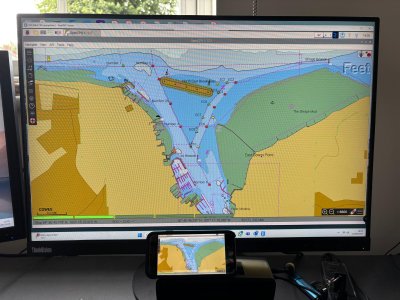
 
You can show the Openplotter screen, and indeed control it, on a phone/tablet easily. I user VNC. In the picture I'm using a Pi to drive a screen on my desk, my phone is at the bottom of the shot. I build them at home and for the boat use a 10" monitor. If you continue to use your laptop then you just access that the same way on your phone or whatever.

Edit: obviously the laptop solution is easier, more portable, for use in your case when you'll be hiring.

Edit #2 You can test it, install RealVNC server on the laptop, download Real VNC (RVNC Viewer) to your phone, click the + to add a new computer and type in the IP address of the laptop (Assuming phone and laptop are on the same network).
 

Attachments

  • OP.jpg
    OP.jpg
    257.1 KB · Views: 19
Last edited:
I would ignore the rasppi for now - if you are running on a laptop, to get that functionality you’ll need to buy a pi, display, power supply, screen, case, keyboard, mouse etc - you might as well stick to the laptop. Have you got a way to charge in from 12V?

Does the laptop have built in gps?
If you really want to use your laptop on a charter boat many will have ais etc via wifi, but faffing with that for the first couple of hours doesn’t sound like a holiday! You could bring your own AIS receiver and feed into the laptop.

But I am wondering why? A tablet with Navionics (or a competitor) is a lovely thing, available with waterproofing etc. moreover I’d expect any charter boat these days to have a plotter of some sort?
 
I would ignore the rasppi for now - if you are running on a laptop, to get that functionality you’ll need to buy a pi, display, power supply, screen, case, keyboard, mouse etc - you might as well stick to the laptop. Have you got a way to charge in from 12V?

Does the laptop have built in gps?
If you really want to use your laptop on a charter boat many will have ais etc via wifi, but faffing with that for the first couple of hours doesn’t sound like a holiday! You could bring your own AIS receiver and feed into the laptop.

But I am wondering why? A tablet with Navionics (or a competitor) is a lovely thing, available with waterproofing etc. moreover I’d expect any charter boat these days to have a plotter of some sort?
Yeah, I bought a 12v power supply for the laptop, which is itself fairly decrepit and only works when power is supplied - the battery is toast. Had to buy a GPS puck for it as well.

You're right - the charter boat was well-equipped with a very swanky plotter at the helm. What I would have struggled with (disregarding it was set up to be in German, which was a whole other challenge), was to export the tracks in such a way that I could have taken them with me for posterity, and really that's my objection to Navionics - I'm paying £40 a year for functionality that equates to a photo album (in the sense that OpenCPN enables me to log and view tracks for free.

I also far prefer the planning process of being able to plot on the RASPI or laptop away from the boat, and then take it with me to store the track. I appreciate that I could do this with Navionics, but I far prefer the process of this with OpenCPN. Finally, the ability to include Google Earth charts for pilotage, and even just preparation and planning, is, I think, lovely. I just prefer it. Does it enable me to do anything fundamental that is an absolute game changer compared to navionics? No. But I do prefer OpenCPN, taken as a whole, and particularly now that O-Charts have tided up what previously stopped em moving across wholesale to it earlier.
 
But I am wondering why? A tablet with Navionics (or a competitor) is a lovely thing, available with waterproofing etc. moreover I’d expect any charter boat these days to have a plotter of some sort?
OpenPlotter can do so much more than Navionics though, especially if you run it with SignalK in the background.
 
…….

But I am wondering why? A tablet with Navionics (or a competitor) is a lovely thing, available with waterproofing etc. moreover I’d expect any charter boat these days to have a plotter of some sort?
This absolutely. I can’t conceive of wanting to drag a clunky laptop away to a charter holiday, when the boat will have a plotter and a tablet is massively more practical backup / secondary device.
Also, those laptop enthusiasts who do use one for primary navigation tend to have adapted the chart table (if there is one on a modern boat) to have a means of securing the laptop in place.
Tablet is much more practical alternative - and very useful for also researching destinations, checking for rocks with Google maps etc, which are quicker to do on a tablet.
 
……

You're right - the charter boat was well-equipped with a very swanky plotter at the helm. What I would have struggled with (disregarding it was set up to be in German, which was a whole other challenge), was to export the tracks in such a way that I could have taken them with me for posterity, and really that's my objection to Navionics - I'm paying £40 a year for functionality that equates to a photo album (in the sense that OpenCPN enables me to log and view tracks for free.
Any modern chart plotter will allow you to save and download your tracks. Or 1,001 phone and tablet apps allow you to do this, in a much more efficient way than dragging a laptop around.
First thing to do with a tablet would be to find out how to change the plotter language to English at the start of the trip
:)

But each to their own
 
Carrying a laptop, power supply and gps puck seems a PITA to get GPS tracks out. I have a friend who uses Strava for this. I think there are probably a load of tracker apps - even the free RYA Safetrx one seems to do it (I’ve not tried exporting). If you like the planning etc in OpenCPN then it’s probably worth the hassle.
 
Any modern chart plotter will allow you to save and download your tracks. Or 1,001 phone and tablet apps allow you to do this, in a much more efficient way than dragging a laptop around.
First thing to do with a tablet would be to find out how to change the plotter language to English at the start of the trip
:)

But each to their own
Just to clarify, I'm coming from a system of using a tablet/phone. I just didn't like it as much as OpenCPN.
 
Carrying a laptop, power supply and gps puck seems a PITA to get GPS tracks out. I have a friend who uses Strava for this. I think there are probably a load of tracker apps - even the free RYA Safetrx one seems to do it (I’ve not tried exporting). If you like the planning etc in OpenCPN then it’s probably worth the hassle.
Agreed. This is why I was exploring the idea of the RASPI, as a smaller, lighter-weight alternative.
 
Agreed. This is why I was exploring the idea of the RASPI, as a smaller, lighter-weight alternative.
Well it will be a faff - rasppi are not really designed for carrying around, so you’ll need a case plus all the other bits. I have pi because I am a nerd so enjoy that stuff but even I sometime wonder if it’s worth it on a fixed install. I don’t actually use OpenCPN for navigation because I just don’t think it’s anywhere near as nice as Navionics app. However there is a paid (low cost) version available for Android tablets. I think there are few difficult things about the user interface for a tablet and some of the stuff is supposed to work when you hover your mouse over - so switching between charts is pot luck!

So if you get an android tablet with a gps built in, you have nothing to carry except that. There are waterproof tablets or cases so you can even use in the cockpit. It can probably play you music, watch Netflix/iPlayer etc too and so you’ll wonder (like we do) why anyone uses a laptop - unless they actually need a keyboard to type lots of stuff. My one comment would be OpenCPN seems to be quite greedy about processor power compared to Navionics/Orca/MemoryMap and so you may want to get the newest/fastest tablet you can otherwise zooming, switching charts etc can be quite laggy.
 
So this is a bit of a weird one, in that I don't totally know what I'm asking.

I've owned a series of battered old tubs that I've sailed in the Bristol Channel - none of them cost more than £600 GBP, and several were less than £250. I really enjoyed this, but my my wife took something of a dim view at the lack of luzury available. I made extensive use of Navionics, and still value the idea of having chart on phone, immediately to hand. The other thing I've really liked is storing GPS tracks as a momento type thing. However, on most other levels, Navionics does my swede in.

Out of the blue, my wife suggested earlier this year, that we charter a boat for our summer holiday, which we duly did. It was a wonderful experience, and my wife and family very much felt that this was much more the kind of sailing they wanted to do.

Accordingly, for the forseeable future, I shall not be sailing batter old tubs, but rather a combination of crewing and chartering.

As part of our summer trip, I installed OpenPlotter on to a Lenovo Yoga laptop, and it was wonderful. I think the planning is fabulous, and the use of Grib files also great. My intention is now to move away from Navionics, and into OpenPlotter.

I recognise that one of the major benefits of OpenPlotter is its integration of everything into one, but this of course will not be what I'm doing. I also recgnise that that a RASPI is very much the backbone of OpenPlotter, but I'm not really sure how I could bring that into my particular use case - what would I use for a display? Have I already accidentally chanced upon my best for now, given that I have to take it onto crewing boats and charters, but not install it? And how can I get charts to be visible on my phone (rather than a speed/depth dashboard)?

Any thoughts or advise graeftully received!
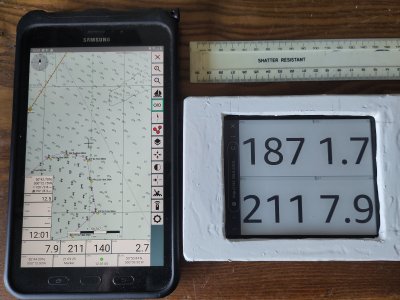
I use open source AvNav (a simpler, more friendly cousin of OpenPlotter) and have run it in the Android version or on a Raspberry pi (headless, server only). I use a waterproof e-ink Kindle paperwhite as the 'dashboard' display device (over WiFi). The charts are like those for OpenCPN - affordable UKHO vector data from O-charts.
 

Attachments

  • IMG_20250906_120106.jpg
    IMG_20250906_120106.jpg
    1.2 MB · Views: 8
I use open source AvNav (a simpler, more friendly cousin of OpenPlotter) and have run it in the Android version or on a Raspberry pi (headless, server only). I use a waterproof e-ink Kindle paperwhite as the 'dashboard' display device (over WiFi). The charts are like those for OpenCPN - affordable UKHO vector data from O-charts.
More information here: AvNav and the Kindle Paperwhite - Segeln-Forum
 
Top