OpenCPN Google Earth walkthrough needed

NickRobinson

Well-Known Member
Joined
23 Dec 2007
Messages
2,143
Location
Near Burton-on-Trent
Visit site
Hi All

After several tries, and after viewing pages of stuff around the issue (always a worrying sign), I've failed to install the GE ocpn plug in.

I'm running v2.5 and have GE running too, however, the plug in dload has a .dll extension and windows refuses to have anything to do with it..

I'm running XP-

Ideas anyone?

Nick (Rivendell)
 
The plugin you have is most likely incompatible with your 2.5 beta.
The published plugins on the official download page are for the stable 2.4 release.
With 2.5 you are on the bleeding edge of the development process. The plugin interface itself has been changed a few times. That's why the old plugins don't work.
A new stable release is due in a couple of month and these things will be sorted out.
If you want the GE plugin now - revert to 2.4.
 
I have it running OK on Vista but it took a few tries. In my case the problem was that I have User Account Control in use (it is on XP too) and I had to configure either or both OpenCPN and google Earth plug-in to run 'as administrator' in order to get the GE plug-in to load on the left edge of the chart on screen. You need to have the GE plug in enabled, via tools, plug-ins then highlight it and press 'enable'. Do not run the normal Google Earth, just click on the GE plug-in icon in the OpenCPN toolbar.

This may be rubbish, but it is what I remember trying when I got mine running! Persevere though because it really is superb.

Edited to add. I have Google Earth Plug-in running on version 2.5 which IS a stable release, it is 2.6 that is the beta version now. In fact I think you must have 2.5 to run GE.
 
Last edited:
Just tried installing this, hmm - no instructions. Ok, the download is a DLL (dynamic link library if anyone cares) so it needs to go somewhere that OCPN can see it. If you've installed on XP using default paths the place it should be is C:\Program Files\OpenCPN\plugins so move the file into that directory. Then open OCPN and go into Tools, you should see the GE Plug in listed in the Plug in section.
 
I've tried this with Vista , running OCPN V 2.5
I can download the GE plugin and get it in the correct location.
However , OCPN does not show it in the list of plugin's that can be enabled ?

I might try reverting to 2.4 and see if this helps.

Not sure I really need it but it frustrates me that I can not get it to work
 
I've tried this with Vista , running OCPN V 2.5
I can download the GE plugin and get it in the correct location.
However , OCPN does not show it in the list of plugin's that can be enabled ?

I might try reverting to 2.4 and see if this helps.

Not sure I really need it but it frustrates me that I can not get it to work

Can't help. I'm afraid. But there's a whole load of stuff here to search through.
Sometimes using "Site:" in google is better than the forum seach engine

http://lmgtfy.com/?q=site:http://www.cruisersforum.com/forums/f134/+vista+google+earth+plugin

Stick with it, there will be reason somewhere & it's a great tool.
 
On my Vista the plug in is located under C>Program files>Google>Google Earth>Plug ins It is not located under OpenCPN plug ins.

As said before I believe GE doesn't work with versions before 2.5 but anyway it works fine for me on 2.5 on Vista. I could be wrong and it is the logbook (Konni version) that needs 2.5, as I downloaded both at the same time. the logbook is also excellent.
 
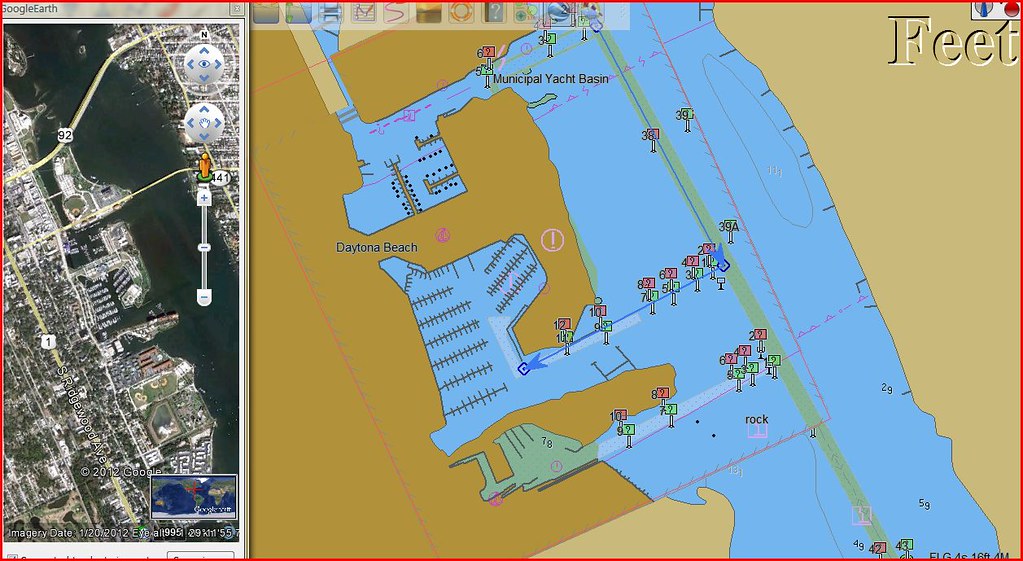
Just to show it works, our boat's new home is on this chart and picture!

6847111974_562bab75c8_b.jpg
 
It's the case that even numbered versions of Ocpn are betas and odd numbers are "stable" releases.

The GE plugin is incompatible with the current beta release but will be OK with stable version 2.7 due out in May.

To get the GE plugin to work with 2.5 and earlier releases you need GE 6.1. Here is a quote from Richard Fairman on the Cruisers Forum OCPN forum.

"Verson 6.2 no longer supports the COM API so any call to GE using this interface will no longer work The utility GE2KAP also uses the COM API so works with 6.1 GE but not 6.2 GE This move was to make people use the GE Web plugin so as to increase traffic though Google that they could monitor

Load GE 6.1 and try again

Here is alink to the older version

http://www.plaisance-pratique.com/IMG/zip/GoogleEarthWin.exe

regards

richard"

So maybe you need to go back a version?
 
Top