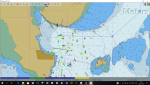
OpenCPN AIS target symbol

dgadee

Well-Known Member
Joined
13 Oct 2010
Messages
4,681
Visit site
Upgraded OpenCPN and AIS symbols have changed from coloured triangles to small black ones which are difficult to see. Looked at manual but can't see how to reset. Any ideas?

Edit: just to clarify - this is what I currently see. The target now has a black dot rather than the coloured triangle.
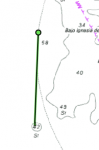
Capture.PNG
 
Last edited:
One thing you could check - in options | ships | AIS targets there's a check box for "allow attenuation .. of targets"

If this is selected then each time you click on the AIS icon on the menu bar it will select one of 3 options - Off; Allow attenuation & show all targets. Might be set to attenuate?

SPvhiq2.png
 
A re-install didn't make any difference - still the same dot being shown.

The attenuation isn't set.

Very odd.
 
Re-install keeps the config - wipe the config (opencpn.ini etc.) manually. No reinstall needed, although you will lose all your settings, then try again. Almost looks like you fiddled with scaling - there seems to be a tiny triangle :)
 
Re-install keeps the config - wipe the config (opencpn.ini etc.) manually. No reinstall needed, although you will lose all your settings, then try again. Almost looks like you fiddled with scaling - there seems to be a tiny triangle :)

Might be on to something there - try having a look at what "ship scale factor " is set to in Options | User interface -

TCDidXm.png
 
Deleted the ini file (hard to find when Windows hide files) and decided to re-install. Of course, now I have lost my charts...

The AIS targets are now larger. I think I had ship scale factor set at mid point - but perhaps not. Now, I've increased the setting and the triangles are the size I originally had.

Many thanks. Now just to sort out the VMH charts again.
 
Top